Week2 #89
Week2 #89
Conversation


 profxed
left a comment
profxed
left a comment
profxed
left a comment
There was a problem hiding this comment.
Hey @salar01, Nicely Done I see your High progress I am really so happy see that after all these days.
your homework still didn't done just yet and it needs some extra work, but you did a good job so far.
I left for you some comments may improve some of your hard work 🙂.
| Object.keys(options).forEach(key => { | ||
| const value = options[key]; | ||
| if (key === 'html') { | ||
| if (key === "text") { |
| const forks = createAndAppend("tr", tbody, { class: "label" }); | ||
|
|
||
| const updated = createAndAppend("tr", tbody, { class: "label" }); | ||
|
|
There was a problem hiding this comment.
By looking to the documentations under the example table you will find a blue table that contains the Permitted content header aside, there you can find the valid values you can use.
Until this poit you have HTML generated:
<table class="table">
  <tbody>
    <tr>
      <td class="label">Repository: </td>
    </tr>
    <a></a>
    <tr></tr>
    <tr class="label"></tr>
    <tr class="label"></tr>
  </tbody>
</table>
and by validating with w3c validator your code we will notice that you have here:
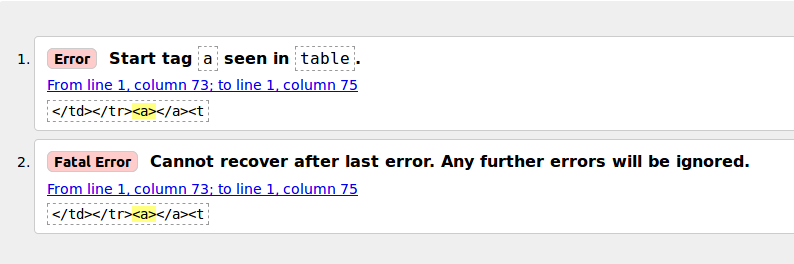
So in order to fix this the only thing you have to do is just to move your a tag into a td that is inside of a tr tag so you will have the following:
<table class="table">
  <tbody>
    <tr>
      <td class="label">Repository: </td>
    </tr>
    <tr>
      <td>
        <a></a> <!-- Like so -->
      </td>
    </tr>
    <tr></tr>
    <tr class="label"></tr>
    <tr class="label"></tr>
  </tbody>
</table>| const updated = createAndAppend("tr", tbody, { class: "label" }); | ||
|
|
||
| fetchJSON(url) | ||
| .catch(error => { |
There was a problem hiding this comment.
catch or then first ? I think it's very important question and here is the answer I think you watched it before but re-watching things we did watched them before is important after applying it sometimes 🙂
| text: error.message, | ||
| class: "alert-error" | ||
| }); | ||
| return; |
There was a problem hiding this comment.
No need for the return keyword here, the return keyword is used usually to return something or to stop the function from executing any thing else, while you have it in the last line of your callback function it just meaningless for the function for stopping it and for you if you need to return something from there.
| updated | ||
| ); | ||
|
|
||
| select.addEventListener("change", () => { |
There was a problem hiding this comment.
this line is telling me that you did understand the callback concept 🙂.
| repositoryLink.setAttribute("target", "_blank"); | ||
|
|
||
| forks.innerHTML = "Forks: " + repositories.forks; | ||
| description.innerHTML = "Description: " + repositories.description; |
There was a problem hiding this comment.
you sre using too much innerHTML and setAttribute while you can create your tags here and for each of them you can set the text as your change in createAndAppend function right?
| "Updated: " + new Date(repositories.updated_at).toLocaleString(); | ||
| }; | ||
|
|
||
| renderContributors(container, repositories[0].contributorsUrl,); |
There was a problem hiding this comment.
If you followed the last comment you will have the container is launched from this function, and then you can pass it via argument.
| text: element.contributions, | ||
| class: "contributors_badge" | ||
| }); | ||
| }); |
There was a problem hiding this comment.
Till this point You have:
<div class="container">
  <ul class="right_div">
    Contributions:
    <li></li>
  </ul>
</div>
it's not really done yet but you may make it better by thinking about it this way:
I will fetch the repositories and for each repository I will fetch contributers and then I will render each contributers.
|
Hello Jawhar, i am really impressed by your comments and spend lot of times to look through my homework. I really apprciate you. I wanna one more time go through whole JavaScript course agian, actually after consulting with Gijs, i will do that. So i stopped with class16 and i follow this course with class17 from 23 September(JavaScrip2) again. I hope i will use your guidence with class17 and also through my study with whole concept of JavaScript again. Thanks for everything. :) 👍 PS : I will study JavaScript again, and i finish this and previous homeworks also :) |

|
Sounds Great 🙂, see you in class 17. |
3 participants


eplaced callbacks by promises, and edited week1 according to Jim's comments.