Repository navigation
Releases
Reverie 0.6.1

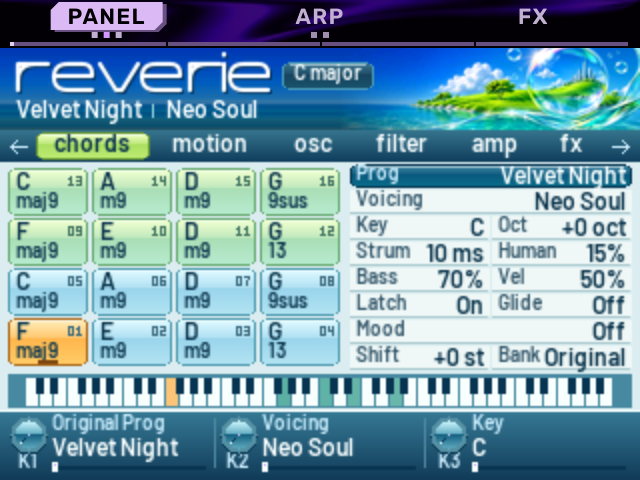
Reverie’s original 46 progressions are back on MPC Sample and SP-16. New tracks start with Velvet Night, followed by Moonlit Two-Five and Sunday Sanctuary. The bank matches desktop Reverie through Moonstone, including all six voicing styles, all twelve keys, and the lifted chords on pads 9–16.
Playing an existing project
- MPC Sample — Open Reverie’s Chords panel on Stage, set Mood to Off and Bank to Original. The first Prog knob on the panel and the first knob in the standard Edit view follow that bank.
- SP-16 — Open Perform → Chord pads → Progression. Use encoder 6 for Prog Bank and encoder 1 for the progression. If a Mood is active, select Off in the Mood controls first.
- macOS and Windows — In Chord pads, set Mood to Off and use Progression. Desktop already used the original bank. Both CLAP and VST3 are included in each desktop download.
MPC and SP-16 projects saved with the 208-choice Factory bank reopen on their saved progression. You can switch to Original and back. The 18 Mood sets still play their own exact voicings across all 16 pads, and Mood Shift still transposes them. Try Dawn at zero shift and octave. A01 plays A3–C4–E4, and A09 plays F3–A♭3–C4.
Downloads
| Platform | Version | Package |
|---|---|---|
| MPC Sample with compatible Melodee or hdslaveOS | 0.6.1 | MPC Sample ZIP |
| SP-16 with freesp16 plug-in tracks | 0.4.4-sp16.13 | SP-16 ZIP |
| macOS 11 or later, Apple Silicon and Intel | 0.3.1 | Universal CLAP and VST3 ZIP |
| Windows x64 | 0.3.1 | Windows CLAP and VST3 ZIP |
Extract the MPC or SP-16 ZIP at the root of the corresponding card or USB stick. Each desktop ZIP has installation instructions and the four optional VST3 pad presets. The macOS bundles are ad-hoc signed and unnotarized. SHA-256 checksums
Verification
All four editions matched the original 52,992 pad voicings. The MPC and SP-16 binaries produced bit-identical stereo audio to their previous releases for every Mood pad at four transpositions. The MPC build passed the hdslaveOS host checks. The SP-16 build passed its ARMv7 tests under QEMU. Both desktop CLAPs passed host and editor tests, and both VST3s passed all 47 Steinberg validator tests. Windows checks ran under CrossOver. Physical MPC and SP-16 playback still needs confirmation.
Melodee and its upstream screen interface are by Kerem Kiliç (Ellic Studio). MPC and desktop source · SP-16 source
Reverie 0.6.0
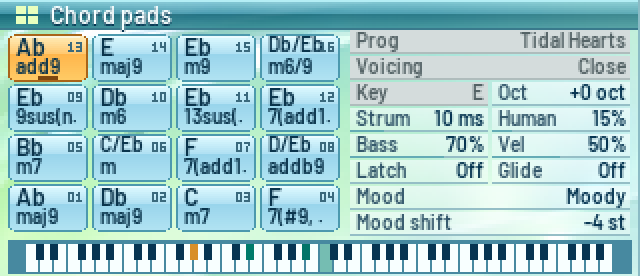
Mood lets you play the 18 SQUID chord sets with their original bass notes, inversions and octave doublings. Each of the 16 pads plays its own chord from the selected set. You can pair any set with any of Reverie’s 25 factory sounds.
Playing Mood
- On MPC, open Chords and select a Mood. On desktop, use Mood in Chord pads. On SP-16, open Perform and tap the Mood bank under Chord pads.
- Try Dawn with Mood Shift and Octave at zero. Pad 1 plays A minor (A3, C4, E4). Pad 9 plays F minor (F3, A♭3, C4).
- Turn Mood Shift to transpose the entire set by up to 12 semitones in either direction. Change the factory sound to try another texture with the same chords.
While Mood is active, Progression, Voicing and Key are greyed out on MPC and desktop. Their SP-16 encoder slots are inactive. Octave, Strum and the other performance controls stay available. Select Off to return to your stored progression, voicing and key. Saving a project remembers the Mood set and its transposition. Older projects open with Mood off.
Downloads
| Platform | Version | Download |
|---|---|---|
| MPC Sample with Melodee 0.7 or hdslaveOS based on it | 0.6.0 | MPC Sample ZIP |
| SP-16 with freesp16 plug-in tracks | 0.4.4-sp16.12 | SP-16 ZIP |
| macOS 11 or later, Apple Silicon and Intel | 0.3.0 | macOS CLAP and VST3 ZIP |
| Windows x64 | 0.3.0 | Windows CLAP and VST3 ZIP |
Extract the MPC ZIP at the root of your Melodee SD card or the SP-16 ZIP at the root of your freesp16 USB stick. For desktop, quit your DAW and copy the complete VST3 or CLAP into the plug-in folder listed in the included installation guide. The macOS bundles are ad-hoc signed and unnotarized. Each desktop ZIP also includes optional VST3 preset files for Opal Rain, Lantern Ferry, Cinder Cello and Cloud Loom. SHA-256 checksums
Verification
The Mood note tests covered all 288 pad voicings at four transpositions. The MPC build passed the hdslaveOS host and audio-fingerprint tests. The SP-16 build passed its ARMv7 screen, preset and audio checks under QEMU. Playback on physical MPC and SP-16 hardware remains unverified. Both desktop CLAP builds passed their host and editor tests. Each VST3 passed all 47 Steinberg validator tests. Windows testing ran under CrossOver on macOS.
Melodee and its upstream screen interface are by Kerem Kiliç (Ellic Studio). MPC and desktop source · SP-16 source
Reverie · MPC Sample, SP-16, macOS and Windows
Reverie had 20 factory presets in the previous public release. Undertow Wah, with its envelope-driven phaser, was preset 21. Four new pads bring the bank to 25 factory presets on MPC Sample, SP-16, macOS and Windows.
- Opal Rain pairs a glassy upper octave with a sustained triangle.
- Lantern Ferry moves between flute and hollow pulse with a dotted-eighth echo.
- Cinder Cello layers bowed string and reed through a slow phaser sweep.
- Cloud Loom swells from breath into octave harmonics.
Downloads
| Platform | Version | Package |
|---|---|---|
| MPC Sample with Melodee 0.7 or hdslaveOS based on it | 0.5.3 | Download MPC Sample |
| SP-16 with freesp16 plug-in tracks | 0.4.4-sp16.11 | Download SP-16 |
| macOS 11 or later, Apple Silicon and Intel | 0.2.3 | Download macOS CLAP and VST3 |
| Windows x64 | 0.2.3 | Download Windows CLAP and VST3 |
Each desktop ZIP includes both plug-in formats and the four new sounds as optional VST3 preset files. All 25 sounds are available from the instrument’s own preset menu. SHA-256 checksums for all four downloads
Installation
- MPC Sample — Extract the MPC ZIP at the root of the Melodee SD card. Choose hdslave Reverie on a plug-in track, then open PRESETS.
- SP-16 — Extract the SP-16 ZIP at the root of the freesp16 USB stick. Choose Track Type → Plugin → Select Plugin → hdslave Reverie → Open UI. Tap the patch name to open Sounds. The bottom row contains the four new pads and Undertow Wah. All five rows use the same styling and lime selection highlight.
- macOS — Quit the DAW. Copy the complete
Reverie.vst3bundle to~/Library/Audio/Plug-Ins/VST3/or the completeReverie.clapbundle to~/Library/Audio/Plug-Ins/CLAP/. Reopen the DAW and rescan. The universal bundles are ad-hoc signed and unnotarized. - Windows — Quit the DAW. Copy the complete
Reverie.vst3folder toC:\Program Files\Common Files\VST3or theReverie.clapfile toC:\Program Files\Common Files\CLAP. In FL Studio, reopen the DAW and choose Options → Manage plugins → Find installed plugins.
Verification
The MPC build passed the hdslaveOS host and audio-fingerprint checks. The SP-16 ARMv7 build passed the freesp16 glibc 2.13 check and its screen, preset and audio tests under QEMU. Physical playback on these two devices is unverified. The macOS and Windows CLAP builds exposed all 25 sounds in host tests. Both VST3 builds passed all 47 Steinberg validator tests. Windows testing ran under CrossOver on macOS.
Melodee and its upstream screen interface are by Kerem Kiliç (Ellic Studio). MPC and desktop source · SP-16 source
Reverie for MPC Sample, SP-16, macOS and Windows
Four-pad edition. For the 25-sound bank with Opal Rain, Lantern Ferry, Cinder Cello and Cloud Loom, use the new MPC Sample, SP-16, macOS or Windows package. Download the four-pad edition.
Reverie is a 16-pad chord and wavetable synth with X/Y Motion, ensemble, delay and shimmer reverb.
Downloads
| Platform | Firmware or format | Version | Download |
|---|---|---|---|
| MPC Sample | Melodee 0.7 or hdslaveOS based on 0.7 | 0.4.4 | MPC Sample ZIP |
| MPC Sample | Earlier hdslaveOS custom screen | 0.4.3 | Earlier hdslaveOS ZIP |
| SP-16 | freesp16 with plug-in tracks | 0.4.4-sp16.3 | SP-16 ZIP |
| macOS 11+ · Apple Silicon and Intel | VST3 | 0.1.7 | Mac VST3 ZIP |
| macOS 11+ · Apple Silicon and Intel | CLAP | 0.1.7 | Mac CLAP ZIP |
| Windows x64 | VST3 | 0.1.7 | Windows VST3 ZIP |
| Windows x64 | CLAP | 0.1.7 | Windows CLAP ZIP |
SHA-256 checksums for all seven ZIPs
Installation
- MPC Sample. Extract the matching ZIP at the root of the Melodee SD card. Both MPC packages install to
Melodee/Plugins/hdslave/hdslave Reverie.clap. Use one per card. Select hdslave Reverie on a plug-in track. - SP-16. Extract the SP-16 ZIP at the root of the freesp16 USB stick. The plug-in goes in
freesp16-data/freesp16/Plugins/Reverie.clap. Choose Track Type → Plugin → Select Plugin → hdslave Reverie → Open UI. Use Scale → Chromatic, Key Shift 0, and the default window to play the 16 chords and lifts from the pads. - macOS. Quit the DAW, extract the ZIP and copy the complete bundle into
~/Library/Audio/Plug-Ins/VST3/or~/Library/Audio/Plug-Ins/CLAP/. The universal binaries are ad-hoc signed and unnotarized. - Windows. Quit the DAW, extract the ZIP and copy the entire
Reverie.vst3folder intoC:\Program Files\Common Files\VST3or theReverie.clapfile intoC:\Program Files\Common Files\CLAP. Reopen the DAW and rescan. In FL Studio choose Options → Manage plugins → Find installed plugins.
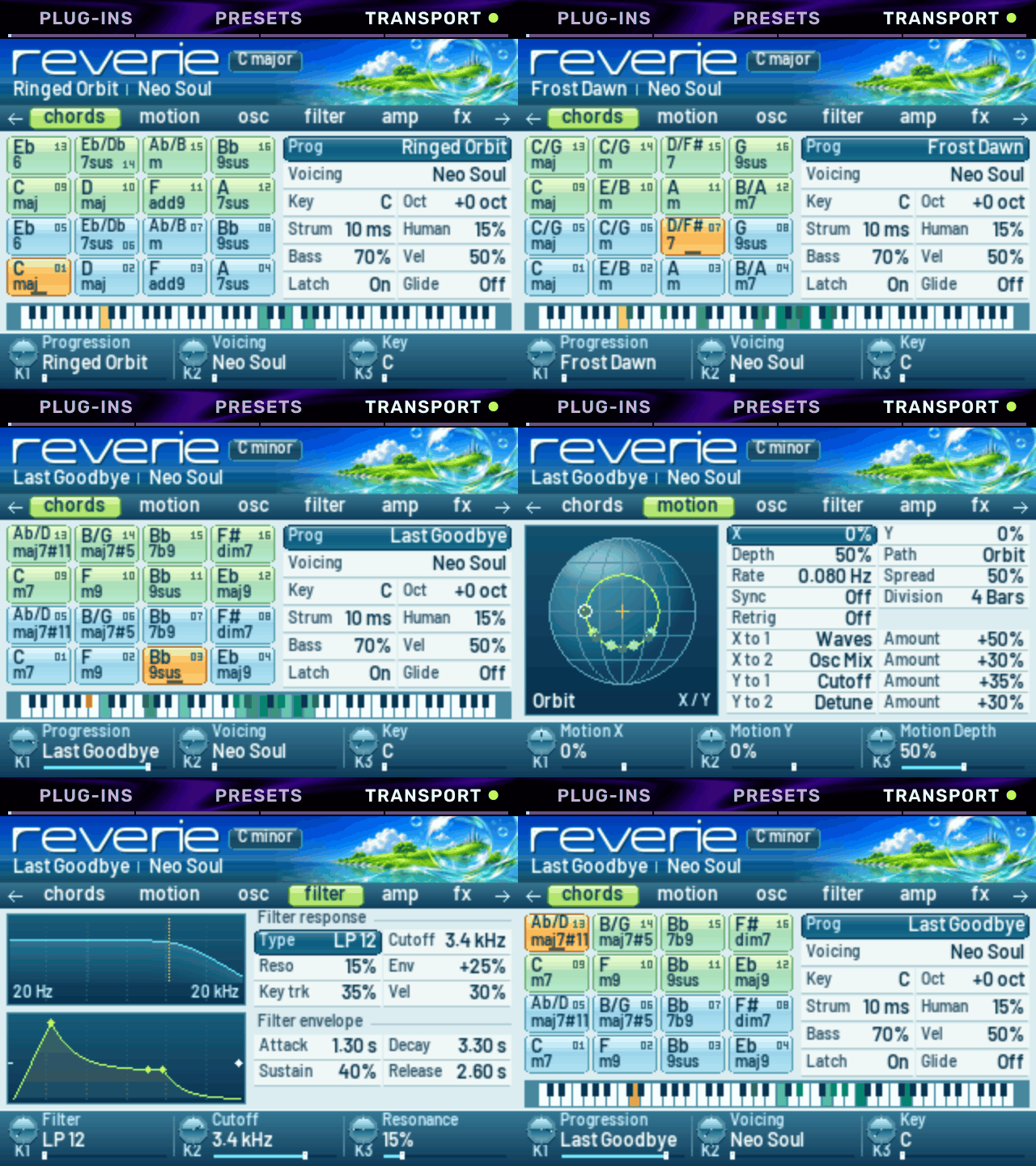
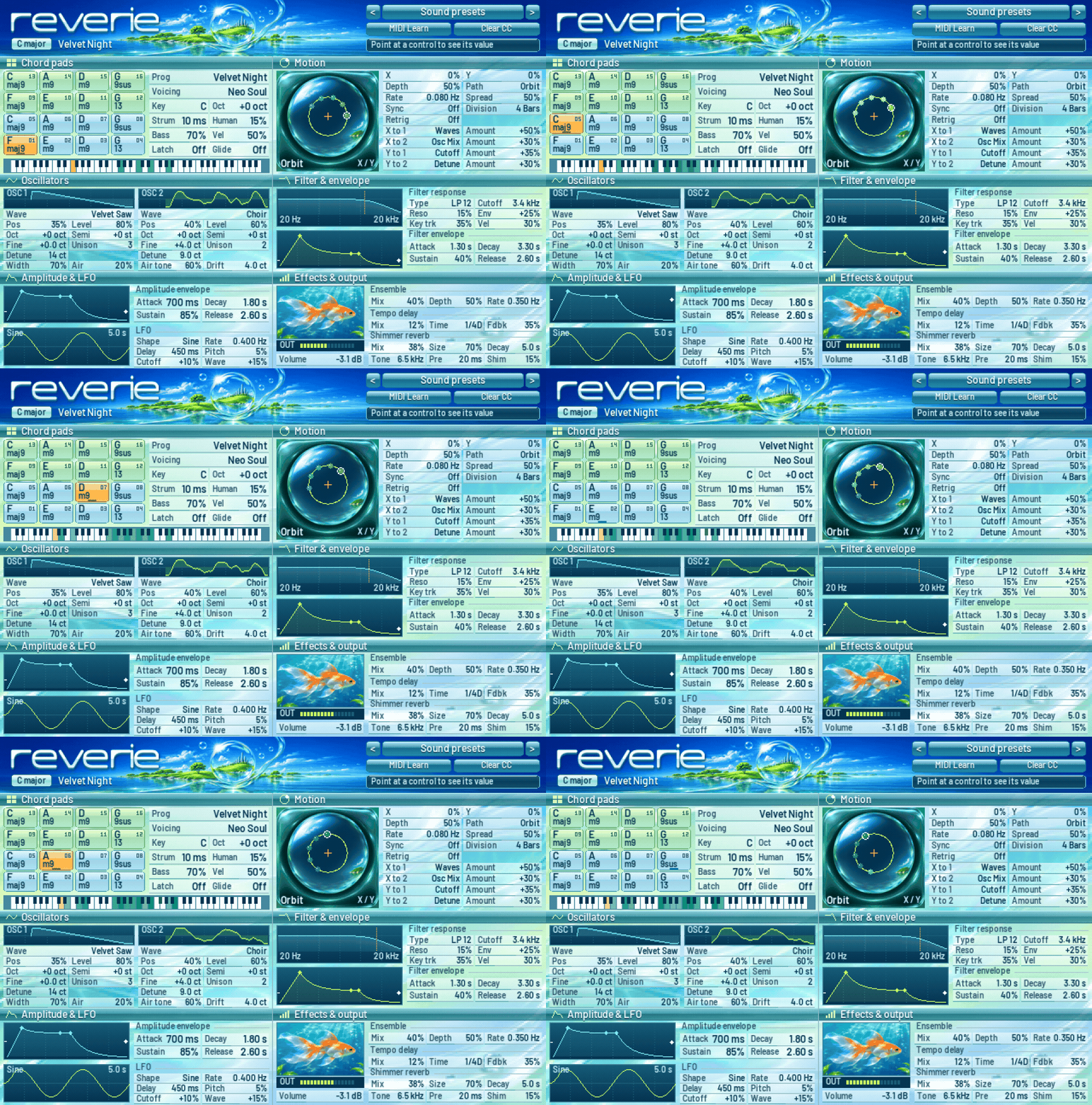
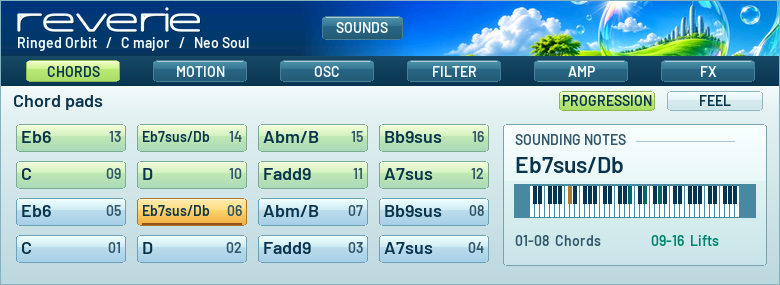
Interfaces
| MPC Sample | macOS and Windows | SP-16 |
|---|---|---|
 |
 |
 |
Verification
- Both MPC builds passed the arm64 host and audio fingerprint suites. Each custom screen opened in its matching hdslaveOS host.
- The SP-16 ARMv7 binary passed the freesp16 glibc 2.13 check and QEMU tests for the screen, 80 control bindings, chord pads, MIDI and sound switching. Physical MPC Sample and SP-16 playback remains unverified for these packages.
- Both desktop VST3 packages passed all 47 Steinberg validator tests. The CLAP and VST3 builds passed editor and audio checks on Mac. Windows checks ran under CrossOver on macOS. Native Windows DAW testing is pending.
MPC 0.4.4 source · MPC 0.4.3 source · Desktop CLAP source · Desktop VST3 source. The SP-16 download is a binary preview from the local freesp16 port.
Melodee and its upstream screen interface are by Kerem Kiliç (Ellic Studio). Each package includes third-party notices.
hdslave Reverie v0.1 (MPC Sample)
hdslave Reverie (v0.1, built from 2b4e780) — a Linux aarch64 CLAP plug-in for the Akai MPC Sample running hdslaveOS or Melodee.
Note: Verified by automated host, audio, state, and screen tests in the arm64 test harness (
clap_check), not yet tested on physical MPC hardware.
Install on the MPC Sample SD card
Unzip hdslave-Reverie-MPC-Sample-v0.1.zip at the root of your SD card (so hdslave Reverie.clap and its licence/documentation files land in Melodee/Plugins/hdslave/).
Checksums (SHA-256)
hdslave-Reverie-MPC-Sample-v0.1.zip:99d0967dce5bf5825fca5ece6b942970337b2679304dba98bdc76372ff183deehdslave Reverie.clap:57b2cf691320b24fa65be283a05b3c84f40609dc71129cbe794e4b33ce429da8
Current downloads
Get the current Reverie builds for MPC Sample, SP-16, macOS and Windows.