English | 中文
Online OCR recognition API service based on Baidu PP-OCRv6 model.
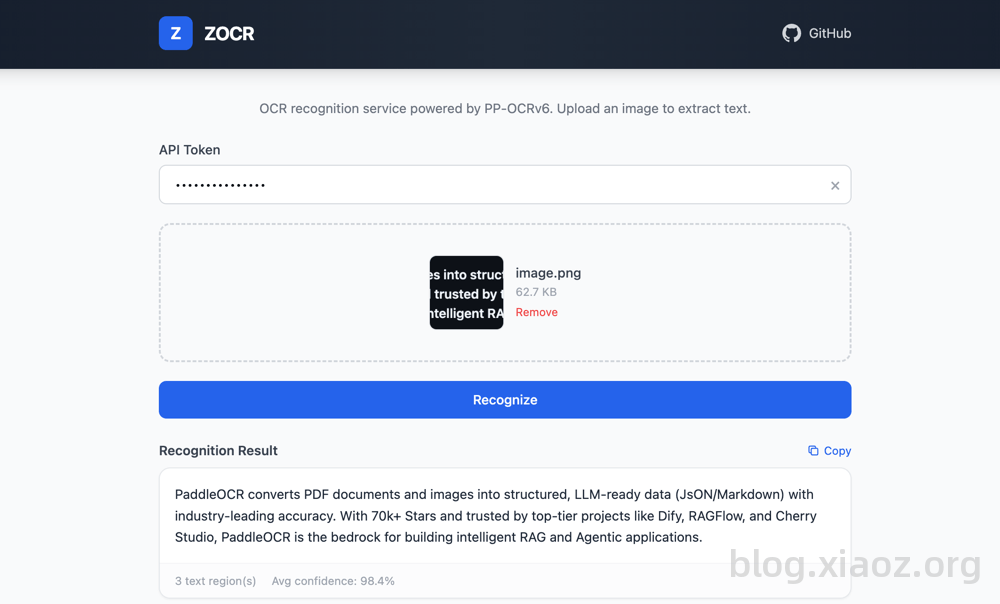
- Supports Bearer Token authentication
- Supports Docker containerized deployment
- Supports common image formats: jpg/jpeg/png/bmp/webp
- Image size limit: 10MB
- Returns JSON format recognition results
Create a compose.yaml file:
services:
  zocr:
    image: helloz/zocr
    container_name: zocr
    ports:
      - "5080:5080"
    environment:
      - ZOCR_TOKEN=your_token_here
    restart: always
Optional environment variables:
ZOCR_WORKERS: Number of uvicorn worker processes, default 1ZOCR_MODEL_VERSION: OCR model version (tiny/small), default smallZOCR_MAX_FILE_SIZE: Maximum file size (bytes), default 10485760
Start the service:
# Start the service
docker compose up -dEnvironment requirements: Python >= 3.11
# Install dependencies
pip install -r requirements.txt

# Start the service (development mode)
bash run.sh devConfigure via environment variables. If ZOCR_TOKEN is empty, authentication is skipped:
| Variable | Description | Default |
|---|---|---|
| ZOCR_TOKEN | Authentication key | Empty (no auth) |
| ZOCR_WORKERS | Number of uvicorn worker processes | 1 |
| ZOCR_MODEL_VERSION | OCR model version (tiny/small) | small |
| ZOCR_MAX_FILE_SIZE | Maximum file size (bytes) | 10485760 (10MB) |
POST /api/ocr/upload
Content-Type: multipart/form-data
Authorization: Bearer <token>
Request Parameters:
file: Image file
GET /api/ocr/fetch?url=<image_url>
Authorization: Bearer <token>
Request Parameters:
url: Image URL address
{
    "code": 200,
    "msg": "success",
    "data": {
        "texts": ["Recognized text 1", "Recognized text 2"],
        "scores": [0.99, 0.95],
        "boxes": [[[0,0], [100,0], [100,30], [0,30]], ...],
        "full_text": "Recognized text 1\nRecognized text 2"
    }
}GET /api/health
# Using curl (upload file)
curl -X POST http://localhost:5080/api/ocr/upload \
  -H "Authorization: Bearer your_token" \
  -F "file=@test.jpg"

# Using curl (via URL)
curl "http://localhost:5080/api/ocr/fetch?url=https://example.com/image.jpg" \
-H "Authorization: Bearer your_token"- X: @xiaozblog