Repository navigation
PadForge v5.2.0


PadForge is a Softpedia Editor's Pick: rated 5/5, Excellent.
"PadForge shines best in its incredibly vast range of supported controller types." (Softpedia's editor review)
PadForge 5.2.0 turns driving games' telemetry into controller input: speed, RPM, gear, pedals and steering from Forza, F1, EA SPORTS WRC, the Codemasters rally games, BeamNG.drive, Assetto Corsa and others map like a controller's buttons and axes. Game mods made for DSX now play their adaptive trigger effects and lights on your PlayStation controllers with no DSX installed. A Novint Falcon plays games as a force-feedback stick. The screens on Logitech's GamePanel devices and the Mad Catz S.T.R.I.K.E. 7, and a phone running Logitech Arx Control, can show your profile, a clock or a controller's lightbar color. A game that plays a DualSense's haptics as audio now rumbles every rumble pad on that virtual controller, and HIDMaestro 2.1.0 keeps virtual Xbox 360 controllers working through sleep.
4.5.3, 5.0.0 and 5.1.0 offer this release from the Updates card in Settings. 4.5.2 and older need one manual download.
| Game Telemetry | Custom telemetry formats |
|---|---|
 |
 |
| DSX game mods | The Novint Falcon |
|---|---|
 |
 |
| Keyboard screens | Steering Angle Rumble on one motor |
|---|---|
 |
 |
Game Telemetry
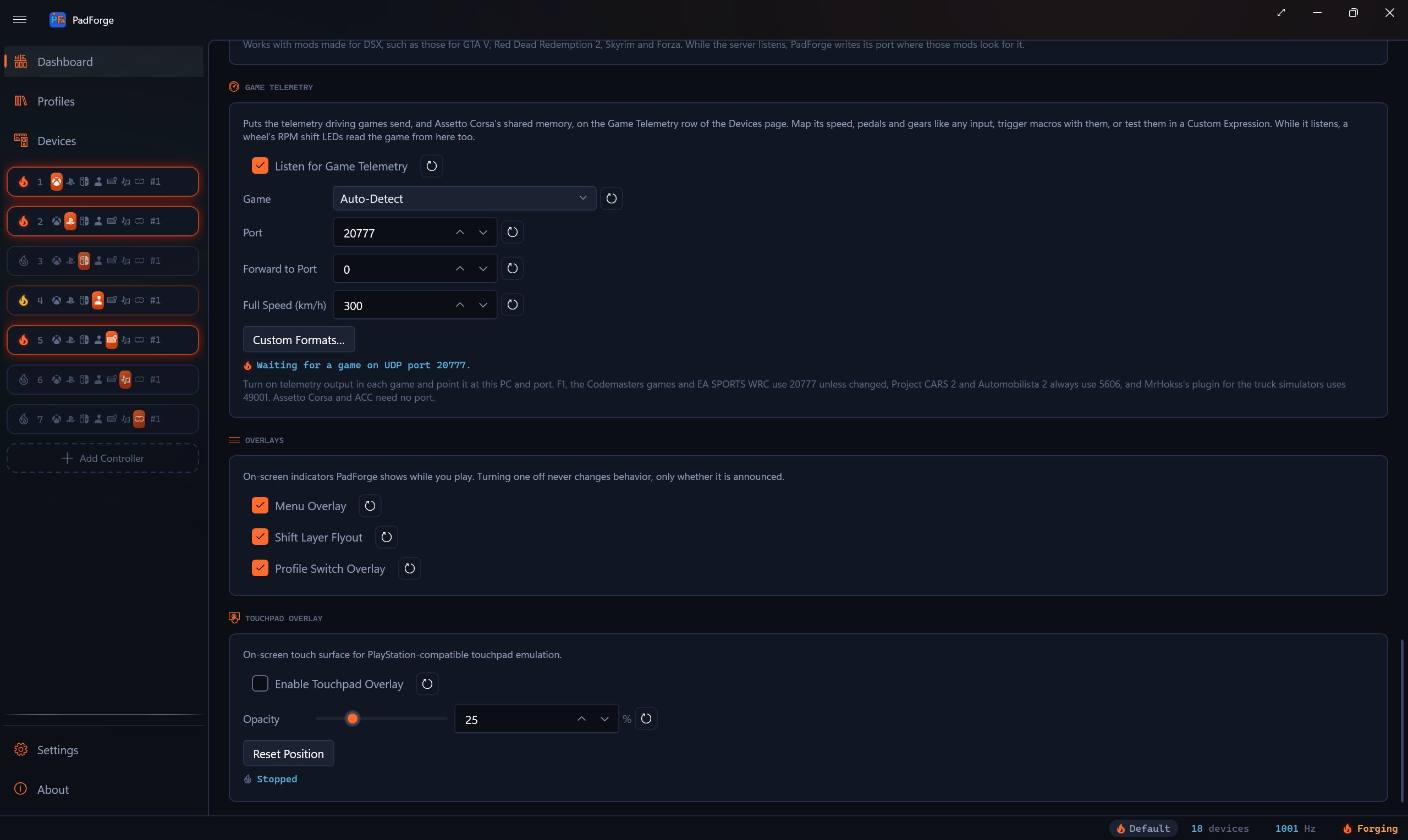
Driving games can send their telemetry to other programs, and PadForge now reads it. Turn on Listen for Game Telemetry on the Dashboard, then pick the game or leave Game on Auto-Detect. The readings appear as a Game Telemetry row on the Devices page: Speed, RPM, Throttle, Brake, Clutch, Handbrake and Steering axes, and Driving, Reverse, Neutral and Gear 1 to Gear 18 buttons. Map them like any controller's inputs, start macros with them, or test them in a Custom Expression: with a reading Speed and b reading Gear, a > 120 && b == 3 holds above 120 km/h in third gear. (#531)
PadForge reads:
- Forza Motorsport 7 and 2023, and Forza Horizon 4 to 6
- F1 22 to F1 25
- DiRT Rally 2.0 and the other Codemasters games that send extradata 3
- EA SPORTS WRC
- BeamNG.drive and Live for Speed, through OutGauge
- Project CARS 2 and Automobilista 2
- Euro Truck Simulator 2 and American Truck Simulator, through MrHokss's ets2-telemetry-udp plugin
- Assetto Corsa and Assetto Corsa Competizione, from shared memory, with no port to set
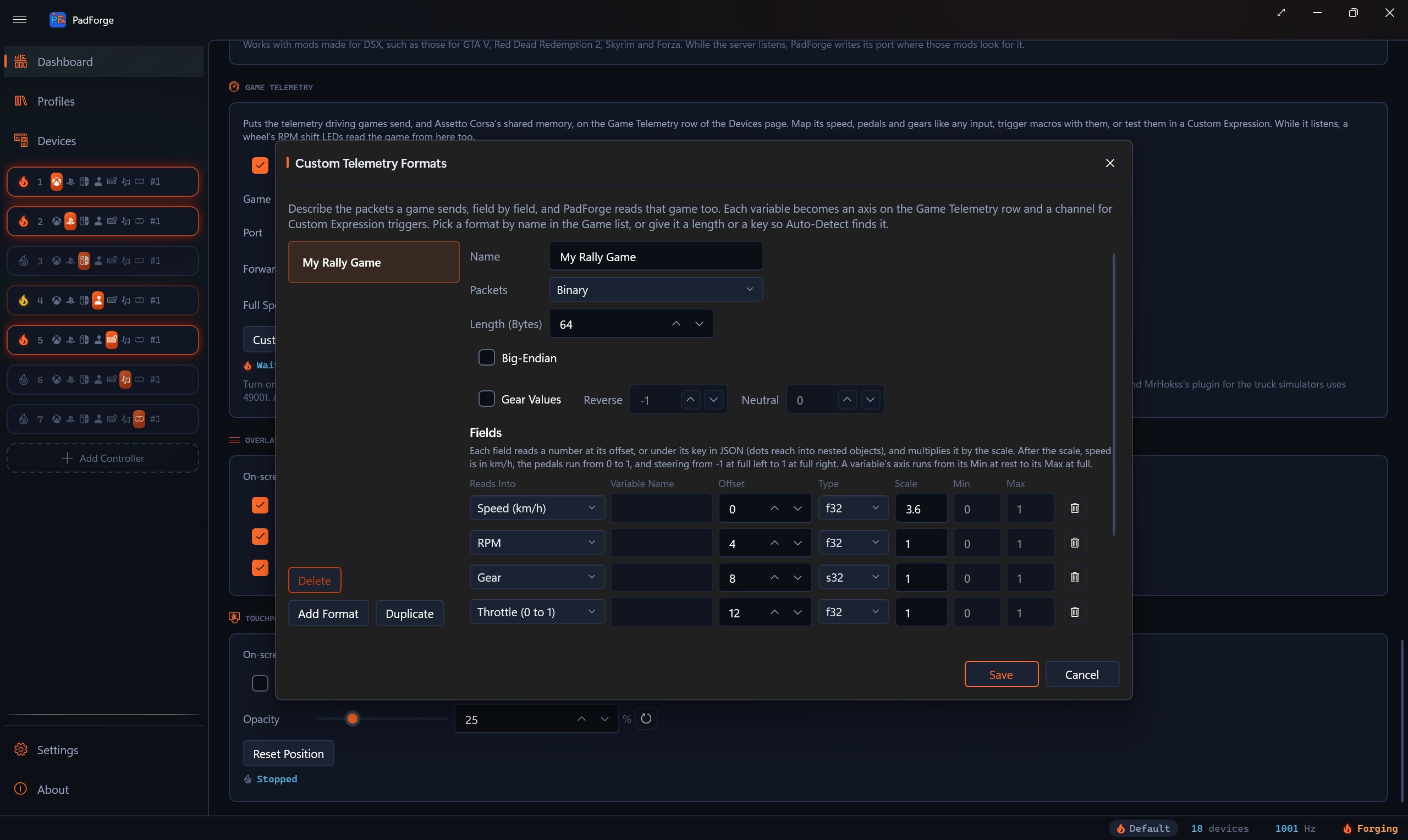
Custom Formats… describes a game PadForge does not know, field by field. Each field reads a number at a byte offset, or under a JSON key, and multiplies it by a scale. A variable becomes an axis on the row and a channel for Custom Expression triggers. Forward to Port copies every packet to another port on the PC, so SimHub or a dashboard keeps receiving it. Full Speed (km/h) sets the speed that moves the Speed axis all the way. While PadForge listens, a wheel's RPM shift lights read the game from the same packets.
Two new macro actions, Adaptive Trigger Effect and Stop Adaptive Trigger Effect, play DSX's trigger modes on the slot's DualSense triggers for a set time, while the macro's trigger is held, or until stopped. An Xbox controller with Translate Adaptive Trigger Vibrations on feels the vibrating ones in its impulse triggers.
DSX game mods
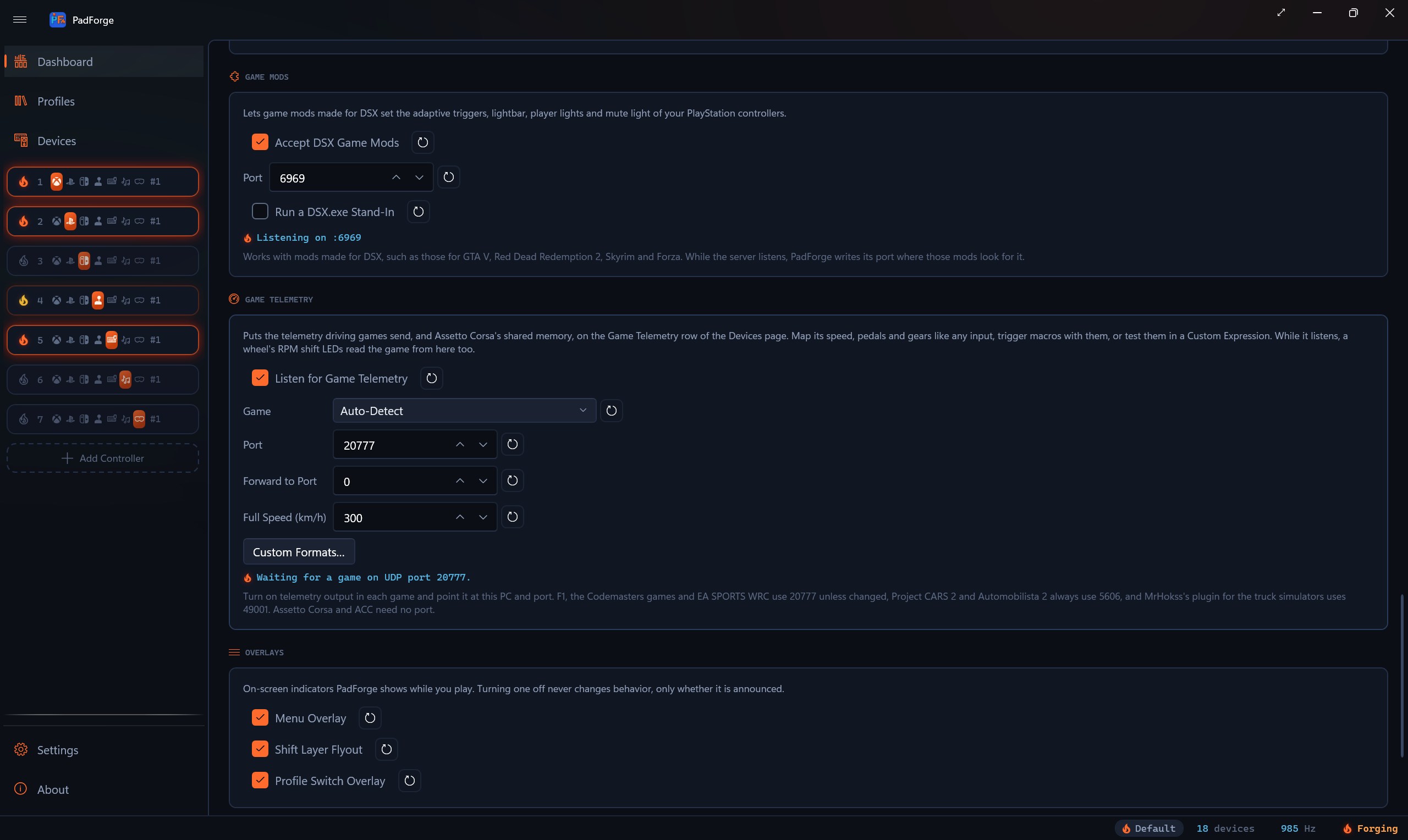
DSX is a DualSense app for Windows, and fan-made game mods for it give the Grand Theft Auto games, Red Dead Redemption 2, Skyrim, Fallout 4 and others adaptive trigger effects and lighting. PadForge now answers those mods itself. Turn on Accept DSX Game Mods on the Dashboard, and a mod's trigger effects, lightbar color, player lights, mute light and trigger thresholds play on the DualSense, DualSense Edge and DualShock 4 controllers assigned to your virtual controllers. (#529)
- PadForge plays all 27 of DSX's trigger modes and its 17 custom modes.
- A mod's first controller is the first virtual controller in Dashboard order with a DualSense, DualSense Edge or DualShock 4 online, its second controller the next one, and so on.
- A game's own trigger effects and lights, sent through a PlayStation virtual controller, take precedence over a mod's.
- A mod's effects stay until its program exits, it resets the controller, you click Clear Mod Effects on the controller's Devices panel, or the listener stops.
- A mod's trigger threshold keeps its trigger at rest until the pull passes it.
- An Xbox controller with impulse triggers feels a mod's trigger vibrations when Translate Adaptive Trigger Vibrations is on.
- PadForge takes mod packets on port 6969 from programs on the same PC only. While it listens, it writes that port where DSX 2 and DSX 3.1 mods look for it, unless DSX itself runs. For mods that check for DSX before they send, Run a DSX.exe Stand-In starts a small program named DSX.exe that ships inside PadForge.
The Novint Falcon
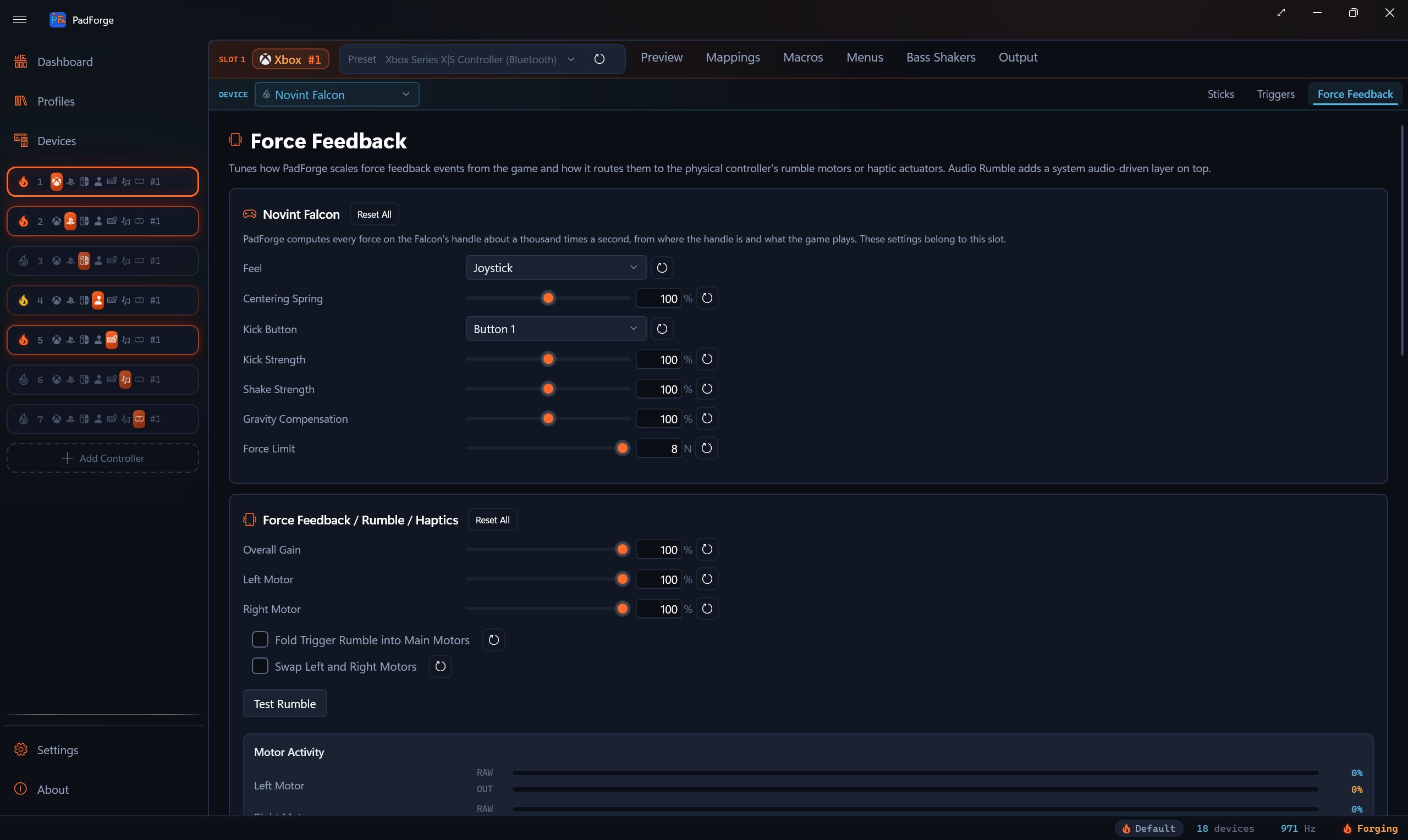
The Novint Falcon, a 3D force-feedback controller, now plays games through PadForge. Install Force Dimension's SDK and turn on Drive Novint Falcon in Settings. Each Falcon gets a row on the Devices page with the handle's Left/Right, Up/Down and In/Out axes and the grip's four buttons, and maps to any virtual controller. PadForge sets the force on the handle about a thousand times a second. (#521)
- The Joystick feel makes the handle a stick that a spring pulls back to center, with an end stop, after FalconJoystick. The Aim feel moves the stick with the handle's motion, the way a mouse moves a cursor, with FalconJoyForce's speed zones, push zone, wall, ridge and nudge.
- A game's rumble shakes the handle, or kicks it toward you while the Kick button is held. A game's constant, ramp and periodic effects push the handle, and its springs, dampers, friction and inertia act on it.
- The Novint Falcon section on the Force Feedback tab sets the feel, the Kick button, the strengths, gravity compensation and the force limit. Calibrate Reach is on the Falcon's panel on the Devices page.
- Install Falcon Driver, on the Settings card, gives a Falcon with no driver Force Dimension's signed driver from the SDK folder. A Falcon on another driver stays on it.
- Stopping the engine, or a crash, leaves every Falcon at zero force.
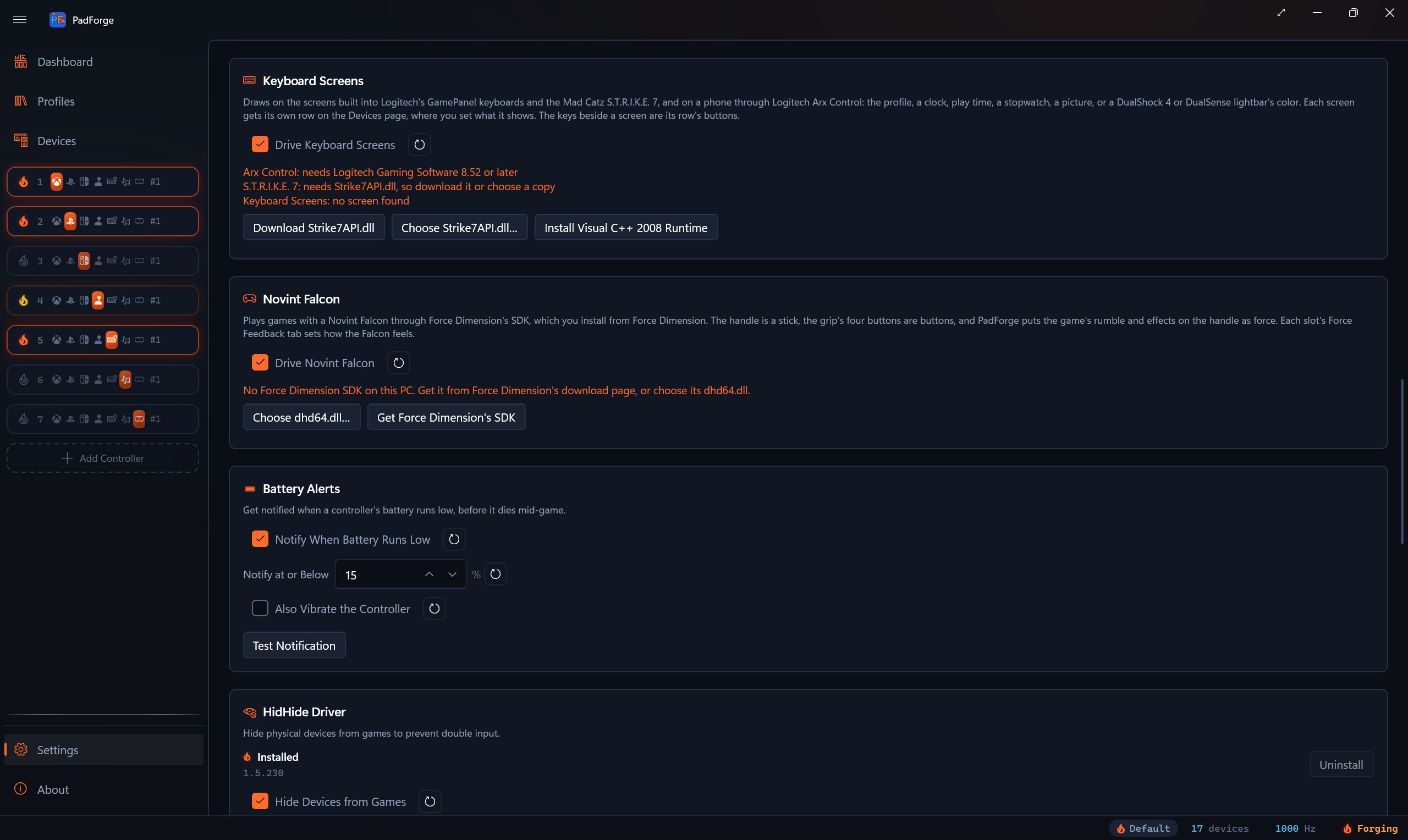
Keyboard screens
PadForge draws on the screens built into Logitech's GamePanel devices (the G15, G15 v2, G510, G13, Z-10 and the GamePanel itself), the G19's color screen, the Mad Catz S.T.R.I.K.E. 7's touchscreen and a phone running Logitech Arx Control. Turn on Drive Keyboard Screens in Settings, and each screen gets a row on the Devices page, where a button opens that screen's settings. A screen shows the profile's name, number or picture, a clock, play time, a picture you choose, a stopwatch, or a DualShock 4 or DualSense lightbar's color, the default. (#519, from discussion #507)
- The keys beside a screen are its row's buttons. Map them like any controller's, and two keyboards keep their keys apart.
- New macro actions Show Keyboard Screen, Keyboard Screen Mode, Stopwatch and Pan Keyboard Screen Picture act on the screens whose rows feed the macro's virtual controller.
- While Logitech Gaming Software runs, PadForge draws the Logitech screens through it. LGS keeps one picture for each kind of screen, so two keyboards of one kind show the first one's choice. Without LGS, PadForge drives each screen itself, and the G19's screen interface alone moves to the WinUSB driver, which goes back to Windows when the switch goes off.
- Arx Control needs Logitech Gaming Software 8.52 or later.
- The S.T.R.I.K.E. 7 needs Mad Catz's Strike7API.dll. PadForge downloads it from Mad Catz's SDK when you ask and checks its SHA-256 before every load, and installs the Visual C++ 2008 runtime it needs after checking Microsoft's signature.
DualSense haptics on every rumble pad
Some games play a DualSense's haptics as audio on a DualSense (PS5): Full or DualSense Edge (PS5): Full virtual controller and send it no rumble, so a DualShock 4 or Xbox controller on that virtual controller stayed still. PadForge now turns those haptics into rumble for every rumble pad assigned to it. The left haptic channel drives the left motor and the right channel the right, the pairing SDL and Linux's hid-playstation use. Each device's Overall Gain, motor strengths and motor swap apply, and Overall Gain at 0 turns it off. Bass Shakers follow the haptics too. (discussion #522)
A pad that plays the haptics itself takes no rumble from them: a real DualSense, and a Steam or Switch controller with Play DualSense Haptics on This Controller on.
DualShock 4 audio
A DualShock 4 on Bluetooth gets the DualSense's Headphone Volume and Output Path rows, so it plays through its headphone jack, in stereo or mono, or through its speaker. It plays through one or the other, never both, so Output Path leaves out Headphones + Speaker. Follow Headphone Jack switches between them as headphones go in and out. (#528)
Its headset microphone works over Bluetooth. When the slot's virtual controller carries audio, the microphone becomes that virtual controller's microphone in Windows, so a game or chat app records from it, and voice macros can listen to it. PadForge turns the microphone on only while something records or listens. PadForge's SDL build now reads the larger reports a DualShock 4 sends while its microphone streams, which this needed (hifihedgehog/SDL#41).
A second-model DualShock 4 (CUH-ZCT2) on a cable now plays PadForge's sound through its headphone jack, as a pad on Sony's USB wireless adapter does. Over USB both are headsets with no speaker, so the slot's macro sounds go to them only while headphones are plugged in, and play on the PC's default output or another controller on the slot when nothing is. The first model has no audio on a cable.
HIDMaestro 2.1.0
HIDMaestro, the driver behind PadForge's virtual controllers, moves from 2.0.3 to 2.1.0.
- Virtual Xbox 360 controllers keep working through a sleep. In every earlier release, a sleep or hibernate ended their HID device, and a game that held it open read nothing after the resume.
- Every frame reaches the game once and in order. Several paths could deliver a frame twice, out of order, or only when the next frame came.
- Input keeps flowing when every processor is busy. Each virtual controller's driver host now runs at high priority. In HIDMaestro's test with 32 threads competing for the processors, a virtual DualShock 4's slowest frame took 1.4 ms instead of 360 ms at the old priority, and a virtual Xbox 360 controller's took 31 ms instead of 496 ms.
- A virtual controller is removed only once no other program holds it open. Removing one that another program held open could leave a device with no driver behind.
- Sending a frame takes less work. On a virtual Xbox 360 controller it took 181 ns instead of 649 ns, measured against 2.0.3.
The driver is a new build, so the first virtual controller that needs it installs it once. A few paths measured slower, and HIDMaestro's 2.1.0 notes list them.
Also new
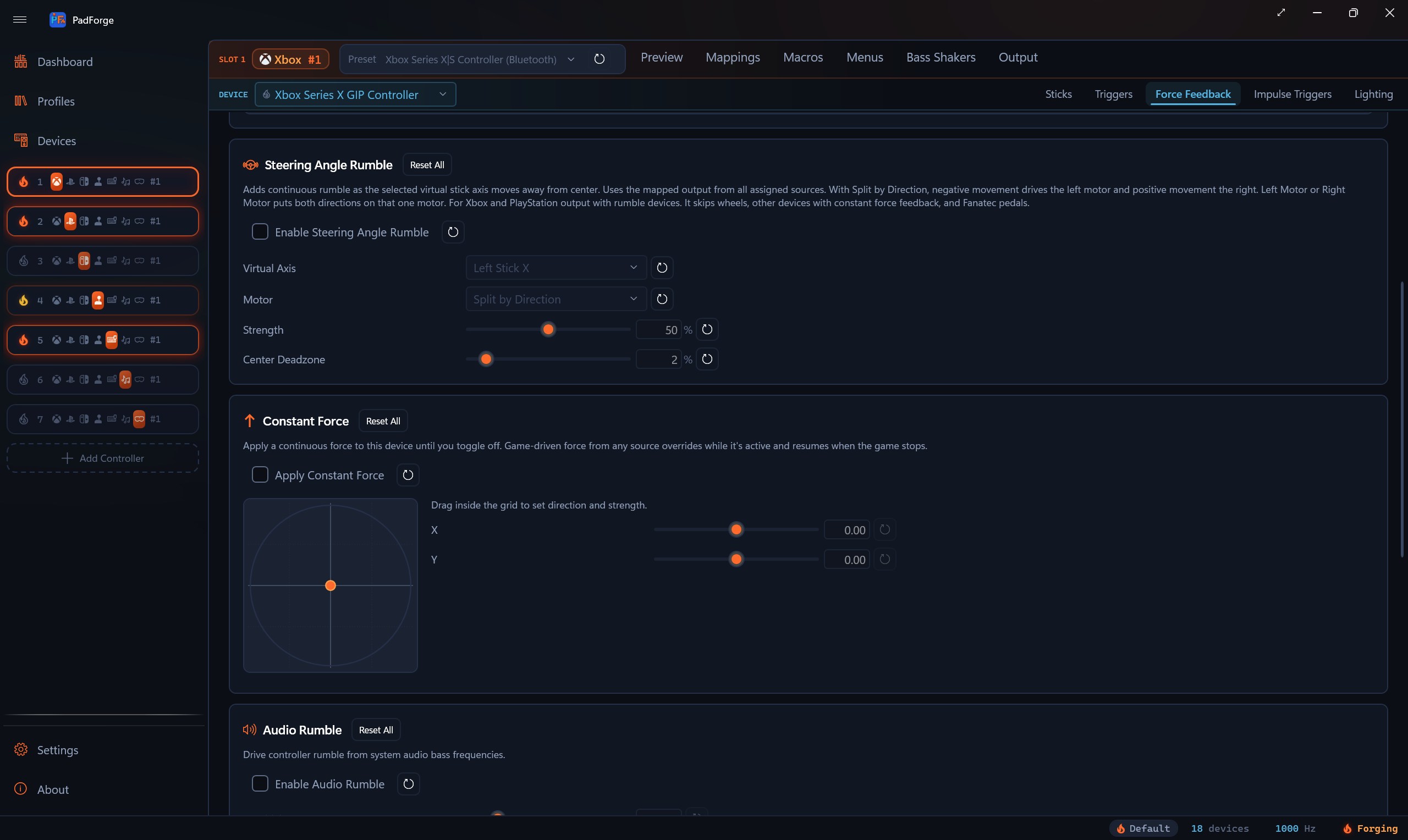
- Steering Angle Rumble has a Motor setting under Virtual Axis. Split by Direction, the default and the old behavior, puts left turns on the left motor and right turns on the right. Left Motor or Right Motor puts both turns on that motor, so a turn of the same size feels the same either way. (#510)
- On a DualShock 3 (SIXAXIS): Full virtual controller, axis macros can set the pressure of its ten pressure-sensitive buttons (Cross, Circle, Square, Triangle, L1, R1 and the four D-pad directions). A value above 0 presses the button at that pressure, and 0 releases it. (#530)
Fixes
- Fanatec wheel commands go out on report 0x01, the report Fanatec bases read. Through 5.1.0 they went out on report 0x00 and failed, so a CSL DD had no force feedback, and its springs, centering, rotation range and rev lights failed with it.
- PadForge no longer rewrites PadForge.xml every 30 seconds while nothing changes.
- The DSU Motion Server, the Web Controller and Head Tracking start once another program frees their port, trying again every 3 seconds. They stayed off. A server switched off after a failed start now says Stopped.
- A wheel's RPM shift lights read F1 22 and F1 25 too. They read only F1 23 and F1 24.
- On a DualSense that a game drives through a DualSense virtual controller, PadForge's own rumble holds: macro rumble, Audio Rumble, Steering Angle Rumble and Test Rumble. Each of the game's frames without rumble stopped it within 100 ms.
- A second-model DualShock 4 on Bluetooth keeps sending input while PadForge plays sound on it. The audio reports asked for a report mode that stops a genuine pad's input after a few reports, in hardware tests by the hbashton fork of DS4Windows.
- The Bluetooth audio stream to a DualShock 4 runs through quiet stretches. It stopped two seconds after the last sound, and DS4-Sound-Link's notes say a stop makes the controller pop and power down its headphone amplifier.
- A DualShock 4 on Sony's USB wireless adapter plays in stereo. It played a mono mix in the right ear only.
- Master Volume sets the level of a DualShock 4's and a Wii Remote's macro sounds. It had no effect on them.
- A Bluetooth DualSense's microphone records at the right speed through a DualShock 4 virtual controller. It came through three times too slow.
- Remove Device on a Bliss-Box port's row puts that port's Dreamcast screen choices back to the defaults. They stayed.
- The Head Tracker's line on the Devices page clears when the engine stops.
Bundled
- HIDMaestro 2.1.0, up from 2.0.3, with 337 device profiles. The pickers offer 136 controllers, 51 keyboards and 52 mice.
- BthPS3 3.2.1, unchanged.
- PadForge's SDL build at fork commit e0b84e3498, which reads a DualShock 4's microphone reports (hifihedgehog/SDL#41).
- DSX.exe, the 5.5 KB stand-in behind Run a DSX.exe Stand-In, built from PadForge's own source.
- The NuGet packages are unchanged.
Localization
The 42 complete languages, American and British English among them, carry every new string. The other 67 show English wherever they have no string.
Credits and licenses
- The About page, LICENSE and README credit four new groups of references, each under the license its own files state: the DSX game mod references (Paliverse's DSX and DualSenseX mod examples, both DualSenseY versions, DualSense4Rockstar, DSZ, pydualsense, the Wujek Dualsense API and the DSX server in hbashton's DS4Windows fork), the DualShock 4 headset references (DS4-Sound-Link, ds4mac, ds4drv, the hbashton fork and Google's libsbc), the keyboard screen references (Logitech's LCD and Arx Control SDKs, Mad Catz's S.T.R.I.K.E. 7 SDK, logitech-lcd, dcspy, foo_logitech_lcd, LogitechStuff, ArxWidgetManager, hid-lg-g15, libg15, G15Interface, lcdproc, gnome15 and G19USB) and the Novint Falcon references (Force Dimension's SDK, FalconJoystick, FalconJoyForce, CHAI3D and libnifalcon).
- The DualShock 4 headset credit also names DJm00n's ControllersInfo descriptor dumps (no license published) and linux-hardware.org's LsUSB probes (CC BY 4.0), the sources for the USB headsets of the second model and Sony's adapter.
- The racing telemetry credits add the ten projects the Game Telemetry decoders read from, among them CMTelemetry, fh6-tel, PCars2UdpNet and vAzhureRacingHub.
Known limitations
- No driving game has sent PadForge its telemetry on the bench. The decoders follow each format's published layout and the readers credited above, and tests build packets to those layouts.
- No DSX game mod has run against PadForge with its game. Tests replay the packets of eight published mods.
- No Novint Falcon has run against PadForge.
- None of the keyboard screens, the Arx Control phone page or the S.T.R.I.K.E. 7 has run against PadForge.
- No Fanatec base has run the report 0x01 fix.
- No DualShock 4 has run against the new audio paths: the Bluetooth headphone routes and microphone, the wired second model and Sony's adapter. Each follows the report layouts and descriptor dumps credited above.
- The DualSense haptics have not been turned into rumble from a game on the bench, and how the rumble feels on real motors is untested.
- Steering Angle Rumble's Motor setting and the DualShock 3 pressure targets have not run with a game.
- No native speaker has reviewed the translations.
- The ARM64 build has not run on ARM64 hardware.
Full changelog: v5.1.0...v5.2.0