Repository navigation
Releases
CHQueue v1.0.7


CHQueue v1.0.7
The in-app updater now actually finishes, every time.
🔄 Fixed: web source disappearing on tiktok
v1.0.7 - this one was a bit of a "duh doh" moment lol
Whole time I was testing on OBS instead of TikTok, so that was on me. TikTok doesn't have a browser refresh option like OBS does, so CHQueue needs to be opened before TikTok for it to work properly. My jank workaround for now is just having CHQueue start with Windows. Not ideal, but it works. Enjoy!
Download
| Installer | File | Best for |
|---|---|---|
| Setup (recommended) | chqueue-setup.exe |
Most users. A standard click-through Windows installer. |
| MSI | chqueue-setup.msi |
Managed or business deployments (Group Policy / Intune). |
Windows 10 or 11, 64-bit. If you're updating from v1.0.3 or earlier, grab this installer directly - the in-app updater on those versions can't fix itself. From v1.0.6 onward, updates work normally through the app.
Full Changelog: v1.0.3...v1.0.7
CHQueue v1.0.6
CHQueue v1.0.6
The in-app updater now actually finishes, every time.
🔄 Fixed: updates getting stuck mid-install (for real this time)
v1.0.4 fixed the crash that showed up when clicking Update, but that only uncovered a second, deeper problem: CHQueue's own process sandboxing (the same mechanism that guarantees a clean shutdown) was also silently killing the freshly-launched installer the instant CHQueue closed to get out of its way. The update would download and appear to start, then just... stop.
The updater now works the way it always should have:
- Update downloads the new installer and hands it to an independent helper process
- CHQueue closes
- The helper waits until CHQueue has actually exited, then installs the update silently - no wizard to click through
- Once install finishes, the helper relaunches CHQueue automatically
Verified end-to-end against a real published release, repeatedly, before shipping this.
Download
| Installer | File | Best for |
|---|---|---|
| Setup (recommended) | chqueue-setup.exe |
Most users. A standard click-through Windows installer. |
| MSI | chqueue-setup.msi |
Managed or business deployments (Group Policy / Intune). |
Windows 10 or 11, 64-bit. If you're updating from v1.0.3 or earlier, grab this installer directly - the in-app updater on those versions can't fix itself. From v1.0.6 onward, updates work normally through the app.
Full Changelog: v1.0.3...v1.0.6
CHQueue v1.0.3
CHQueue v1.0.3
The overlay no longer flashes.
🚫 No more flashing overlay
Every one-second queue refresh was quietly pulling every visible row out of the page and putting it right back where it already was - a no-op for the queue itself, but reinserting an element is exactly what makes a browser replay any CSS animation still attached to it. Each row's entrance animation was never cleaned up once it finished, so the whole queue ended up replaying its fade/slide/pop-in animation once a second, forever - visible as a constant flash on top of your stream in OBS and TikTok LIVE Studio.
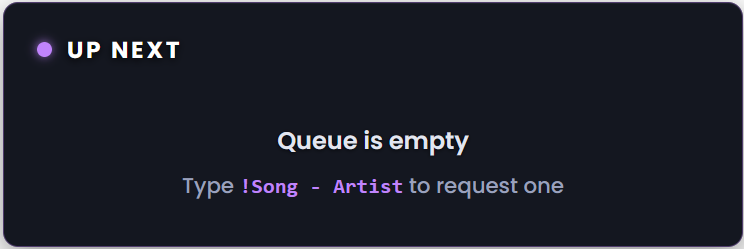
Rows are now only touched in the DOM when something about them actually changed - a new request, a reorder, or a removal. An unchanged queue no longer moves a single pixel between polls.
Download
| Installer | File | Best for |
|---|---|---|
| Setup (recommended) | chqueue-setup.exe |
Most users. A standard click-through Windows installer. |
| MSI | chqueue-setup.msi |
Managed or business deployments (Group Policy / Intune). |
Windows 10 or 11, 64-bit.
Full Changelog: v1.0.2...v1.0.3
CHQueue v1.0.2
CHQueue v1.0.2
TikTok LIVE Studio compatibility, a quieter TikFinity connection, and a bigger, sharper overlay.
📺 TikTok LIVE Studio, actually working
TikTok's own "Add Link" dialog does a live DNS check and flatly rejects any URL that resolves to a loopback address - which is exactly what 127.0.0.1 is. There was never a way to hand it a working link.
- The Overlay card now shows a second URL,
app.chqueue.lol, purpose-built to pass TikTok's check - it resolves publicly, then a local hosts-file entry quietly routes it back to your own overlay server - A one-click Fix TikTok Studio URL button adds that hosts entry for you - no manual editing, no admin prompt on most machines
- The original
127.0.0.1URL is still there for OBS/Streamlabs, unchanged
🔇 A quieter TikFinity connection
If your chat went quiet for as little as 30 seconds, CHQueue was silently tearing down and reopening its entire TikFinity connection - visible as an endless "connected to TikFinity" line spamming the activity log during any slow stretch of a stream. It's now a stable, long-lived connection, with a real ping-based keepalive so an actual dropped connection is still caught and reconnected.
🔍 A bigger, sharper overlay
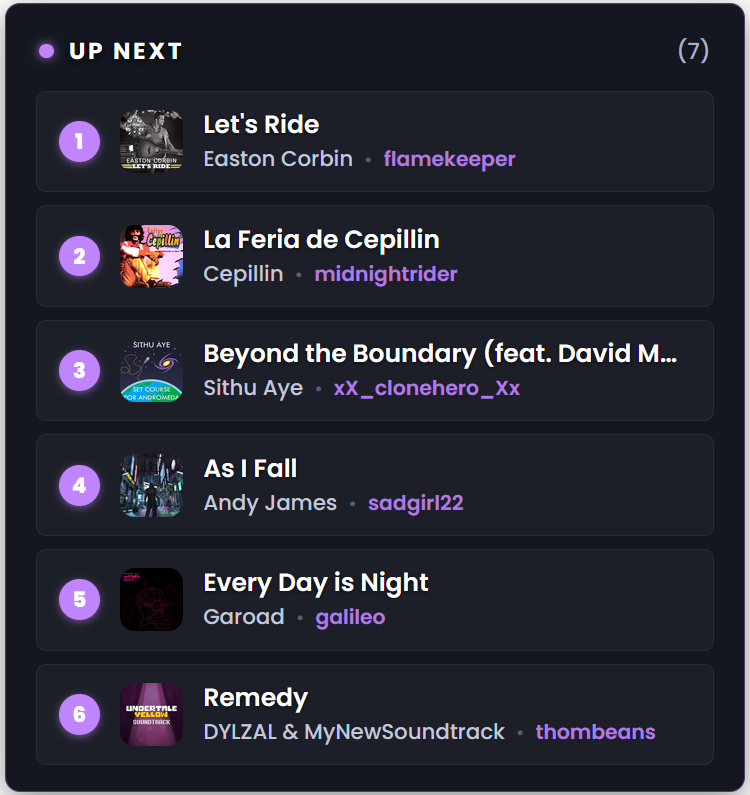
Resizing the overlay's source box in OBS or TikTok LIVE Studio blurs it - you're stretching a fixed-resolution render. Customize Overlay now has its own Size slider (75%-250%) that grows the overlay through real layout instead, staying crisp at any size you pick (as long as the browser source's own render resolution is large enough to match).
Download
| Installer | File | Best for |
|---|---|---|
| Setup (recommended) | chqueue-setup.exe |
Most users. A standard click-through Windows installer. |
| MSI | chqueue-setup.msi |
Managed or business deployments (Group Policy / Intune). |
Windows 10 or 11, 64-bit.
Full Changelog: v1.0.1...v1.0.2
CHQueue v1.0.1
CHQueue v1.0.1
A bugfix release - the overlay no longer flashes.
🖼️ Overlay
- Fixed the overlay flashing continuously for some setups - every visible row (including its album art) was being torn down and rebuilt from scratch on every 1-second poll, even when nothing about the queue had actually changed. Depending on the machine/browser engine rendering the overlay, that showed up as a constant visible flash. A row now only rebuilds when its content actually changes.
Download
| Installer | File | Best for |
|---|---|---|
| Setup (recommended) | chqueue-setup.exe |
Most users. A standard click-through Windows installer. |
| MSI | chqueue-setup.msi |
Managed or business deployments (Group Policy / Intune). |
Windows 10 or 11, 64-bit.
Full Changelog: v1.0.0...v1.0.1
CHQueue v1.0.0
CHQueue v1.0.0
Initial release. TikTok LIVE chat requests, verified against your own Clone Hero library, with a fully customizable stream overlay and automatic chart downloading for the songs you don't have yet.
🎤 Chat & Requests
- Takes song requests from TikTok LIVE chat with
!Song - Artist(or just a title/artist on its own) - Uses TikFinity's local connection when it's running, falls back to a direct TikTok LIVE connection by username otherwise
- Fuzzy-matches every request against your own scanned library - handles typos, word order, and title-only initialisms like
!TTFAFfor "Through the Fire and Flames" - Per-viewer request limit,
!revoketo cancel a pending request, and a configurable no-repeat window so a song can't be re-requested right after it played
⬇️ Bridge Auto-Download
- Requests that don't match your library are automatically searched against Bridge (Chorus Encore) and the best-scoring chart is downloaded straight into your songs folder
- Every result is re-scored against what was actually typed - never trusts Bridge's own search ranking as-is
- Restrict downloads to only the instruments you actually chart, with an adjustable match-confidence floor
- Downloaded-but-unscanned songs are flagged
[]in the queue, distinct from*for "still needs downloading"
🖼️ Overlay
- One page that works as both an OBS Browser Source and a TikTok LIVE Studio Add Link - includes the hosts-file workaround for TikTok's dialog rejecting
127.0.0.1URLs - Fully customizable: heading text, accent color, background style (glass/solid/transparent), font (including your own uploaded font), corner radius, entrance animation, and overall size, all with a live demo preview
- Per-field visibility toggles for artist, requester, position number, and album art
- Card shrinks and grows smoothly with the queue itself instead of sitting at a fixed reserved height
🎮 Now Playing
- Watches Clone Hero's own
currentsong.txtand clears the front of the queue automatically once a song is actually confirmed playing - Configurable dwell time before removal, so a brief flicker in Clone Hero's own file doesn't drop a request early
- Live queue also exported to a plain
.txtfile for any OBS text source that isn't the browser overlay
Download
| Installer | File | Best for |
|---|---|---|
| Setup (recommended) | chqueue-setup.exe |
Most users. A standard click-through Windows installer. |
| MSI | chqueue-setup.msi |
Managed or business deployments (Group Policy / Intune). |
Windows 10 or 11, 64-bit.