




multiversum is a package designed to make it easy to conduct multiverse analyses in Python. The package is intended to seemlessly integrate into a normal analysis or ML workflow and can also be added to an existing pipeline.
- Simple 🧩: Built with the goal of being as simple as possible to integrate into existing workflows.
- Parallel 👯: Different universes are automatically evaluated in parallel.
- Notebooks 📓: Analyses can be written as Jupyter notebooks or Python scripts.
- Play/Pause ⏯️: Interrupt and then continue a multiverse analysis where you left it.
Install this library using pip:
pip install multiversum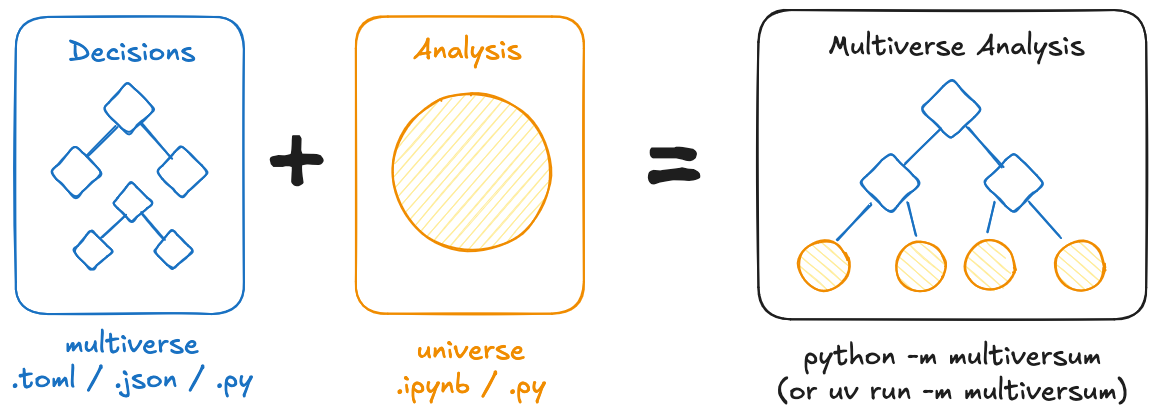
The package always works with two different files: The multiverse.toml (or json / py) ✨️, specifying the different dimensions (and their options) and the universe.ipynb (or py) ⭐️ containing the actual analysis code. The universe file is then evaluated (in parallel) using different dimension-combinations, by running python -m multiversum.
An example using a machine learning workflow in scikit-learn can be found here.
To quickly get started with running your own multiverse analysis, you can use the multiversum starter template.
This section contains real-world examples of multiverse analyses conducted using this library.
- Preventing Harmful Data Practices by using Participatory Input to Navigate the Machine Learning Multiverse [Code] [Paper]
- Bias Begins with Data: The FairGround Corpus for Robust and Reproducible Research on Algorithmic Fairness [Code] [Paper]
To contribute to this library, first checkout the code. Then create a new virtual environment:
cd multiversum
python -m venv venv
source venv/bin/activate
Now install the dependencies and test dependencies:
python -m pip install -e '.[test]'To run the tests:
python -m pytestRuff is used for formatting and linting. Formatting can be automatically checked / applied wherever possible via ruff check . --fix && ruff format.
The documentation is generated using mkdocs and can be locally run using mkdocs serve after installing its dependencies using python -m pip install -e '.[docs]'.