Develop the Aligent CheckItOut JavaScript ES6 MVC Application with Sass styling.
It uses Gulp and Babel as simply as possible to transpile the source code into browser-ready JavaScript and CSS.
To get started as a developer, use your preferred command line application to change directory to /source/modules/aligent/
git clone git@bitbucket.org:aligent/ecomdev_checkitout_source.git checkitout
cd checkitout
sudo npm install
gulp
This will create the codebase in a folder called checkitout, install the node dependencies and start gulp running. The gulp process watches for any changes in the /src/js or /src/scss folders and re-transpiles the JS and Sass into modern browser compliant, minimised code.
This directory allows developers to work directly with the gulp auto-generated code using browser sync saving a lot of development time over working from within Magento and having to refresh the page too often.s
To make this as portable as possible, we've got the concept of css skins. Look in the develop/src/scss/skins folder to see some examples. Skins are changed in the develop/src/scss/screen.scss file. Create your own by copying an existing one in the skins directory and loading it from screen.scss.
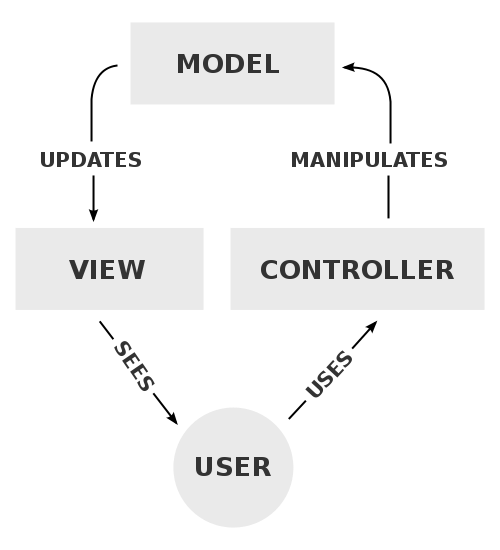
Model–view–controller (MVC) is a software architectural pattern for implementing user interfaces on computers. It divides a given application into three interconnected parts in order to separate internal representations of information from the ways that information is presented to and accepted from the user.
- Simple Sass file structure ready to use
- Example ES6 application you can extend
- Holy grail 3 column flexbox layout
- Easy, modular integration with any project