Repository navigation
Releases
X-Plane Add-on Utility Version 2.0 Build 1

X-Plane Add-on Utility Version 2.0 Build 1 Update:
Implemented some quality of life updates that are specific to MacOS... namely:
-
Implemented logic that parses through aircraft folders looking for binaries that have been quarantined by MacOS. These files are what typically trigger the gate keeper warnings when adding new aircraft that require you approve the execution of certain file types like .xpl through the MacOS security settings menu. You can now remove the quarantine extension attribute from these files directly from the utlity now, prior to launching X-Plane, which will negate the need to approve these files after launching X-Plane.
-
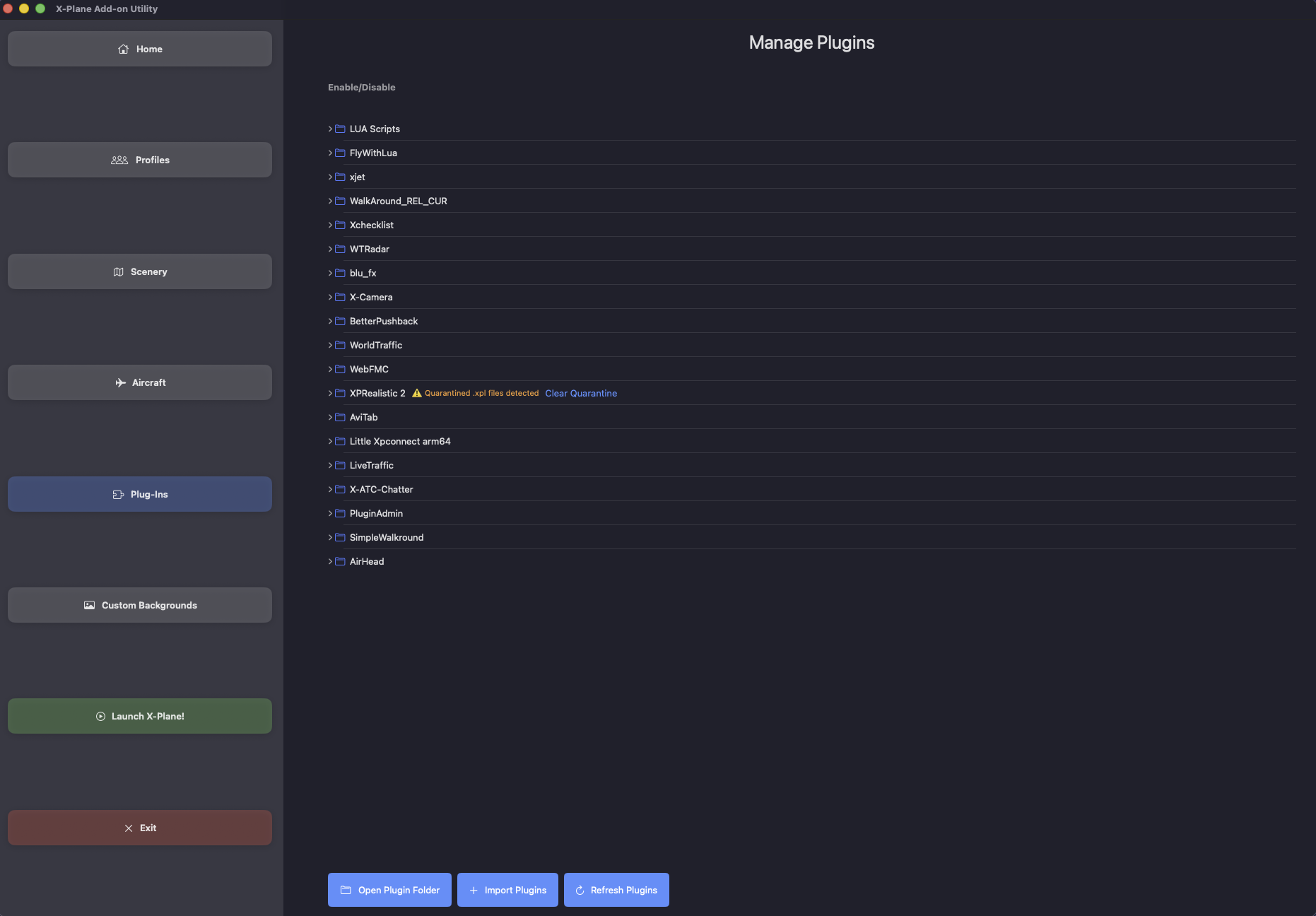
Likewise, implememted the same functionality for plug-ins. If a plug-in or script file contains a quarantine extension attribute, you can clear it directly from the plug-ins section of the app.
-
Added a quality of life feature to scenery manager that allows you to enable all packs. Especially useful if you are making use of the flight plan scenery enablement feature, and wish to reset all your packs very quickly.
-
Fixed some parsing logic in the flight plan scenery enablement function that caused the app to not enable all tiles along your flight plan. This was due to a logic error on my part when and this functionality should be fixed! The flight plan scenery pack enablement function only adjusted scenery, ortho, and airport packs. It won't touch library files, as well as some of the main scenery packs like simheaven, xroads, global forests, extended night time lighting, etc. If anyone encounters the tool modifying a pack it shouldn't, please let me know so that I can scope it out.
-
Added a function that stores the joystick and key binding preferences when you are using profiles and press the button to store your preferences. Prevously I forgot to add the contents of the 'control profiles' folder, so joystick profiles and keybindings were not getting properly stored and backed up.
-
Added a button to load control profiles in the profile management section. While your specific joystick and keybinding control profiles get stored with the X-Plane preferences, they do not automatically get loaded everytime you switch between profiles like the other preference files do. I made this decission because I didn't want users to get into a state where their yoke/joystick/key binding profiles get overwritten in error. I know how long it can take to create the perfect binding orders, and I want to protect those settings. Think of this more as a backup feature for your control profiles. If you ever need to restore them due to app reload, etc., you'll have them backed up and available in the profile!

Version 2.0 Release
Changes in this build:
-
The layout for this version of the application has been completely redesigned to facilitate easier and faster access to all sections of the application. The new home screen is where you select the folder for the instance of X-Plane you wish to manage, and where you will find the configuration profile that's currently active (if a profile has been enabled).
-
The new Profiles section allows you to add and remove configuration profies for the instance of X-Plane you are managing. The configuration profiles can store scenery pack, aircraft, and plug-in configurations. New to this build is the abilty to store your in-game X-Plane preferences. This new feature allows you to store your graphics configuration, joystick/flight control configurations, custom key mappings, and screen placement mappings. This enables scenarios such as remembering placement of your screens for multi-monitor setups where screen placement may need to be different for each aircraft being flown. Instead of manually tweaking the layout on your monitors for every flight, you can use a configuration profile to store these settings for you so that screen layout is automatically updated as your enable your various configuration profiles. To save your X-Plane preferences simply press the button to Store Preferences. Enablement of a configuration profile will automatically load your scenery pack configurations, aircraft selections, plug-in selections, and X-Plane preferences whenever a profile has been selected.
-
In the scenery section, I added a new requested feature that will automatically enable scenery for you along a flight path that has been specificed in a flight plan. All scenery that doesn't intersect with the flight path is automatically disabled, with the exception of some prespecifieid library packs that are commonly used in X-Plane. This feature may still disable some libraries that contain scenery as well, so please inspect the applied scenery packs if you chose to utilize this feature. Please remember that changes to scenery pack configuration need to be saved any time you make a modification. This is the only section you need to do this in. All other sections (aircraft, plugins) automatically save any time you make a change. I've implemented change control that makes you aware of when you need to save your scenery pack configuration!
-
The Aircraft and Plug-in sections will now automatically expand to show all Aircraft and Plug-ins.
-
The new Backgrounds section allows you to add and remove custom backgrounds to your X-Plane instance. Image selection is currently limited to .png files.
X-Plane Add-on Utility v1.2
Version 1.2 Update!
As always, a big thank you to everyone who has contributed to app feedback! It's been a invaluable source of information for squashing bugs and implementing new features. Apologies for the delay in the release cadence. This build had more moving parts than I had originally anticipated, and every time I implemented a new component something else needed to be updated, tweaked, fixed, etc.
Updates in this build:
-
Added support for individual flight configurations. When you open the app, you'll notice a white button in the center of the menu that lets you create a configuration profile. You can also manage your configuration profiles from the menu bar application as well (under Manage Configurations). When you add a new configuration file, you'll need to ensure that it's selected in the picker and then visit each section in the app that you wish to store settings for, making whatever adjustments you require. The scenery section requires you to press SAVE to confirm your happy with the ordering of your scenery pack data in order the values to be written to the configuration file. All other sections (Aircraft and Plugins) get updated and saved automatically anytime you make an adjustment to a setting. The application will remember the last configuration profile you utilized and will load all settings from this file as soon as the add-on utility is launched. Every time you select a new profile the settings are automatically applied for you, negating the need to visit each section of the app. If you remove a configuration profile from the list, please ensure that you select another profile that you want to utilize for your next flight. If there are no configuration profiles to choose from, the picker menu will disappear and be replaced with the white "New Configuration" button in the middle of the menu.
-
The application is no longer running in a sandbox, and symbolic file links are now fully supported and working.
-
Tweaked the red dot overlay that gets generated for enabled Airports and Airfields and made it smaller.
-
Lots of changes under the hood for the "Show Enabled Scenery" function. Due to the fact that lots of simmers have absolutely massive scenery packs that potentially cover thousands of tiles, I have incorporated some logic that will warn you when one of these packs is encountered, and you can choose to either let the app render the applied areas, or you can simply skip the processing of this pack. If you chose to proceed, be prepared to wait upwards of a couple minutes while the app computes the covered areas.
X-Plane Add-on Utility v1.1.2
Weekly build update!
Thanks for all the feedback from the community! Please keep it coming so that I can continue fixing issues and adding new features!
Updates in this build:
- Added the option to view individual scenery pack coverage areas by pressing the new "Show on map" button in the scenery list view.
- Updated the way that scenery overlay tiles get rendered to prevent some areas on the map becoming solid blue if you have multiple packs that cover the same area enabled.
- Updated the way that airport overlays are generated by situation to a regular expression based function that finds lat and lon data. This previous function was based off of what I thought was a standardized format which apparently is not the case when it comes to apt.dat files. Please let me know if you continue to see custom airports and field that you have enabled not rendering. I also updated the size of the overlay that gets generated, and made it more red to make it easier to spot when zoomed out.
- Completely overhauled the way orthophoto overlays are generated by using a much faster method to calculate coverage area. This new function reduces processing time by almost 95%. This will hopefully alleviate some of the wierd overlays that some folks were seeing.
- Updated the function that generates overlays for all enabled scenery packs (and changed the name of the button). I had previously limited the number of total overlays that could be generated, but with the above enhancements I have removed these limitations, so hopefully you will see coverage for all tiles in your packs now. Please note: if you have packs like SimHeaven enabled, overlays for these packs will not render when viewing all enabled packs, as their coverage areas are much to broad, which I think defeats the purpose of seeing what custom scenery you currently have enabled. If you want to see areas that those packs provide coverage for, please use the new "Show on map" button.
- Added a button in the enabled scenery map view that lets you load a .fms flight plan file to see if you have the appropriate scenery enabled for all the legs of your flight... if you're using a flight plan.
That's it for this week! Keep the feedback coming!
X-Plane Add-on Utility v1.1
Minor v1.1 update release
Change notes:
-
Added support for LUA script files in the plugins section.
-
Updated the scenery overview function. The function will now generate overlays for enabled orthophoto, scenery data, and airports. Also changed the colors to reflect how the items are tagged in the list... orange for orthophoto, red for airport, and blue for scenery. Also added a key to the top of the map.
X-Plane Add-on Utility v1.0
Release 1.0 is now available!
This is the initial release of X-Plane Add-on Utility! This build includes the following main features:
Scenery Pack management:
-The utility will build a list based off of the contents of the scenery_pack.ini file. As the list gets generated, the individual folders get parsed and classified into distinct catagories to assist with ordering: scenery, library, orthophoto, or aircraft. This list can be reordered by pressing the edit button and dragging the individual list items into what order you wish to utilize. Make sure you press the save button when finished to commit your changes to the file.
-Enable or disable scenery packs via toggle. Again, please make sure you press the save button any time you have modified your list.
-Quick access to the X-Plane 'custom scenery' folder.
-Add new scenery packs directly to the 'custom scenery' folder. *This is currently a move operation.
-Generate a scenery overview of all enabled orthophoto packs. Enabled packs show up as a highlighted area in green. This process also generates a blue circular overlay for any airport packs that have been enabled.
Aircraft management:
-Quick access to the X-Plane 'Aircraft' folder.
-Add new aircraft directly to the 'Aircraft' folder. *This is currently a move operation.
-Enable or disable aircraft via toggle.
Plugin management:
-Quick access the X-Plane 'Plugins' folder.
-Add new plugins directly to the "Plugins' folder. *This is currently a move operation.
-Enable or disable plugins via the toggle.
Other:
-Menu bar application allows you to easily and quickly make modifications to your scenery, aircraft, and plugin selections without having to use the main window.
-The application will remember your selected X-Plane folder the next time you open the app.