Repository navigation
Releases
Redmine Form Sections v1.1.0

Redmine Form Sections v1.1.0
This release extends custom field sections to issue viewing, improves the default configuration behavior, and completes the integration of the visual editor into a single plugin.
What's new
- Sections in issue view: Custom fields are now organized into the same tracker-based sections when creating, editing, and viewing issues.
- Hide empty fields: A new filter, enabled by default, hides empty custom fields and sections in the issue view. Users can disable it instantly without reloading the page.
- Native Redmine behavior preserved: Field visibility, value formatting, and full-width custom fields remain supported.
- Cleaner initial configuration: New installations start with
trackers: {}, without predefined sections. - Simplified architecture: Legacy Pro naming has been removed from the integrated visual editor.
- Updated documentation: French and English guides now include new screenshots and an improved getting-started experience.
Important upgrade notes
Existing valid layouts saved in Redmine settings are preserved. No database migration is required.
The visual editor has moved from /redmine_form_sections_pro to /redmine_form_sections/editor. Update any bookmarks or integrations using the old URL.
The legacy config/form_layouts.yml fallback has been removed. If your layouts were stored exclusively in this file, transfer them to the advanced YAML configuration.
Compatibility and validation
Redmine 7.0.3: Automated Rails and JavaScript tests, plus manual validation.
Redmine 4.1.2: Manual validation of issue viewing and the visual editor.
The Rails test suite completed successfully with 33 tests and 491 assertions. Both JavaScript test suites passed.
Compatibility with Redmine 4.2.x and other versions remains to be verified.
Documentation
See the English documentation or the French documentation for installation, configuration, and upgrade instructions.
Redmine Form Sections v1.0.0 — Visual Editor
Redmine Form Sections 1.0.0 introduces a built-in visual editor for organizing custom fields in Redmine issue forms.
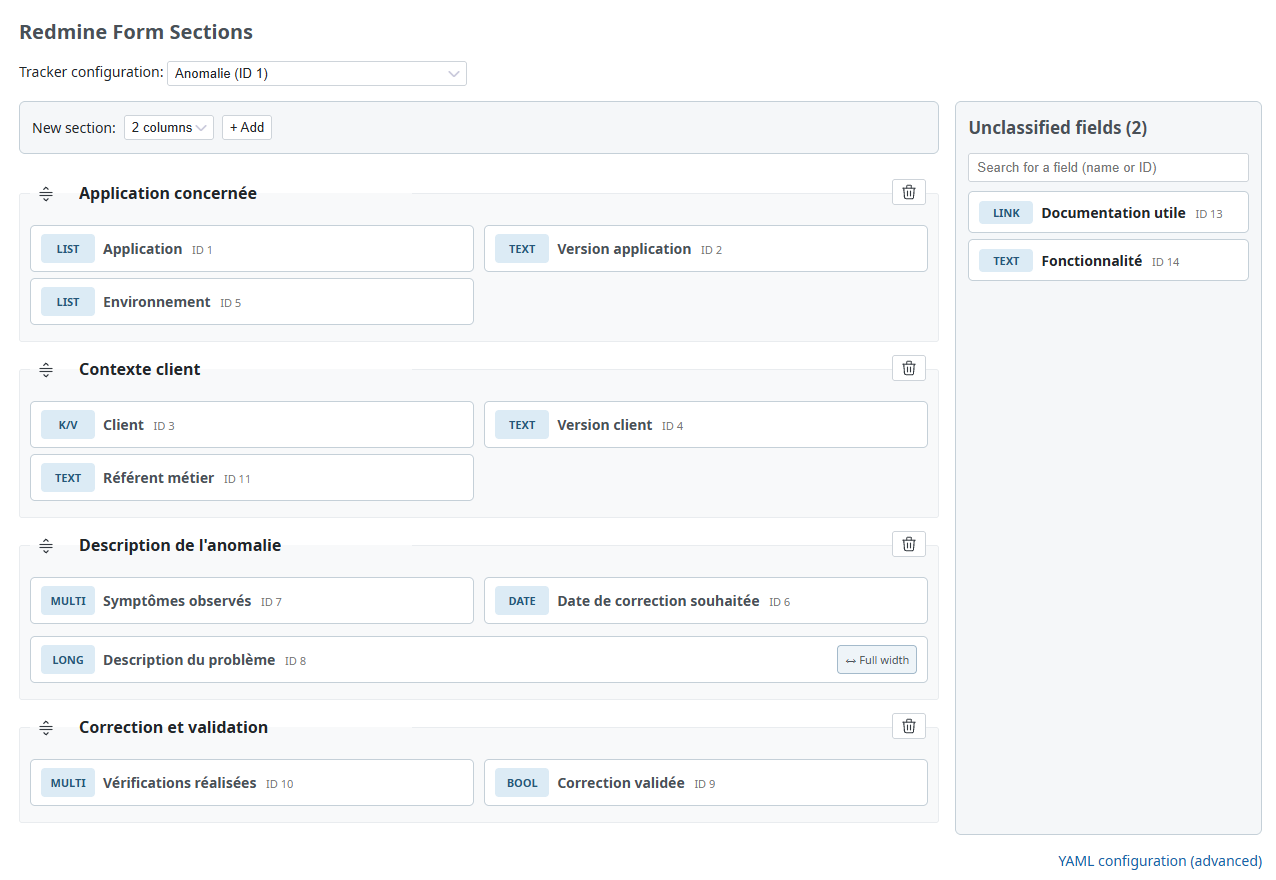
Administrators can now create and manage form sections through a drag-and-drop interface, without editing YAML manually.
What's new
- Integrated visual editor: Configure form layouts directly from Redmine Administration.
- Drag-and-drop organization: Create, rename, remove, and reorder sections and custom fields.
- Flexible layouts: Arrange custom fields in one or two columns while respecting Redmine's native full-width fields.
- Unclassified fields: Quickly find and organize fields using the built-in search.
- Safer configuration: Validate layouts before saving and detect concurrent modifications.
- Per-project activation: Enable or disable customized forms independently for each project.
- Bilingual interface: French and English translations.
The plugin preserves Redmine's native fields and automatically falls back to the standard form layout when customization is disabled.
Visual editor
Upgrading from v0.1.1
Version 1.0.0 keeps the existing plugin identifier and YAML configuration format.
To upgrade:
- Back up your existing YAML configuration.
- Replace the
redmine_form_sectionsplugin files with version 1.0.0. - Restart Redmine.
Existing configurations are preserved. No database migration is required.
Documentation
- English documentation: https://github.com/jmaisonnas/redmine_form_sections/blob/v1.0.0/README.md
- Documentation française: https://github.com/jmaisonnas/redmine_form_sections/blob/v1.0.0/README.fr.md
License
GNU General Public License v2.0 or later (GPL-2.0-or-later).
Redmine Form Sections v0.1.1
Redmine Form Sections v0.1.1
Redmine Form Sections is a free plugin that allows Redmine administrators to organize custom fields into named sections, displayed in one or two columns on issue creation and editing forms.
The plugin only changes the layout of custom fields. Native Redmine fields, custom field definitions, and stored values remain unchanged.
Features
- Define field sections independently for each tracker.
- Organize custom fields into one or two columns.
- Enable the plugin individually for each project.
- Manage layouts through a centralized YAML configuration.
- Validate configuration and detect duplicate field assignments.
- Automatically group unassigned fields under "Other fields".
- Preserve the native Redmine layout for trackers without configuration.
- French and English localization.
Compatibility
Tested with:
- Redmine 4.1.2
- Redmine 4.2.6
- Redmine 7.0.3
Compatibility with other Redmine versions has not yet been verified.
Installation
- Download the source code archive.
- Extract it and rename the extracted directory to
redmine_form_sections. - Copy the directory into your Redmine
pluginsfolder. - Restart Redmine.
- Configure the plugin under Administration → Plugins and enable its module in the relevant projects.
No database migration is required.
Documentation
Installation instructions, configuration examples, and screenshots are available in the README.
French documentation is also available in README.fr.md.