


Live-coding console tool that renders GLSL Shaders. Every file you use (frag/vert shader, images and geometries) are watched for modification, so they can be updated on the fly.
Install the GLFW 3 library and other dependencies:
sudo apt-get update
sudo apt-get upgrade
sudo apt-get install libglfw3-dev git-core
Download the glslViewer code, compile and install:
git clone http://github.com/patriciogonzalezvivo/glslViewer
cd glslViewer
make
sudo make install
This was tested with Ubuntu 16.04.
These instructions may not work for all users. For example, it seems that libglfw3-dev conflicts with the older libglfw-dev. The previous Ubuntu install instructions direct you to download and compile glfw3 manually:
sudo apt-get update
sudo apt-get upgrade
sudo apt-get install git-core cmake xorg-dev libglu1-mesa-dev
cd ~
git clone https://github.com/glfw/glfw.git
cd glfw
cmake .
make
sudo make installGet Raspbian, a Debian-based Linux distribution made for Raspberry Pi and then do:
sudo apt-get install glslviewerOr, if you want to compile the code yourself:
cd ~
git clone http://github.com/patriciogonzalezvivo/glslViewer
cd glslViewer
make
sudo make installsudo pacman -S glu glfw-x11
git clone http://github.com/patriciogonzalezvivo/glslViewer
cd glslViewer
make
sudo make installOr simply install the AUR package glslviewer-git with an AUR helper.
Use Homebrew to install glslViewer and its dependencies:
brew update
brew upgrade
brew install glslviewerIn the most simple scenario you just want to load a fragment shader. For that you need to:
- Run the app passing the shader as an argument
cd examples
glslViewer test.frag- Then edit the shader with your favorite text editor.
vim test.fragNote: In RaspberryPi you can avoid taking over the screen by using the -l flags so you can see the console. Also you can edit the shader file through ssh/sftp.
Note: On Linux and macOS you may used to edit your shaders with Sublime Text 2, if thats your case you should try this Sublime Text 2 plugin that lunch glslViewer every time you open a shader.

You can also load both fragments and vertex shaders. Of course modifing a vertex shader makes no sense unless you load an interesting geometry. That's why glslViewer is can load .ply files. Try doing:
glslViewer bunny.frag bunny.vert bunny.ply-
uniform float u_time;: shader playback time (in seconds) -
uniform float u_delta;: delta time between frames (in seconds) -
uniform vec4 u_date;: year, month, day and seconds -
uniform vec2 u_resolution;: viewport resolution (in pixels) -
uniform vec2 u_mouse;: mouse pixel coords -
varying vec2 v_texcoord: UV of the billboard ( normalized ) -
u_view2d: -
u_eye3d: -
u_centre3d: -
u_up3d:
ShaderToy.com image shaders are automatically detected and supported. These conventions are also supported by other tools, such as Synthclipse.
To be recognized as a ShaderToy image shader, a fragment shader must define
void mainImage(out vec4 fragColor, in vec2 fragCoord)It must not define main(), because this is automatically defined for you.
The following ShaderToy uniforms are automatically defined, you don't declare them:
uniform vec3 iResolution;
iResolution.xyis the viewport size in pixels, likeu_resolution.iResolution.zis hard coded to 1.0, just like shadertoy.com and synthclipse, although it was originally supposed to be the pixel aspect ratio.uniform float iGlobalTime;
Shader playback time (in seconds), likeu_time.uniform float iTimeDelta;
Render time for last frame (in seconds), likeu_delta.uniform vec4 iDate;
[year, month (0-11), day of month (1-31), time of day (in seconds)], likeu_date.uniform vec4 iMouse;
iMouseis initialized to 0, and only changes while the left mouse button (LMB) is being held down.- Mouse coordinates are integers in the range
[0,0]..iResolution.xy. iMouse.xyis the current mouse coordinates in pixels, while the LMB is being held down. When the LMB is released,iMouse.xyis set to the current coordinates, then stops changing.iMouse.zwis set to the current mouse coordinates at the instant when the LMB is pressed, remains constant as long as the LMB is held down, and is set to-iMouse.zwwhen the LMB is released.- If the LMB is up, then
iMouse.xyis the mouse location at the most recent mouseup event, andiMouse.zwis the negative of the mouse location at the most recent mousedown event. For example, after a mouse click,iMousemight be[216,320,-216,-320].
- Mouse coordinates are integers in the range
Demo: examples/numbers.frag
You can load PNGs and JPEGs images to a shader. They will be automatically loaded and asigned to an uniform name acording to the order they are pass as arguments: ex. u_tex0, u_tex1, etc. Also the resolution will be assigned to vec2 uniform acording the texture uniforma name: ex. u_tex0Resolution, u_tex1Resolution, etc.
glslViewer test.frag test.pngIn case you want to assign customs names to your textures uniforms you must specify the name with a flag before the texture file. For example to pass the following uniforms uniform sampled2D imageExample; and uniform vec2 imageExampleResolution; is defined in this way:
glslViewer shader.frag -imageExample image.pngBeside for texture uniforms other arguments can be add to glslViewer:
-
-x [pixels]set the X position of the billboard on the screen -
-y [pixels]set the Y position of the billboard on the screen -
-w [pixels]or--width [pixels]set the width of the billboard -
-h [pixels]or--height [pixels]set the height of the billboard -
-s [seconds]exit app after a specific amount of seconds -
-o [image.png]save the viewport to a image file before -
-lto draw a 500x500 billboard on the top right corner of the screen that let you see the code and the shader at the same time. (RaspberryPi only) -
-cor--cursorshow cursor. -
--headlessheadless rendering. Very usefull for making images or benchmarking. -
-I[include_folder]add a include folder to default for#includefiles -
-D[define]add system#defines directly from the console argument -
-[testure_uniform_name] [texture.png]: add textures asociated with differentuniform sampler2Dnames -
-vFlipall textures after will be fliped vertically -
-vverbose outputs -
--helpdisplay the available command line options
You can include other GLSL code using a traditional #include "file.glsl" macro. Note: included files are not under watch so changes will not take effect until the main file is save.
Once glslViewer is running the CIN is listening for some commands, so you can pass data trough regular *nix pipes.
-
int,floats,vec2,vec3andvec4uniforms can be pass as comma separated values, where the first column is for the name of the uniform and the rest for the numbers of values the uniform have. Note that there is a distintion betweenintandfloatso remember to put.(floating points) to your values. -
data: return content ofu_date, return the current year, month, day and seconds -
time: return content ofu_time, the elapsed time since the app start -
delta: return content ofu_delta,return the last delta time between frames -
fps: return content ofu_fps,return the number of frames per second -
frag: return the source of the fragment shader -
vert: return the source of the vertex shader -
window_width,window_height,screen_sizeandviewport: return the size of the windows, screen and viewport (content ofu_resolution) -
pixel_density: return the pixel density -
mouse_x,mouse_yandmouse: return the position of the mouse (content ofu_mouse) -
view3d: -
screenshot [filename]: save a screenshot of what's being render. If there is no filename as argument will default to what was define after the-oargument when glslViewer was lanched. -
q,quitorexit: close glslViewer
glslLoader is a python script that is install together with glslViewer binnary which let you download any shader made with The book of shaders editor (editor.thebookofshaders.com) . Just pass as argument the log number
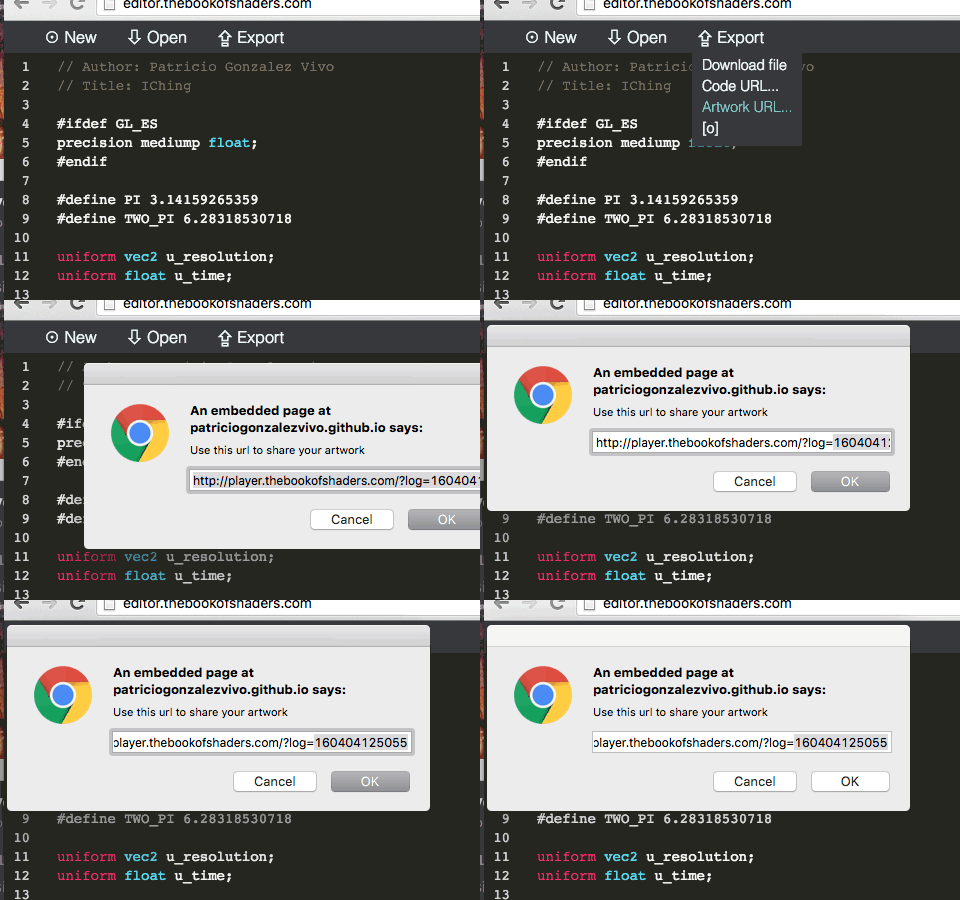
glslLoader 170208142327It will also download a shader shared through the ShaderToy's by passing the ID glslLoader. Ex:
glslLoader llVXRd- Open a Fragment shader:
glslViewer examples/test.frag- Open a Fragment shader with an image:
glslViewer examples/test.frag examples/test.png- Open a Fragment and Vertext shader with a geometry:
glslViewer examples/bunny.frag examples/bunny.vert examples/bunny.ply- Open a Fragment that use the backbuffer to do a reaction diffusion example:
glslViewer examples/grayscott.frag- Open a Fragment that use OS defines to know what platform is runnion on:
glslViewer examples/platform.frag- Change a uniform value on the fly by passing CSV on the console IN:
glslViewer examples/temp.frag
u_temp,30
u_temp,40
u_temp,50
u_temp,60
u_temp,70- Create a bash script to change uniform parameters on the fly:
examples/.temp.sh | glslViewer examples/temp.frag- Run a headless instance of glslViewer that exits after 1 second outputing an PNG image:
glslViewer examples/cross.frag --headless -s 1 -o cross.png- Make an SVG from a shader usin potrace and ImageMagic:
glslViewer examples/cross.frag --headless -s 1 -o cross.png
convert cross.png cross.pnm
potrace cross.pnm -s -o cross.svg- Open a ShaderToy's image shader:
glslViewer examples/numbers.frag- Download a shader shared through the ShaderToy's by passing the ID
glslLoader. Ex:
glslLoader llVXRd- Download a shader shared through the Book of Shader's editor by passing the LOG number to
glslLoader. Ex:
glslLoader 170208142327Patricio Gonzalez Vivo: github | twitter | website
Thanks to:
-
Karim’s Naaki lot of concept and code was inspired by his: fragTool.
-
Doug Moen he help to add the compatibility to ShaderToy shaders and some RayMarching features were added for his integration with his project: curv.
-
Yvan Sraka for puting the code in shape and setting it for TravisCI.