Repository navigation
Handtop v0.3.0 — New look, hardware video, Xbox over Bluetooth

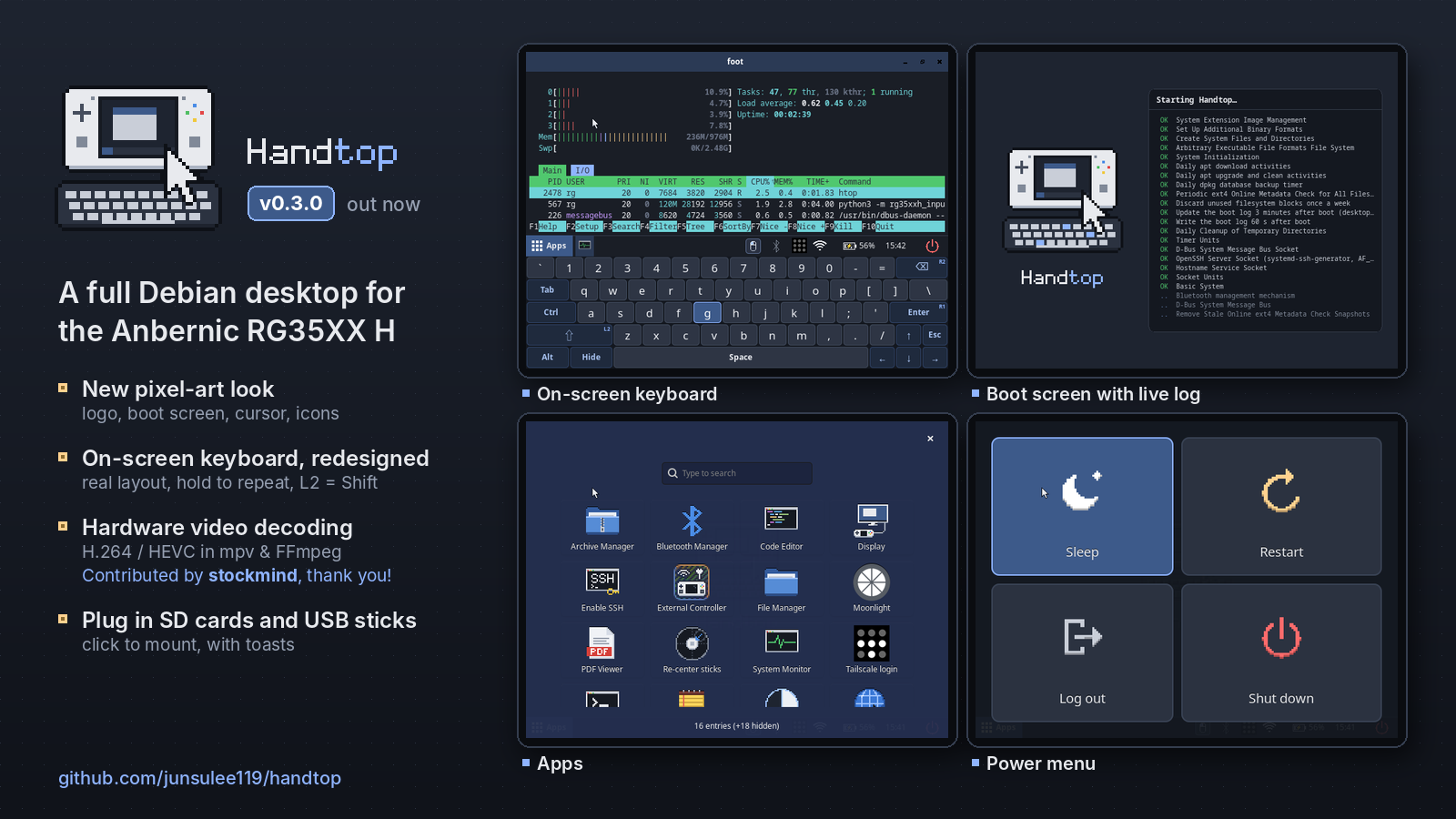
A new look for Handtop, a real-keyboard on-screen keyboard, hardware video decoding, an Xbox controller over Bluetooth, and a lot of work under the hood to make it safer.
⚠️ Known issue: Bluetooth is sometimes missing on the first boot after flashing (the Bluetooth icon shows it off and External Controller → Bluetooth can't start). Restart once (Power → Restart); it works from then on. We're still looking into the cause.
Which image do I need?
- Most RG35XX H units:
handtop-20261027-v0.3.0.img.xz - If that image does nothing at power-on (no LED at all), your unit has DDR3 RAM:
handtop-20261027-v0.3.0-DDR3.img.xz
Flash with balenaEtcher or Rufus, boot from the TF1 (left) slot. Login rg / rg35xxh; SSH is off until Apps → Enable SSH.
Screen shows garbled lines or stays black, but the image boots? Your unit has the newer screen panel. Put the card in your PC, open the
RG35XXHBOOTdrive and copydevice_trees\sun50i-h700-anbernic-rg35xx-h-rev6-panel.dtboverdtb.img(replace it). Then boot again. This is not a DDR3 problem: keep the regular image.
| File | SHA-256 |
|---|---|
| handtop-20261027-v0.3.0.img.xz | db682e6960699e09cd3be7a6b80b91154ba4117587a12e590b9af78736f432d9 |
| handtop-20261027-v0.3.0-DDR3.img.xz | 5e683f4ce21afbd2098b4a86ebd5400aff2cee5481c03ffa800ce1b0b33d1f04 |
What's new in v0.3.0
A new look
- The Handtop logo, and wallpapers with the logo carved in (dark and light).
- An animated boot screen: the logo's keyboard types while the real boot log scrolls beside it.
- Pixel-art mouse cursor, power menu (Sleep, Restart, Log out, Shut down) and taskbar (Apps button, red power button, even spacing).
- The default apps have plain names and pixel-art icons: Terminal, File Manager, Text Editor, Web Browser, System Monitor, Code Editor, PDF Viewer, Archive Manager.
- Pixel-art Wi-Fi and Bluetooth tray icons; softer terminal colours; a new volume / brightness bar.
On-screen keyboard, redesigned (X)
- Laid out like a real keyboard: staggered rows, Enter and Backspace where you expect them, ↑ above ↓.
- Every typed key shows a press, hold A to repeat, L2 = Shift while it's open, and small badges show which shoulder button types which key.
- Light theme, and it now stays on top of the Apps screen.
Hardware video decoding, contributed by @stockmind in #3, thank you!
- H.264, HEVC, MPEG-2 and VP8 decode on the handheld's video engine in mpv and FFmpeg, zero-copy. Details:
docs/video-decode.md.
External Controller
- Bluetooth mode is now an Xbox controller (Xbox Wireless Controller over Bluetooth LE): Windows uses its own Xbox driver, XInput-only games work, and game vibration now works over Bluetooth too. If you used it with v0.2.0, remove "Handtop Gamepad" on the PC and pair it again once.
- No more stick lag over Bluetooth on Windows.
External display (Apps → Display)
- The Display app opens by itself when you plug in a monitor: Monitor only / Extend / Mirror, plus resolution and refresh rate with a 15 s "Keep this mode?" test. Remembered per monitor.
- Extend puts the handheld below the monitor; the pointer moves faster on the bigger screen.
SD cards and USB sticks
- The TF2 card and USB sticks show up in Files and mount with a tap, with "inserted" / "removed" notifications.
Safer under the hood
- Logging out now cleans up the previous session properly (v0.2.0 left a second input daemon and Tailscale icon running), and the controls hand over safely between sessions.
- If the controls ever stop responding, they restart by themselves within about 10 s ("Controls restarted").
- A review of everything that touches the hardware fixed several edge cases: vibration on Re-center sticks, a failed USB-cable start, and a 90 s hang when switching from Bluetooth to USB cable. New rules for contributors in
docs/hardware-safety.mdandAGENTS.md. - The Bluetooth taskbar icon no longer needs blueman's tray applet (~55 MB less memory).
Known limitations
- Bluetooth controller mode is tested with Windows 11 only so far; reports from Android, macOS or Linux are welcome!
- Bluetooth sometimes missing on the first boot (see the note at the top).
Contributors
- @stockmind: hardware video decoding in FFmpeg and mpv on the Cedrus VPU (#3)
Full history in CHANGELOG.md.
