Repository navigation
Releases
Handtop v0.4.1 — Controls app, and Videos, Music and Image Viewer

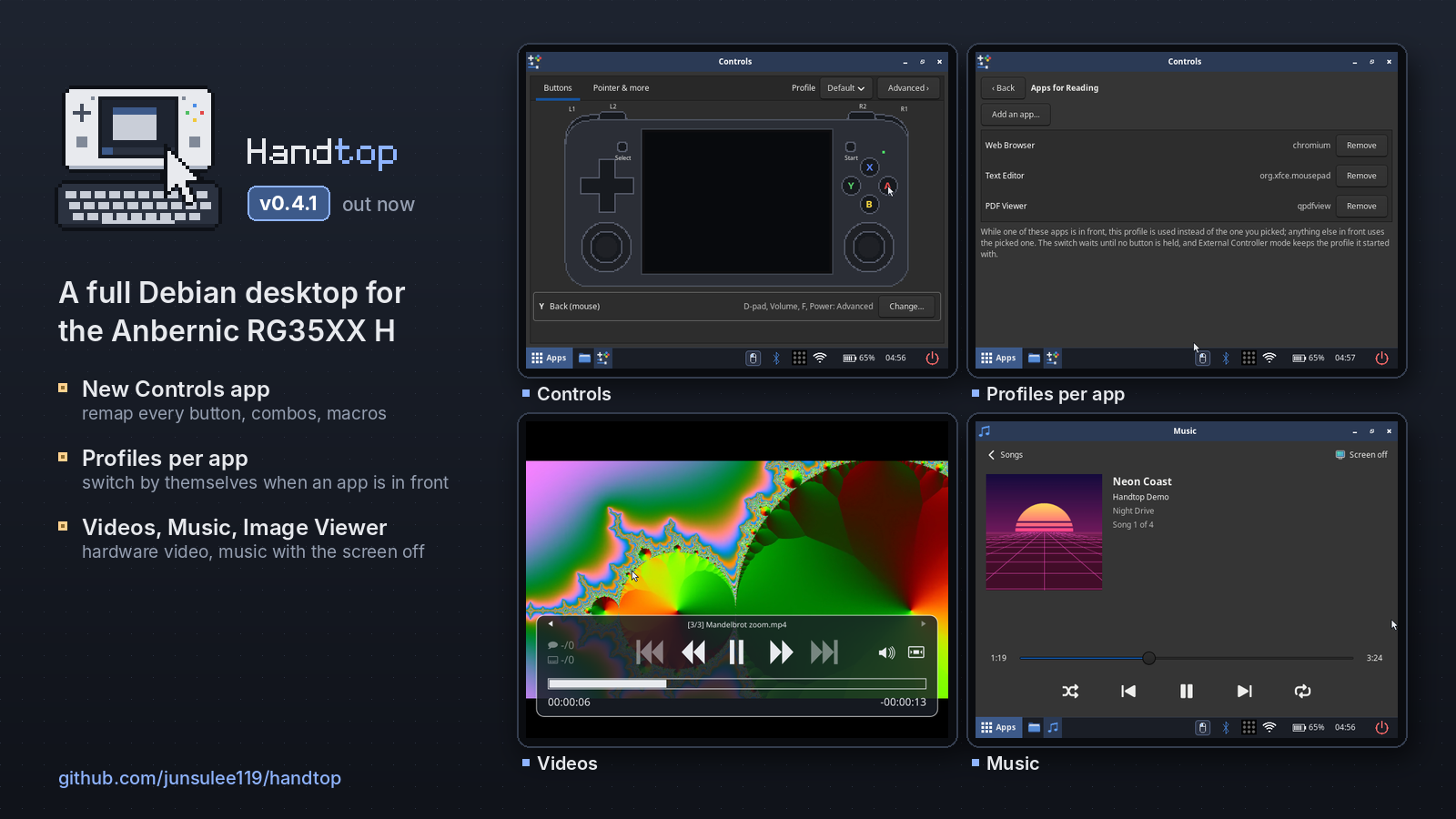
Controls and media. A Controls app for every button, with profiles that switch by themselves per app, plus apps for videos, music and pictures.
Which image do I need?
- Most RG35XX H units:
handtop-20261118-v0.4.1.img.xz - If that image does nothing at power-on (no LED at all), your unit has DDR3 RAM:
handtop-20261118-v0.4.1-DDR3.img.xz
Flash with balenaEtcher or Rufus, boot from the TF1 (left) slot. Login rg / rg35xxh; SSH is off until Apps → Enable SSH.
| File | SHA-256 |
|---|---|
| handtop-20261118-v0.4.1.img.xz | 8290e50d26df41f5039f7c0864bd0472a56d80ddc2ed817ff34f684151a8af01 |
| handtop-20261118-v0.4.1-DDR3.img.xz | f040fe7cacc2dcbd2f2cd45c66dd1c99efe934f722feb324ca0e39f3729982b3 |
What's new in v0.4.1
Controls app (Apps → Controls)
Everything about the controls in one place, applied at once, with no re-login.
- Buttons: click a button on a picture of the handheld and pick what it does: a click, a key, a key combination, an app, a macro and more.
- Pointer & more: pointer speed and acceleration, scroll speed with a test page to try it on, natural scrolling, gamepad buttons by position or by label, and vibration strength.
- Advanced: remap the D-pad, Volume, F and Power too (holding Power to shut down always works); button combinations (hold one button, press another); macros, built step by step or recorded from any app; a live view of both sticks with the dead zone; timing; profiles you can export and import.
- Profiles switch by themselves per app: link apps to a profile (Advanced → Profiles → Apps…) and it is used while one of them is in front, with a short "Profile: …" note.
- Can't lock you out: button and pointer changes run 15 s on trial ("Keep these controls?") and undo themselves unless you keep them, even if the app is closed.
The boot partition's rg35xxh-input.conf is now a rescue file, all commented out: if the controls are ever broken, uncomment use_app_settings = no at the top. Cards flashed with v0.4.0 or older keep their old file, which still works but fixes every setting it lists.
Videos, Music and Image Viewer
- Videos: your videos in
~/Videos(and on a USB stick or SD card) with thumbnails and "Resume at"; hardware-decoded and full screen, with big themed controls. A pauses, the right stick seeks, R1 / R2 go to the next / previous video, L1 closes. - Music: your songs in
~/Music, folder by folder with album covers, shuffle and repeat. The handheld doesn't sleep while music plays; after 5 minutes without input the screen turns off and the music goes on, and Vol still works. - Image Viewer (Ristretto) replaces imv for pictures: it follows the theme and browses the folder with a thumbnail strip. The File Manager now shows picture thumbnails too.
All three have icons in all nine themes.
Fixes
- A rare video failure in Chromium and VLC: the VA-API driver takes upstream's fix for a race that could make a video frame's allocation fail.
Disclaimer
Handtop is an unofficial hobby project, not affiliated with Anbernic, ROCKNIX, LibreELEC, Debian, Microsoft or Nintendo. Use at your own risk; see the Disclaimer section in the README.
Full history in CHANGELOG.md.
Handtop v0.4.0 — Themes: Retro, Glass, Pocket, Signal and your own
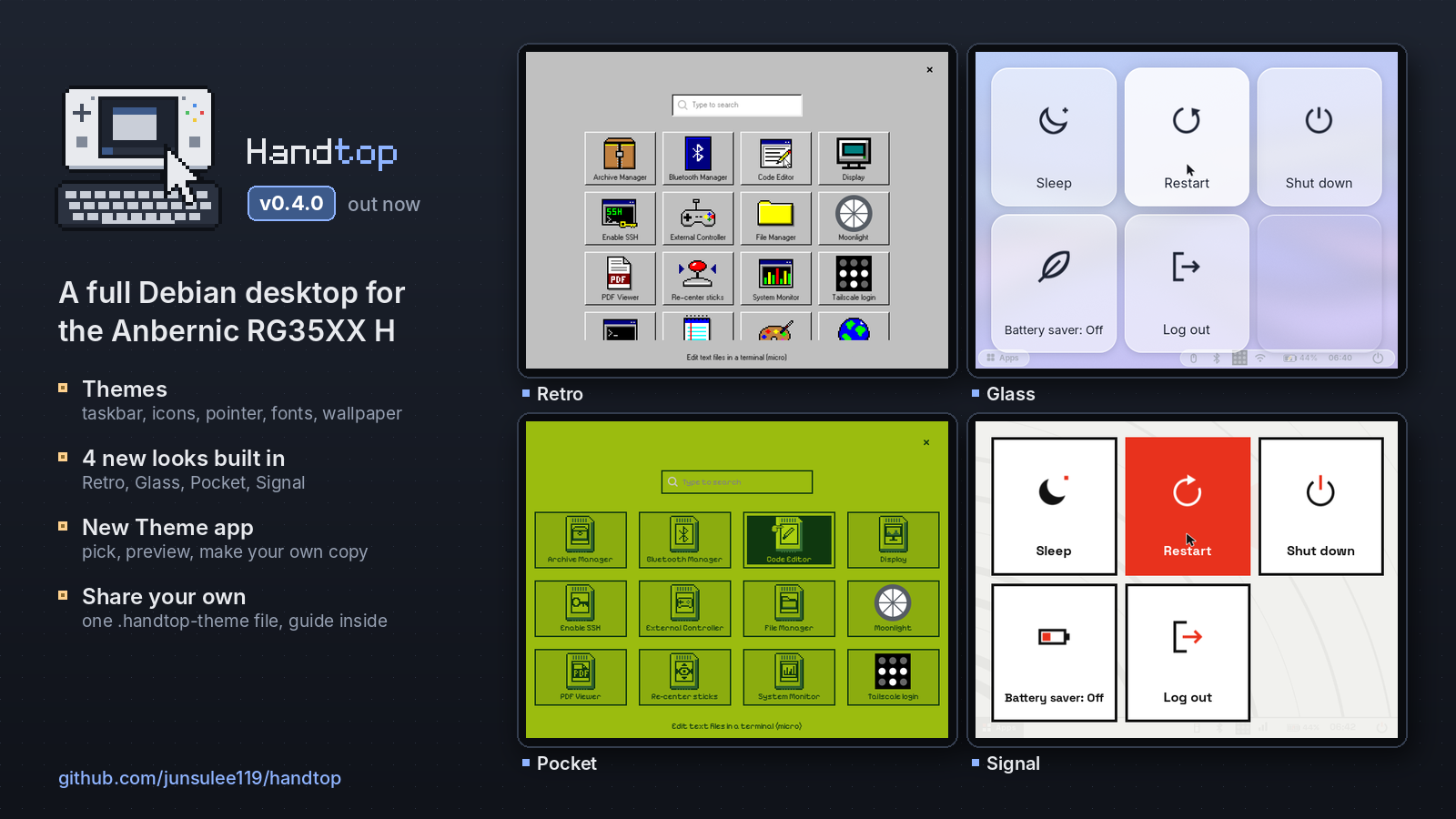
Themes. Nine looks built in, your own copies in a few taps, and theme files you can share.
Which image do I need?
- Most RG35XX H units:
handtop-20261112-v0.4.0.img.xz - If that image does nothing at power-on (no LED at all), your unit has DDR3 RAM:
handtop-20261112-v0.4.0-DDR3.img.xz
Flash with balenaEtcher or Rufus, boot from the TF1 (left) slot. Login rg / rg35xxh; SSH is off until Apps → Enable SSH.
| File | SHA-256 |
|---|---|
| handtop-20261112-v0.4.0.img.xz | ab61303d49dff6b77d5131f80630b5d2d8dd3883c67b0286b14265ae59b00d32 |
| handtop-20261112-v0.4.0-DDR3.img.xz | 1d83a8bd59dd7480573f21d733e4802053f9a5046555a1be8cb3127dec295afe |
What's new in v0.4.0
Themes
A theme now changes the whole desktop: the taskbar and its icons, the app drawer, the power menu, notifications, window title bars, the on-screen keyboard, the terminal, the volume / brightness bar, the pointer, fonts and the wallpaper. Open Apps → Theme, pick one and press Apply.
- Four new looks:
- Retro: a 90s desktop with grey bevelled buttons, navy title bars, a teal desktop, pixel-art icons, its own pointer and a DOS-style terminal.
- Glass: light and modern, with see-through panels over a blue-to-violet gradient and a floating taskbar.
- Pocket: a pocket game console in four greens, with a dot-matrix home screen, hearts for the battery and apps as game cartridges.
- Signal: a minimal design object in warm white and black with one signal red.
- Also built in: Handtop dark and light, as before, plus Debian (a stock Debian desktop), High contrast and Grayscale.
- Make your own copy: Duplicate any theme and pick its name, accent and background colours, dark or light icons, pointer size and text size, with a live preview.
- Share themes: Export writes a theme to one
.handtop-themefile, and Import installs one from your home folder, a USB drive or an SD card. A file is checked before anything changes; if something is wrong, the app lists exactly what. - Design your own from scratch, by hand or with an AI agent. A theme is a
theme.jsonwith colours, plus optional images, its own pointer, fonts and a little CSS. Anything left out comes from Handtop dark or light. Every exported theme has aGUIDE.mdinside that lists everything a theme can set. How to do it, with a ready-made prompt for agents: docs/themes.md.
A theme's pointer changes at the next log-in; the app offers Log out now.
Fixes
- Bluetooth on the first boot after flashing: the fix from v0.3.9 is now confirmed on fresh flashes, so the known-issue note is gone.
- The taskbar's power button sometimes did nothing after the power menu had been opened with the Power key. Fixed.
Disclaimer
Handtop is an unofficial hobby project, not affiliated with Anbernic, ROCKNIX, LibreELEC, Debian, Microsoft or Nintendo. Use at your own risk; see the Disclaimer section in the README.
Full history in CHANGELOG.md.
Handtop v0.3.9: HDMI fixes and device notifications
HDMI fixes, notifications when things are plugged in or connect, and a fix for Bluetooth missing on the first boot.
⚠️ Known issue (fix included, not yet confirmed): Bluetooth was sometimes missing on the first boot after flashing. This release should fix it (below). If it still happens, restart once (Power → Restart) and please attach the newestlogs/bt-NNNN.txtfrom the boot partition to an issue.
Which image do I need?
- Most RG35XX H units:
handtop-20261106-v0.3.9.img.xz - If that image does nothing at power-on (no LED at all), your unit has DDR3 RAM:
handtop-20261106-v0.3.9-DDR3.img.xz
Flash with balenaEtcher or Rufus, boot from the TF1 (left) slot. Login rg / rg35xxh; SSH is off until Apps → Enable SSH.
| File | SHA-256 |
|---|---|
| handtop-20261106-v0.3.9.img.xz | a9fa74b0b0fce74b599344c8eae8261d24e94eaf6bbb52a43ed28cb48e01cbde |
| handtop-20261106-v0.3.9-DDR3.img.xz | fa0ed796aefd1eb7684468bcc6af22b2792cef8876a6cbcddb112485ee89a5e9 |
What's new in v0.3.9
Notifications
- USB devices: plugging in or pulling out a keyboard, mouse, controller, hub, Wi-Fi, Bluetooth or network adapter, audio device or webcam shows what it is and its name. If no driver takes it, the notification says so. USB drives and SD cards keep their own notifications.
- Bluetooth devices: a paired controller, mouse or headset now shows when it connects or disconnects. Before, this only happened while Bluetooth Manager was open.
- Charger and battery: "Charging" or "Charger unplugged" with the battery level, and "Fully charged" once when the battery is full.
- Monitor: unplugging it tells you the picture is back on the handheld screen.
HDMI
- No taskbar and a slow pointer on some monitors, fixed. On a 1920×1200 monitor, Monitor only left the screen without a taskbar and with the pointer at handheld speed, and unplugging didn't bring the taskbar back. The monitor's own best mode was more than the handheld's HDMI can drive. Now the Display app only picks modes from the monitor's list, checks after every change that the monitor really came on, and otherwise keeps the handheld screen on and tells you. The taskbar restarts by itself if it ever stops, and the pointer keeps its monitor speed.
- A notification stuck on the monitor, fixed. After keeping a new resolution, its notification could stay frozen at the top left of the monitor, and later notifications didn't show until a reboot.
- Every display change is logged to
~/.local/state/session/display.log. If a monitor misbehaves, please attach it to an issue.
Bluetooth
- Missing on the first boot after flashing, should be fixed. On those boots the Bluetooth chip stayed silent until its driver started it again. A boot check now notices that within a few seconds and restarts the driver once, so Bluetooth is up before the desktop appears. Every boot also leaves a short record in
logs/bt-NNNN.txton the boot partition. It hasn't been seen on a real failing boot yet, so the known-issue note stays for now.
Disclaimer
Handtop is an unofficial hobby project, not affiliated with Anbernic, ROCKNIX, LibreELEC, Microsoft or Nintendo. Use at your own risk; see the Disclaimer section in the README.
Full history in CHANGELOG.md.
Handtop v0.3.8 — Battery saver and low-battery shutdown (+ YouTube on the hardware decoder since v0.3.5)
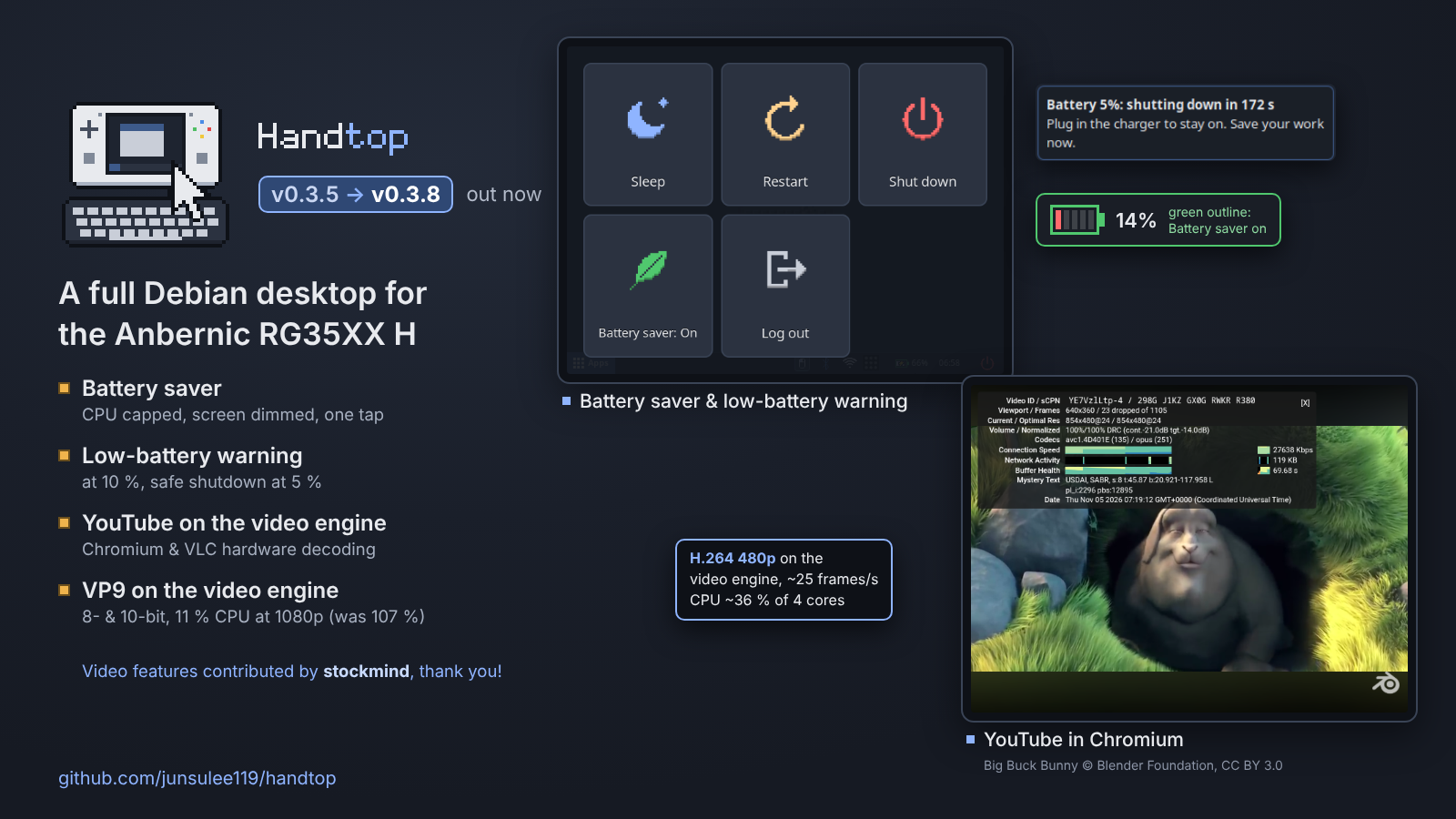
Battery saver, a low-battery warning and shutdown, and exact 10-bit VP9 and HEVC at every video width.
⚠️ Known issue (still open): Bluetooth is sometimes missing on the first boot after flashing (the Bluetooth icon shows it off and External Controller → Bluetooth can't start). Restart once (Power → Restart); it works from then on.
Which image do I need?
- Most RG35XX H units:
handtop-20261105-v0.3.8.img.xz - If that image does nothing at power-on (no LED at all), your unit has DDR3 RAM:
handtop-20261105-v0.3.8-DDR3.img.xz
Flash with balenaEtcher or Rufus, boot from the TF1 (left) slot. Login rg / rg35xxh; SSH is off until Apps → Enable SSH.
| File | SHA-256 |
|---|---|
| handtop-20261105-v0.3.8.img.xz | 106b0afab8bd72e8cab3539a771bf99fd70cd2dcc56958fca3b55829615dfa71 |
| handtop-20261105-v0.3.8-DDR3.img.xz | a789e9270614ce87a9567caf72392c67873561e4087b1aa088edfdad1a2ef466 |
What's new in v0.3.8
Battery
- Battery saver. One switch caps the CPU at 1.0 GHz (from 1.4 GHz) and halves the screen brightness; turning it off puts both back. Switch it with the new Battery saver button in the power menu, which also works over fullscreen apps, or by tapping the battery on the taskbar, which gets a green outline while it's on. It stays on across reboots. How much it saves isn't measured yet; most of it should come from the dimmer screen.
- Low-battery warning and shutdown. At 10 % a warning stays on screen until you tap it and the handheld buzzes three times. At 5 % it counts down 3 minutes in the notification, then shuts down cleanly; plugging in the charger cancels it. Running the battery flat can damage the SD card's filesystem. Both levels can be changed or turned off in
/etc/rg35xxh/power.conf. - The power menu is now a 3 + 2 grid: Sleep, Restart, Shut down / Battery saver, Log out.
Video
- 10-bit VP9 and HEVC are exact at every width. In v0.3.7, 10-bit VP9 at a few unusual widths (for example 352, 416, 1282) was very close to the software result but not identical, and 10-bit HEVC 1282 pixels wide was visibly wrong. The decoder now uses Jernej Skrabec's buffer layout fix from LibreELEC, which replaces two of Handtop's own patches. All 25 test clips (VP9 and HEVC 8/10-bit, H.264, VP8, MPEG-2) now match software decoding bit for bit. Unchanged limit: 10-bit VP9 at 4K doesn't fit in the decoder's memory.
For builders
- The weekly upstream check now also watches Arm's GNU toolchain releases. ROCKNIX releases built with GCC 16 wait until Arm publishes GCC 16, so Handtop's kernel modules keep using the same compiler as ROCKNIX's kernel (
docs/kernel.md).
Thanks
- @stockmind for reporting the 10-bit issue and testing the fix (#8).
Disclaimer
Handtop is an unofficial hobby project, not affiliated with Anbernic, ROCKNIX, LibreELEC, Microsoft or Nintendo. Use at your own risk; see the Disclaimer section in the README.
Full history in CHANGELOG.md.
Contributors

Assets 6
Handtop v0.3.7 — VP9 hardware decoding and a sleep warning
VP9 on the video engine, 8- and 10-bit, contributed by @stockmind. The screen now dims as a warning before auto-sleep, and the power menu is fixed.
⚠️ Known issue (still open): Bluetooth is sometimes missing on the first boot after flashing (the Bluetooth icon shows it off and External Controller → Bluetooth can't start). Restart once (Power → Restart); it works from then on.
Which image do I need?
- Most RG35XX H units:
handtop-20261105-v0.3.7.img.xz - If that image does nothing at power-on (no LED at all), your unit has DDR3 RAM:
handtop-20261105-v0.3.7-DDR3.img.xz
Flash with balenaEtcher or Rufus, boot from the TF1 (left) slot. Login rg / rg35xxh; SSH is off until Apps → Enable SSH.
| File | SHA-256 |
|---|---|
| handtop-20261105-v0.3.7.img.xz | fe00627d76209e507ecbf2601eeee69ed4ab70d8c059853ccbf7565c83d3ba15 |
| handtop-20261105-v0.3.7-DDR3.img.xz | 3c53d149f35c18de6ae8bb21dd23f72ec770a8b30a281e3acddef296e68400ec |
What's new in v0.3.7
Video
- VP9 plays on the video engine, 8- and 10-bit. The handheld's video engine can decode VP9, but the Linux driver had no support for it, so VP9 played on the CPU. The image now carries Jernej Skrabec's VP9 driver patches from LibreELEC. The output is identical to software decoding at the common sizes (720p, 1080p, 4K and more). At 1080p VP9 now takes about 11 % of one CPU core instead of 107 %. This helps local files, mpv, ffmpeg and VLC. YouTube in Chromium stays on H.264 (pick 480p), as in v0.3.6.
- mpv hands the video straight to the screen (
vo=dmabuf-wayland), which takes about half the CPU of before. Formats the video engine can't decode, like AV1, still play through the old path. - Limit: 10-bit VP9 at a few unusual widths (for example 352, 416, 1282) is very close to the software result but not identical. 8-bit, and 10-bit at 720p, 1080p and 4K, are exact.
Desktop
- The screen dims 10 seconds before auto-sleep. Touch anything and it comes back, and the 10 minutes start over. It only happens when the handheld would really go to sleep, so not while charging, in controller modes, with HDMI or in Screen off. You can change the seconds, or turn it off with 0, in
/etc/rg35xxh/power.conf(AUTOSLEEP_DIM_SECONDS). - Power menu: Sleep no longer stays highlighted while the pointer is on another button, and all four buttons are now the same width.
For builders
- The weekly upstream check can now watch one folder of a busy repository (
git-path), and it tracks the LibreELEC VP9 patches that way. ROCKNIX 20261101 was looked at and skipped: it changes nothing in the RG35XX H's kernel.
Thanks
- @stockmind for VP9 on the video engine (#6): the patches, a fix of his own on top, the test tools, and the quick turnarounds in review. He also spotted a memory issue at some 10-bit widths, which is fixed before release (#8).
Disclaimer
Handtop is an unofficial hobby project, not affiliated with Anbernic, ROCKNIX, LibreELEC, Microsoft or Nintendo. Use at your own risk; see the Disclaimer section in the README.
Full history in CHANGELOG.md.
Contributors
Assets 6
Handtop v0.3.6 — Security fixes, YouTube on the video engine, audit clean-up
Security and reliability release: FFmpeg brought up to Debian's 7.1.5, Bluetooth controller modes that only accept what a controller needs, YouTube and Chromium decoding on the video engine, and fixes for every finding of an external review of the whole codebase.
This release carries security fixes. Installed handhelds only get them by reflashing (an update system without reflashing is planned).
⚠️ Known issue (still open): Bluetooth is sometimes missing on the first boot after flashing (the Bluetooth icon shows it off and External Controller → Bluetooth can't start). Restart once (Power → Restart); it works from then on.
Which image do I need?
- Most RG35XX H units:
handtop-20261102-v0.3.6.img.xz - If that image does nothing at power-on (no LED at all), your unit has DDR3 RAM:
handtop-20261102-v0.3.6-DDR3.img.xz
Flash with balenaEtcher or Rufus, boot from the TF1 (left) slot. Login rg / rg35xxh; SSH is off until Apps → Enable SSH.
| File | SHA-256 |
|---|---|
| handtop-20261102-v0.3.6.img.xz | d8de59b58f4b173cfd4a66fe4ef5d0477da33bd6aa950dd0e439fb6cbc2b8965 |
| handtop-20261102-v0.3.6-DDR3.img.xz | 5ffd2627dfb7eecfffd8555b12577279921d4bfbeead6a04d1d01ced6ae778e3 |
What's new in v0.3.6
Security
- FFmpeg 7.1.5. The hardware-decoding FFmpeg was based on 7.1.3 while Debian ships 7.1.5: about 390 upstream commits behind, including fixes for two crafted-media-file bugs (CVE-2026-8461, CVE-2026-38347). Because it replaces Debian's libraries, Debian's updates never reached it. It's now built on 7.1.5 with the same hardware decoding;
ffmpeg -versionshows7.1.5-handtop-v4l2request-…. - Bluetooth controller modes no longer accept everything. While a mode waited for a PC or Switch, any nearby device could pair, and in Bluetooth: Xbox it was trusted for good, so it could have posed as a keyboard. Now each mode accepts only what a controller needs, Bluetooth keyboards and mice pause while a mode is on (yours come back afterwards), only the device that actually uses the handheld as a controller is trusted, and anything else that paired during the mode is removed when it ends. Pairing works as before.
Video
- YouTube plays on the video engine in Chromium. Chromium installs the enhanced-h264ify extension on first launch, so YouTube sends H.264, which the handheld decodes in hardware. Pick 480p: the screen is 640×480.
- Chromium and VLC use hardware decoding (VA-API over the V4L2 request API), with no flags. Contributed by @stockmind (#5). Measured at 1080p: Chromium about 160 % of one core instead of 255 %, VLC 11 % instead of 227 %.
Fixes
- Controls are harder to lose. A typo in
rg35xxh-input.confused to stop the input daemon, leaving no buttons; now that line is ignored and the reason logged. Input errors restart the daemon within seconds, and buttons no longer get stuck held after a busy moment. - External Controller: over Bluetooth, a button release could get lost when the radio was busy; it's now sent again. Stopping USB mode while it's still starting always cleans up.
- Screen off: logging out (or a crash) while the screen was off no longer leaves the next session with the screen dark and one CPU core.
- Display: with an HDMI monitor at a scale other than 1, Extend puts the handheld's screen right below the monitor (no gap). A resolution Test always switches back after 15 s.
- Wi-Fi from
wifi.txt: if the password is refused (WPA needs 8–63 characters), your existing Wi-Fi profile now stays.
For builders
- Go 1.27.3 for the launcher; kernel modules build on arm64 hosts too; an edited kernel patch is picked up by the next build.
- CI on every push and a weekly check for upstream updates of everything Handtop builds itself (
docs/upstreams.md). Security reports: seeSECURITY.md(private reporting is on).
About the review
Codex reviewed the whole codebase against v0.3.5 and reported 18 findings (2 High, 13 Medium, 3 Low). All were confirmed and all are fixed in this release; every fix that touches the handheld was tested on it. The report, its evidence and what was done about each finding are in docs/audits/.
Thanks
- @stockmind for the VA-API work (#5) that gets Chromium and VLC onto the video engine, including the fixes to the VA-API driver for this handheld's decoder.
Disclaimer
Handtop is an unofficial hobby project, not affiliated with Anbernic, ROCKNIX, Microsoft or Nintendo. Use at your own risk; see the Disclaimer section in the README.
Full history in CHANGELOG.md.
Contributors
Assets 6
Handtop v0.3.5: Switch Controller mode
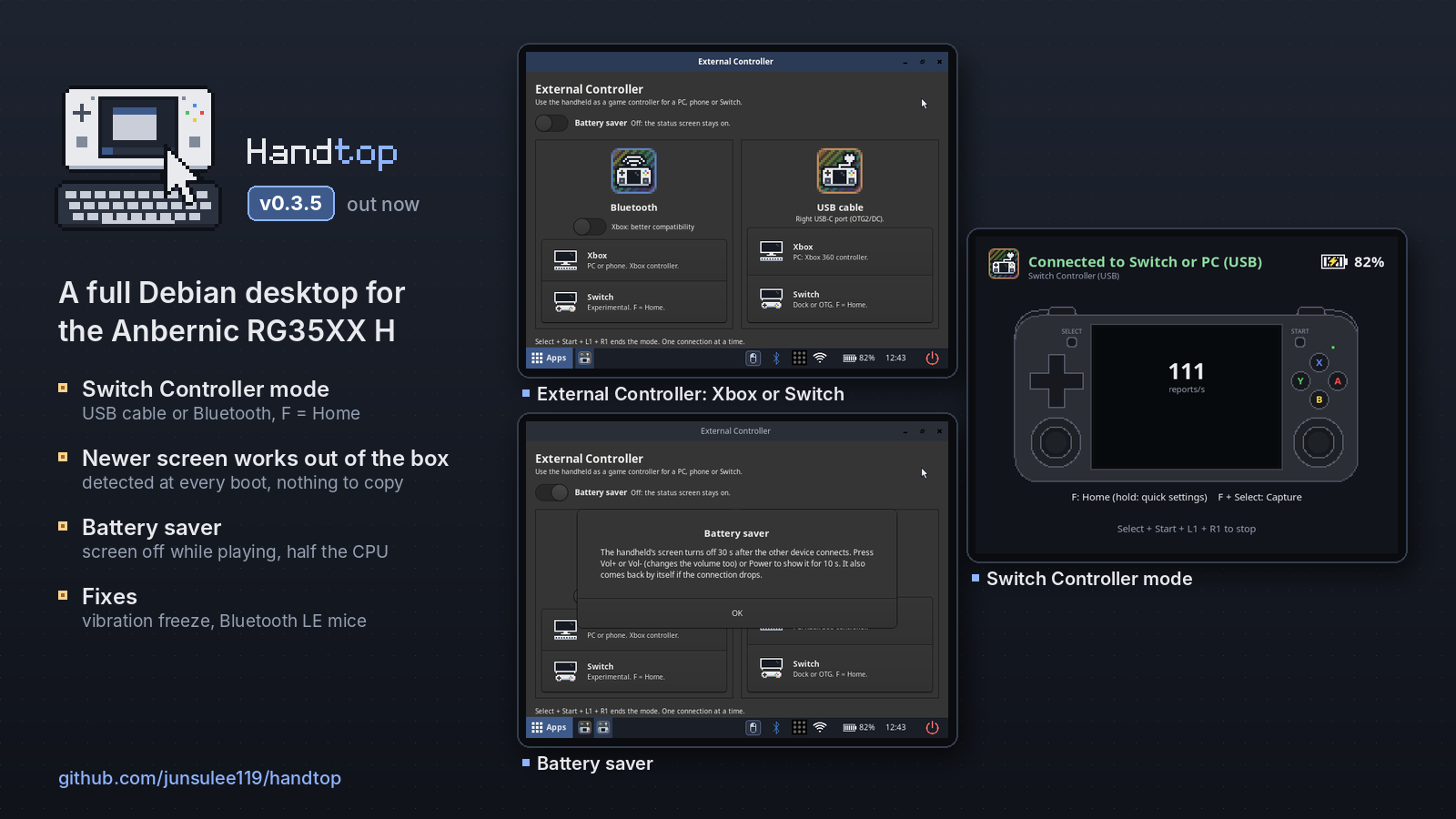
Switch Controller mode (USB and Bluetooth), a Battery saver for External Controller, Bluetooth LE mice and keyboards, the newer screen panel detected automatically, and a fix for the vibration freeze.
⚠️ Known issue (still open): Bluetooth is sometimes missing on the first boot after flashing (the Bluetooth icon shows it off and External Controller → Bluetooth can't start). Restart once (Power → Restart); it works from then on.
Which image do I need?
- Most RG35XX H units:
handtop-20261029-v0.3.5.img.xz - If that image does nothing at power-on (no LED at all), your unit has DDR3 RAM:
handtop-20261029-v0.3.5-DDR3.img.xz
Flash with balenaEtcher or Rufus, boot from the TF1 (left) slot. Login rg / rg35xxh; SSH is off until Apps → Enable SSH.
Newer screen panel (rev6): nothing to copy any more. Handtop reads which screen your unit has at every start and picks the right device tree by itself (it may restart once on the first boot).
| File | SHA-256 |
|---|---|
| handtop-20261029-v0.3.5.img.xz | 1c934d0ad2378b7be0e0b87d2c2a9bfb930af72e9b387c8cbe511813d366cb5e |
| handtop-20261029-v0.3.5-DDR3.img.xz | 153777f5a4c6a5c1ab22d9269a150756defd1af285dfc8d36afaec4406cf96b7 |
What's new in v0.3.5
Switch Controller mode
- USB cable: Switch. The handheld becomes a wired Switch controller (it poses as HORI's licensed wired pad, so no setup on the Switch). Right USB-C port → the dock's USB-A port, or a USB-C OTG adapter without the dock. F = Home (hold for quick settings), F + Select = Capture. No vibration (that pad type has none).
- Bluetooth: Switch (experimental). Pairs as a Pro Controller (Controllers → Change Grip/Order the first time; it reconnects by itself afterwards). Same controls, and vibration works. While it is on, other Bluetooth devices disconnect (the app lists them and asks first).
- Both tested with Ryujinx on a PC (Mario Kart 8 DX, Smash), not on a real Switch yet: please report how it goes! In Ryujinx pick Pro Controller and rebind A/B/X/Y once.
- The External Controller app keeps its two cards, each split into Xbox and Switch.
External Controller
- Battery saver (switch in the app, off by default): the screen turns off 30 s after the other device connects and the status screen draws much less. Vol+/- or Power shows it for 10 s. About half the CPU use in Bluetooth modes (70 % → 33 % in Xbox mode), plus no display or backlight.
- Xbox: better compatibility (Bluetooth card): for PC Bluetooth adapters that won't pair with the Xbox mode, especially cheap clone dongles. The handheld then pairs as an Xbox One S controller over classic Bluetooth (pair again on the PC). Tested with an iPhone so far; Windows reports welcome.
- Clearer names on the other device: "Handtop (Xbox)" / "Handtop (Switch)" (Bluetooth Switch mode has to be "Pro Controller"). An existing Windows pairing keeps the old name until you pair again; it works either way.
Fixes
- The handheld could freeze with the motor buzzing when a game's vibration kept changing strength. The cause was a locking bug in ROCKNIX's gamepad driver; Handtop now ships a fixed build. Every kernel-level difference from ROCKNIX is listed in
docs/kernel.md. - Bluetooth LE mice and keyboards work (they paired but did nothing: ROCKNIX's kernel lacks the uhid driver BlueZ needs; Handtop adds it).
- Newer screen panel (rev6) detected automatically, and its device tree now has hardware video decoding too. If it ever picks wrong, write
rev6orregularinpanel.txton the boot partition.
Known limitations
- Switch modes not yet tested on a real Switch.
- Better compatibility mode not yet tested on Windows.
- Bluetooth sometimes missing on the first boot (see the note at the top).
Disclaimer
Handtop is an unofficial hobby project, not affiliated with Anbernic, ROCKNIX, Microsoft or Nintendo. Use at your own risk; see the Disclaimer section in the README.
Thanks
- u/Boldiatti for the Bluetooth dongle reports and tests that led to Better compatibility mode.
- Everyone on Reddit who reported the rev6 screen and USB hub behaviour.
Full history in CHANGELOG.md.
Handtop v0.3.0 — New look, hardware video, Xbox over Bluetooth
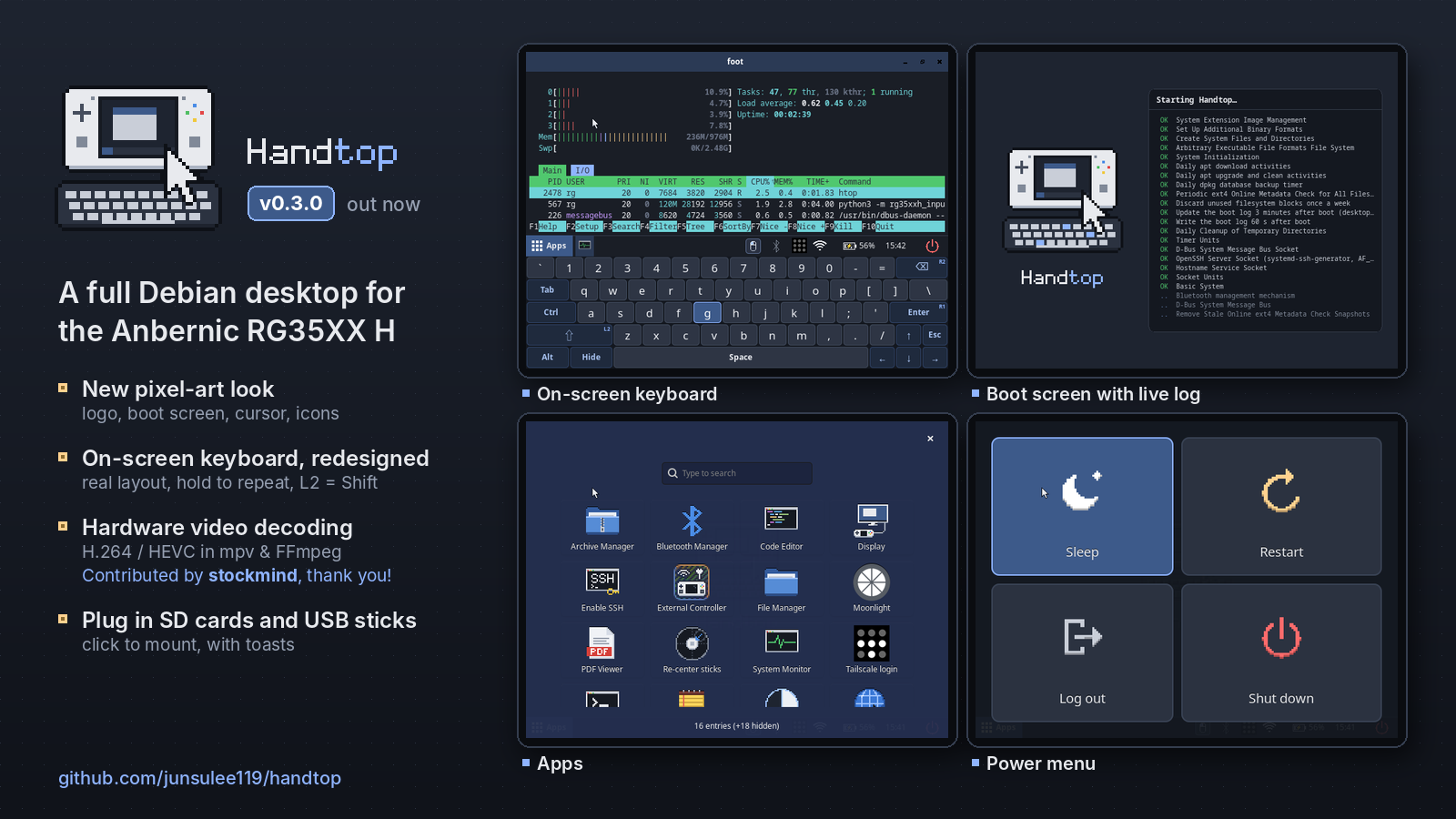
A new look for Handtop, a real-keyboard on-screen keyboard, hardware video decoding, an Xbox controller over Bluetooth, and a lot of work under the hood to make it safer.
⚠️ Known issue: Bluetooth is sometimes missing on the first boot after flashing (the Bluetooth icon shows it off and External Controller → Bluetooth can't start). Restart once (Power → Restart); it works from then on. We're still looking into the cause.
Which image do I need?
- Most RG35XX H units:
handtop-20261027-v0.3.0.img.xz - If that image does nothing at power-on (no LED at all), your unit has DDR3 RAM:
handtop-20261027-v0.3.0-DDR3.img.xz
Flash with balenaEtcher or Rufus, boot from the TF1 (left) slot. Login rg / rg35xxh; SSH is off until Apps → Enable SSH.
Screen shows garbled lines or stays black, but the image boots? Your unit has the newer screen panel. Put the card in your PC, open the
RG35XXHBOOTdrive and copydevice_trees\sun50i-h700-anbernic-rg35xx-h-rev6-panel.dtboverdtb.img(replace it). Then boot again. This is not a DDR3 problem: keep the regular image.
| File | SHA-256 |
|---|---|
| handtop-20261027-v0.3.0.img.xz | db682e6960699e09cd3be7a6b80b91154ba4117587a12e590b9af78736f432d9 |
| handtop-20261027-v0.3.0-DDR3.img.xz | 5e683f4ce21afbd2098b4a86ebd5400aff2cee5481c03ffa800ce1b0b33d1f04 |
What's new in v0.3.0
A new look
- The Handtop logo, and wallpapers with the logo carved in (dark and light).
- An animated boot screen: the logo's keyboard types while the real boot log scrolls beside it.
- Pixel-art mouse cursor, power menu (Sleep, Restart, Log out, Shut down) and taskbar (Apps button, red power button, even spacing).
- The default apps have plain names and pixel-art icons: Terminal, File Manager, Text Editor, Web Browser, System Monitor, Code Editor, PDF Viewer, Archive Manager.
- Pixel-art Wi-Fi and Bluetooth tray icons; softer terminal colours; a new volume / brightness bar.
On-screen keyboard, redesigned (X)
- Laid out like a real keyboard: staggered rows, Enter and Backspace where you expect them, ↑ above ↓.
- Every typed key shows a press, hold A to repeat, L2 = Shift while it's open, and small badges show which shoulder button types which key.
- Light theme, and it now stays on top of the Apps screen.
Hardware video decoding, contributed by @stockmind in #3, thank you!
- H.264, HEVC, MPEG-2 and VP8 decode on the handheld's video engine in mpv and FFmpeg, zero-copy. Details:
docs/video-decode.md.
External Controller
- Bluetooth mode is now an Xbox controller (Xbox Wireless Controller over Bluetooth LE): Windows uses its own Xbox driver, XInput-only games work, and game vibration now works over Bluetooth too. If you used it with v0.2.0, remove "Handtop Gamepad" on the PC and pair it again once.
- No more stick lag over Bluetooth on Windows.
External display (Apps → Display)
- The Display app opens by itself when you plug in a monitor: Monitor only / Extend / Mirror, plus resolution and refresh rate with a 15 s "Keep this mode?" test. Remembered per monitor.
- Extend puts the handheld below the monitor; the pointer moves faster on the bigger screen.
SD cards and USB sticks
- The TF2 card and USB sticks show up in Files and mount with a tap, with "inserted" / "removed" notifications.
Safer under the hood
- Logging out now cleans up the previous session properly (v0.2.0 left a second input daemon and Tailscale icon running), and the controls hand over safely between sessions.
- If the controls ever stop responding, they restart by themselves within about 10 s ("Controls restarted").
- A review of everything that touches the hardware fixed several edge cases: vibration on Re-center sticks, a failed USB-cable start, and a 90 s hang when switching from Bluetooth to USB cable. New rules for contributors in
docs/hardware-safety.mdandAGENTS.md. - The Bluetooth taskbar icon no longer needs blueman's tray applet (~55 MB less memory).
Known limitations
- Bluetooth controller mode is tested with Windows 11 only so far; reports from Android, macOS or Linux are welcome!
- Bluetooth sometimes missing on the first boot (see the note at the top).
Contributors
- @stockmind: hardware video decoding in FFmpeg and mpv on the Cedrus VPU (#3)
Full history in CHANGELOG.md.
Contributors
Assets 6
Handtop v0.2.0
Your handheld can now be a game controller for your PC or phone, over Bluetooth or a USB cable. Thanks to boldiatti on Reddit for the idea!
Which image do I need?
- Most RG35XX H units:
handtop-20261021-v0.2.0.img.xz - If that image does nothing at power-on (no LED at all), your unit has DDR3 RAM:
handtop-20261021-v0.2.0-DDR3.img.xz
Flash with balenaEtcher or Rufus, boot from the TF1 (left) slot. Login rg / rg35xxh; SSH is off until Apps → Enable SSH.
| File | SHA-256 |
|---|---|
| handtop-20261021-v0.2.0.img.xz | bb00f577d9cfab36960268498cfc0b7fbe8a96732e2fe0c4870c4a5e53dd9f54 |
| handtop-20261021-v0.2.0-DDR3.img.xz | d9bbd682310905fb6693cd8d5ea89c453fd4baed80373314f51c8a90f54eb00f |
What's new in v0.2.0
External Controller (Apps → External Controller): pick Bluetooth or USB cable.
- Bluetooth: the handheld shows up as "Handtop Gamepad". Pair it once; after that it reconnects by itself. Tested with Windows 11. Your other Bluetooth accessories on the handheld pause while it is on.
- USB cable: the handheld becomes a wired Xbox 360 controller. Windows needs no driver, XInput-only games work directly, the PC reads the controls about 1000 times a second, and game vibration plays on the handheld's motor. It charges at the same time. Use the right USB-C port (OTG2/DC).
- One connection at a time. Select + Start + L1 + R1 ends it (the same combo Moonlight uses to quit).
- A full-screen status page shows the connection, a live drawing of the handheld's buttons and sticks, and the battery.
Light theme (Apps → Theme): dark (default) or light, switched live. Covers the taskbar, wallpaper, app drawer, power menu, notifications, window title bars and apps. The terminal, volume bars and on-screen keyboard stay dark for now.
New pixel-art icons
- Taskbar input-mode icon (mouse, handheld, Bluetooth, cable). When the mode changes it gives a little spring shake, and the handheld vibrates in step with it (
haptic_strengthin the input config; 0 turns it off). - Battery icon with 5 bars, red when low, and a charging animation.
- App icons for External Controller and Theme.
Fixes
- Notifications now appear above the power menu and full-screen apps, with Handtop's own style (it was never applied before).
- The mouse pointer hides in gamepad and controller modes.
- The 4th column of the app drawer no longer runs off the screen.
- Vibration requests from a PC or game can no longer freeze the system ("infinite" vibration on some controller testers could lock the handheld up).
Known limitations
- No vibration over Bluetooth yet (USB cable only).
- Bluetooth mode is tested with Windows 11 only so far; reports from Android, macOS or Linux are welcome!
Full history in CHANGELOG.md, details in docs/bt-controller.md.
Handtop v0.1.3
Which image do I need?
- Most RG35XX H units:
handtop-20261017-v0.1.3.img.xz - If that image does nothing at power-on (no LED at all), your unit has DDR3 RAM:
handtop-20261017-v0.1.3-DDR3.img.xz
Flash with balenaEtcher or Rufus, boot from the TF1 (left) slot. Login rg / rg35xxh; SSH is off until Apps → Enable SSH.
| File | SHA-256 |
|---|---|
| handtop-20261017-v0.1.3.img.xz | cb4be09df54fd74e93592b2010042aa2d89742a365f603984626adf92da3fe1d |
| handtop-20261017-v0.1.3-DDR3.img.xz | af6984246b19d961df2642df70de6a4650c4bdf55ebd9453d1426f4f16a4cd3a |
What's new in v0.1.3
- Chromium replaces Firefox. In side-by-side tests on the device, Chromium with uBlock Origin Lite scrolled much smoother (4/3 vs 2/1 on Wikipedia/Naver) using less than half the CPU and leaving ~200 MB more free RAM. uBlock Origin Lite installs automatically the first time Chromium starts with internet. Full results in
docs/desktop.md. /tmpis now 256 MB (it could fill up during heavy browsing).
Also included (from v0.1.2)
- DDR3 boards supported with their own image (#1, thanks @Aaronhrndz). Charging while switched off is not confirmed on DDR3 yet.
- On-screen keyboard follows your click button if you remap it (#2, thanks @Aaronhrndz).
Full history in CHANGELOG.md.
