Repository navigation
Handtop v0.4.0 — Themes: Retro, Glass, Pocket, Signal and your own

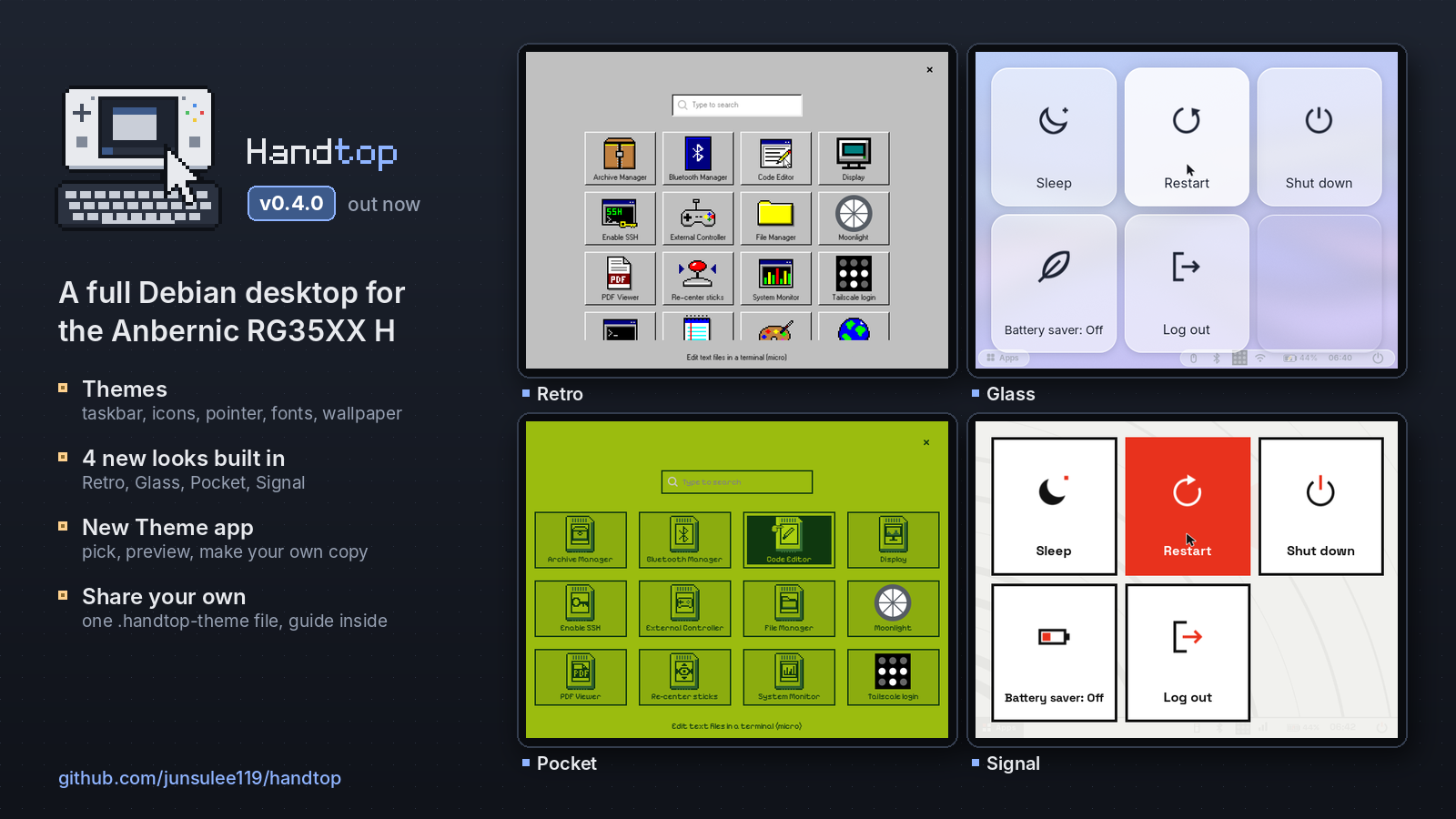
Themes. Nine looks built in, your own copies in a few taps, and theme files you can share.
Which image do I need?
- Most RG35XX H units:
handtop-20261112-v0.4.0.img.xz - If that image does nothing at power-on (no LED at all), your unit has DDR3 RAM:
handtop-20261112-v0.4.0-DDR3.img.xz
Flash with balenaEtcher or Rufus, boot from the TF1 (left) slot. Login rg / rg35xxh; SSH is off until Apps → Enable SSH.
| File | SHA-256 |
|---|---|
| handtop-20261112-v0.4.0.img.xz | ab61303d49dff6b77d5131f80630b5d2d8dd3883c67b0286b14265ae59b00d32 |
| handtop-20261112-v0.4.0-DDR3.img.xz | 1d83a8bd59dd7480573f21d733e4802053f9a5046555a1be8cb3127dec295afe |
What's new in v0.4.0
Themes
A theme now changes the whole desktop: the taskbar and its icons, the app drawer, the power menu, notifications, window title bars, the on-screen keyboard, the terminal, the volume / brightness bar, the pointer, fonts and the wallpaper. Open Apps → Theme, pick one and press Apply.
- Four new looks:
- Retro: a 90s desktop with grey bevelled buttons, navy title bars, a teal desktop, pixel-art icons, its own pointer and a DOS-style terminal.
- Glass: light and modern, with see-through panels over a blue-to-violet gradient and a floating taskbar.
- Pocket: a pocket game console in four greens, with a dot-matrix home screen, hearts for the battery and apps as game cartridges.
- Signal: a minimal design object in warm white and black with one signal red.
- Also built in: Handtop dark and light, as before, plus Debian (a stock Debian desktop), High contrast and Grayscale.
- Make your own copy: Duplicate any theme and pick its name, accent and background colours, dark or light icons, pointer size and text size, with a live preview.
- Share themes: Export writes a theme to one
.handtop-themefile, and Import installs one from your home folder, a USB drive or an SD card. A file is checked before anything changes; if something is wrong, the app lists exactly what. - Design your own from scratch, by hand or with an AI agent. A theme is a
theme.jsonwith colours, plus optional images, its own pointer, fonts and a little CSS. Anything left out comes from Handtop dark or light. Every exported theme has aGUIDE.mdinside that lists everything a theme can set. How to do it, with a ready-made prompt for agents: docs/themes.md.
A theme's pointer changes at the next log-in; the app offers Log out now.
Fixes
- Bluetooth on the first boot after flashing: the fix from v0.3.9 is now confirmed on fresh flashes, so the known-issue note is gone.
- The taskbar's power button sometimes did nothing after the power menu had been opened with the Power key. Fixed.
Disclaimer
Handtop is an unofficial hobby project, not affiliated with Anbernic, ROCKNIX, LibreELEC, Debian, Microsoft or Nintendo. Use at your own risk; see the Disclaimer section in the README.
Full history in CHANGELOG.md.