Repository navigation
Releases
v1.2: what it can do, .NET, Android and ZIP

binkeep now tells you what a file can do, and opens .NET programs, Android apps and password-protected ZIPs.
What it can do
A new card at the top of the Overview lists behaviours the code is able to perform, such as logging keystrokes, taking screenshots, starting itself at boot, injecting into other processes, downloading files, or reading SMS on Android. Each one is mapped to a MITRE ATT&CK technique and shows the evidence it was found from (an import, a string, a .NET call or a permission). Behaviours that ordinary software has too are folded away at the bottom.
.NET
A new .NET tab lists every type and method, the referenced assemblies, the framework calls the code makes (such as WebClient.DownloadString or Assembly.Load), P/Invoke imports, embedded resources and user strings. Known obfuscators are named.
Android APK and DEX
Package, version and SDK levels, the permissions it asks for (sensitive ones highlighted), activities, services and receivers with exported ones marked, classes grouped by package, and the signing scheme, including a warning for the Android debug key. The Files tab lists everything inside, and native libraries (lib/*/*.so) open with full disassembly.
ZIP archives
Drop a ZIP and pick a file inside. ZipCrypto and AES encrypted archives are supported, and the usual sample passwords such as infected are tried automatically.
Also new
- Hash lookup buttons for VirusTotal, MalwareBazaar and Hybrid Analysis. Only the SHA-256 is sent, and only when you click.
- Install as an app. On Android, the installed app appears in the share menu.
Everything still runs in your browser. Nothing is uploaded.
v1.1: control flow graph
What's new
Control flow graph
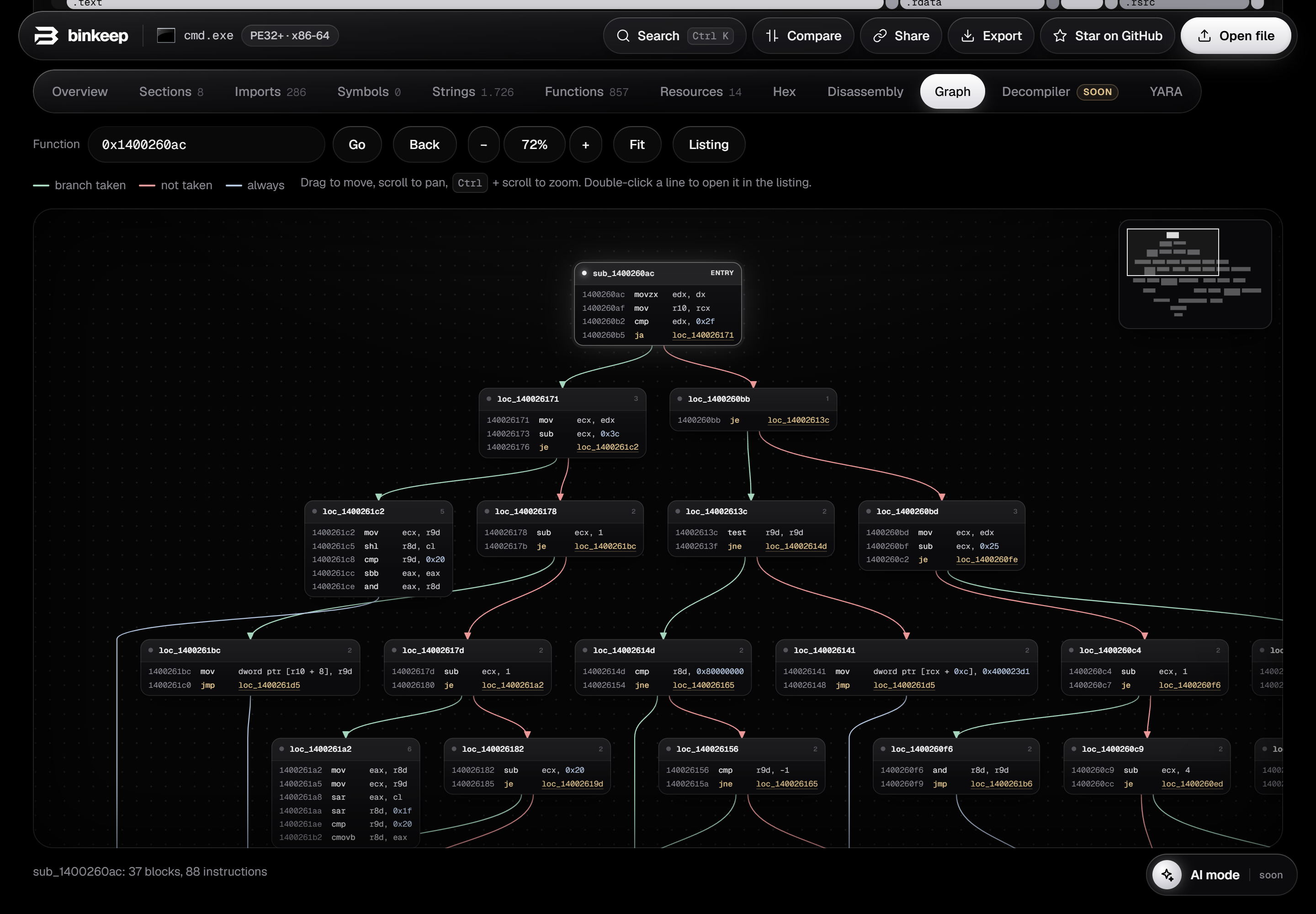
A new Graph tab draws any function as basic blocks connected by its branches.
- Green edges: branch taken. Red: not taken. Blue: always. Dashed: loops.
- Drag to move, Ctrl + scroll to zoom, minimap in the corner to jump around.
- Hover a block to light up the paths in and out of it.
Spaceswitches between the listing and the graph, like in IDA and Ghidra.- Double-click a line to open it in the listing. Click a call to open that function's graph.
Also new
- Click a register or a name in the listing or the graph to highlight every use of it.
- Cleaner function headers and labels in the disassembly.
- Decompiler and AI mode are on the way (marked as coming soon in the app).
As before, everything runs in your browser and the file never leaves your computer.