Repository navigation
Releases
LunaNX 3.1

LunaNX 3.1 — Bug fix update
LunaNX 3.1 fixes a crash that could occur when a game search returned no results.
Created by KazaR-RooT.
Fixes
- Search crash fixed. An empty result now keeps you in the library. LunaNX briefly ignores
input after the Switch keyboard closes so the + used to submit a search cannot trigger
another action. To quit from the library, use Main menu → Quit or the HOME button. - Catalog-wide search. Search includes games across library sections. Luna Premium games
appear with a lock icon when your subscription does not include them. - Luna search integration. LunaNX also queries Luna's search service. It can find games
that have yet to load and some misspelled titles. Matches are added to All games. - More complete All games. Background exploration now loads the rows that Luna sends
separately, keeps game tiles without artwork and no longer spends its budget on game pages.
Finding Alan Wake 2
Searching for Alan Wake finds the original Alan Wake. Luna's search service omits
Alan Wake 2, so browse All games manually to find it if it is available in your catalog.
Search tips
- Case, Latin accents, punctuation, ™/®/© symbols, extra spaces and word order are ignored:
pokemon cafe,wake alanandalanwakeall work. The best matches are listed first. - If nothing matches, focus stays on Search: press A to correct the text, or B to
return to the library. Choosing Top 10, Continue playing or All games also closes the search.
Install or update
- Download LunaNX.nro and copy it to sdmc:/switch/LunaNX/LunaNX.nro, replacing 3.0.
- Launch through the Homebrew Menu in application mode: hold R while opening a game.
Saved sessions and settings are kept when replacing the NRO. Keep one copy of LunaNX.nro on
the SD card. To leave a game, press ZL + ZR + − together. During gameplay, + and −
together still toggle the performance line.
Validation and integrity
Offline host tests cover title matching (accents, symbols, word order, spacing, empty input and
truncated UTF-8), input shortcuts, metrics, artwork and provenance. The Switch build has no
compiler warnings in LunaNX sources, and the source/NRO integrity check passes. Luna's search
service and catalog are only available with a signed-in account, so search results and the
number of games found depend on your country and subscription.
SHA-256 of LunaNX.nro:
b7991a2c7c6aadf719d797c75e8a98dc24b9eb9474daaa7131a3d9c1595ed215
Downloads: LunaNX.nro, SHA256SUMS.txt, LunaNX-v3.1-Licenses.zip and the original LunaNX-V3.png logo.
The exact corresponding source is available from this v3.1 tag and GitHub's source archives.
Changes since 3.0 are listed in CHANGELOG.md.
Creator: KazaR-RooT · License: GPL-3.0 ·
Third-party credits
LunaNX 3.0
LunaNX 3.0 — New design, simpler sign-in and live performance stats
LunaNX 3.0 brings a new look and a clearer way to browse, connect and play Amazon Luna on
Nintendo Switch. Created by KazaR-RooT.
Highlights
- New design and new logo: animated cover carousel, game artwork backgrounds, permanently
labeled navigation buttons, your Luna profile avatar and a branded launch screen. - Optimized video streaming: responsive 720p/60 H.264 playback with bounded decode queues,
latest-frame presentation and adaptive image tuning. Actual performance depends on the game,
server and connection. - Live in-game performance: press + and − together to toggle one line showing battery,
estimated remaining battery time, clock, measured bitrate and presented FPS. - Simpler Amazon sign-in: choose your country, scan the QR code or open the official Amazon
page, enter the short code and let LunaNX finish connecting automatically. No copied redirect
address or shared Wi-Fi network is needed. - Smarter navigation: Main menu → Top 10 → Continue playing → All games → Search.
Open directly on Top 10, or Continue playing when recent games are detected. - Continue playing improvements: local launch history is preserved and matched to fresh
catalog data; Luna's separately loaded account history is included without duplicate games. - Better touch navigation and artwork: tap to select, swipe to browse and use PLAY to launch.
Portrait covers are retained, image composition is preserved and covers fit without distortion. - Polished details: correct Wi-Fi/Ethernet status, immediate return to sign-in after logout,
country names without store domains, a separate settings scrollbar gutter and a discreet v3.0
label on the main library screen only.
Screenshots
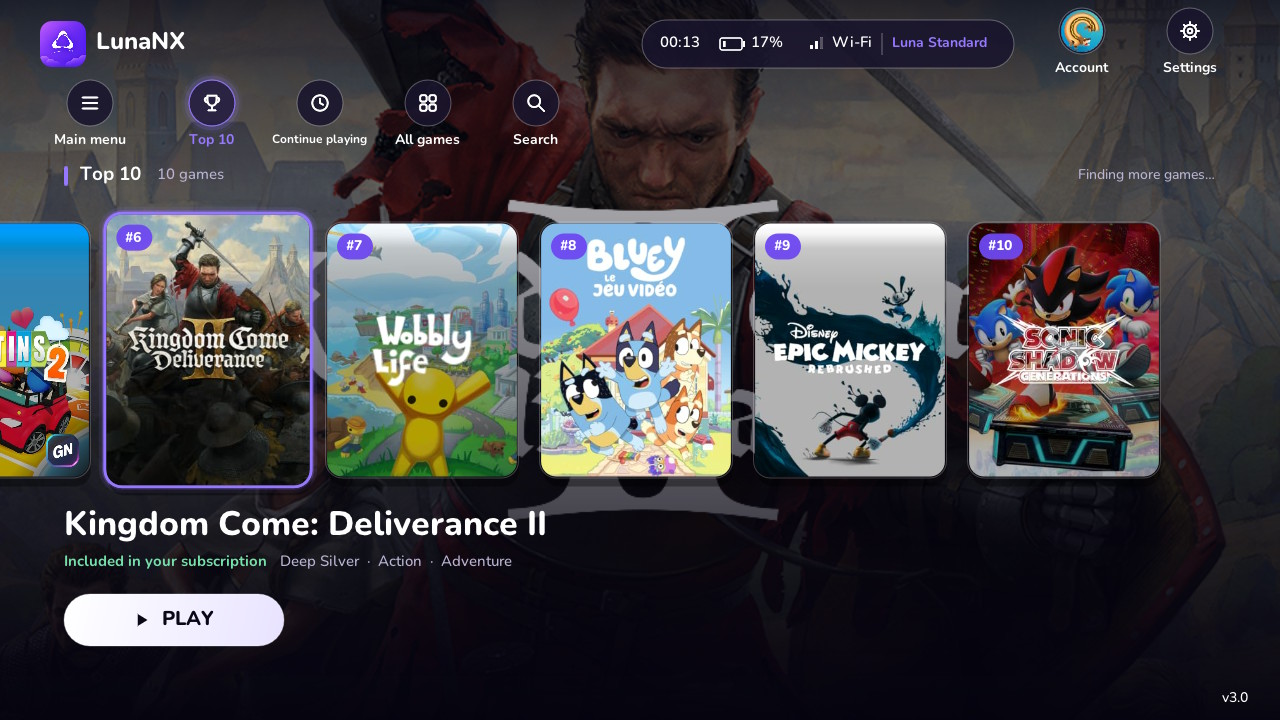
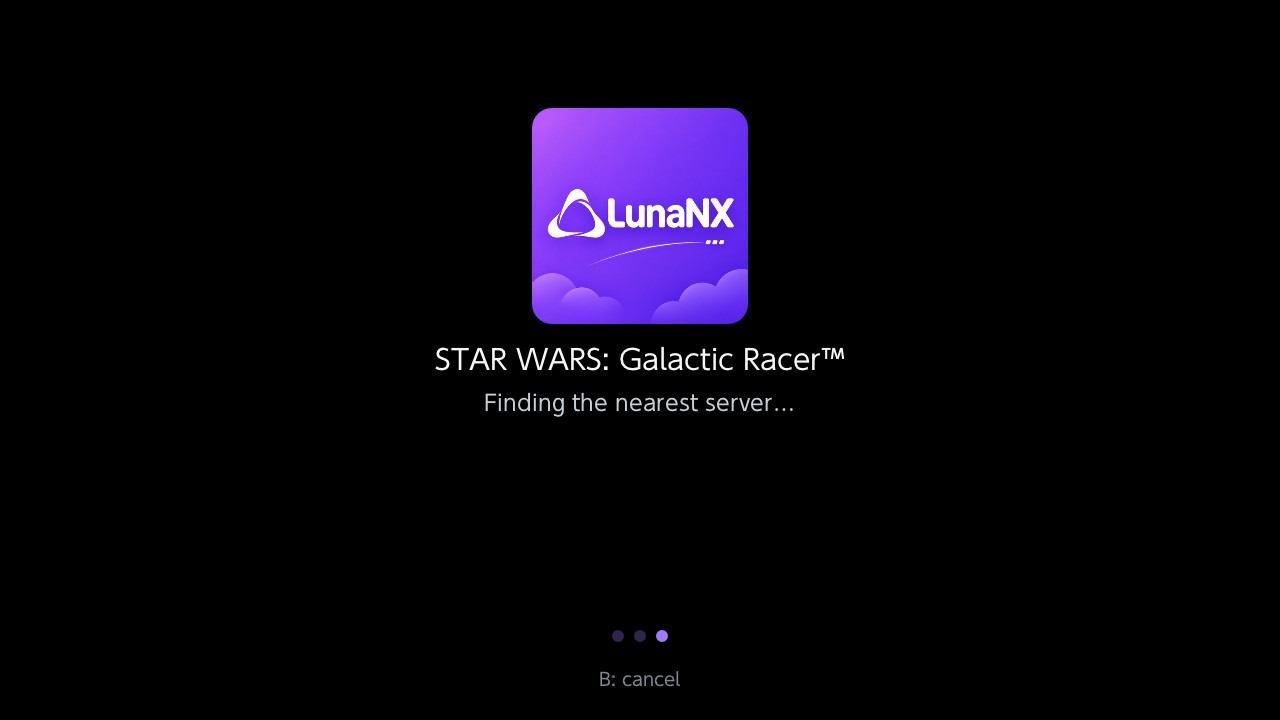
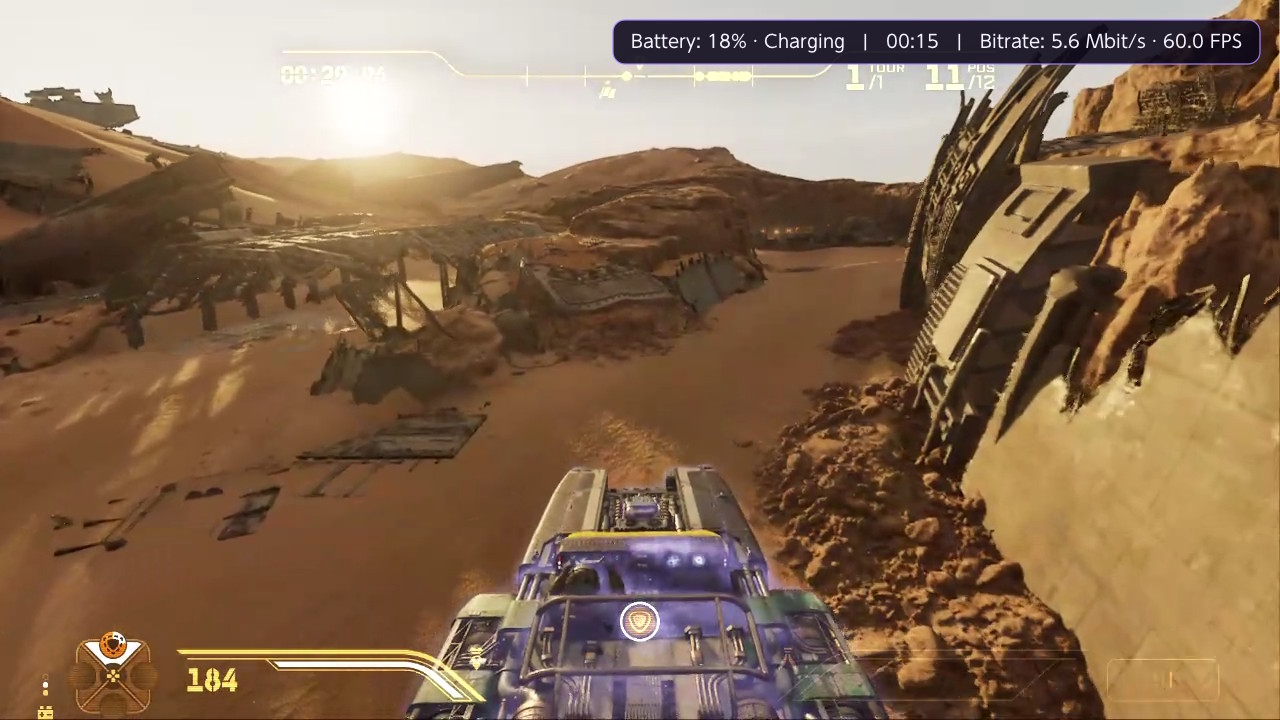
See the full screenshot gallery
for Continue playing, search, language settings and gameplay captures.
Install or update
- Download LunaNX.nro and copy it to sdmc:/switch/LunaNX/LunaNX.nro.
- Launch through the Homebrew Menu in application mode: hold R while opening a game.
- Choose your country and use Simplified sign-in (Amazon code) if sign-in is required.
Existing saved sessions and settings are retained when replacing the NRO. Keep one copy of
LunaNX.nro on the SD card. To leave a game, press ZL + ZR + − together.
Amazon may identify the current sign-in compatibility profile as Audible for iPhone.
Your password is entered only on Amazon's official page. Game access requires your own eligible
Luna account and depends on your country and subscription.
Validation and integrity
The creator confirmed the final version on console and supplied the screenshots above.
Offline tests cover authentication, local/remote history, artwork, input shortcuts and metrics,
including 14 configured markets and 154 market/language combinations. The Switch build and
source/NRO integrity checks pass.
The current video configuration uses software decoding. Battery time is an estimate based on
observed discharge. Keyboard/mouse input and Luna parental PIN prompts are not supported.
SHA-256 of LunaNX.nro:
b9ee54a835c4fb2b1624ade7914f8ac9f8bec1e0220ad0f8b4c5f65dc3d9a2fe
Downloads: LunaNX.nro, SHA256SUMS.txt, LunaNX-v3.0-Licenses.zip and the original LunaNX-V3.png logo.
The exact corresponding source is available from this v3.0 tag and GitHub's source archives.
Creator: KazaR-RooT · License: GPL-3.0 ·
Third-party credits
LunaNX v2.0.2
LunaNX v2.0.2
This update takes user feedback and the user experience into account.
Mise à jour qui tient compte des retours utilisateurs et de l'expérience utilisateur.
What's new
- Queue position: when Luna puts you in a queue, the waiting screen now shows your position,
and the estimated wait when Luna provides it. - Check for updates: a new button in Settings tells you whether you have the latest
LunaNX version published on GitHub.
Fixes
- Sign out of Amazon now really removes your account from the console. You return to the
sign-in screen, and your session, cookies and recently played games are deleted from the SD
card, even without a network connection. Your country, language and streaming settings are
kept.
A problem?
If you notice a problem, don't hesitate to contact me by opening an issue in the
Issues page.
— KazaR-RooT
Installation / update
- Download
LunaNX_V2.0.2.nrobelow. - Copy it to
sdmc:/switch/LunaNX/and rename itLunaNX.nro, replacing the previous version
(keep only one.nroof LunaNX). Your settings and your Amazon session are kept. - Launch it from the Homebrew Menu in application mode (hold R while starting a game).
Integrity
SHA-256 (LunaNX_V2.0.2.nro):
d82e8909c4f39c561b35000cdcd2830703677e0ffdc37da7341843ac15dff67b
Unofficial community project, not affiliated with Amazon or Nintendo. An Amazon account with
Luna access is required.
LunaNX v2.0.1
LunaNX v2.0.1
New countries requested by several users: LunaNX now covers all 14 Luna countries. In
addition to France, Germany, United Kingdom, Spain, Italy, United States and Canada, you can now
choose:
| Country | Amazon store | Language applied |
|---|---|---|
| Poland | amazon.pl | Polski |
| Netherlands | amazon.nl | Nederlands |
| Sweden | amazon.se | Svenska |
| Belgium | amazon.com.be | Nederlands (Français available) |
| Austria | amazon.de | Deutsch |
| Portugal | amazon.es | Português |
| Luxembourg | amazon.de | Français |
Three new interface languages: Polski, Nederlands and Svenska (11 languages in total). The
Luna catalog and game texts follow the chosen language.
Choose your country at first launch, or in Settings → Amazon account.
Good to know:
- Austria, Portugal and Luxembourg have no Amazon store of their own: LunaNX uses the store
where Prime is offered there (amazon.de or amazon.es) and tells Luna your real country, as
the Luna website does. In Luxembourg, if your Prime subscription is on amazon.fr, choose
France. - Poland, Netherlands, Sweden and Belgium: the sign-in page is Amazon's European sign-in page
on amazon.de, shown in your store's language. This is expected: European Amazon accounts
are shared, so your usual email and password work there.
How to sign in
There are currently 3 ways to sign in to your Amazon account:
- Sign in with Amazon (directly in the Switch browser).
⚠️ This method does not work on
firmware 23.x (CFW) for now: use method 2 instead. - Sign in with my phone (QR code): the recommended method. Scan the QR code shown on the
Switch with your phone (same Wi-Fi network), sign in on the official Amazon page, then paste
the address of the last page into the LunaNX page. cookies.txtfile exported once from a PC browser (fallback; instructions are shown on
the sign-in screen).
A problem?
If you notice a problem, don't hesitate to contact me by opening an issue in the
Issues page. Reports from players in the new
countries are especially welcome.
— KazaR-RooT
Installation / update
- Download
LunaNX_V2.0.1.nrobelow. - Copy it to
sdmc:/switch/LunaNX/and rename itLunaNX.nro, replacing the previous version
(keep only one.nroof LunaNX). Your settings and your Amazon session are kept. - Launch it from the Homebrew Menu in application mode (hold R while starting a game).
Integrity
SHA-256 (LunaNX_V2.0.1.nro):
30f682e4dcf875ef41b97ac9d5bc3bee7df464ea1c13566bb61bddde15b2cff7
Unofficial community project, not affiliated with Amazon or Nintendo. An Amazon account with
Luna access is required.
LunaNX v2.0

LunaNX v2.0 — Amazon Luna on Nintendo Switch


LunaNX is a homebrew application (.nro) that lets you play Amazon Luna cloud games on a
Nintendo Switch running custom firmware. It signs in to your Amazon account, shows your Luna
library, and streams the game to the console with your controller as the input device.
Important
LunaNX is an unofficial community project. It is not affiliated with, endorsed by or
sponsored by Amazon or Nintendo. Amazon Luna and Nintendo Switch are trademarks of their
respective owners. You need your own Amazon account with access to Luna; the games available
depend on your subscription and your country.
What's new in v2.0
Sign in with your phone. On some consoles the Switch browser does not open the Amazon
sign-in page and shows "This feature is not available". LunaNX v2.0 adds a second way to
sign in that does not use the Switch browser at all:
- On the sign-in screen, choose Sign in with my phone.
- Scan the QR code shown on the Switch with your phone or tablet (on the same Wi-Fi network).
- Sign in on the official Amazon page in your phone's browser.
- Copy the address of the last page Amazon shows, paste it into the LunaNX page and send it to
the Switch. Your Luna library appears.
Your password is typed only on Amazon's site: LunaNX never sees it. No PC, no browser extension
and no cookies.txt file are needed.
If the Switch browser works on your console, Sign in with Amazon still lets you sign in
directly on the Switch, without a phone.
LunaNX works with the Amazon stores of the countries where Luna is available: France, Germany,
United Kingdom, Spain, Italy, United States and Canada (with the North American Luna server fix
of v1.2).
I hope you'll enjoy this update and that it finally lets you make the most of Luna on your
Switch! — KazaR-RooT
Earlier versions: see CHANGELOG.md.
What's next
Mouse and keyboard support is planned for a next version. Until then, feel free to share
your feedback, remarks and bug reports in the Issues page: they will shape the
next versions.
Features
- Amazon sign-in, two ways: in the Switch browser, or with your phone (QR code) when the
Switch browser is not available. Both use the official Amazon sign-in page; the session then
renews automatically. Your password is never seen or stored by LunaNX. - Amazon stores: France, Germany, United Kingdom, Spain, Italy, United States and Canada,
chosen at first launch. - Interface in 8 languages: Deutsch, English, Español, Français, Italiano, Português,
Русский, 简体中文. - Luna library, loaded automatically:
- Featured banner,
- Continue playing (your last 10 games launched from LunaNX),
- Top 10 (current Luna ranking, when Luna provides it for your account),
- All games: the complete catalog, explored live, shown as pages of 10 covers,
- optional simple list view.
- Game streaming: 720p at 60 fps, H.264 video, stereo audio, with bitrate adapted to your
network. - Automatic server selection based on measured latency (a server region can also be chosen
manually). - Controllers: Joy-Con, Pro Controller and handheld mode, with rumble. Switch button
labels by default (Xbox layout available); the D-pad can also drive the left stick. - Settings: language, Amazon store, sign out, library view, server region, button layout,
sound, volume, audio buffer, optional in-game technical overlay.
Screenshots
| Luna library | In game |
|---|---|
 |
 |
| Launching a game | Settings |
 |
 |
Requirements
- A Nintendo Switch able to run homebrew (custom firmware such as Atmosphère, with the
Homebrew Menu). - An internet connection (5 GHz Wi-Fi close to the router recommended).
- An Amazon account with access to Amazon Luna in your country.
Installation
See INSTALLATION.md for step-by-step instructions. In short:
- Copy
LunaNX.nrotosdmc:/switch/LunaNX/on your SD card. - Start LunaNX from the Homebrew Menu in application mode (hold R while launching a game).
- Choose your Amazon store, then Sign in with Amazon (Switch browser) or Sign in with my
phone (QR code), and complete the sign-in on the official Amazon page.
Usage
- Your Luna library appears after sign-in.
- Move with the D-pad or the left stick, then press A on a cover to start the game.
- To leave a game, press ZL + ZR + − at the same time.
| Action | Button |
|---|---|
| Launch a game | A on a cover |
| Settings | Settings button (top right) or X |
| Refresh the library | Refresh button or Y |
| Previous / next page of "All games" | L / R |
| Quit LunaNX (library) | + |
| Start / Xbox button (in game) | + short press / long press |
| Left stick (in game) | left stick or D-pad |
| Technical overlay (in game, if enabled in Settings) | L3 + R3 |
| Quit a game | ZL + ZR + − |
Known limitations
- Streaming quality is fixed at 720p 60 fps with software decoding.
- Application mode is required: the Switch browser used for sign-in and the memory needed
for streaming are not available from the Album (applet mode). - Phone sign-in: the phone or tablet must be on the same Wi-Fi network as the Switch; guest
networks that isolate devices from each other block it. Paste the address soon after signing
in: Amazon's sign-in code is only valid for a short time. - No keyboard or mouse support: games that require them cannot be controlled.
- Parental control PIN prompts from Luna are not supported.
- Game availability depends on your Luna subscription and your country. Luna does not say in
its catalog which subscription includes each game: a game outside your subscription shows the
message "This game cannot be launched with this account". - Arabic and Hebrew interfaces are not available (no right-to-left text support).
Compatibility
- Tested on a Nintendo Switch running custom firmware, launched from the Homebrew Menu in
application mode. - Not tested on every console model or firmware version: please report problems in the
Issues page.
Security and privacy
- Your Amazon session is stored on your SD card in
sdmc:/switch/LunaNX/amazon_device.json.
Never share this file. Use Settings → Sign out of Amazon before lending or selling your
console; you can also remove "LunaNX" from your Amazon account → Manage your devices. - Log files in
sdmc:/switch/LunaNX/can contain your IP address: remove it before sharing a
log in an issue.
Download and integrity check
Download LunaNX.nro from the Releases page. Its SHA-256 checksum is
given in the release notes; to check it on macOS or Linux:
shasum -a 256 LunaNX.nroLicense and source code
LunaNX is distributed under the GNU General Public License v3.0 (see LICENSE).
This repository contains the complete source code of LunaNX:
github.com/kazar-root/LunaNX.
Third-party components and their licenses are listed in
THIRD_PARTY_NOTICES.md, with the full license texts in
licenses/.
Building from source
Requirements: devkitPro with the following
packages, plus CMake and Ninja.
sudo dkp-pacman -S --needed devkitA64 switch-dev switch-curl switch-jansson switch-mbedtls \
  switch-ffmpeg switch-dav1d switch-libopus switch-glfw switch-libdrm_nouveau switch-zlib \
  switch-freetype switch-libpng switch-libwebp switch-sdl2 ninja
python3 -m pip install --user cmake
./build.sh
The output file is build/LunaNX.nro.
Acknowledgments
Thanks to the developers of the open-source projects LunaNX is built on:
devkitPro, libnx and deko3d,
Borealis,
libpeer,
Mbed TLS,
libsrtp,
usrsctp,
FFmpeg and averne's
NVTEGRA branch,
Moonlight-Switch,
OpenNOW-Switch,
curl, Jansson,
cJSON, Yoga,
NanoVG, fmt,
zlib, bzip2, Project Nayuki's QR Code generator
and Google's Material Icons.
Created by KazaR-RooT
Developed with the assistance of Claude Code (Anthropic).
"The only limit is your imagination. AI makes it possible."
LunaNX v1.2
LunaNX v1.2
US and Canadian users got a "service unavailable" error after signing in: LunaNX always
contacted the wrong Luna server. It now uses the Luna server of your country.
I hope you'll enjoy this update! A bigger update is already planned: LunaNX v2, which should
bring mouse and keyboard support. Until then, feel free to share your feedback, remarks and
bug reports in Issues.
— KazaR-RooT
Installation / update
- Download
LunaNX.nrobelow. - Copy it to
sdmc:/switch/LunaNX/, replacing the previous version (keep only one
LunaNX.nro). Your settings are kept. - Launch it from the Homebrew Menu in application mode (hold R while starting a game).
Integrity
SHA-256 (LunaNX.nro):
a53abff9affe64646ce0f158990837466cb22e4ea2ebdd283d01768a9849866f
Unofficial community project, not affiliated with Amazon or Nintendo. An Amazon account with
Luna access is required.
LunaNX v1.1

LunaNX v1.1 — Amazon Luna on Nintendo Switch

LunaNX is a homebrew application (.nro) that lets you play Amazon Luna cloud games on a
Nintendo Switch running custom firmware. It signs in to your Amazon account, shows your Luna
library, and streams the game to the console with your controller as the input device.
Important
LunaNX is an unofficial community project. It is not affiliated with, endorsed by or
sponsored by Amazon or Nintendo. Amazon Luna and Nintendo Switch are trademarks of their
respective owners. You need your own Amazon account with access to Luna; the games available
depend on your subscription and your country.
What's new in v1.1
New features
- 8 interface languages: Deutsch, English, Español, Français, Italiano, Português, Русский
and 简体中文. English by default, changeable at any time in Settings → Language. The Luna
catalog and game texts follow the chosen language when your store offers it. - Store choice at first launch: pick your Amazon store (France, Germany, United Kingdom,
Spain, Italy, United States or Canada) before signing in. LunaNX then connects to the right
Luna service and switches to the store's language. - Complete Luna catalog: LunaNX now browses the Luna catalog live in the background ("All
games", genres, collections), so games that are not on the home page (for example Sonic Mania)
appear too, instead of only the games of the home rows. - Paged "All games" grid: 10 covers per page, with Previous page / Next page buttons or
the L / R buttons. - Automatic return to the library when a game session ends.
- Loading animation (three purple dots) until the game picture appears.
Fixes and optimizations
- Fixed a crash when browsing to the last games of the library: only the covers of the current
page are kept in memory, and oversized artwork is downscaled before display. - Fixed games shown two or three times in the library: duplicates are now detected by Amazon
ID or by title. - Fixed a crash when changing the language in Settings.
What's next: v1.2
A v1.2 is already in preparation. It will take community feedback into account and add
support for more features (details to come). Suggestions and bug reports are welcome in the
Issues page.
Features
- Amazon sign-in on the console: the official Amazon sign-in page opens in the Switch
browser; the session then renews automatically. Your password is never seen or stored by
LunaNX. - Amazon stores: France, Germany, United Kingdom, Spain, Italy, United States and Canada,
chosen at first launch. - Interface in 8 languages: Deutsch, English, Español, Français, Italiano, Português,
Русский, 简体中文. - Luna library, loaded automatically:
- Featured banner,
- Continue playing (your last 10 games launched from LunaNX),
- Top 10 (current Luna ranking, when Luna provides it for your account),
- All games: the complete catalog, explored live, shown as pages of 10 covers,
- optional simple list view.
- Game streaming: 720p at 60 fps, H.264 video, stereo audio, with bitrate adapted to your
network. - Automatic server selection based on measured latency (a server region can also be chosen
manually). - Controllers: Joy-Con, Pro Controller and handheld mode, with rumble. Switch button
labels by default (Xbox layout available); the D-pad can also drive the left stick. - Settings: language, Amazon store, sign out, library view, server region, button layout,
sound, volume, audio buffer, optional in-game technical overlay.
Screenshots
| Luna library | In game |
|---|---|
 |
 |
| Launching a game | Settings |
 |
 |
Requirements
- A Nintendo Switch able to run homebrew (custom firmware such as Atmosphère, with the
Homebrew Menu). - An internet connection (5 GHz Wi-Fi close to the router recommended).
- An Amazon account with access to Amazon Luna in your country.
Installation
See INSTALLATION.md for step-by-step instructions. In short:
- Copy
LunaNX.nrotosdmc:/switch/LunaNX/on your SD card. - Start LunaNX from the Homebrew Menu in application mode (hold R while launching a game).
- Choose your Amazon store, then Sign in with Amazon and complete the sign-in in the Switch
browser.
Usage
- Your Luna library appears after sign-in.
- Move with the D-pad or the left stick, then press A on a cover to start the game.
- To leave a game, press ZL + ZR + − at the same time.
| Action | Button |
|---|---|
| Launch a game | A on a cover |
| Settings | Settings button (top right) or X |
| Refresh the library | Refresh button or Y |
| Previous / next page of "All games" | L / R |
| Quit LunaNX (library) | + |
| Start / Xbox button (in game) | + short press / long press |
| Left stick (in game) | left stick or D-pad |
| Technical overlay (in game, if enabled in Settings) | L3 + R3 |
| Quit a game | ZL + ZR + − |
Known limitations
- Streaming quality is fixed at 720p 60 fps with software decoding.
- Application mode is required: the Switch browser used for sign-in and the memory needed
for streaming are not available from the Album (applet mode). - No keyboard or mouse support: games that require them cannot be controlled.
- Parental control PIN prompts from Luna are not supported.
- Game availability depends on your Luna subscription and your country. Luna does not say in
its catalog which subscription includes each game: a game outside your subscription shows the
message "This game cannot be launched with this account". - Arabic and Hebrew interfaces are not available (no right-to-left text support).
Compatibility
- Tested on a Nintendo Switch running custom firmware, launched from the Homebrew Menu in
application mode. - Not tested on every console model or firmware version: please report problems in the
Issues page.
Security and privacy
- Your Amazon session is stored on your SD card in
sdmc:/switch/LunaNX/amazon_device.json.
Never share this file. Use Settings → Sign out of Amazon before lending or selling your
console; you can also remove "LunaNX" from your Amazon account → Manage your devices. - Log files in
sdmc:/switch/LunaNX/can contain your IP address: remove it before sharing a
log in an issue.
Download and integrity check
Download LunaNX.nro from the Releases page. Its SHA-256 checksum is
given in the release notes; to check it on macOS or Linux:
shasum -a 256 LunaNX.nroLicense and source code
LunaNX is distributed under the GNU General Public License v3.0 (see LICENSE).
This repository contains the complete source code of LunaNX:
github.com/kazar-root/LunaNX.
Third-party components and their licenses are listed in
THIRD_PARTY_NOTICES.md, with the full license texts in
licenses/.
Building from source
Requirements: devkitPro with the following
packages, plus CMake and Ninja.
sudo dkp-pacman -S --needed devkitA64 switch-dev switch-curl switch-jansson switch-mbedtls \
  switch-ffmpeg switch-dav1d switch-libopus switch-glfw switch-libdrm_nouveau switch-zlib \
  switch-freetype switch-libpng switch-libwebp switch-sdl2 ninja
python3 -m pip install --user cmake
./build.sh
The output file is build/LunaNX.nro.
Acknowledgments
Thanks to the developers of the open-source projects LunaNX is built on:
devkitPro, libnx and deko3d,
Borealis,
libpeer,
Mbed TLS,
libsrtp,
usrsctp,
FFmpeg and averne's
NVTEGRA branch,
Moonlight-Switch,
OpenNOW-Switch,
curl, Jansson,
cJSON, Yoga,
NanoVG, fmt,
zlib, bzip2 and Google's Material Icons.
Created by KazaR-RooT
Developed with the assistance of Claude Code (Anthropic).
"The only limit is your imagination. AI makes it possible."
LunaNX v1.0 — Initial Release
LunaNX v1.0 — Initial Release
First public release of LunaNX, an unofficial Amazon Luna client for the Nintendo Switch
(homebrew .nro).
Highlights
- Amazon sign-in on the console through the official Amazon page, with automatic renewal
- Luna library loaded automatically: Featured, Continue playing, Top 10, All games (10 at a time)
- 720p 60 fps game streaming with stereo audio and network-adapted bitrate
- Automatic server selection by latency
- Joy-Con, Pro Controller and handheld mode, with rumble
- Switch button labels by default, Xbox layout available
Installation
- Download
LunaNX.nrobelow. - Copy it to
sdmc:/switch/LunaNX/on your SD card (keep only oneLunaNX.nro). - Launch it from the Homebrew Menu in application mode (hold R while starting a game), then
choose Sign in with Amazon.
Full instructions: see INSTALLATION.md.
Known limitations
- English interface only
- Streaming fixed at 720p 60 fps (software decoding)
- Application mode required
- No keyboard/mouse support; parental control PIN prompts not supported
Integrity
SHA-256 (LunaNX.nro):
f0561f58793d67d99b495148fbdb1d2d867a0eb533aeebd581856043d24ad922
Unofficial community project, not affiliated with Amazon or Nintendo. An Amazon account with
Luna access is required.
Created by KazaR-RooT — Developed with the assistance of Claude Code (Anthropic).