Repository navigation
Releases
v1.3.2

v1.3.2(正式版 vc355 / 2026-11-19)— 修复 modern 包更新误提示
版本关系:正式版 versionCode 355 / versionName 1.3.2(modern 版为
1.3.2-api102)。上一正式版为 v1.3.1(vc354)。本版只修复更新检查,不含功能变更。
修复
- 更新误提示:modern 包版本名带
-api102后缀,旧比对逻辑把第三段1-api102解析为 0,导致已安装 1.3.1 仍提示「发现新版本 1.3.1」。现在比较前先剥离-/+后缀与v前缀,数字段只取开头数字;新增回归测试覆盖1.3.1与1.3.1-api102。
升级注意
- v1.3.1 正式版可直接覆盖安装;签名证书不变,SHA-256 仍为
2850e82a5c4e001eb19e1d4d340bfaca049ebea1abc4f1940c02c8065137b82e。
APK:modern API 102 与 legacy (Xposed API 82) 两个变体;签名证书未变。
v1.3.1
ClockSeconds v1.3.0 → v1.3.1 更新说明(通俗版)
一句话:这是一次「看着更顺眼、用着更省心」的小升级——时间里的冒号会自动摆正,预览时间上的小相机框对准数字了,更新提醒也更稳。
先看效果


这次到底改了什么
1. 冒号会自动摆正
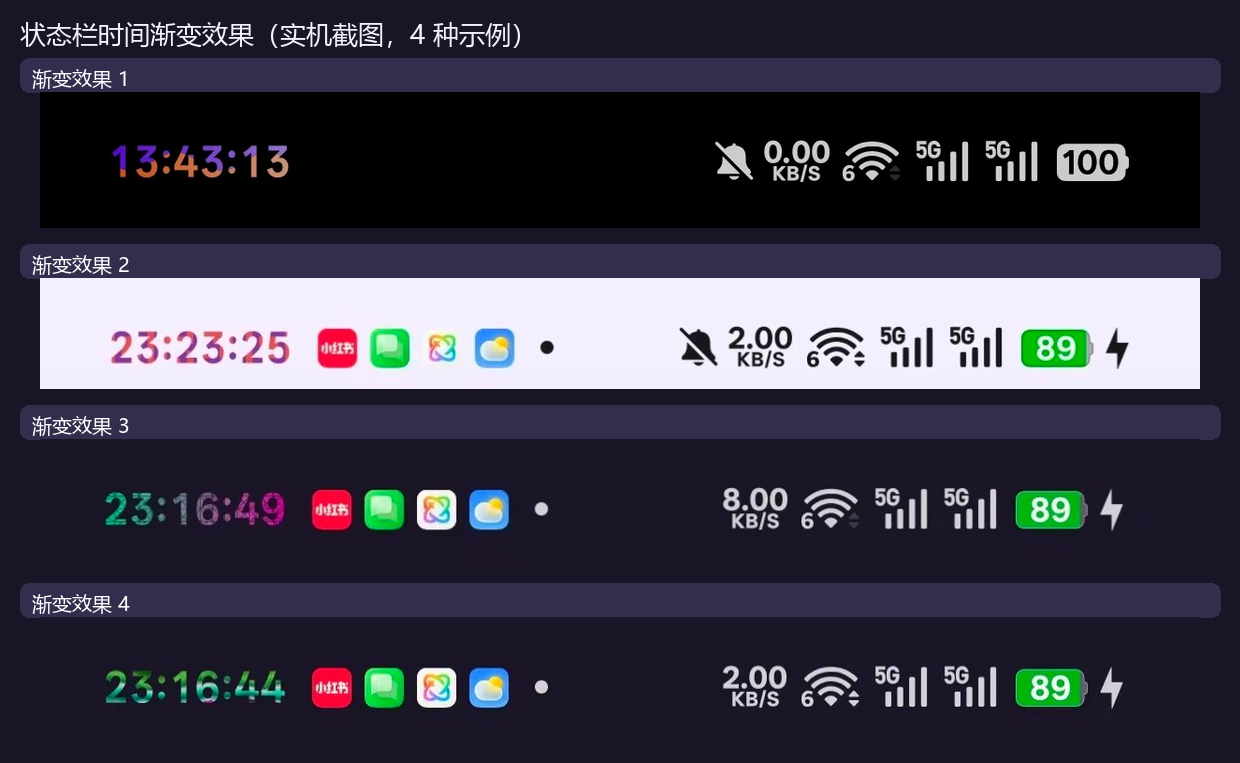
以前有些字体下,状态栏时间里的两个冒号会偏高、偏低或离数字太近。现在改成按当前字体实际画出来的数字和冒号来算位置和宽度:
- 状态栏时间:冒号水平宽度和垂直高度都按字形实测,跟着系统字体走。
- 单色预览时间:和状态栏用同一套算法,你看到的预览基本就是真实效果。
- 渐变预览时间:也接上了这套算法,不再出现「数字和冒号不在一条线」的情况。
2. 预览时间的小相机框对准了
单色预览里点某一个数字,会有一个四角取景框标出正在编辑的那一位。之前这个框会整体往右偏,点最后一位时甚至框不到数字上。现在:
- 框的位置按文字实际排版算,不再重复叠加边距。
- 四角短线的长度收短了一点,看着更轻巧;框本身的高度恢复正常,不会再被压扁。
3. 更新提醒更稳
以前 GitHub API 偶尔限流时,应用内可能收不到更新提醒。现在增加了网页 / Atom 回退:即使 API 暂时不可用,也能继续检查新版本,不会「假装没更新」。
修好了什么
| 你看到的问题 | 现在 |
|---|---|
| 冒号忽高忽低、和数字不对齐 | 按当前字体实测字形自动排版,状态栏、单色预览、渐变预览统一 |
| 单色预览的相机框偏到数字右边 | 自动计算字符位置,框准确落在正在编辑的数字上 |
| 相机框四角太长、框太矮 | 四角短线缩短,框高恢复正常 |
| GitHub API 限流后收不到更新提醒 | 增加网页 / Atom 回退,更新检查更可靠 |
从 v1.3.0 升级要注意
- v1.3.0 正式版用户:可以直接覆盖安装,预设、任务和设置都会保留。
- 正在用 vc347–vc353 测试包的用户:如果签名与正式版一致,可以直接覆盖;若安装器提示签名冲突,请先记下预设和任务,卸载测试包后再装正式版。
- 安装后到 LSPosed 勾选 com.android.systemui 作用域,然后重启 SystemUI 或重启手机。
- 证书没有更换,SHA-256:
2850e82a5c4e001eb19e1d4d340bfaca049ebea1abc4f1940c02c8065137b82e。
版本信息
- 本版:v1.3.1,versionCode 354。
- modern(API 102):
io.github.kelebao.colorosclockseconds.modern,versionName1.3.1-api102。 - legacy(API 82):
io.github.kelebao.colorosclockseconds,versionName1.3.1。 - 安装包:
ClockSeconds-v1.3.1-api102-release.apk、ClockSeconds-v1.3.1-legacy-release.apk。 - 源码 Release / tag:
v1.3.1;模块仓库 Release tag:354-1.3.1。 - 源码 Release:https://github.com/kelebao/ClockSeconds/releases/tag/v1.3.1
- 模块仓库:https://github.com/Xposed-Modules-Repo/io.github.kelebao.colorosclockseconds
English
In short: a polish release — colons are optically aligned from real glyph metrics, the preview viewfinder sits on the digit being edited, and update checks survive GitHub API rate limits.
What changed
- Auto-aligned colons — colon width and vertical lift are measured from the current font, so the status-bar clock, solid preview and gradient preview all use the same placement.
- Preview viewfinder fixed — the four-corner marker no longer shifts to the right; it lands on the selected digit. The corner arms are shorter and the frame height is back to normal.
- More reliable update check — a web/Atom fallback keeps update notifications working when the GitHub API is rate-limited.
Upgrading
- v1.3.0 users can install over the old build and keep all settings.
- If you are on a vc347–vc353 test build and the installer reports a signature conflict, back up presets/tasks, uninstall it, then install this release.
- Enable the com.android.systemui scope in LSPosed and restart SystemUI or reboot.
- Signing certificate is unchanged: SHA-256
2850e82a5c4e001eb19e1d4d340bfaca049ebea1abc4f1940c02c8065137b82e.
Version info
- This release: v1.3.1, versionCode 354.
- modern (API 102):
io.github.kelebao.colorosclockseconds.modern, versionName1.3.1-api102. - legacy (API 82):
io.github.kelebao.colorosclockseconds, versionName1.3.1. - Source tag:
v1.3.1; module-repo tag:354-1.3.1.
v1.3.0
ClockSeconds v1.2.0 → v1.3.0 更新说明(通俗版)
一句话:这次把「高级设置」补齐了——颜色更多、调色更顺手、预设更好管,通知栏大时钟也能显示秒,还修好了几个大家反馈过的小毛病。
先看效果
这次到底多了什么
1. 高级设置页更好用了
- 以前颜色设置散在首页,现在有了独立的「高级设置」页。
- 页面里分成单色和渐变两个页签,点哪个就切到哪个模式,预览时间也会跟着变。
- 色号框不再单独占一行,而是放到「正在编辑」那一行的右边:边输边生效,少滚一屏。
2. 预设从「够用」变成「随便存」
- 深色、浅色两组,每组最多 20 个自定义预设,互不占用。
- 全新安装会自动带入 深色 4 套 + 浅色 4 套(每组 2 渐变 + 2 单色),都是实机调好的颜色。
- 旧用户升级后不会被塞新预设,你原来存的不会被覆盖。
- 长按任意预设可以删除或重命名;保存时会真正写进文件,不再出现「提示成功但没存上」。
3. 渐变方式多了,效果也更好认
现在一共有 11 种渐变形式:
上→下、左→右、象限光晕、颗粒噪点、镀铬金属、斜纹糖果、波浪切割、低多边形、水磨石、二维码、液态水银。
- 起点色和终点色各有一个圆圈,点一下会有一圈多层涟漪提示当前编辑的是哪一个。
- 方向胶囊改成单行横滑,标题行有一个会动的 ⇆ 箭头提醒「这一排可以左右滑」。
- 渐变也支持浅色模式单独一套颜色,系统切到浅色时自动换过去。
4. 颜色会跟着系统深浅色走
新增「系统模式自适应」:打开后,时间颜色会按系统的深色 / 浅色模式自动切换,不用你手动来回改。旁边有 ? 图标,点开就能看到说明。
5. 自定义任务也能换配色
「自定义任务」里的换配色面板也一起升级:单色方案和渐变方案分开显示,勾选状态不会错位,单色方案显示为分段纯色条,不再被误画成渐变。
6. 作者信息补上了多语言
「关于」卡片新增作者行,点一下可以跳转到作者主页;这一行已经同步到全部语言。
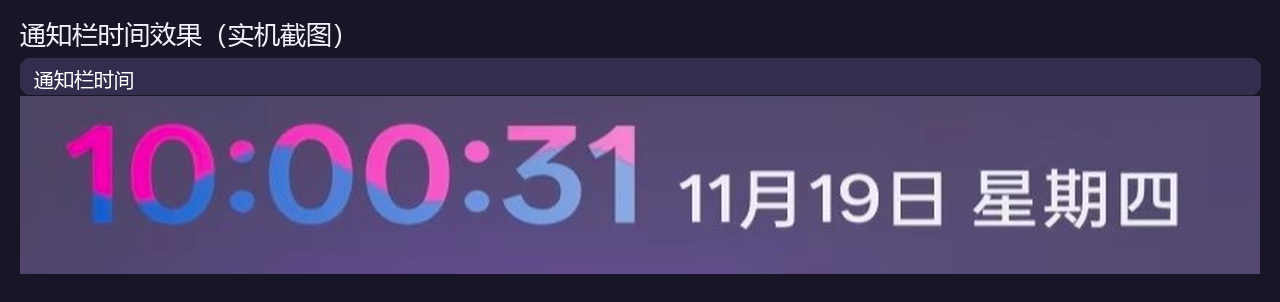
7. 通知栏时间显秒效果
- 下拉通知栏里的大时钟现在也会显示秒(
HH:mm:ss),不再只有时和分。 - 它和状态栏时间共用同一套逐位颜色 / 渐变设置:在「高级设置」里改颜色,通知栏大时钟会同步跟着变。
- 实机效果见本文第一张图。
8. 其他小改进
- 顶部页签改成更紧凑的一体胶囊,不再占掉一大块屏幕。
- 通知栏、浮窗和预览卡的渐变效果保持一致,预览基本就是状态栏实际效果。
- 旧 API 环境装 legacy 包时,会提示还有 API 102 版本可选;modern 包不会重复提示。
修好了什么
| 你看到的问题 | 现在 |
|---|---|
| 单色页预览时间突然变得很大,把调色盘挤没了 | 预览卡高度恢复正常 |
| 色号框删空后再也输不进去、也不生效 | 可以正常清空后重新输入 |
| 拖第一条滑杆时,圆圈颜色慢半拍 | 圆圈、预览和状态栏同步变色 |
| HSV 第 2、3 条滑杆不跟着颜色变 | 饱和度 / 明度滑杆会随色相重绘 |
| 预设重命名、删除提示成功但没保存 | 真正写盘,重开还在 |
| 点高级设置闪退 | 已修,不再闪退 |
| 切换深浅色后,高级页和系统颜色对不上 | 以系统模式为准,页面和时间颜色一致 |
从 v1.2.0 升级要注意
- v1.2.0 正式版用户:legacy 包可以直接覆盖安装;modern 包是不同包名,覆盖同一包名即可,数据都会保留。
- 正在用 vc327–vc345 测试包的用户:测试包和正式版签名不同,不能直接覆盖。请先记下预设和任务,卸载测试包后再装正式版。
- 安装后到 LSPosed 勾选 com.android.systemui 作用域,然后重启 SystemUI 或重启手机。
- 如果升级后发现颜色怪怪的,先检查是不是从测试包直接覆盖安装;签名不同会导致数据读不到。
版本信息
- 本版:v1.3.0,versionCode 346。
- modern(API 102):
io.github.kelebao.colorosclockseconds.modern,versionName1.3.0-api102。 - legacy(API 82):
io.github.kelebao.colorosclockseconds,versionName1.3.0。 - 安装包:
ClockSeconds-v1.3.0-api102-release.apk、ClockSeconds-v1.3.0-legacy-release.apk。 - modern / API 102 版本请到源码 Release 下载:https://github.com/kelebao/ClockSeconds/releases/tag/v1.3.0
- 正式版签名证书未变,SHA-256:
2850e82a5c4e001eb19e1d4d340bfaca049ebea1abc4f1940c02c8065137b82e。 - GitHub Release / tag / Xposed 仓库:已发布。
English
In short: This release completes the Advanced settings page — more colors, smoother color editing, easier preset management, seconds in the notification-panel clock, and several bug fixes.
Effects
What is new
- Better Advanced settings — a dedicated page with separate Solid and Gradient tabs. Switching tabs switches the mode and the live preview. The hex field now sits on the same row as the color being edited and applies while you type.
- Presets you can really manage — dark and light groups, up to 20 custom presets each. Fresh installs start with 4 dark + 4 light presets; upgrades keep everything you already saved. Long-press a preset to delete or rename it, and changes are actually written to disk.
- 11 gradient forms — top→bottom, left→right, quadrant glow, grain, chrome, striped candy, wave cut, low poly, terrazzo, QR code and liquid mercury. The two endpoint circles show a multi-ring ripple when tapped, the direction row scrolls horizontally with a moving ⇆ hint, and gradients can use a separate light-mode palette.
- System mode adaptive — when enabled, clock colors follow the system dark / light mode automatically. The ? icon next to the switch explains how to use it.
- Task recoloring — the custom-task color picker now separates solid and gradient schemes, keeps checkmarks aligned, and draws solid schemes as segmented color bars instead of gradients.
- Author info in every language — the About card now has an author row that opens the author homepage; it is translated in all 21 locales.
- Notification-panel clock with seconds — the large clock in the notification shade now shows
HH:mm:ssand shares the same per-digit color / gradient settings as the status-bar clock, so colors stay in sync. - Other refinements — compact tab header, consistent gradient preview across the notification shade / floating window / preview card, and no duplicate API-102 hints on the modern build.
Fixes
| Problem you saw | Now |
|---|---|
| Huge preview time on the Solid tab hid the color picker | Preview card is back to normal height |
| Empty hex field could not be filled again or applied | You can clear and retype it normally |
| Endpoint circle lagged behind the first slider | Circle, preview and status bar update together |
| HSV sliders 2 and 3 did not follow the color | Saturation / value sliders redraw with hue |
| Preset rename/delete claimed success but did not save | Changes are really persisted |
| Advanced settings crashed on open | Fixed |
| Advanced page colors disagreed with the system after theme switching | System mode is the single source of truth |
Upgrading from v1.2.0
- v1.2.0 users can install the legacy build over the old one. The modern build uses a different package name, so update that same package name to keep data.
- If you are on test builds vc327–vc345, do not install over them — the signing certificate differs. Back up presets and tasks, uninstall the test build, then install the release build.
- After installing, enable the com.android.systemui scope in LSPosed and restart SystemUI or reboot.
- If colors look wrong after upgrading from a test build, check whether you installed over a differently signed build; data cannot be read in that case.
Version info
- This release: v1.3.0, versionCode 346.
- modern (API 102):
io.github.kelebao.colorosclockseconds.modern, versionName1.3.0-api102. - legacy (API 82):
io.github.kelebao.colorosclockseconds, versionName1.3.0. - Packages:
ClockSeconds-v1.3.0-api102-release.apk,ClockSeconds-v1.3.0-legacy-release.apk. - The modern (API 102) build is available on the source release: https://github.com/kelebao/ClockSeconds/releases/tag/v1.3.0
- Release certificate is unchanged, SHA-256:
2850e82a5c4e001eb19e1d4d340bfaca049ebea1abc4f1940c02c8065137b82e. - GitHub Release / tag / Xposed module repository: published.
v1.2.0

ClockSeconds v1.2.0 正式版更新说明
| 项目 | 内容 |
|---|---|
| 版本 | v1.2.0(versionCode 249) |
| 包名 | io.github.kelebao.colorosclockseconds |
| 适用环境 | Android 10 及以上;已在 ColorOS 15 / 16(Android 15 / 16)真机验证,一加 / OPPO 直接可用;其它厂商走通用适配(核心链路只用 AOSP 公开 API),尚未逐一真机验证 |
| 运行方式 | LSPosed 模块,作用域 com.android.systemui |
| 签名 | 与 1.0.x 系列相同(SHA-256 前 8 位 2850e82a),可直接覆盖安装 |
| 升级自 | v1.0.9 及更早版本(1.1.0 未单独发版,其改动已并入本版) |
一句话:这一版把「状态栏时间」从一个开关,做成了一个可自由配色、可定时、可预览的完整工具。
为什么值得升级
- 时分秒 6 位数字可以各自上色,还能点开预览卡逐位调,改哪一位、看哪一位。
- 两色渐变:起点色 → 终点色,6 套现成配色 + 自定义端点色,预览与状态栏完全一致。
- 定时任务:到点自动显示秒 / 到点自动隐藏秒,例如「整点前 2 分钟自动开秒」。
新增功能
数字颜色:6 位独立取色
- 时十位、时个位、分十位、分个位、秒十位、秒个位各一个颜色,支持 10 颗预设色点 / 色相·饱和度·明度三条滑杆 / 调色盘 / 跟随系统。
- 点预览时间展开取色:数字放大、字距拉开,下面两张统计卡平滑收起;展开后直接点某一位数字即选中该位。
- 选中位显示同色下划线并做 2 秒一循环的发光呼吸;其余 5 位降到 30% 不透明度,正在调哪一位一目了然。
- 等宽数字排版:秒数跳动时整行不再左右抖动。
渐变(起点色 → 终点色)
- 数字颜色卡分为**「逐位颜色 | 渐变」两页**,停在哪页就是哪种模式,页签即开关。
- 内置 6 套渐变预设,点一下同时套用两端颜色;端点色也可单独自定义。
- 端点色被选中时,色点外有双涟漪呼吸提示当前编辑目标。
- 预览与状态栏共用同一套配色规则与着色实现,做到「预览看到的,就是状态栏显示的」。
自定义任务(到点自动显秒 / 关秒)
- 触发方式支持每小时 / 每天 + 指定时刻,可设定提前 N 分钟开始、持续 N 分钟。
- 动作可选显示秒数或隐藏秒数(隐藏秒时保留颜色)。
- 修改系统时间、切换时区、休眠唤醒后自动重算窗口,并每 60 秒兜底重算一次。
- 任务生效期间点击状态栏时间,会明确提示「任务进行中:显秒已由自定义任务接管」,不会静默改变你的总开关。
悬浮时间(长按状态栏时钟)
- 支持与状态栏相同的渐变配色,配置变更 1 秒内自动跟随。
- 采用等宽数字,长时间观察不再出现色带「游走」的错觉。
稳定性与自诊(并入自 1.0.9 之后的所有改动)
- ColorOS 17 原生「显示秒」强制常开:系统自带的「5 分钟后自动收回」不再生效;私有类不存在时静默降级,不影响其它机型。
- ColorOS 17 显秒掉色根治:修复系统与第三方主题模块重建文本时剥掉颜色的问题。
- 「激活状态」卡:通过心跳直接告诉你模块是否已在系统界面进程里跑起来。
- App 内一键重启系统界面:无需插线跑命令,重启后自动确认生效。
- 诊断与时钟探测:把「为什么没生效」翻译成人话(仅 Probe / 调试版提供,正式版不含)。
设置页
- 标题「时间显秒」改为粉尘点阵:进入时由散点聚拢成字,点一下会炸开再聚回。
体验优化
- 预览卡展开/收起全程平滑过渡,尺寸锁定后不再跳动;数字下段不再被裁切。
- 「网络时间」行在高密度屏幕下不再溢出卡片,「同步」按钮不再被挤压。
- 关掉颜色总开关后,预览立即回到默认文字色。
- 单色模式下预览时间的冒号与数字视觉居中对齐。
- 深色 / 浅色主题分别适配,浅色主题下亮色自动按背景明暗校正,避免看不清。
- 卡片按压倾斜与音效、长弧刻度色板、无障碍朗读标签等细节保持完整。
问题修复
- 显秒后小时十位颜色被系统「洗」回去(反馈最多):在写入文本末尾补零宽空格,破坏系统的模式匹配,颜色得以保留。
- 「关了秒再打开,秒数不动」:补上接管分支缺失的刷新计时器。
- 部分机型单击状态栏无反应(历史三星 One UI 反馈):修正触摸目标指向。
- 长按状态栏时钟无反应:修正候选视图判定与刷新时机。
- 幂等判断误跳过重绘:改为「文字 + 颜色标记」双重判断,掉色即补。
- 空闲时持续空转耗电:改为自适应节流,判定真正掉色才加速,连续无异常自动停表。
- 预览渐变与状态栏渐变有色差(仅个别亮色):两边统一到同一套配色函数,并放宽对亮色的过度压暗。
- 个别分辨率下预览数字下半被裁:按实测字形高度反推字号上限并加运行时兜底。
- 点击状态栏时间「没反应」:实为任务窗口接管期间,现给出明确提示且不再改动总开关。
- 打开自定义任务界面时状态栏消失:修正弹窗窗口标志。
- 设置页顶部多出一条空白带:系统已为状态栏留白时不再重复留白。
行为变更与移除
- 移除「流动」功能(含流动开关与速度滑杆):只保留静态渐变,系统界面 CPU 占用回到基线水平(约 7%,远低于流动时的最高约 40%)。
- 移除「省电自适应」:省电模式下不再暂停走秒,仅在熄屏 / 非交互时降低刷新频率。
- 移除「启用渐变」独立开关:改由页签切换。
- 移除独立的「小时颜色」卡:能力并入「逐位颜色」。
- 单色预设精简为 10 颗;「正在编辑:xx」提示行已移除。
- 四色渐变为阶段性尝试,本版仍为两色渐变。
安装与升级
- 在 LSPosed 中启用本模块,作用域勾选 com.android.systemui。
- 直接覆盖安装本版 APK(签名一致,无需卸载、不丢配置)。
- 安装后需要重启系统界面才会加载新代码:设置页内有「重启 SystemUI」按钮,或执行
adb shell su -c 'killall com.android.systemui'。 - 首次进入设置页即自动读取已有配置;颜色、渐变、任务均保存在系统设置数据库,重装不丢失。
已知限制
- 任务窗口建议 ≥ 5 分钟:若设置「提前 2 分钟 + 持续 1 分钟」,窗口仅 1 分钟,极端情况下可能整段错过。
- 冒号颜色不可自定义:ColorOS 以白色单独绘制冒号,不属于模块可着色的文本段。
- 不支持修改状态栏字体:状态栏时钟为系统自有控件,模块只负责着色,不接管字体与排版。
- 渐变仅支持两色。
反馈
遇到问题请附上:机型 / 系统版本 / 模块版本号(设置页底部可见)/ 现象截图;能用「诊断」卡复现的,请一并附上诊断结果,便于快速定位。
感谢一路反馈问题的用户 —— 本版大多数修复都来自你们的实测复现。
v1.1.0-test.20261026-2020
1.1.0 测试线 vc36(ColorOS 15/16/17 适配;显秒/点击切换/小时标红/关秒保色/长按浮窗/磁贴)
v1.0.9
v1.0.9(versionCode 10)— 设置页视觉与体验优化
新增功能
- 预览卡秒刻度盘:预览卡新增一圈刻度盘,颜色采用深绿、深青、深海军蓝、深金等沉稳配色,随时间缓缓流动变化;深色模式下自动切换为更亮的配色,依然清晰可见。
优化
- 小时颜色色块光晕更亮:色块呼吸时,最亮的一下比之前更亮、更明显。
- 关闭小时颜色时装饰弧不再消失:右下角三条装饰弧现在始终显示;关闭小时颜色时色块只是变淡,不再有弧线透上来、像是盖在色块上的情况。
- 读屏(TalkBack)更好用:开启手机读屏后,小时颜色的每个色块会念出颜色名称和色号(例如「红色 #F44336」),选中哪个也会播报;设置页里的按钮也都能被正确识别为可点击。
- 更省电、更流畅:设置页滚动到预览卡不可见时,自动停止它的动画刷新以省电;同时修复了深色模式下刻度盘有一段颜色几乎看不见的问题。
说明
- 最低支持 Android 10 及以上。
- 主要在 ColorOS(一加)上做过真机验证;其他品牌手机走的是通用适配,逻辑上兼容,但没有逐一实测。
- 有问题或建议,欢迎到 GitHub 提 Issue。
v1.0.9 (versionCode 10) — Settings UI & Experience Polish
New Features
- Second-tick dial on the preview card: The preview card now shows a ring of tick marks in calm colors (deep green, deep teal, deep navy, deep gold) that slowly shift over time. In dark mode it switches to a brighter palette so it stays clearly visible.
Improvements
- Brighter glow on hour-color swatches: The breathing glow on the color swatches now peaks brighter and more noticeable.
- Decorative arcs stay when hour color is off: The three decorative arcs in the corner now always stay visible. When hour color is turned off, the swatches just dim — no more arcs showing through them.
- Better screen-reader support: With a screen reader, each hour-color swatch now announces its name and hex code (e.g. "红色 #F44336"), and the selected one is announced too. Buttons on the settings page are now properly exposed as actionable.
- More power-efficient and smoother: The preview animation auto-pauses when scrolled off-screen, saving battery. Also fixed a dark-mode issue where part of the dial was nearly invisible.
Notes
- Requires Android 10 or later.
- Primarily verified on ColorOS (OnePlus); other brands use generic adaptation and should work, but aren't individually tested.
- Issues and suggestions are welcome on GitHub.
Full Changelog: https://github.com/kelebao/ClockSeconds/blob/main/CHANGELOG.md
v1.0.8
v1.0.8(versionCode 9)— 自动检测与安全加固
安全加固
- 配置广播签名权限(F1):SystemUI 进程内注册的配置接收器新增 signature 级自定义权限
io.github.kelebao.colorosclockseconds.permission.CONFIG,要求发送方持有该权限。此前任意已安装应用都能广播代写Settings.Secure/Global(开关显秒、改识别名、改小时颜色、置AUTO_TIME);加固后只有与本模块同签名的设置页/磁贴能写入。
新增功能
- 状态栏时间识别名「自动检测」:设置弹窗内新增「自动检测」大按钮,一键识别状态栏时间控件并自动配置,无需理解「资源名」是什么。结果分三种提示:内置规则已识别(立即生效)、已写入自定义识别名(重启 SystemUI 后生效)、未识别到(建议手动设置或重启重试)。
- 手填校验提醒:手动填写的识别名若不含
clock/time/date,保存前二次确认,避免「乱填 → 以为设置好了」却不生效。
优化
- 设置页交互重构:「自动检测」从卡片按钮移入设置弹窗,作为主操作;卡片只保留「设置」入口并补充说明文案。
- 移除浮窗日期行:浮窗只显示时间,界面更简洁(拖动/拉伸/位置尺寸记忆不受影响)。
- 措辞统一:「时钟」统一改为「时间」,更贴近用户表述。
其它
- README 21 语言同步更新。
- 修复 CI:不再使用已失效的
android-actions/setup-android@v3(其sdkmanager "tools"会失败),改用 runner 预装 SDK。
v1.0.8 (versionCode 9) — Auto-detect & Security Hardening
Security
- Signature-level permission for config broadcasts (F1): The config receiver registered inside SystemUI now requires the sender to hold the custom signature permission
io.github.kelebao.colorosclockseconds.permission.CONFIG. Previously any installed app could broadcast writes intoSettings.Secure/Global(toggle seconds, change the clock rule, change the hour color, forceAUTO_TIME); now only the settings page / QS tile signed with the same key can write.
New Features
- "Auto-detect" for the status bar time view name: A large one-tap button inside the settings dialog finds the status bar time widget and configures it automatically — no need to understand what a "resource name" is. Three outcomes are reported: built-in rule matched (effective immediately), custom name written (effective after a SystemUI restart), or not detected (set it manually or retry).
- Manual entry validation: If a manually entered name contains no
clock/time/date, a confirmation dialog warns before saving.
Improvements
- Settings dialog rework: "Auto-detect" moved from the card into the dialog as the primary action; the card keeps only the "Settings" entry plus a short explanation.
- Floating window date row removed: The floating window now shows time only — cleaner UI (drag/resize and geometry memory unaffected).
- Wording unified: "clock" → "time" throughout the UI.
Other
- README updated in all 21 languages.
- CI fix: dropped the broken
android-actions/setup-android@v3step (itssdkmanager "tools"no longer resolves) in favour of the runner's preinstalled SDK.
Full Changelog: https://github.com/kelebao/ClockSeconds/blob/main/CHANGELOG.md
v1.0.7
v1.0.7(versionCode 8)— 体验感增强
新增功能
- 下拉磁贴一键开关:新增 Quick Settings 磁贴「时间显秒」,下拉通知栏即可一键切换显秒,无需打开设置页。
- 浮窗位置与尺寸记忆:浮窗关闭时记住其位置与尺寸,下次长按按记忆恢复。
- 浮窗日期显示:浮窗底部新增日期行(跟随系统语言)。
- 浮窗双击切换显秒:在浮窗时间上双击,可像点击状态栏时钟一样切换显秒开关。
- 省电模式自适应:系统开启省电模式时自动暂停秒级刷新,退出省电立即恢复。
- 时钟识别可配置:设置页新增「状态栏时钟识别名」,其它厂商机型若未能被内置规则自动识别,可手动填写资源名。
- 模块自保护:hook 在短时间窗口内异常次数超过阈值时自动停用本模块逻辑,避免把 SystemUI 反复拖崩、触发 LSPosed 安全模式;恢复只需重启 SystemUI。
修复
- 修复快速连点时误弹浮窗(区分多指 POINTER_UP 与标准 UP)。
其它
- README 21 语言同步更新。
- 新增 GitHub Actions CI:lint + 单元测试 + 多语言一致性校验。
- 新增单元测试(手势归一化、秒数补零后缀、小时十位检测)。
v1.0.7 (versionCode 8) — Experience & Robustness
New Features
- Quick Settings Tile: Toggle seconds display directly from the QS panel without opening the app.
- Floating Window Memory: Position and size of the floating window are remembered across sessions.
- Floating Window Date: A date line is added at the bottom of the floating window.
- Double-Tap Floating Window: Double-tap the floating window to toggle seconds display.
- Power-Save Adaptive: Automatically pauses second-level refresh when battery saver is on.
- Configurable Clock ID: Manually specify the status bar clock resource name for unsupported devices.
- Self-Protection: Automatically disables module logic if hooks crash repeatedly within a short window, preventing SystemUI boot loops.
Fixes
- Fixed accidental floating window popup during rapid consecutive taps.
Other
- README updated in 21 languages.
- Added GitHub Actions CI: lint, unit tests, and i18n consistency check.
- Added unit tests for gesture normalization, zero-padding suffix, and hour-tens detection.
Full Changelog: https://github.com/kelebao/ClockSeconds/blob/main/CHANGELOG.md
v1.0.6
时钟显秒(Clock Seconds)v1.0.6
修复
- 小米 / 其它厂商状态栏时间消失(#2):此前「固定占位宽度」逻辑对所有机型无条件执行,在
MiuiClock(wrap_content且未重写onMeasure)上会把时间文本裁掉。现在宽度锁定只在 ColorOS 系(OPPO / 一加 / realme)生效,且只设minWidth、不再设maxWidth——minWidth已足够避免显秒开关引起的横向移位,maxWidth在字体测量有偏差时会裁切文本。其它厂商不再对时钟视图做任何宽度约束。 - 该问题在 HyperOS 4 / Android 17(小米 12S Ultra)上复现,感谢 @1332514136 提供的高质量定位分析。
说明
- 仅作用域:
com.android.systemui - 最低支持:Android 10
- 签名证书 SHA-256 与 v1.0.5 一致(
2850e82a…),可直接覆盖升级
Clock Seconds v1.0.6
Fixed
- Clock disappearing on Xiaomi / other vendors (#2): the "fixed placeholder width" logic used to run unconditionally on every vendor; on
MiuiClock(which iswrap_contentand does not overrideonMeasure) it clipped the clock text away. The width lock is now applied only on ColorOS-family devices (OPPO / OnePlus / realme), and it sets onlyminWidth, no longermaxWidth—minWidthalone already prevents the horizontal shift when seconds are toggled, whilemaxWidthclips text whenever font measurement is slightly off. Other vendors get no width constraint at all. - Reported on HyperOS 4 / Android 17 (Xiaomi 12S Ultra); thanks to @1332514136 for the excellent root-cause analysis.
Notes
- Scope only:
com.android.systemui - Minimum supported: Android 10
- Same signing certificate SHA-256 as v1.0.5 (
2850e82a…), so it installs over the previous version without uninstalling
v1.0.5
时钟显秒(Clock Seconds)v1.0.5
新增
- 应用内更新检查:打开设置页自动检测新版本(可在设置中关闭),发现新版本时弹窗提醒,一键跳转 Releases 页;也可手动点击「检查更新」
- 设置页「关于模块」:显示版本号,并提供 GitHub 源码与开放源代码(Xposed API,Apache-2.0)入口
- 获取更新入口:设置页可直接打开 Releases 页下载最新版
优化
- 模块介绍精简(21 语言):移除「真机验证 / 兼容厂商 / 最低 Android 10」等冗余描述,只保留功能说明,模块卡片更清爽
说明
- 仅作用域:
com.android.systemui - 最低支持:Android 10
- 签名证书 SHA-256 与 v1.0.4 一致(
2850e82a…),可直接覆盖升级,无需卸载
Clock Seconds v1.0.5
New
- In-app update check: the settings page automatically checks for a new version on open (can be turned off), shows a dialog when one is found and takes you to the Releases page in one tap; there is also a manual "Check for updates" button
- "About" section in settings: shows the version and provides entries to the GitHub source and open-source licenses (Xposed API, Apache-2.0)
- "Get update" entry: open the Releases page directly from the settings page
Improved
- Shorter module description (21 languages): removed the redundant "verified on device / vendor compatibility / minimum Android 10" sentence, keeping only the feature description, so the module card stays clean
Notes
- Scope only:
com.android.systemui - Minimum supported: Android 10
- Same signing certificate SHA-256 as v1.0.4 (
2850e82a…), so it installs over the previous version without uninstalling