Repository navigation
v1.3.0

ClockSeconds v1.2.0 → v1.3.0 更新说明(通俗版)
一句话:这次把「高级设置」补齐了——颜色更多、调色更顺手、预设更好管,通知栏大时钟也能显示秒,还修好了几个大家反馈过的小毛病。
先看效果
这次到底多了什么
1. 高级设置页更好用了
- 以前颜色设置散在首页,现在有了独立的「高级设置」页。
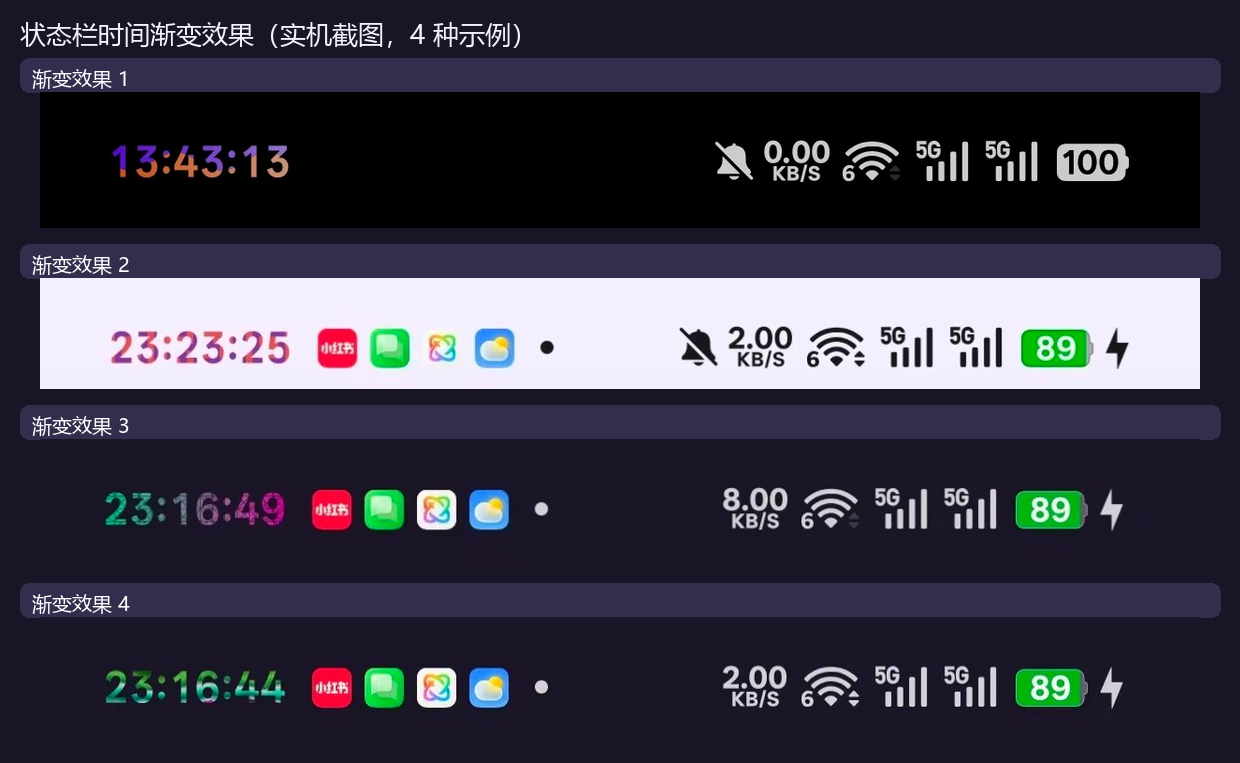
- 页面里分成单色和渐变两个页签,点哪个就切到哪个模式,预览时间也会跟着变。
- 色号框不再单独占一行,而是放到「正在编辑」那一行的右边:边输边生效,少滚一屏。
2. 预设从「够用」变成「随便存」
- 深色、浅色两组,每组最多 20 个自定义预设,互不占用。
- 全新安装会自动带入 深色 4 套 + 浅色 4 套(每组 2 渐变 + 2 单色),都是实机调好的颜色。
- 旧用户升级后不会被塞新预设,你原来存的不会被覆盖。
- 长按任意预设可以删除或重命名;保存时会真正写进文件,不再出现「提示成功但没存上」。
3. 渐变方式多了,效果也更好认
现在一共有 11 种渐变形式:
上→下、左→右、象限光晕、颗粒噪点、镀铬金属、斜纹糖果、波浪切割、低多边形、水磨石、二维码、液态水银。
- 起点色和终点色各有一个圆圈,点一下会有一圈多层涟漪提示当前编辑的是哪一个。
- 方向胶囊改成单行横滑,标题行有一个会动的 ⇆ 箭头提醒「这一排可以左右滑」。
- 渐变也支持浅色模式单独一套颜色,系统切到浅色时自动换过去。
4. 颜色会跟着系统深浅色走
新增「系统模式自适应」:打开后,时间颜色会按系统的深色 / 浅色模式自动切换,不用你手动来回改。旁边有 ? 图标,点开就能看到说明。
5. 自定义任务也能换配色
「自定义任务」里的换配色面板也一起升级:单色方案和渐变方案分开显示,勾选状态不会错位,单色方案显示为分段纯色条,不再被误画成渐变。
6. 作者信息补上了多语言
「关于」卡片新增作者行,点一下可以跳转到作者主页;这一行已经同步到全部语言。
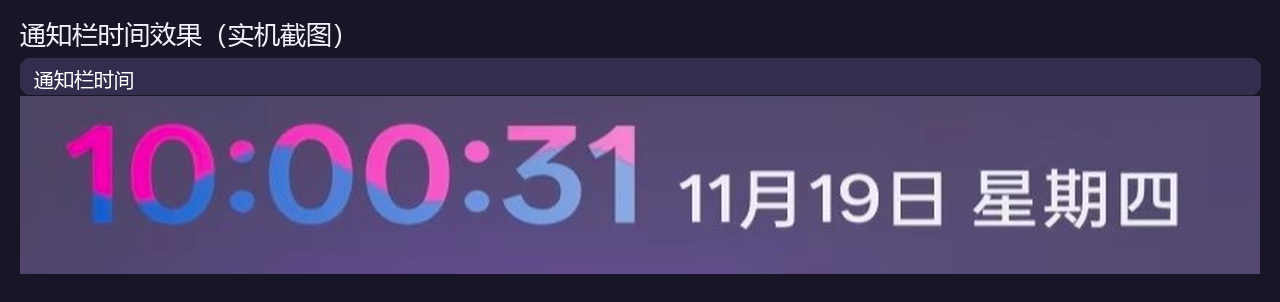
7. 通知栏时间显秒效果
- 下拉通知栏里的大时钟现在也会显示秒(
HH:mm:ss),不再只有时和分。 - 它和状态栏时间共用同一套逐位颜色 / 渐变设置:在「高级设置」里改颜色,通知栏大时钟会同步跟着变。
- 实机效果见本文第一张图。
8. 其他小改进
- 顶部页签改成更紧凑的一体胶囊,不再占掉一大块屏幕。
- 通知栏、浮窗和预览卡的渐变效果保持一致,预览基本就是状态栏实际效果。
- 旧 API 环境装 legacy 包时,会提示还有 API 102 版本可选;modern 包不会重复提示。
修好了什么
| 你看到的问题 | 现在 |
|---|---|
| 单色页预览时间突然变得很大,把调色盘挤没了 | 预览卡高度恢复正常 |
| 色号框删空后再也输不进去、也不生效 | 可以正常清空后重新输入 |
| 拖第一条滑杆时,圆圈颜色慢半拍 | 圆圈、预览和状态栏同步变色 |
| HSV 第 2、3 条滑杆不跟着颜色变 | 饱和度 / 明度滑杆会随色相重绘 |
| 预设重命名、删除提示成功但没保存 | 真正写盘,重开还在 |
| 点高级设置闪退 | 已修,不再闪退 |
| 切换深浅色后,高级页和系统颜色对不上 | 以系统模式为准,页面和时间颜色一致 |
从 v1.2.0 升级要注意
- v1.2.0 正式版用户:legacy 包可以直接覆盖安装;modern 包是不同包名,覆盖同一包名即可,数据都会保留。
- 正在用 vc327–vc345 测试包的用户:测试包和正式版签名不同,不能直接覆盖。请先记下预设和任务,卸载测试包后再装正式版。
- 安装后到 LSPosed 勾选 com.android.systemui 作用域,然后重启 SystemUI 或重启手机。
- 如果升级后发现颜色怪怪的,先检查是不是从测试包直接覆盖安装;签名不同会导致数据读不到。
版本信息
- 本版:v1.3.0,versionCode 346。
- modern(API 102):
io.github.kelebao.colorosclockseconds.modern,versionName1.3.0-api102。 - legacy(API 82):
io.github.kelebao.colorosclockseconds,versionName1.3.0。 - 安装包:
ClockSeconds-v1.3.0-api102-release.apk、ClockSeconds-v1.3.0-legacy-release.apk。 - modern / API 102 版本请到源码 Release 下载:https://github.com/kelebao/ClockSeconds/releases/tag/v1.3.0
- 正式版签名证书未变,SHA-256:
2850e82a5c4e001eb19e1d4d340bfaca049ebea1abc4f1940c02c8065137b82e。 - GitHub Release / tag / Xposed 仓库:已发布。
English
In short: This release completes the Advanced settings page — more colors, smoother color editing, easier preset management, seconds in the notification-panel clock, and several bug fixes.
Effects
What is new
- Better Advanced settings — a dedicated page with separate Solid and Gradient tabs. Switching tabs switches the mode and the live preview. The hex field now sits on the same row as the color being edited and applies while you type.
- Presets you can really manage — dark and light groups, up to 20 custom presets each. Fresh installs start with 4 dark + 4 light presets; upgrades keep everything you already saved. Long-press a preset to delete or rename it, and changes are actually written to disk.
- 11 gradient forms — top→bottom, left→right, quadrant glow, grain, chrome, striped candy, wave cut, low poly, terrazzo, QR code and liquid mercury. The two endpoint circles show a multi-ring ripple when tapped, the direction row scrolls horizontally with a moving ⇆ hint, and gradients can use a separate light-mode palette.
- System mode adaptive — when enabled, clock colors follow the system dark / light mode automatically. The ? icon next to the switch explains how to use it.
- Task recoloring — the custom-task color picker now separates solid and gradient schemes, keeps checkmarks aligned, and draws solid schemes as segmented color bars instead of gradients.
- Author info in every language — the About card now has an author row that opens the author homepage; it is translated in all 21 locales.
- Notification-panel clock with seconds — the large clock in the notification shade now shows
HH:mm:ssand shares the same per-digit color / gradient settings as the status-bar clock, so colors stay in sync. - Other refinements — compact tab header, consistent gradient preview across the notification shade / floating window / preview card, and no duplicate API-102 hints on the modern build.
Fixes
| Problem you saw | Now |
|---|---|
| Huge preview time on the Solid tab hid the color picker | Preview card is back to normal height |
| Empty hex field could not be filled again or applied | You can clear and retype it normally |
| Endpoint circle lagged behind the first slider | Circle, preview and status bar update together |
| HSV sliders 2 and 3 did not follow the color | Saturation / value sliders redraw with hue |
| Preset rename/delete claimed success but did not save | Changes are really persisted |
| Advanced settings crashed on open | Fixed |
| Advanced page colors disagreed with the system after theme switching | System mode is the single source of truth |
Upgrading from v1.2.0
- v1.2.0 users can install the legacy build over the old one. The modern build uses a different package name, so update that same package name to keep data.
- If you are on test builds vc327–vc345, do not install over them — the signing certificate differs. Back up presets and tasks, uninstall the test build, then install the release build.
- After installing, enable the com.android.systemui scope in LSPosed and restart SystemUI or reboot.
- If colors look wrong after upgrading from a test build, check whether you installed over a differently signed build; data cannot be read in that case.
Version info
- This release: v1.3.0, versionCode 346.
- modern (API 102):
io.github.kelebao.colorosclockseconds.modern, versionName1.3.0-api102. - legacy (API 82):
io.github.kelebao.colorosclockseconds, versionName1.3.0. - Packages:
ClockSeconds-v1.3.0-api102-release.apk,ClockSeconds-v1.3.0-legacy-release.apk. - The modern (API 102) build is available on the source release: https://github.com/kelebao/ClockSeconds/releases/tag/v1.3.0
- Release certificate is unchanged, SHA-256:
2850e82a5c4e001eb19e1d4d340bfaca049ebea1abc4f1940c02c8065137b82e. - GitHub Release / tag / Xposed module repository: published.