Flutter Testing Examples
You can find the article here Unit Testing Article
A unit test is a test that verifies the behavior of an isolated piece of code. It can be used to test a single function, method or class.
Let's start with the basic Counter app we get as the default app in Flutter.
Initially separate the counter code from the UI code. So we just put it in a file named counter.dart:
class Counter {
  int _counter = 0;

  int get count => _counter;

  void incrementCount() {
    _counter += 1;
  }
}Now we can write a unit test for this in a file named counter_test.dart. ==As for the name convention it always must end in _test.dart with the start being any name.==
In order to test. We'll always have to import 'package:flutter_test/flutter_test.dart';
So we can call a test(description,body) function inside our main().
Description: The standard convention when describing a test class is:
==GIVEN WHEN THEN==
For example in the current scenario we want to check if the count value is 0 when the counter class is instantiated.
So we'll write: Given counter class when it is instantiated then the value of the count should be 0.
Body: In here we are going to do three things: ==ARRANGE ACT ASSERT==
ARRANGE: We will declare an object of the class
ACT: We will get the value of the count
ASSERT: We will check if the value is 0
And here's the final counter_test.dart:
import 'package:basic_counter/counter.dart';
import 'package:flutter_test/flutter_test.dart';
void main() {
  // given when then
  test('Given counter class when it is instantiated then value of the count should be 0', (){
    // Arrange
    final Counter counter = Counter();
    // Act
    final val = counter.count;
    // Assert
    expect(val, 0);
  });
}
We can test the code using the following command:
flutter testWe can also test the incrementCount(): using the following code:
 // given when then
  test('Given counter class when incrementCount() is called then the value of the count should be 1',(){
    // Arrange
    final Counter counter = Counter();
    // Act
    counter.incrementCount();
    final val = counter.count;

    // Assert
    expect(val, 1);
  });
}Since both of the test are for Counter we can group them together like this:
// Given When Then
group('Counter Class - ', () {
  // Arrange
  final Counter counter = Counter();
  test(
      'Given counter class when it is instantiated then value of the count should be 0',
      () {

    // Act
    final val = counter.count;
    // Assert
    expect(val, 0);
  });

  // given when then
  test(
      'Given counter class when incrementCount() is called then the value of the count should be 1',
      () {
    // Act
    counter.incrementCount();
    final val = counter.count;

    // Assert
    expect(val, 1);
  });
});Imagine if we added another function to Counter called decrementCounter():
void decrementCounter() {
	_counter--;
}
Now we'll have to again add another test:
test(
    'Given counter class when decrementCount() is called then the value of the count should be -1',
    () {

  counter.decrementCount();
  final val = counter.count;

  expect(val, -1);
});
The problem is that this test will fail because in the [[#incrementCount() test]] we've increased the value to 1. So now val will be 0. This is why Flutter provides us with pre-test and post-test functions.
There are two pretest functions:
setUp()setUpAll()
This function will run before every test. So let's say we have 3 tests:
Then it'll be setUp --> test --> setUp --> test --> setUp --> test
So in order to solve the above problem of running multiple tests with the same instance of the Counter() we can declare it like this:
late Counter counter;
	setUp((){
	counter = Counter();
});This function will run only once.
So it'll be: setUpAll --> test --> test --> test
There are two post-test functions:
tearDown()tearDownAll()
The function will run after every test.
test -> tearDown -> test -> tearDown
The function will only run once after all the tests are done. test -> test -> test -> tearDownAll
Imagine we have define a basic User Model:
class User {
  int id;
  String name;
  String username;
  String email;
  String phone;
}Now we can define a UserRepository class where we can get the user from network from jsonPlaceholder:
class UserRepository {
  Future<User> getUser() async {
    final response = await http.get(
      Uri.parse('https://jsonplaceholder.typicode.com/users/1'),
    );

    if (response.statusCode == 200) {
      final responseBody = jsonDecode(response.body);
      return User.fromJson(responseBody);
    }
    throw Exception('Some Error Occurred');
  }
}We have multiple testing scenarios
void main() {
  late UserRepository userRepository;
  // Pre-test function
  setUp(() {
    userRepository = UserRepository();
  });
  group('User Repository -', () {
    group('getUser Function -', () {
      test(
          'given UserRepository class when getUser function is called and status code is 200 then the returned object should be a User Model',
          () async {
        // Act
        final user = await userRepository.getUser();

        // Assert
        expect(user, isA<User>());
      });
    });
  });
}
==If we see line 16. The way we check if it is an object is by using isA<User>() function.
This checks if it's an object of that type.==
test(
    'given userRepository class when getUser function is called and the status code is not 200 then the function throws an exception',
    () async {
  // Act
  final user = await userRepository.getUser();

  // Assert
  expect(user, throwsException);
});
==So as we can see in line 8. We can check for an exception using throwsException==
But the problems is when we run the test it is obviously going to fail because the status code is going to be 200. So how do we test the exception test block ?
That's why we are going to use external plugins such as Mockito and Mocktail.
Now if we look at [[#getUser()]] We see that it is dependent on http package.
==So whenever there is an external dependency we need to get control over them so that we can test them out properly. This is basically dependency injection.==
Since our main dependency is http. Let's put in the constructor so that we can inject it from anywhere so we are going to change the UserRepository to this
class UserRepository {
  final http.Client client;

  UserRepository(this.client);

  Future<User> getUser() async {
    final response = await client.get(
      Uri.parse('https://jsonplaceholder.typicode.com/users/1'),
    );

    if (response.statusCode == 200) {
      final responseBody = jsonDecode(response.body);
      return User.fromJson(responseBody);
    }
    throw Exception('Some Error Occurred');
  }
}
Since we are calling a constructor, we can switch the http client to a mock client if we want for testing purposes. A mock client allows us to modify its behavior.
For now we will be using the Mocktail from pub.dev as we can pass in a mock client.
We are going to add Mocktail to the dev dependency
flutter pub add -d mocktailImagine if we wanted to create a MockHTTPClient of Client from HTTP. We get the following:
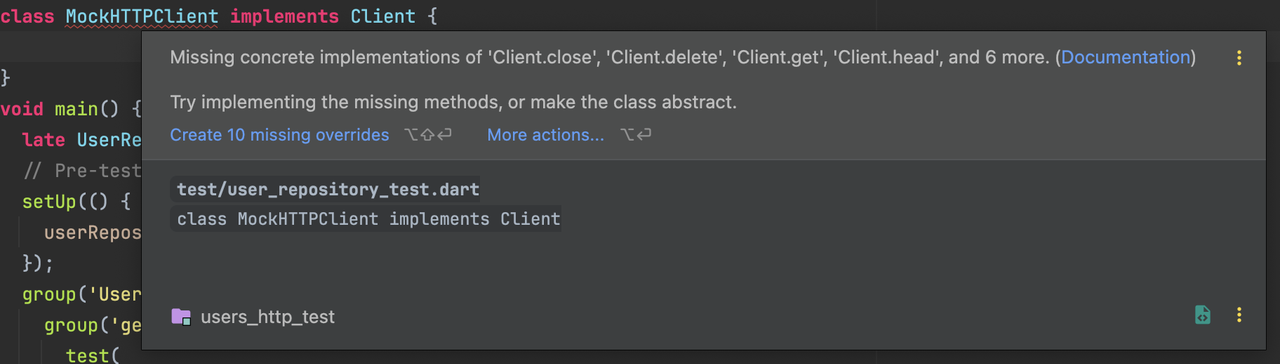
This is where Mocktail comes into play. So we can write the following code:
class MockHTTPClient extends Mock implements Client {}and it doesn't cause any errors.
We have to use the when() to declare the expected output for the mockHTTPClient
test(
          'given UserRepository class when getUser function is called and status code is 200 then the returned object should be a User Model',
          () async {
        // Arrange
        when(() => mockHTTPClient
                .get(Uri.parse('https://jsonplaceholder.typicode.com/users/1')))
            .thenAnswer((invocation) async {
          return Response('''
              {  "id": 1,  "name": "Leanne Graham",  "username": "Bret",  "email": "Sincere@april.biz",  "phone": "1-770-736-8031 x56442",  "website": "hildegard.org"}
              ''', 200);
        });
        // Act
        final user = await userRepository.getUser();

        // Assert
        expect(user, isA<User>());
});test(
'given userRepository class when getUser function is called and the status code is not 200 then the function throws an exception',
() async {
// Arrange
when(
() => mockHTTPClient.get(
Uri.parse('https://jsonplaceholder.typicode.com/users/1'),
),
).thenAnswer(
(invocation) async => Response('', 500),
);
// Act
final user = userRepository.getUser();
// Assert
expect(user, throwsException);
});
});As you can see here i just changed the status code and this resulted in a exception which satisfies our test case.
So this basically covers Unit Testing