Repository navigation
Releases
JAgentDesk v0.9.58

macOS: on Apple Silicon, download the asset named macOS-Apple-Silicon. Do not install the Intel x64 asset on Apple Silicon; it runs under Rosetta and is intentionally rejected by the app.
Remote tasks from any folder: remote_run no longer needs git, can send only the folders you name,
or run without sending code. ssh_run results now show as a card, and job cards render for every
agent provider.
Added and changed
- No git required. By default
remote_runsends the agent's current folder. Outside a git
repository it skips dependency, cache and VCS folders (node_modules,.venv,__pycache__,.next,
.gitand similar); every git repository found inside keeps following its own.gitignore..env,
private keys and similar files are still never sent; limits stay 1 GiB per run and 100 MiB per file,
and size limits are now checked before any file is read, then files are hashed as a stream. - Choose what to send.
sourcesends only the folders you name (one or several, inside the
current folder); each lives in its ownsources/<name>on the target and
keeps its dependencies between runs.sendCode: falseruns a command in a separate emptynocode/
folder without sending anything. The permission card lists every source, or says no code is sent. ssh_runresult card: server name, command, exit code, output and a separate stderr box.- Job cards for every provider. Claude delivers tool results inside a wrapper, so v0.9.57 showed
only a collapsed "Remote run" row for Claude agents; the job card and thessh_runcard now read
the result shapes of Claude, Codex, OpenCode and ACP agents. - Clearer tool choice.
remote_runis described for project work on a copy of the code;
ssh_runfor quick commands on the server itself. - Protocol: optional
noCodeandsourcesfields on remote jobs; older apps ignore them.
Verification and current limits
- Checked on the real Windows 11 PC (WSL2) over the tailnet with the Tailscale app on the Mac stopped:
a non-git folder holding two git repositories and a plain folder (ignored build output,node_modules
and both.envfiles left out, zero files on re-run);sendCode: falsein an emptynocode/folder;
sourcewith one and two folders, every refused source (outside the folder, symlink escape, missing,
duplicate name, more than eight) refused before any permission card; earlier sources and the default
copy left untouched. Regression: re-run, running-job refusal, Stop, a 90-second job across a
20-second Tailscale freeze, no secrets in daemon files. - In the app, a Claude agent's
ssh_runcalls (exit 0 and exit 2 with stderr), a two-source job and a
no-code job rendered as cards. - A whole folder of many repositories can exceed 1 GiB: the run is refused (measured: 22 seconds for a
multi-GB folder, no file content read) with a hint to usesource. - Repository typecheck, focused server/protocol/app tests and the real OpenSSH end-to-end suite (19)
passed; the full app suite has the same 39 pre-existing failures as v0.9.57. - OpenCode agents with Code Mode enabled may not see the remote tools directly.
Guide: docs/remote-tasks.md
Full changelog: v0.9.57...v0.9.58
JAgentDesk v0.9.57
macOS: on Apple Silicon, download the asset named macOS-Apple-Silicon. Do not install the Intel x64 asset on Apple Silicon; it runs under Rosetta and is intentionally rejected by the app.
Remote tasks: ask the agent in chat to run something on another machine — for example a Windows PC
through WSL2 — and get the output back in the same chat. The project and the agent stay on the
daemon machine; the other machine only receives a copy of the code.
Added
- Run on another machine from chat. Agents get
remote_targets,remote_run,
remote_job_wait,remote_job_output,remote_job_stopandremote_jobs.remote_runand
remote_job_stopask for permission first; the card shows the target, command, folder, file count
and size, and how many secret files were left out. - JAgentDesk Tailscale route for SSH servers. A server can use Route → JAgentDesk Tailscale:
SSH goes through the daemon's embedded Tailscale node (a loopback-only SOCKS5 proxy with a per-run
credential), so the daemon machine does not need the Tailscale app running. If the embedded node is
not connected, the connection fails withtailnet_unavailableinstead of trying a direct route. - Workspace copy, not a remote checkout. Tracked files plus new files that are not ignored,
including uncommitted changes..env, private keys and similar secret files are never sent.
Re-runs only send changed files and delete removed ones; dependencies and caches installed on the
target (for examplenode_modules) are kept. - Jobs that keep running. Jobs run detached on the target: they survive network drops, closing
the app and daemon restarts, and output resumes from the last byte. Stop ends the whole process
group. One active job per workspace and target; a second run is refused with the running job's id. - Remote tasks in the server form: enable a server for remote tasks, choose its work folder and
run Check (OS, shell, free space, writable folder, required tools). - Job card in chat: the tool call shows as a card with live status, sync summary, exit code, the
end of the output and a Stop button. - Protocol: additive
remote_exec.*RPCs, theremote_exec.job_updatedevent and optionalvia/
remoteExecfields on SSH servers. Older apps ignore them.
Verification and current limits
- All 12 acceptance checks passed against a real Windows 11 PC (Ubuntu 20.04 on WSL2) over the
tailnet with the Tailscale app on the Mac stopped: SSH terminal and host-key check,tailnet_unavailable
in 3 ms with Tailscale off, target check, run, incremental sync with.envexcluded, zero-byte
re-run, a 90-second job surviving a 20-second Tailscale freeze and a daemon restart with all 90
output lines exactly once, Stop in 1.9–2.9 seconds with no process left, the running-job refusal,
no secret in daemon files or client messages, and the live job card with Stop in the app. - Stop was also checked at eight moments between 0.3 and 4.5 seconds after starting, including while
the copy was still being sent. - Repository typecheck, focused server/protocol/app tests and a real OpenSSH end-to-end suite passed.
The full app suite has the same 39 pre-existing failures as v0.9.56 and no new ones. - Targets need a POSIX shell,
tarandsetsid: Linux and WSL2 work; macOS targets do not ship
setsid, so Check reports it missing. Plain Windows without WSL is not supported. Results from a
Linux target do not prove macOS or iOS behaviour. - A snapshot is limited to 1 GiB (100 MiB per file). Files are not copied back from the target.
- In a repository whose own OpenCode configuration enables Code Mode, OpenCode agents may not see
the remote tools directly. - The app was checked through the desktop renderer (web build); the iOS/Android form and card share
the same components but were not exercised on devices.
Setup for a Windows PC with WSL2: docs/remote-tasks.md
Full changelog: v0.9.56...v0.9.57
JAgentDesk v0.9.56 — Figma connection and page loading fixes
Figma connection and navigation fixes since v0.9.55. Viewing and playback run inside JAgentDesk; Figma Desktop and Link are not required for those paths.
Changes
- OAuth completion and account removal update the UI immediately; stale in-flight reads cannot restore removed rows.
- Connections no longer shows a separate editing setup or raw editing identity. Basic OAuth scopes no longer include optional catalog scopes that can reject sign-in.
- Browse tracked files inside JAgentDesk using the existing REST connection, without a second website login. Complete account/folder discovery remains unfinished.
- Section Fit, loading all visible previews together, zoom-aware preview resolution, cached-first painting and visible failure notifications.
- Page index and selected-page loading share a pinned snapshot. Malformed/mismatched snapshots and missing pages display errors; Retry reconnects the paired host.
- Prototype flow page selection preserves the background and current playback until a flow is chosen. Long page/flow menus scroll within the window.
Current limits
This release does not finish cold loading or full Figma Design parity. A real run with empty local design/font caches and a restarted daemon/Electron needed 24.68 s to fill a 65-preview viewport. The PNG export call to Figma waited 17.64 s. A four-screen Section needed 6.75–6.91 s from opening the file, with 1.84–2.00 s after selecting the Section. Figma-side cache state was uncontrolled.
Folder discovery, authenticated writes to the original design, presence/follow and other unimplemented Design features remain unfinished. New page-scoped viewing needs an updated host. Native mobile and Windows/Linux/web have not passed the same real-file UI checks as macOS Electron.
Verification
Repository typecheck, focused regressions, affected-file lint/format and daemon build passed. Real macOS Electron checks covered pages, host disconnect/reconnect/Retry, missing-page errors, 49 flows on another page, pinned playback, scrolling to the final flow and preserving the background canvas. Experimental replacement renderers, SVG previews and smaller PNG export groups are not included.
Downloads
- Apple Silicon Mac: choose
macOS-Apple-Silicon, not the Intelx64package. - Windows installers, Linux packages and Android APK are attached below.
- The iOS IPA is unsigned and requires signing/sideloading before installation.
JAgentDesk v0.9.55
Figma browsing, rendering and prototype playback improvements. JAgentDesk draws designs and
plays frames itself; viewing and playback do not require Figma Desktop or the Figma Link plugin.
This is an incremental release, not full Figma Design feature parity.
Changed
- Browse files: a desktop file picker opens Figma's Files website in an isolated guest.
Selecting a supported file URL hands it to JAgentDesk's canvas. Website sign-in remains separate
from the daemon's REST connection. Manual file/team URLs and Link controls move under Advanced. - Large-file navigation: include frames nested in Sections, preserve flow starting points,
expand truncated Section metadata on demand and load detailed frame trees only where needed.
Overview, loading, failed content and ready content have distinct visible states. - Sharper canvas: unavailable fonts use Figma-exported outlined SVG glyphs. Raster fallback
resolution follows zoom and display density, with separate cache keys for version, format and
bounds. Correct fallback placement, opacity, shadows, linear-gradient handles and stroke alignment.
Complex stroke clipping uses a node fallback rather than dropping parts of the outline. - Scoped prototype playback: fetch only the frames currently needed for the stage, overlays
and transitions, in batches of at most ten. Reuse the canvas's versioned frame cache, release
unused frame assets and show loading/failure with targeted Retry until required images and
glyphs have painted. A mounted canvas is no longer reported as complete content. - Sections and editing connection: add Section selection and move-preview handling, plus
an independent editing-connection panel. A write requires the connector's authorization and
readback; a local preview or pending operation is not presented as a saved Figma change.
Chat keeps the provider and model selected by the user. - Comments: improve search, sorting, filters, refresh and desktop/compact layouts. Comment
region data can travel through the protocol without being collapsed to a point. - Less repeated work: coalesce identical in-flight reads, reuse freshly verified metadata
and stop unchanged-version polls from clearing the canvas. Historical reads cannot replace
the live-version memo; stale poll results cannot roll back a confirmed write readback. - File-access errors identify the connected account and preserve Figma's denial details.
Verification and current limits
- Focused regression tests, app typecheck and daemon build passed. Real Electron checks used
a file with over 3,600 frame nodes; the same design frame was visually compared at 100%,
200% and 332% zoom on a DPR-2 display. - Continuous pan on a loaded viewport measured about 56–58 compositor frames per second.
One open/play/close run measured approximately 184 MB peak app-process-tree growth; these
measurements are not a performance guarantee for every file or platform. - Cold loading still misses the three-second target: the latest real file needed about
29 seconds for complete viewport content. Initial prototype content can also take many
seconds while Figma API/export requests finish. A warm UI reopen completed its viewport in 0.44 seconds with no new REST requests in that run. - Website sign-in and file selection, authenticated writes to the original design, native mobile
rendering and multi-user presence/follow have not passed end-to-end acceptance. This release
does not claim full Figma collaboration or editing support. - Some context-dependent backdrop exports and advanced prototype behavior can still differ
from Figma. Comment pins, mentions, resolve/reopen and other unimplemented Design features
remain outside this release's verified behavior.
JAgentDesk v0.9.54 — Figma sign-in and iPhone touch fixes
Fixes the Figma sign-in crash and Apple App ID rejection when enabling touch on an iPhone.
Fixed
- Figma sign-in: consume the completed sign-in before navigating to files. While the connection
query was catching up, repeated navigation could crash the app with React error #185. Reopening
Connections and React StrictMode no longer replay the completed sign-in. - iPhone touch: sign a newly prepared WebDriverAgent with a stable JAgentDesk bundle identifier
for the Apple team, instead of trying to registercom.facebook.WebDriverAgentRunner.xctrunner
and receiving Apple error 9401. Retries use the same identifier. Reinstalling with the same account
keeps the identifier already stored for that device; switching accounts does not inherit it. - The WebDriverAgent bundle override reaches the existing Sideload provisioning/signing pipeline
and remains part of its saved auto-refresh options.
Verification
- 7 React DOM component tests and 23 daemon tests passed, including the regression cases, WDA
signing adapter, device hub, and IPA bundle-editing fixture. - Full repository typecheck, focused lint and formatting checks, and daemon/CLI build passed.
- Live Figma OAuth and signing/installing WebDriverAgent on a physical iPhone were not exercised.
Downloads
Choose the macOS Apple Silicon asset for an Apple Silicon Mac, or the Intel x64 asset for an Intel Mac. Android uses the APK; the iOS device IPA is unsigned and requires signing before installation.
v0.9.53 — Figma inside JAgentDesk and the mobile menu grid
Figma inside JAgentDesk: sign in with your own Figma account, open big files in a light viewer
JAgentDesk draws itself (no Figma desktop canvas, no heavy WebView), inspect and export, play
prototypes, read and answer comments, and design or edit through the new Figma Link plugin or a
chat agent. The mobile drawer menu no longer pushes the project list off the screen.
Figma — sign in
- OAuth with your own private Figma app. Figma only gives API access to OAuth apps, and a private
app in your own team needs no review. The connect screen walks through it: create the app, copy the
callback URL, tick the listed scopes (Copy all), paste the client ID and secret. The secret and the
tokens stay on the daemon ($JAGENTDESK_HOME/figma, files 0600) and never reach the apps or the logs. - System browser only. Desktop opens your browser and catches the answer on
127.0.0.1:8766/figma/callback; you can always paste the final URL instead. On a phone, Sign in on a
desktop finishes the sign-in on a paired desktop. - One token manager for the whole daemon: a refresh happens once even when several requests hit an
expired token, and an account that needs signing in again says so.
Figma — files and the canvas
- Figma section with its own left column (desktop rail and the mobile drawer): connections, Add file
(paste afigma.com/design|file|proto/…link), pinned and recent files, teams by URL, files open in
Figma (through Link), and Figma Link status. - A viewer JAgentDesk draws itself. Figma has no light viewer to embed, so JAgentDesk renders the
nodes on its own canvas: frames, groups, clips, vector paths, rectangles/ellipses/polygons/stars/lines,
corner radii, solid/linear/radial/angular/diamond gradients, image fills, strokes, drop and inner
shadows, blurs, opacity, blend modes, masks and text with its own fonts. A node the renderer cannot
draw yet is shown with Figma's own render of that one node, in place. - Only what you look at is loaded. Opening a file loads pages and top-level frames; a frame's layers
load once when it comes into view and are cached per file version, so panning and zooming cost no
extra Figma requests. Fit shows every frame of the page; 100 % and centring use the canvas size. - Badge: Live when the file comes from Figma Link, Snapshot · version when it comes from the
REST API. Open files are checked for a new version once a minute (only while open). - Deep links (
node=1-61) and comment clicks select and zoom to the layer, nested layers included. - Inspect: size, position, auto layout (direction, gap, padding per side, sizing), fills (gradients
shown as gradients with their stops), strokes, effects, text, component or instance (local component
or team library), and generated CSS to copy (gradient angle from Figma's handle positions,
shadows with blur and spread). Export PNG/JPG/SVG/PDF at 1–4× through the daemon. - Versions: list them and open the canvas at an older version (read only).
- REST limits are respected per tier, with
Retry-After; a 429 shows your plan tier and Figma's upgrade
link and is never retried in a loop.
Figma — prototypes
- A prototype player JAgentDesk wrote (Figma has no playback API): flows from the file, hotspots on
nodes with interactions, on click / on hover / while pressed / after delay, navigate, back, overlays,
swap and close overlay, scroll to, open URL, and the instant / dissolve / move / push / slide
transitions with their easing. Smart animate matches layers by name between two frames and
animates position, size, opacity, colour and corner radius. - The first flow starts by itself; a file without flows starts at its first frame, and the flow name
stays on the flow you started. Overlays are drawn at the same scale as the frame under them, which
stays visible, and the buttons inside an overlay work. Text is drawn in the file's fonts.
Figma — comments
- Comments per file and per layer, pinned on the canvas, with replies, reactions (shown as emoji),
posting and deleting your own. Clicking a comment goes to its layer or its point on the canvas.
Figma — design and edit (Figma Link)
- Figma only accepts changes from a Figma client, so JAgentDesk ships JAgentDesk Figma Link, a Figma
desktop plugin built on figma-mcp-forge (MIT,
credited). The daemon installs it under$JAGENTDESK_HOME/figma/plugin; the Link panel shows the
manifest path to import once (Figma desktop → Plugins → Development → Import plugin from manifest…). - Pairing. The bridge listens on
127.0.0.1:1995only. The first time the plugin connects it shows a
6-digit code you enter in JAgentDesk; after that it uses a 32-byte key you can revoke. Connections with
a webOriginor from another machine are refused before the socket opens, and an unpaired client
cannot run anything. If another tool already uses port 1995 (for example figma-mcp-forge itself), the
panel says so. - Edit from the canvas: rename, hide, lock, delete, duplicate, reorder, text, fill colour, corner
radius, size, position, auto layout, create frame/text/rectangle, components and instances, swap, and
prototype reactions. With Link connected the change happens in Figma and shows on the canvas. - Edit queue without Link. Edits made while Figma Link is not connected are drawn on the canvas at
once and kept in a queue (Review, drop one, Discard all). When Link connects, Apply N changes sends
them through the plugin and stops on any value changed in Figma meanwhile (Keep mine / Keep Figma).
run_scriptstays off unless you turn it on.
Figma — chat agent
- Ask AI on a file, frame or layer opens a chat that knows the file, page and selection. Agents get
figma_*tools to read through REST (outline, nodes, renders, comments, versions, components, styles,
CSS, prototype) andfigma_link_*tools for every figma-mcp-forge read and write tool; writes,
comments and the edit queue ask for permission first.
Mobile drawer menu
- The drawer's 16+ menu rows are now a compact grid of tiles (5 per row, icon and short name) above the
projects list, which gets the rest of the screen and scrolls. New sections (Figma) appear in the grid
by themselves. The grid can be collapsed with the Menu header; the choice is remembered.
Tested
- 212 daemon Figma tests and 877 app tests (Figma and shared components), with the fake Figma API
answering in the shapes Figma documents; app and repository typecheck clean. The renderer is checked against 60 recorded fixtures, including REST-shaped nodes. - A real daemon with the web app, headless, three rounds: sign-in screens, adding a file, canvas, Fit,
pan and zoom, deep links, inspect and CSS, prototype with overlays, comments, the Link panel (Origin
refused with 403, unpaired clients do nothing) and the phone drawer and canvas (screenshots in the
README). - Not tested here: a real Figma account and Figma desktop with the plugin — that needs your own private
OAuth app, and port 1995 free.
JAgentDesk v0.9.52 — iPhone screen over the cable starts
A cabled iPhone stayed on "Connecting…" / "Starting the screen…" after Enable control. Fixed and
checked on a real iPhone (iPhone14,5, iOS 18.5, USB).
iPhone screen over the cable
- Cause. On iOS 17 and later the screen goes through go-ios' userspace tunnel. go-ios writes its
RemotePairing identity (selfIdentity.plist) into the current working directory, and the packaged
daemon runs with/as its working directory, which is read-only. The tunnel therefore exited with
code 1 at once, the daemon started it again on every screen request, and no frame ever arrived. - Fix. go-ios now runs in its own writable directory,
$JAGENTDESK_HOME/devices/go-ios(0700),
and the tunnel keeps its pair records there (--pair-record-path). A tunnel that fails is logged
with go-ios' own messages (never pairing material) and is retried after 10 seconds instead of on
every request. - Measured on the real iPhone with a built daemon: first frame after 2.9 s, then about 1.5 frames
per second at 592 × 1280 while only viewing (no WebDriverAgent); the faster WebDriverAgent stream
takes over once touch is on.packages/server/scripts/iphone-screen-check.mjs <port>repeats this
check (it counts frames and sizes, it never stores a frame). - Tests cover the working directory and the pair-record path given to every go-ios command.
Apple ID sign-in
- "Apple is limiting sign-in attempts from this host (HTTP 429)" is Apple pausing sign-ins from one
machine and network after many attempts in a short time (today's attempts plus test probes made from
the same machine). Nothing is wrong with the account; it clears after a while. JAgentDesk never
retries a sign-in by itself.
Downloads
- macOS: on Apple Silicon download the asset named
macOS-Apple-Silicon. Do not install the Intel
x64 asset on Apple Silicon; it runs under Rosetta and is intentionally rejected by the app. - Windows x64 installer, Linux x64 AppImage/deb, Android APK, and an unsigned iOS IPA.
JAgentDesk v0.9.51 — iPhone view-first over the cable; Apple ID sign-in reaches your teams
An iPhone plugged in with its cable now shows its screen as soon as you enable control — no Apple ID,
no setup step — and the first touch sets up the rest in place. Adding an Apple ID that works in
Sideloadly no longer stops at "Developer Services listTeams returned 200 without a plist". (v0.9.50
was withdrawn before its files were built; its changes are part of this release.)
iPhone and iPad over the cable — view first, touch when you want
- The screen shows right away. After Enable control, a cabled iPhone or iPad streams its screen
through the device's own screenshot service over the cable (go-ios; the Developer Disk Image is
mounted automatically, the personalized one on iOS 17+). No Apple ID and no helper app are needed to
watch it. The view is marked "View only" until touch is on. If Developer Mode is off, the device says
so (needs_developer_mode). - Touch turns on where you are. Apple only lets a computer tap and type on an iPhone through a
small XCTest app signed with an Apple ID — WebDriverAgent, the open-source app Appium and Maestro use.
The first tap, swipe, text or button press (or the Enable touch button) opens one dialog in
place: with one Apple account saved in Sideload it is used directly; with several you pick one; with
none the Add Apple ID form (with two-factor code) is right there — no separate "Prepare device" step
and no trip to the Sideload tab. The dialog shows each step (download, sign, install, launch) and
then performs the touch you made. The account is saved for Sideload too. - After that it just works. When WebDriverAgent runs, the screen switches to its faster MJPEG stream
without dropping viewers. A free account uses one of its 3 app slots for it and the signature lasts 7
days; Sideload's auto refresh renews it, and if it ever expires the next touch repeats the dialog. - Chat agents.
sim_screenshot, logs and app tools work on an iPhone without WebDriverAgent. A
touch tool sets it up with the saved Apple account (after the per-device permission card); with no
account saved it returnsapple_account_requiredand tells you to add one; with several it reuses the
account that signed this device, otherwise asks you to pick one in Sims. - Protocol: one optional field (
SimDevice.screenAvailable) and new error codes; older daemons keep
their previous behaviour. - Checked with tests and a built daemon driving a stand-in for go-ios; not yet on a real iPhone.
Sideload — Apple ID sign-in reaches your teams
- Signing service request updated. Sign-in itself (anisette, password, two-factor code, the
signing token) already succeeded; the next call, which lists the account's teams, got an answer
that was not a property list. JAgentDesk introduced itself to Apple's signing service as a 2019
client version (X-Xcode-Version: 11.2 (11B41)). Like Sideloadly and other current tools, it now
sends the current version (16.4 (16F6), as the maintained open-source implementations do). This
is only the name every free-account sideloader uses with Apple's signing service; nothing needs
to be installed. - Compressed and JSON answers. Responses from Apple's signing service are now decompressed
(gzip, deflate, brotli — including gzip sent without a header), and JSON error answers are read and
shown with Apple's own message. - Errors that say what happened. If Apple still answers with something that is not a property
list, the error now states the HTTP status, the kind of content (empty, JSON, XML, or an HTML page
with its title), its type and size — never its content — so the next step is clear. - Tests cover gzip with and without the header and the description of non-plist answers.
Downloads
- macOS: on Apple Silicon download the asset named
macOS-Apple-Silicon. Do not install the Intel
x64 asset on Apple Silicon; it runs under Rosetta and is intentionally rejected by the app. - Windows x64 installer, Linux x64 AppImage/deb, Android APK, and an unsigned iOS IPA.
JAgentDesk v0.9.49 — Apple ID sign-in with the Mac's own anisette, whole Jira boards with links and attachments
Fixes for the first real-world use of v0.9.48: signing in with an Apple ID on macOS works with the
Mac's own anisette, the Add Apple ID dialog is as short as Sideloadly's, and Jira boards load every
issue, scroll, show links correctly and display attachments.
Sideload — Apple ID sign-in on macOS
- HTTP 503 from Apple fixed. With the default
nativeanisette, Apple's sign-in service refused
every request ("refused the request (HTTP 503) … anisette data"). Tested one variable at a time
against Apple: the request described itself as Xcode (X-MMe-Client-Infoending in
com.apple.dt.Xcode/…) next to this Mac's own AuthKit one-time password, and Apple rejects that
pair. The native source now sends the Mac's real identity from AuthKit'sAKDevice: its own client
description (serverFriendlyDescription), device id (uniqueDeviceIdentifier), local user id and
serial number, the matchingakduser agent for this Mac's CFNetwork and Darwin versions, the
device locale and time zone, and AltServer's routing info. With these headers Apple answers the
first sign-in step normally (checked with a made-up Apple ID: HTTP 200 and "account information
entered incorrectly" instead of 503). The random identity is now used only for aremoteanisette
server. - Clearer errors. A 503 says which anisette source Apple refused and how to switch to a remote
server under Advanced; HTTP 429 says Apple is rate-limiting sign-ins from this network. - Add Apple ID like Sideloadly. The dialog now shows only Apple ID, Password and "Keep me signed
in for automatic refresh". A line under the password explains that Apple requires the Apple ID
password to sign apps (Sideloadly asks for it too) and that it goes only to this host and to Apple.
The anisette source moved into a collapsed Advanced section; on Linux, where a remote server is
required, the dialog opens Advanced with Remote selected after the first attempt. Two-factor codes
are still typed in the app. - "Sign in again" keeps the account's anisette source instead of resetting a remote account to
native. - Still to confirm with a real Apple ID: the steps after the first one (password check, two-factor
code, the developer token). An opt-in probe for the first step ships as a local test
(JAD_GSA_PROBE=1, macOS only, never in CI).
Jira
- Whole boards. Boards were cut at 500 issues with a red "only the first 500 are shown" banner.
Boards, backlogs and sprint completion now page through every issue (Jira Cloud page by page, Data
Center four pages at a time once the total is known) with the board's Kanban sub-filter on every
page, so the columns match the web board. A safety ceiling of 5,000 issues remains; above it a
neutral note suggests a quick filter. Projects and quick filters also load past 500. Agent tools
keep their 500 default so an agent's context is not flooded. - Scrolling. The board could not scroll on web and desktop because its columns had no height.
Each column is now its own virtualized list that scrolls vertically (only the visible cards are
drawn, so an 800-card Done column stays smooth), and the board scrolls horizontally. With
swimlanes on, lanes scroll together and each cell shows 50 cards with "Show more". - Links. Smart links in descriptions and comments showed as
<https: host path …>because they
were converted to<url>and read as an HTML tag. Smart links (inlineCard,blockCard,
embedCard), Data Center[url]/[text|url]and bare URLs now render as clickable, coloured
links that open in the system browser. - Attachments you can see. Images and files embedded in descriptions and comments showed only as
[attachment: name]. They are now matched by file name to the issue's attachments (newest wins if
names repeat) and shown in place: images inline with a full-screen viewer on tap, other files as a
download chip; Data Center!image.png!,!x|thumbnail!,[^file]and[label|^file]work the
same way. Bytes still come only through the daemon (jira.issue.attachments.download); the app
never receives a Jira URL. - Attachment downloads fixed. Every download asked Jira for JSON, which Jira's file endpoints
refuse, so no attachment could be previewed. Downloads now accept any content type, and images over
10 MB preview through Jira's thumbnail.
Verification
- Root typecheck clean; Jira and Sideload suites pass (server 102, app 58), including new tests for
native anisette headers, board paging with the sub-filter, the ADF / wiki converters and media
mapping. - Built daemon starts without errors;
six-features-smoke.mjspasses 7/7; the Jira daemon check
passes 12/12 against the fake Jira site (a 1,200-issue Kanban board loads fully in 12 pages); the
browser end-to-end test passes 6/6, asserting both scroll directions, the clickable link and the
inline image on desktop and phone sizes.
Downloads
- macOS: on Apple Silicon download the asset named
macOS-Apple-Silicon. Do not install the Intel
x64 asset on Apple Silicon; it runs under Rosetta and is intentionally rejected by the app. - Windows x64 installer, Linux x64 AppImage/deb, Android APK, and an unsigned iOS IPA
(install it with Sideloadly or with JAgentDesk's own Sims → Sideload).
JAgentDesk v0.9.48 — Jira, Argo CD, iOS sideload, real devices over cable, Spec mode, activity graph
Six new areas: Jira and Argo CD you sign in to and work with inside JAgentDesk, a
Sideloadly-class iOS sideload with your Apple ID (plus Android APK install), real iPhones,
iPads and Android phones in Sims with live screen and control, Spec mode that runs GitHub Spec
Kit's spec-driven workflow phase by phase in the agent chat, and an activity graph drawn with
archify that shows what the agent did, is doing and still has to do. The Android APK is back in
the release assets.
Jira (new "Jira" section, desktop and mobile)
- Sign in inside JAgentDesk, three ways. Jira Cloud with email + API token; Jira Cloud with
OAuth 2.0 (3LO) using an Atlassian app you register yourself (step-by-step guide and a copy button
for the callback URL; the client secret stays in the daemon); Jira Data Center / Server with a
Personal Access Token. On desktop the browser login returns to a local listener on
127.0.0.1:8765; if the developer console rejects that callback you paste the final URL instead;
on mobile you can "Sign in on a desktop" through a paired desktop. - Tokens never leave the daemon. API tokens, PATs, OAuth access/refresh tokens and client
secrets live in the daemon's own secret store underjira/; one credential manager refreshes each
connection one request at a time (two parallel requests on an expired token cause exactly one
refresh), writing the rotated refresh token before using the new access token. - Its own left column. Your work, Search, Filters, then each connection with its sign-in state,
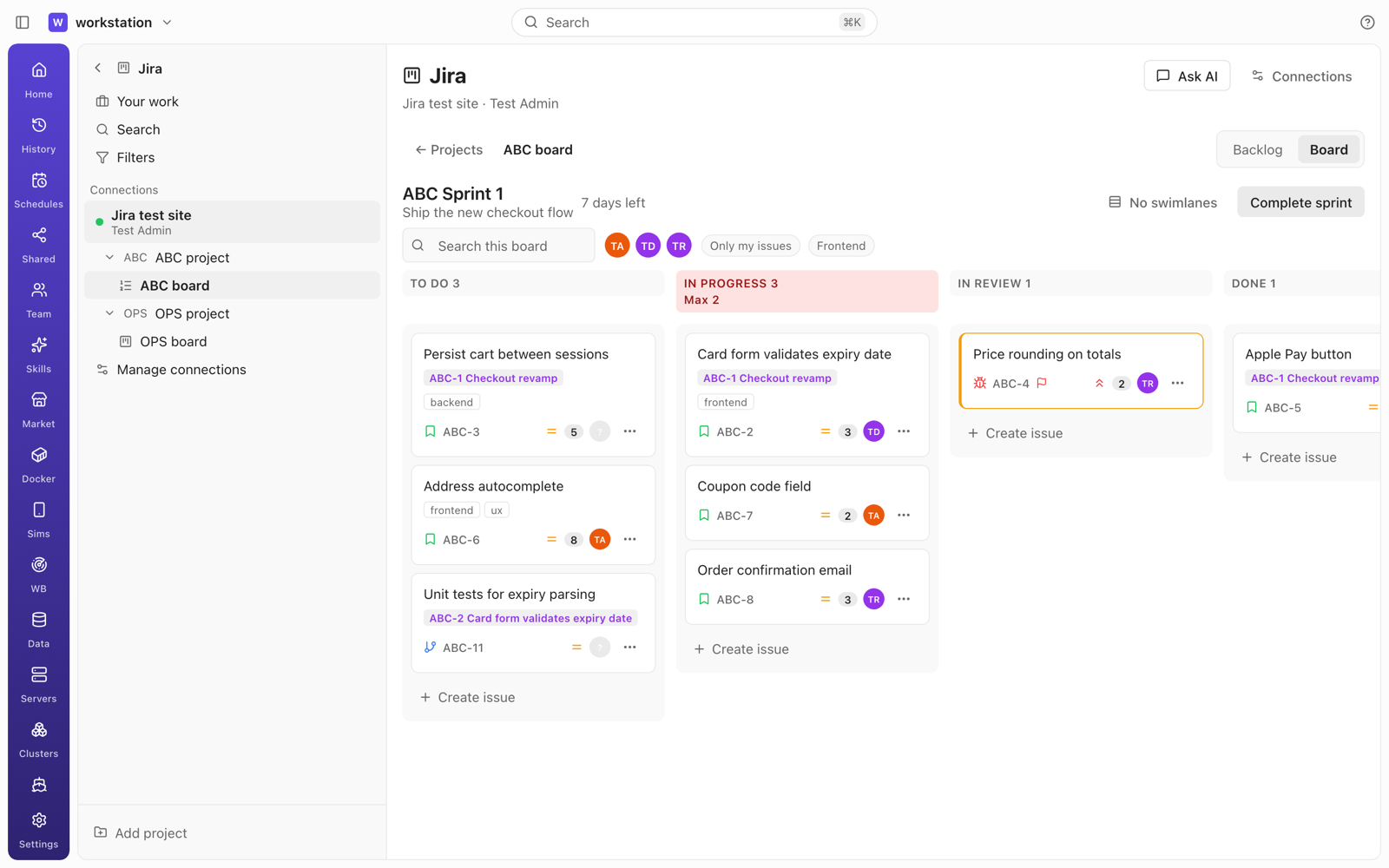
its projects and their boards. - Boards like the web. Kanban boards and the active sprint of Scrum boards: columns from the board
configuration with issue counts and WIP limits (highlighted when exceeded); cards with key,
summary, type, priority, assignee, estimate, epic/parent and labels. Drag a card to another column
to transition it — transitions with a required screen open a dialog with exactly those fields —
and drag within a column to rank. Mobile gets "Move to…". Swimlanes (none, assignee, epic/parent or
your own JQL queries, saved per board), quick filters, search and filters by assignee, epic, label
and type; sprint name, days left and Complete sprint; quick-create in a column. - Backlog and sprints. Sprints above the backlog; create, start and complete sprints (dates, goal,
where unfinished issues go); drag to rank or move into a sprint; epic and version panels;
multi-select to change status, assignee or sprint. - Issues. Header with key, type, parent, status change and watch; summary and description written
in Markdown and converted to Jira's format (ADF on Cloud, wiki markup on Data Center), with a
read-only view and "Open in Jira" for content that cannot be converted safely (complex tables,
panels, macros); subtasks, linked issues, web links; attachments with image preview, upload and
delete, all proxied by the daemon so the app never receives a URL carrying credentials; side fields
fromeditmeta(assignee + "Assign to me", reporter, labels, priority, sprint, story points, fix
version, component, due date, basic custom fields); Activity with comments (mentions), history and
work log. - Your work, JQL search with suggestions and a basic mode, filters (mine, favourites, save new).
- Live while you look. An open board, backlog or issue re-reads changes every 15 s with an
updated >=JQL query; leaving the view stops it. No background polling. - A chat agent that works the issue. Ask AI on a project, board or issue opens a chat bound to
the connection; attach an issue to any composer (typing a key such asABC-123suggests it).
Work on this issue starts an agent in the workspace you choose with the issue, its acceptance
criteria and text attachments in a visible prompt; the agent uses git and Forge Hub to open the PR.
jira_*tools: reads (search, issue, comments, changelog, worklogs, transitions, create meta,
boards, sprints, backlog, users, filters, attachments with a size cap) run directly; writes (create,
update, transition, assign, comment, worklog, links, attachments, sprint moves, rank, create/update
sprint) show a permission card; there are no delete tools.
Argo CD (new "Argo CD" section, desktop and mobile)
- Instances. Sign in with username + password, an API token, or SSO like
argocd login --sso
(PKCE; the desktop opens a listener on127.0.0.1:8085, mobile asks a paired desktop). Sessions are
kept alive while you look, re-login with a remembered password if you turned that on, SSO refreshes
itself. Skip TLS verify, a custom CA, mTLS and custom headers per instance. Argo CD 2.14 and newer
(checked against 2.14.9 and 3.5.7 on kind clusters). - Applications. List and tiles, filters (sync, health, project, label, cluster, namespace, repo,
auto-sync, operation), search, and bulk Sync / Refresh. The left column lists instances and the open
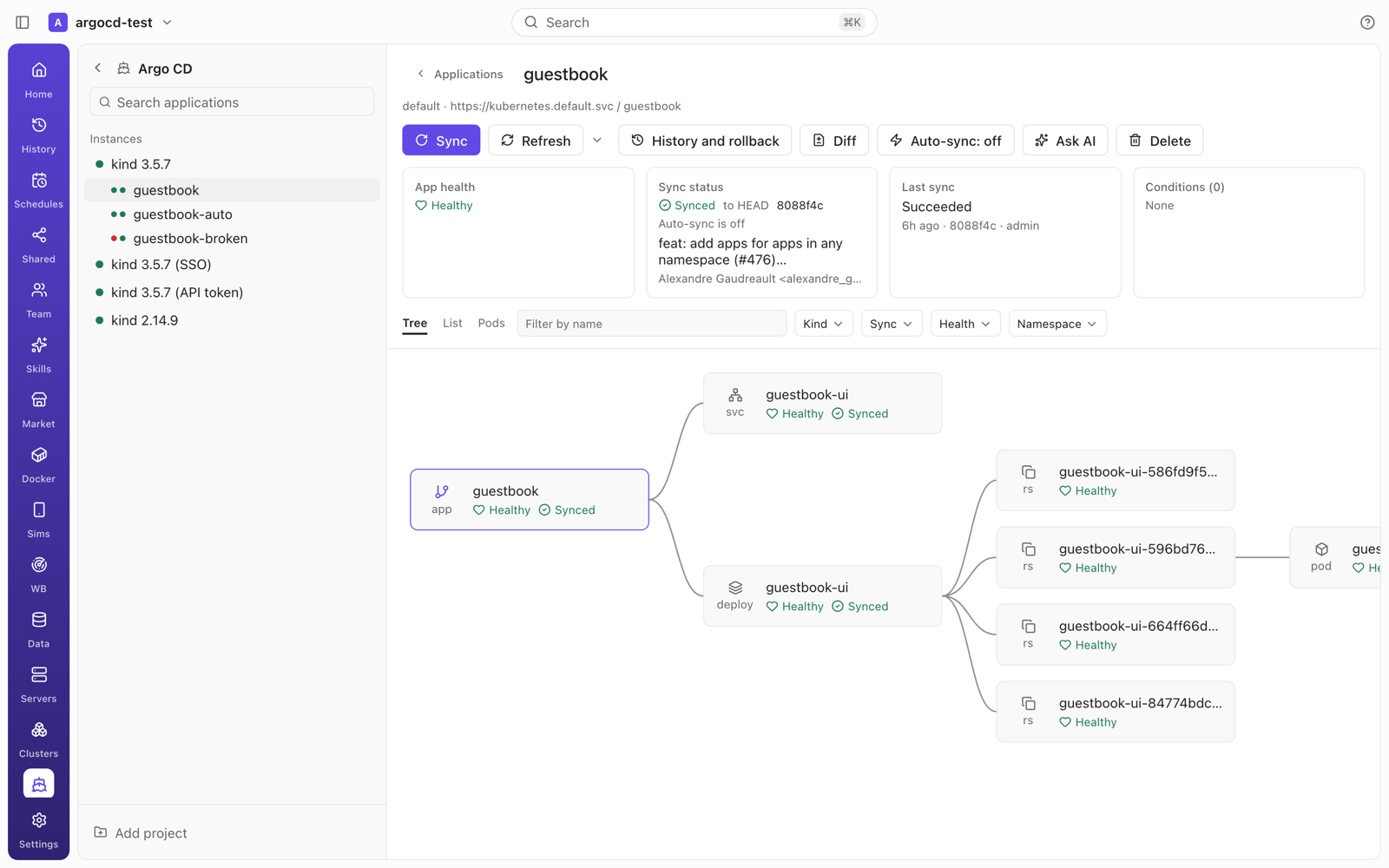
instance's apps with health and sync dots. - Application detail. Sync, Refresh / Hard refresh, History and rollback, Diff, Confirm pruning,
Terminate, Delete (type the name to confirm), auto-sync on/off; health, sync, revision and commit,
last sync and conditions; the resource graph left to right like the Argo CD UI, plus List and Pods
views (an indented tree on mobile) with filters. Resource detail: Summary, Manifest (read-only),
Diff, Events, Logs (follow, tail, filter, previous) and resource actions. The sync dialog covers
revision, prune, dry run, apply out-of-sync only, force, resource selection and sync options, and
shows how many resources change or get pruned first. - ApplicationSets, Projects, Repositories and Clusters tabs (read-only, fields filtered).
- Live updates through one narrow application stream per instance; detail and resource-tree
streams open only while someone looks. - Open in Clusters. A resource jumps to JAgentDesk's Kubernetes cockpit when its destination is a
linked, connected cluster (in-clusteris matched by reading a resource UID). - Chat agent. Ask AI on an instance, app or resource;
argocd_*tools read directly and ask for
permission before sync, rollback, refresh, terminate or resource actions.
Sideload — sign and install iOS apps with your Apple ID, install Android APKs (Sims → Sideload)
- Your Apple ID inside JAgentDesk, free or paid: email + password in the app, two-factor code (or
"Send SMS instead") typed in the app and passed to the daemon, never stored. Paid accounts can use an
App Store Connect API key (Issuer ID, Key ID,.p8) instead. The first Apple ID shows Apple's
terms and recommends a secondary Apple ID. Keep me signed in for automatic refresh is off by
default. - The daemon does the signing. It registers the device, creates or reuses the certificate, App ID
and provisioning profile, signs the IPA (zsign,codesignon macOS) and installs over USB or Wi-Fi.
Options: app name, icon, bundle ID (install side by side), minimum iOS, remove device restrictions,
file sharing, remove extensions, inject.dylib/.framework/.bundle. Modes: Sign & install,
Install as-is, Export signed IPA. Step-by-step progress and a log with "Hide sensitive info". - Free-account limits checked before calling Apple: at most 3 sideloaded apps per device and 10
new App IDs per 7 days, with the date the next App ID becomes available. - Auto refresh. An hourly daemon job (no agent, no model) re-signs apps within 2 days of expiry
with the same App ID and installs over them, keeping app data; it warns every paired client 12
hours before expiry and asks you to sign in again when needed. Refresh now / Refresh all. - Anisette from macOS (
native) or a self-hosted anisette v3 server you enter (remote); errors
are shown verbatim with a hint to switch. - Android: install
.apk(adb install -r) and split.apks(install-multiple) on a phone
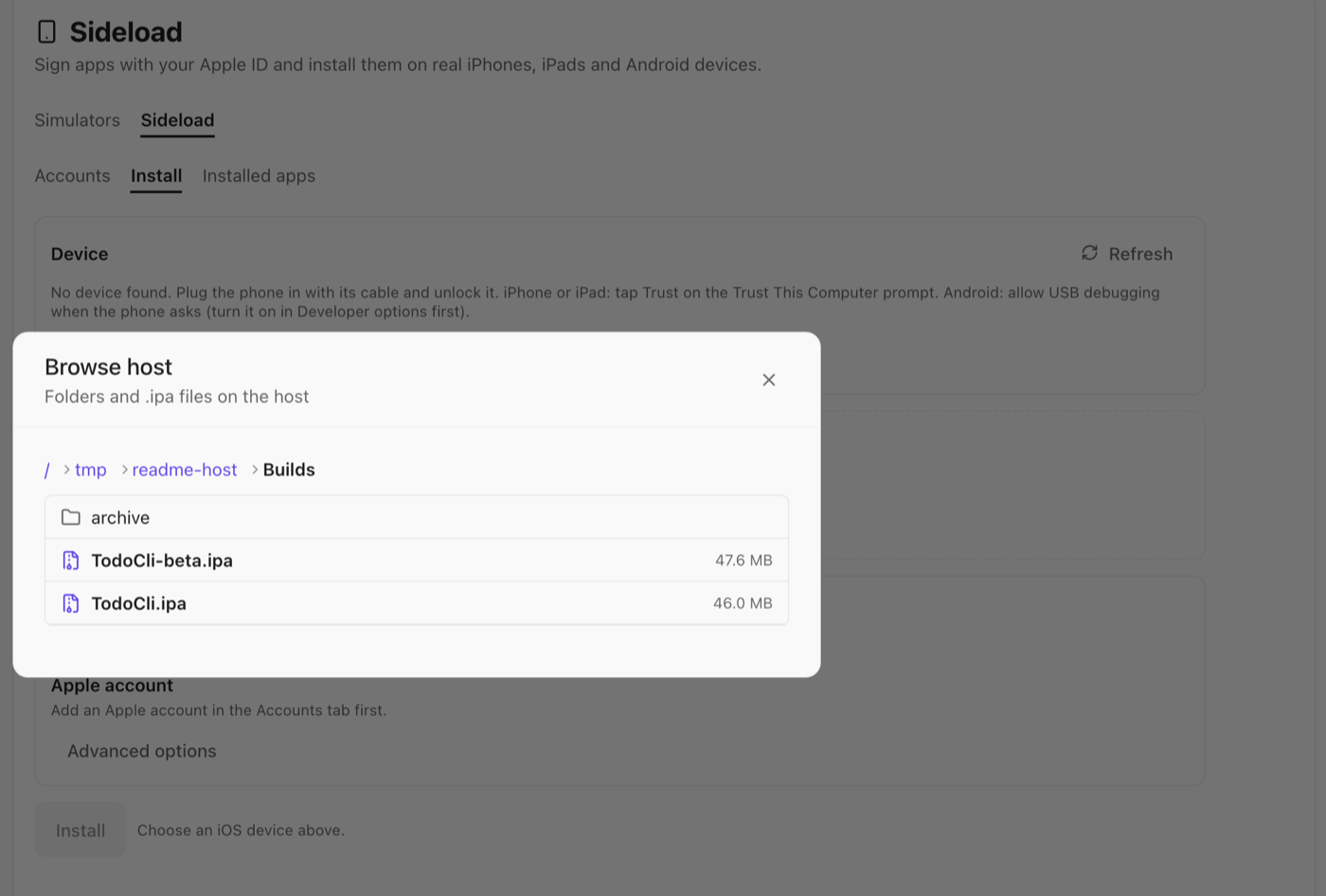
plugged in with its USB cable. - Picking the file: Choose file… or drag and drop uploads it from the device you use the app
on; Browse host… opens the daemon machine's home folder and lists only sub-folders and.ipa
(or.apk/.apks) files with their size, with a breadcrumb to go up. There is no path field. - Agent tools:
sideload_list_appsandsideload_list_accountsrun directly;sideload_install
andandroid_installask for permission. No tool sees passwords, tokens, certificates or 2FA codes. - Not in this release: native anisette on Windows, bundling ElleKit for
.debtweaks, app groups,
downloading an exported IPA to the device. macOS native anisette returned HTTP 503 from Apple in our
tests with a test account — switch to aremoteanisette server if you see it.
Real devices in Sims — iPhone, iPad and Android over cable
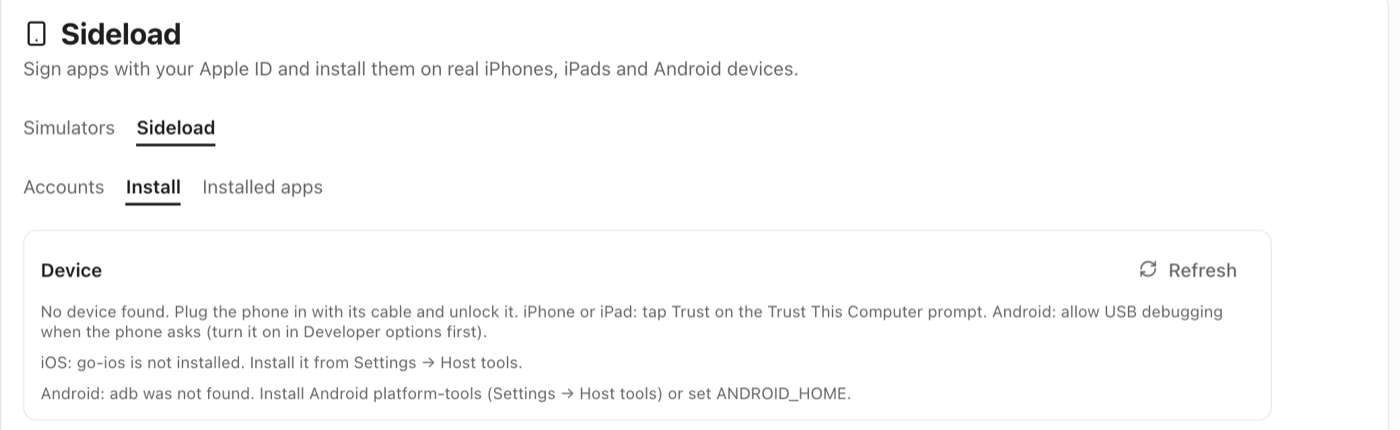
- Physical devices next to simulators. Plug the phone in with its cable: Android through
adb
over USB, iPhone and iPad through g...