Repository navigation
JAgentDesk v0.9.48 — Jira, Argo CD, iOS sideload, real devices over cable, Spec mode, activity graph

Six new areas: Jira and Argo CD you sign in to and work with inside JAgentDesk, a
Sideloadly-class iOS sideload with your Apple ID (plus Android APK install), real iPhones,
iPads and Android phones in Sims with live screen and control, Spec mode that runs GitHub Spec
Kit's spec-driven workflow phase by phase in the agent chat, and an activity graph drawn with
archify that shows what the agent did, is doing and still has to do. The Android APK is back in
the release assets.
Jira (new "Jira" section, desktop and mobile)
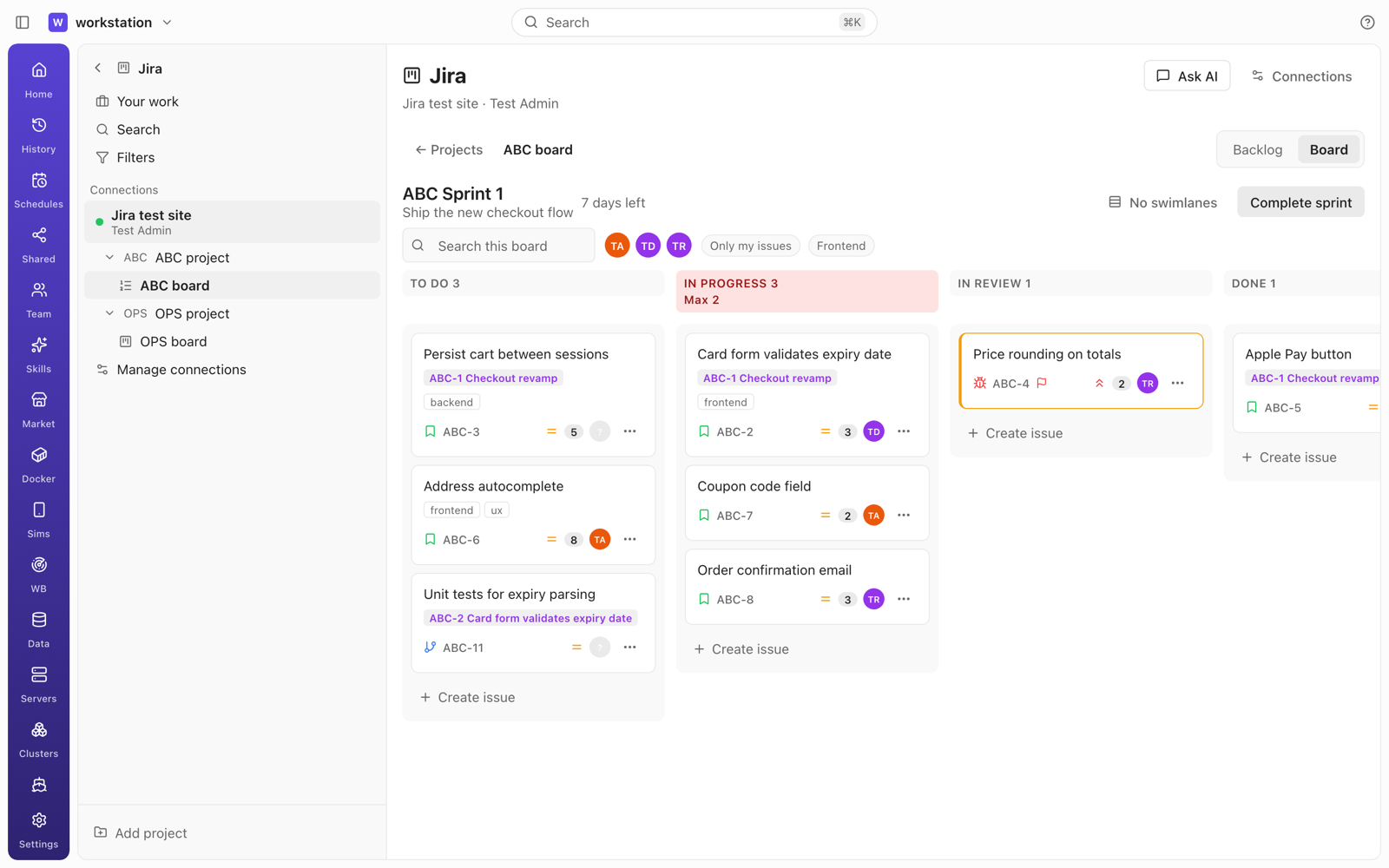
- Sign in inside JAgentDesk, three ways. Jira Cloud with email + API token; Jira Cloud with
OAuth 2.0 (3LO) using an Atlassian app you register yourself (step-by-step guide and a copy button
for the callback URL; the client secret stays in the daemon); Jira Data Center / Server with a
Personal Access Token. On desktop the browser login returns to a local listener on
127.0.0.1:8765; if the developer console rejects that callback you paste the final URL instead;
on mobile you can "Sign in on a desktop" through a paired desktop. - Tokens never leave the daemon. API tokens, PATs, OAuth access/refresh tokens and client
secrets live in the daemon's own secret store underjira/; one credential manager refreshes each
connection one request at a time (two parallel requests on an expired token cause exactly one
refresh), writing the rotated refresh token before using the new access token. - Its own left column. Your work, Search, Filters, then each connection with its sign-in state,
its projects and their boards. - Boards like the web. Kanban boards and the active sprint of Scrum boards: columns from the board
configuration with issue counts and WIP limits (highlighted when exceeded); cards with key,
summary, type, priority, assignee, estimate, epic/parent and labels. Drag a card to another column
to transition it — transitions with a required screen open a dialog with exactly those fields —
and drag within a column to rank. Mobile gets "Move to…". Swimlanes (none, assignee, epic/parent or
your own JQL queries, saved per board), quick filters, search and filters by assignee, epic, label
and type; sprint name, days left and Complete sprint; quick-create in a column. - Backlog and sprints. Sprints above the backlog; create, start and complete sprints (dates, goal,
where unfinished issues go); drag to rank or move into a sprint; epic and version panels;
multi-select to change status, assignee or sprint. - Issues. Header with key, type, parent, status change and watch; summary and description written
in Markdown and converted to Jira's format (ADF on Cloud, wiki markup on Data Center), with a
read-only view and "Open in Jira" for content that cannot be converted safely (complex tables,
panels, macros); subtasks, linked issues, web links; attachments with image preview, upload and
delete, all proxied by the daemon so the app never receives a URL carrying credentials; side fields
fromeditmeta(assignee + "Assign to me", reporter, labels, priority, sprint, story points, fix
version, component, due date, basic custom fields); Activity with comments (mentions), history and
work log. - Your work, JQL search with suggestions and a basic mode, filters (mine, favourites, save new).
- Live while you look. An open board, backlog or issue re-reads changes every 15 s with an
updated >=JQL query; leaving the view stops it. No background polling. - A chat agent that works the issue. Ask AI on a project, board or issue opens a chat bound to
the connection; attach an issue to any composer (typing a key such asABC-123suggests it).
Work on this issue starts an agent in the workspace you choose with the issue, its acceptance
criteria and text attachments in a visible prompt; the agent uses git and Forge Hub to open the PR.
jira_*tools: reads (search, issue, comments, changelog, worklogs, transitions, create meta,
boards, sprints, backlog, users, filters, attachments with a size cap) run directly; writes (create,
update, transition, assign, comment, worklog, links, attachments, sprint moves, rank, create/update
sprint) show a permission card; there are no delete tools.
Argo CD (new "Argo CD" section, desktop and mobile)
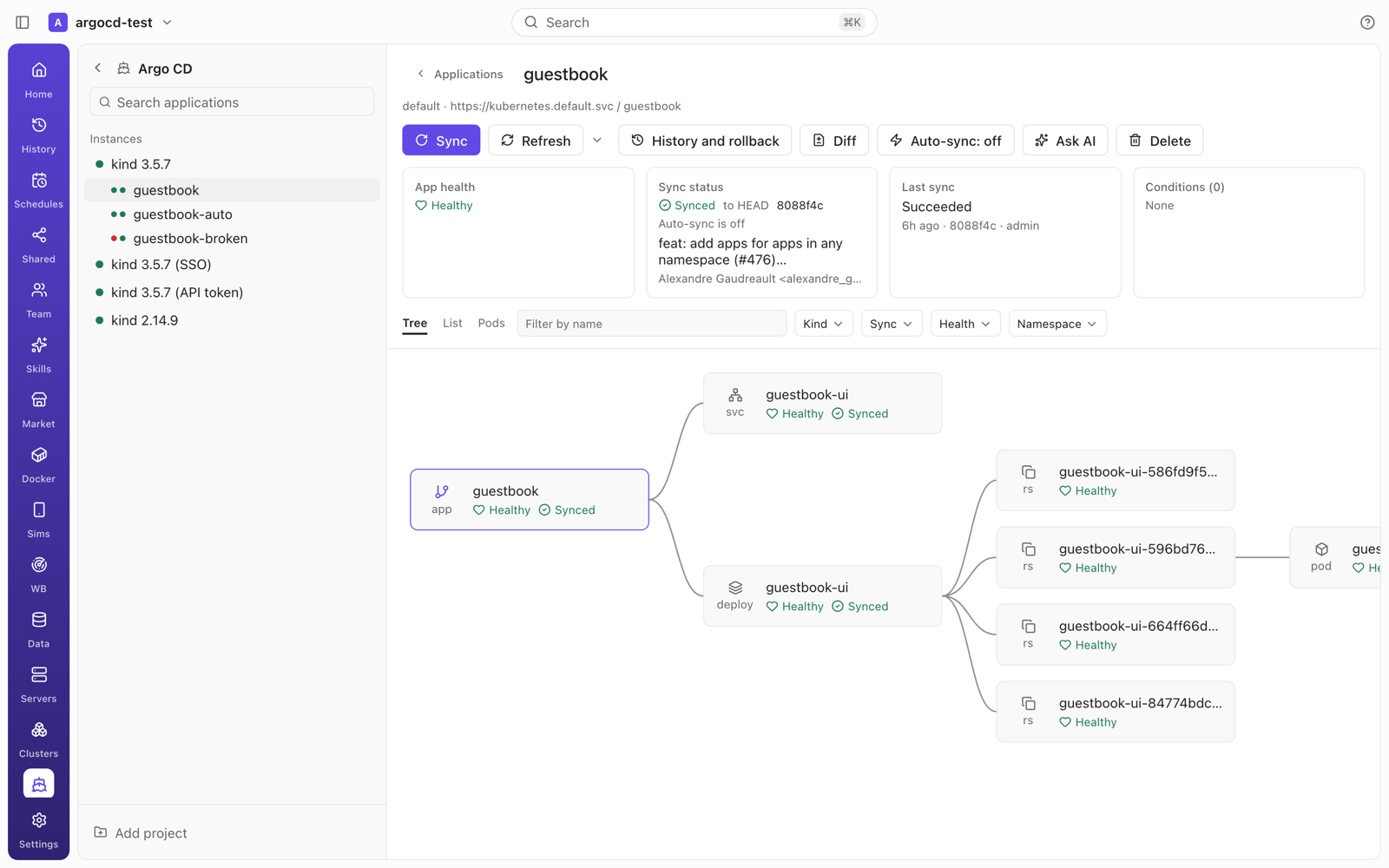
- Instances. Sign in with username + password, an API token, or SSO like
argocd login --sso
(PKCE; the desktop opens a listener on127.0.0.1:8085, mobile asks a paired desktop). Sessions are
kept alive while you look, re-login with a remembered password if you turned that on, SSO refreshes
itself. Skip TLS verify, a custom CA, mTLS and custom headers per instance. Argo CD 2.14 and newer
(checked against 2.14.9 and 3.5.7 on kind clusters). - Applications. List and tiles, filters (sync, health, project, label, cluster, namespace, repo,
auto-sync, operation), search, and bulk Sync / Refresh. The left column lists instances and the open
instance's apps with health and sync dots. - Application detail. Sync, Refresh / Hard refresh, History and rollback, Diff, Confirm pruning,
Terminate, Delete (type the name to confirm), auto-sync on/off; health, sync, revision and commit,
last sync and conditions; the resource graph left to right like the Argo CD UI, plus List and Pods
views (an indented tree on mobile) with filters. Resource detail: Summary, Manifest (read-only),
Diff, Events, Logs (follow, tail, filter, previous) and resource actions. The sync dialog covers
revision, prune, dry run, apply out-of-sync only, force, resource selection and sync options, and
shows how many resources change or get pruned first. - ApplicationSets, Projects, Repositories and Clusters tabs (read-only, fields filtered).
- Live updates through one narrow application stream per instance; detail and resource-tree
streams open only while someone looks. - Open in Clusters. A resource jumps to JAgentDesk's Kubernetes cockpit when its destination is a
linked, connected cluster (in-clusteris matched by reading a resource UID). - Chat agent. Ask AI on an instance, app or resource;
argocd_*tools read directly and ask for
permission before sync, rollback, refresh, terminate or resource actions.
Sideload — sign and install iOS apps with your Apple ID, install Android APKs (Sims → Sideload)
- Your Apple ID inside JAgentDesk, free or paid: email + password in the app, two-factor code (or
"Send SMS instead") typed in the app and passed to the daemon, never stored. Paid accounts can use an
App Store Connect API key (Issuer ID, Key ID,.p8) instead. The first Apple ID shows Apple's
terms and recommends a secondary Apple ID. Keep me signed in for automatic refresh is off by
default. - The daemon does the signing. It registers the device, creates or reuses the certificate, App ID
and provisioning profile, signs the IPA (zsign,codesignon macOS) and installs over USB or Wi-Fi.
Options: app name, icon, bundle ID (install side by side), minimum iOS, remove device restrictions,
file sharing, remove extensions, inject.dylib/.framework/.bundle. Modes: Sign & install,
Install as-is, Export signed IPA. Step-by-step progress and a log with "Hide sensitive info". - Free-account limits checked before calling Apple: at most 3 sideloaded apps per device and 10
new App IDs per 7 days, with the date the next App ID becomes available. - Auto refresh. An hourly daemon job (no agent, no model) re-signs apps within 2 days of expiry
with the same App ID and installs over them, keeping app data; it warns every paired client 12
hours before expiry and asks you to sign in again when needed. Refresh now / Refresh all. - Anisette from macOS (
native) or a self-hosted anisette v3 server you enter (remote); errors
are shown verbatim with a hint to switch. - Android: install
.apk(adb install -r) and split.apks(install-multiple) on a phone
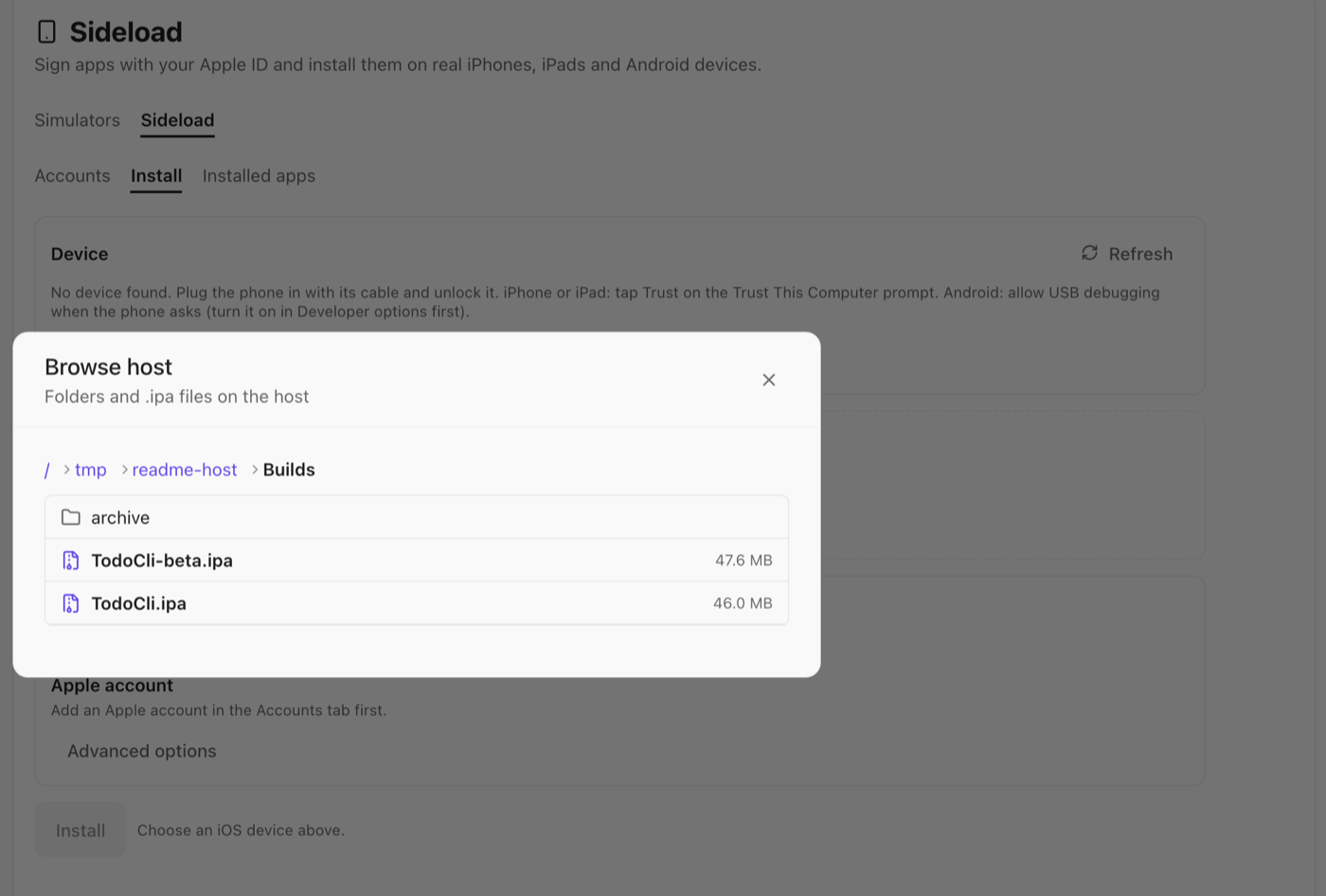
plugged in with its USB cable. - Picking the file: Choose file… or drag and drop uploads it from the device you use the app
on; Browse host… opens the daemon machine's home folder and lists only sub-folders and.ipa
(or.apk/.apks) files with their size, with a breadcrumb to go up. There is no path field. - Agent tools:
sideload_list_appsandsideload_list_accountsrun directly;sideload_install
andandroid_installask for permission. No tool sees passwords, tokens, certificates or 2FA codes. - Not in this release: native anisette on Windows, bundling ElleKit for
.debtweaks, app groups,
downloading an exported IPA to the device. macOS native anisette returned HTTP 503 from Apple in our
tests with a test account — switch to aremoteanisette server if you see it.
Real devices in Sims — iPhone, iPad and Android over cable
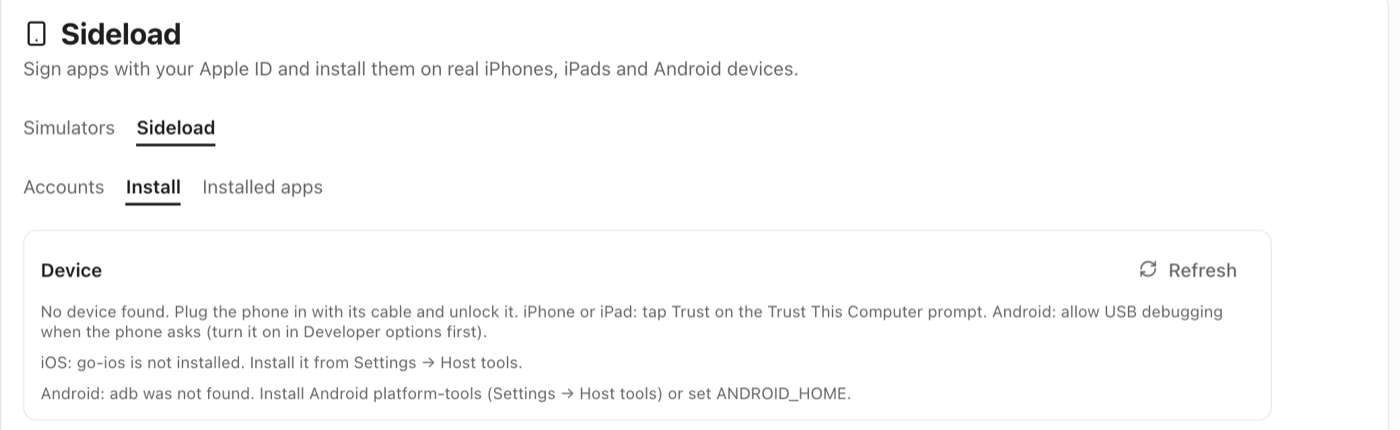
- Physical devices next to simulators. Plug the phone in with its cable: Android through
adb
over USB, iPhone and iPad through go-ios over USB (iOS 17+ through go-ios' userspace tunnel, no
root). Cable only — there is no wireless pairing, and the daemon never runsadb pair,
adb connectoradb tcpip; an iPhone seen only over Wi-Fi sync is not offered for control.
Readiness guides you through Trust This Computer, Developer Mode, unlocking, USB debugging and the
RSA prompt. - Control is off until you turn it on. A new physical device shows only its name, model, OS,
connection and readiness; Enable control (with a clear warning) unlocks the screen, logs, UI tree,
input and app install. Simulators and emulators keep their current behaviour. - Live screen. Android via the bundled
scrcpy-server5.0.1 decoded by ffmpeg (falls back to
screenshots without ffmpeg), iOS via WebDriverAgent's MJPEG; frames are pushed as binary JPEG
WebSocket frames (up to 15 fps, long side ≤ 1280 px, older frames dropped when the client is slow, 2
fps per grid tile). Older clients keep polling screenshots. - Input: tap, swipe, text, Home, Back (Android), App switch, volume, power/lock and rotation (Android);
installed apps, logs, screenshots and open URL as for simulators. - Prepare device (iOS) downloads WebDriverAgent (pinned SHA-256), signs it with an Apple account
from Sideload and installs it; Sideload's auto refresh keeps it signed. - Agents: the
sim_*tools work on physical devices too (plussim_press_buttonand
sim_logs); the first use of a device by an agent asks "Allow to view and control
", and the grant ends with that agent session. - Nothing leaves loopback: WebDriverAgent, MJPEG and scrcpy listen only on the daemon's loopback.
- Physical-device paths are covered by unit tests and a built daemon; they have not yet been run
against real hardware.
Spec mode — GitHub Spec Kit in the agent chat
- A toggle in the composer. When on, the agent follows Spec-Driven Development phase by phase:
Constitution (once per project) → Specify → Clarify (optional) → Plan → Checklist (optional) →
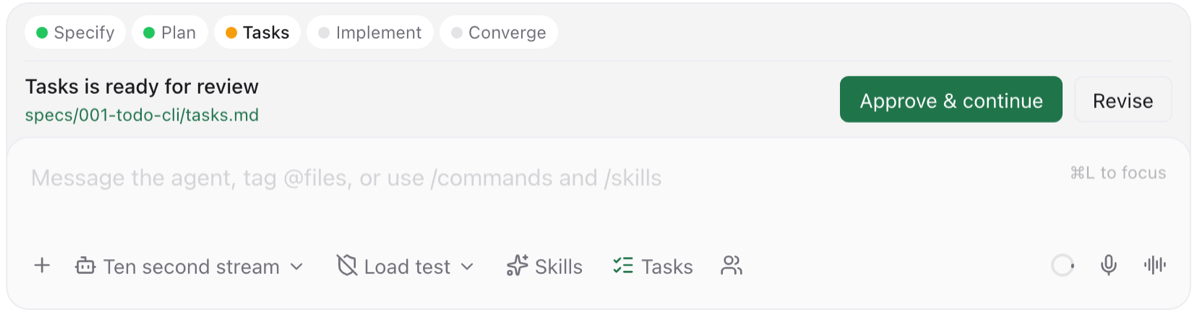
Tasks → Analyze (optional) → Implement → Converge. Off, the chat works as before. - You approve every phase. After a turn the daemon checks the phase's files on disk (no model);
when the phase is done a Phase review bar lists the files it created or changed (open them in
the viewer or diff) with Approve & continue and Revise (your note goes back with the same
phase). The daemon only sends the next phase command when you approve — it never starts turns on
its own. - A clean chat. Phase messages show only "Spec mode · " and what you wrote (your request,
your Revise note, or "Approved — continue to "); the spec-kit command itself stays behind a
collapsed Show command. The phase strip and the review bar sit together on top of the composer. - Set up with your consent. The first time, the app lists the files it will write (the pinned
spec-kit 1.3.0 templates and scripts, and the provider's command folder) and writes nothing until
you press Set up; an existing.specify/is used as-is. Works with Claude Code, Codex, OpenCode,
Pi, OMP and Copilot commands; generic ACP providers get the rendered command as a visible prompt.
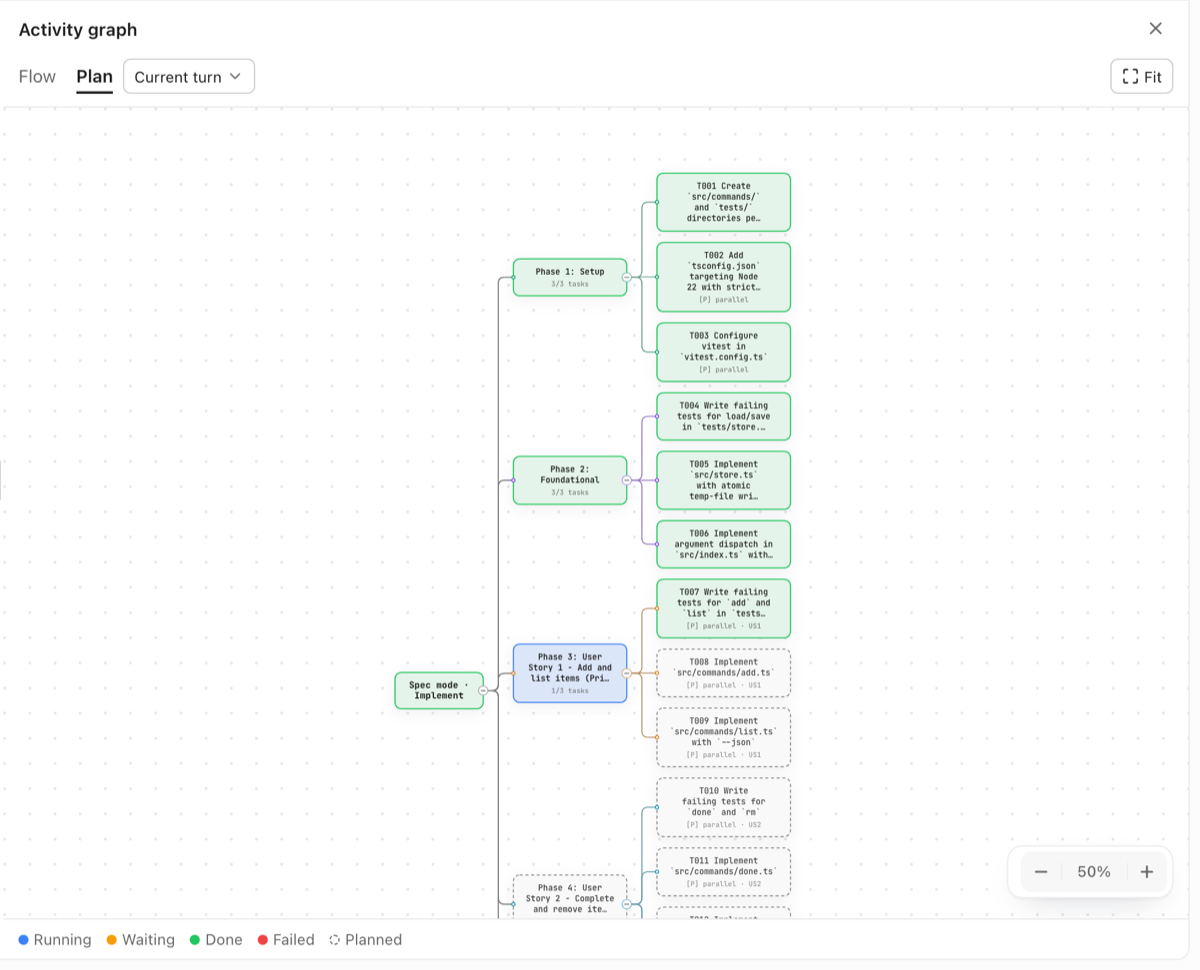
Several agents on one checkout get their ownspecs/NNN-…folder. - Progress you can see: the current phase on the toggle, a phase strip above the composer, and the
activity graph's Plan view showing the phases and tasks oftasks.md(parallel[P]tasks marked). - Spec mode and autonomous run exclude each other. Needs
bash+jqorpython3(PowerShell 5.1+ on
Windows); missing tools disable the toggle with an Install button. Based on GitHub Spec Kit (MIT);
its license ships with the daemon.
Activity graph — what the agent did, is doing and still has to do
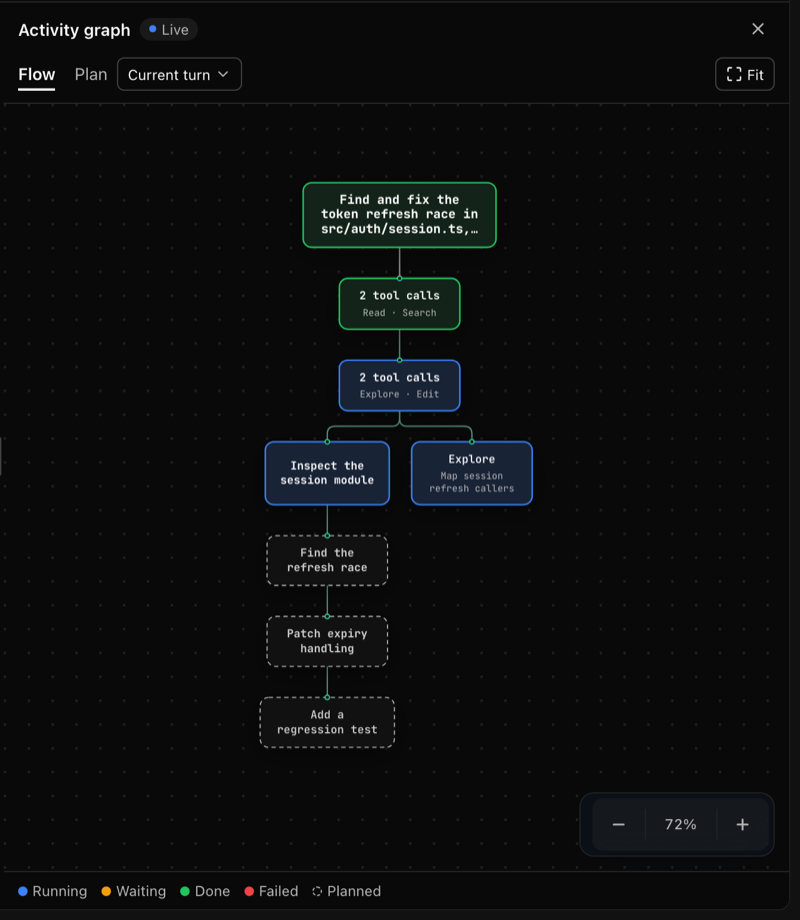
- A canvas you can show or hide from the chat header: a resizable panel on desktop, a full-screen
sheet with pinch-zoom on mobile, light and dark themes. - Flow lays one turn out top to bottom — your prompt, grouped tool calls, subagents and permission
waits as side branches, compaction and errors, the final answer — with the agent's unfinished todos
as dashed nodes after the running one. Plan shows the request with its todos, or Spec mode's
phases andtasks.mdtasks. Pick any of the last 10 turns; Fit to the panel. - Live without flicker. Structure changes re-render at most every 1.5 s per agent and view;
status changes (running, waiting, done, failed) recolour nodes in place without reloading, so pan and
zoom stay. Long turns fold the oldest finished steps into "N earlier steps" (at most 40 nodes). - Click a node to scroll the chat to that step (subagent nodes open the subagent panel).
- Drawn by algorithm, rendered by archify 3.2.0 (MIT) inside the daemon in the same sandbox as
Team mode diagrams (no network, no storage); upcoming steps come only from structured data (todos,
Spec mode phases,tasks.md). Turning the graph on never adds a model request.
Release pipeline
- Android APK fixed. The v0.9.47 APK job lost its runner right after the JavaScript bundle was
written. The cause: the protocol's generated (zod-aot) message validator is a single ~6 MB function,
and Hermes needed more than 10 GB of memory to compile it. Android bundles now validate daemon
messages with zod's own parser for the same schema (packages/app/metro.config.cjs); Hermes then
compiles the whole app in about 1.6 GB, and the Android bundle shrinks from 26.7 MB to 20.9 MB.
Web, desktop and iOS keep the generated validator. The build logs memory and disk every minute, and
a release can re-cut only its Android APK (workflow_dispatchwithonly: android).
Under the hood
- New capabilities and flags are optional and backwards compatible: client capabilities
specMode,activityGraph,binaryScreenFrames,argocdSsoLoopback,jira,sideload; server
featuresspecMode,activityGraph,argocd,sideload,sideloadHostBrowse,jira; host
capabilitiesspecKit,
iosSideload,androidPhysical,iosPhysical; host toolszsign,go-ios(pinned SHA-256) and
ffmpeg. - Every new RPC is registered both in the session allowlist and in its handler.
packages/server/scripts/six-features-smoke.mjs <port>calls one real RPC per new area against a
built daemon.
Downloads
- macOS: on Apple Silicon download the asset named
macOS-Apple-Silicon. Do not install the Intel
x64 asset on Apple Silicon; it runs under Rosetta and is intentionally rejected by the app. - Windows x64 installer, Linux x64 AppImage/deb, Android APK, and an unsigned iOS IPA
(install it with Sideloadly or with JAgentDesk's own Sims → Sideload).