Repository navigation
Switch 2 Dashboard 1.0.0

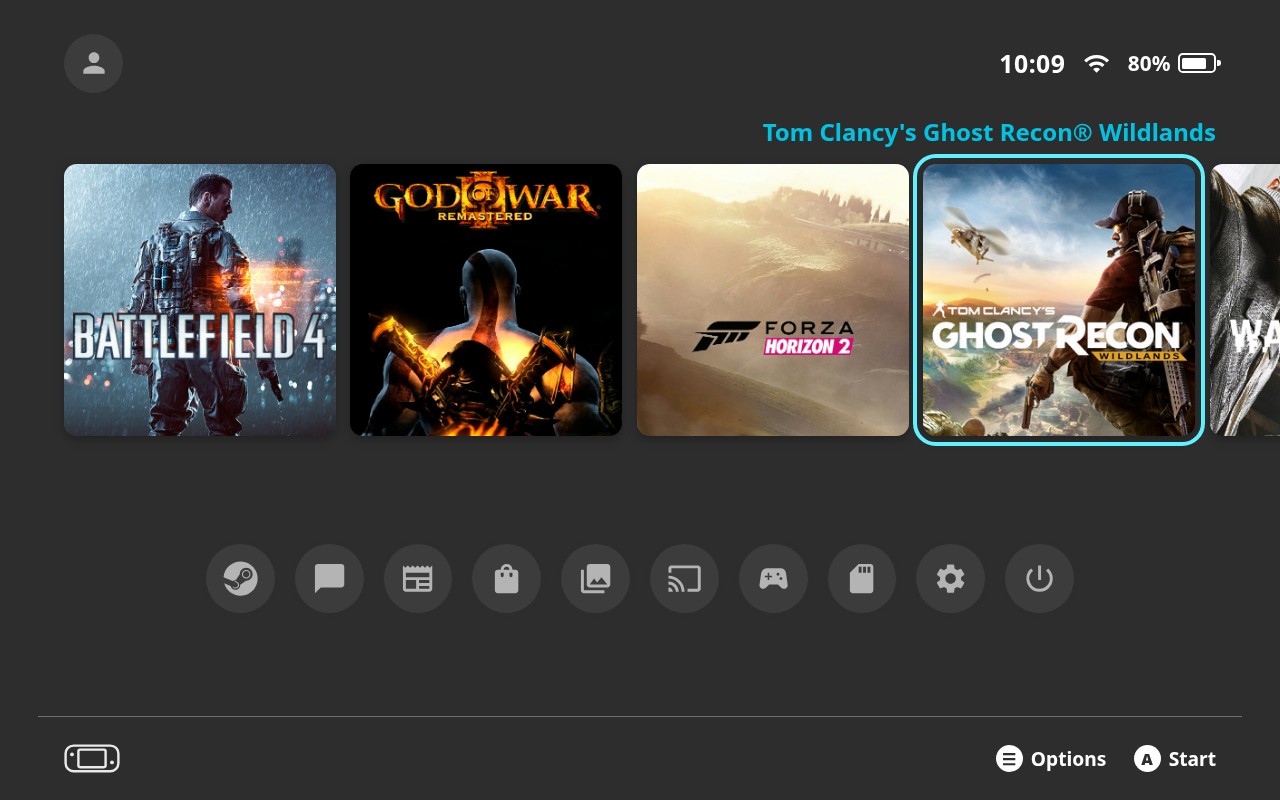
The first release: the Nintendo Switch 2 HOME Menu for SteamOS Game Mode.
What's in 1.0.0
- The HOME Menu layout. Steam's home becomes a status bar, a row of big square game tiles, ten round shortcuts and a footer with ☰ Options · A Start.
- Square game tiles. Your recent games (12 by default, 4–20 in the settings), then All Software, which opens your Steam library. The selected game's name sits above its tile in cyan, with a pulsing frame. Long names slide left so they stay on screen.
- Ten round shortcuts in the console's order, each mapped to Steam: Steam Online, Chat, News, Steam Store, Album, Remote Play, Controllers, Library, System Settings and Sleep Mode. Gray symbols, rainbow selection ring.
- Live status bar. Your avatar (My Page → your profile), the clock, Wi-Fi and the battery level. Steam's own top and bottom bars are hidden on the HOME Menu only.
- Basic Black and Basic White themes, a tile art choice (cover, banner or hero) and a 24-hour clock option.
- Your art and your games. SteamGridDB covers and non-Steam games show up like any other game. A starts or resumes a game, ☰ opens Steam's game menu, including SteamGridDB's Change artwork….
- English and Portuguese, following Steam's language.
Install
- Download
switch2-dashboard.zipbelow. - In Game Mode: Quick Access (
…) → Decky → ⚙ Settings → General, turn on Developer mode. - Developer → Install plugin from ZIP, pick
switch2-dashboard.zip.
Using PS5 Dashboard or Xbox Dashboard too? Turn their home screen off first, so only one dashboard replaces Steam's home. The plugin panel shows v1.0.0 at the bottom.
