Repository navigation
Switch 2 Dashboard 1.1.0

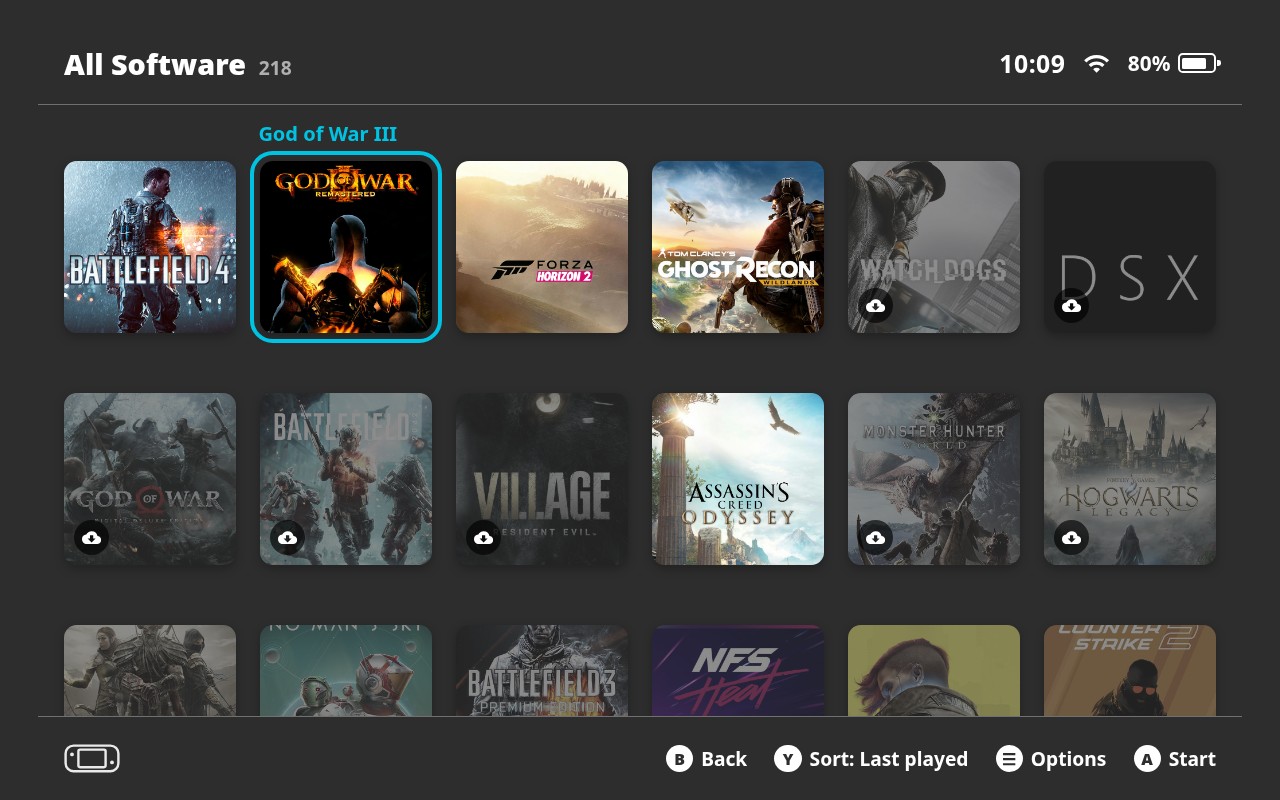
This release adds the console's All Software screen.
What's new in 1.1.0
- All Software screen. The All Software tile at the end of the HOME Menu row now opens your whole library as a grid of square tiles, six to a row, with the selected title above it in cyan, just like on the console.
- Archived look for games that aren't installed. They're dimmed with a cloud icon. Press A to open the game's page and install it.
- Sorting with Y: last played, play time or title. The current order shows in the footer.
- B goes back to the HOME Menu. ☰ opens Steam's game menu on any tile, like on the HOME Menu.
- Long titles in the grid's last column end at the tile's edge.
See the changelog for 1.0.0.
Install
- Download
switch2-dashboard.zipbelow. - In Game Mode: Quick Access (
…) → Decky → ⚙ Settings → General, turn on Developer mode. - Developer → Install plugin from ZIP, pick
switch2-dashboard.zip.
Updating? Install the new ZIP the same way; your settings are kept. The plugin panel should then show v1.1.0 at the bottom. If it still shows an older version, restart Steam.
