Repository navigation
Switch 2 Dashboard 1.2.0

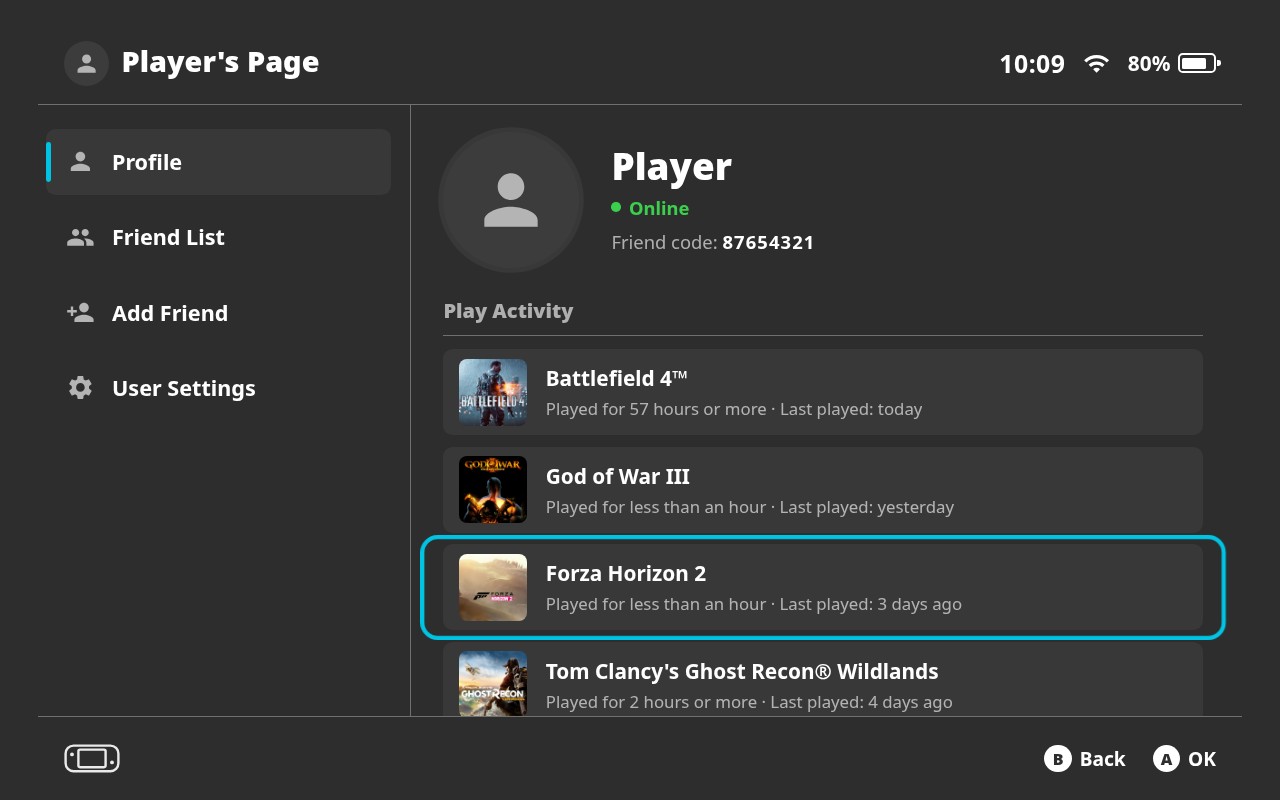
This release adds the console's My Page.
What's new in 1.2.0
- My Page. Press A on your avatar in the HOME Menu for the console's user page: a menu on the left that fills the right side as you move through it.
- Profile: your avatar, name, status and Steam friend code, plus Play Activity: each game with "Played for X hours or more" and when you last played it.
- Friend List: your Steam friends as round icons, the ones playing first, with what they're playing or when they were last online. A opens Friends & Chat.
- Add Friend: your friend code in big type, search by friend code, and your received and sent friend requests.
- User Settings: edit profile, change icon, privacy settings and Steam account.
- B goes back to the HOME Menu.
- In the Basic White theme, rows and menus use white cards, like the console.
See the changelog for earlier versions.
Install
- Download
switch2-dashboard.zipbelow. - In Game Mode: Quick Access (
…) → Decky → ⚙ Settings → General, turn on Developer mode. - Developer → Install plugin from ZIP, pick
switch2-dashboard.zip.
Updating? Install the new ZIP the same way; your settings are kept. The plugin panel should then show v1.2.0 at the bottom. If it still shows an older version, restart Steam.
