The coding challenge to create a commandline API mashup of the Github and Twitter APIs.
Run maven install to generate the .jar file in the same level of pom.xml file:
mvn clean install
Inside the folder target will be generated the file
sportdec-app-1.0.0-jar-with-dependencies.jar
Before run the system, you have to require a Twitter consumer key, secret key, access token and access token secret.
Now that you have the keys, you have to set up the sportdec.properties file like mentioned bellow:
consumer.key=CONSUMER_KEY
consumer.secret=CONSUMER_SECRET
access.token=ACCESS_TOKEN
access.token.secret=ACCESS_TOKEN_SECRET
The sportdec.properties file have to be in the same directory of the .jar file.
Ex.:
root/sportdec-app-1.0.0-jar-with-dependencies.jar
root/sportdec.properties
After set up the environment, you can run the application using the command line:
java -jar sportdec-app-1.0.0-jar-with-dependencies.jar [-w <arg>] [-o <arg>] [-s <arg>]
Where:
-w, --word  <arg>   Required. The word to search.
-o, --order <arg>   Determines if the first search result returned is [desc] or [asc]. Default: [desc]
-s, --sort  <arg>   Sorts the results by number of [stars], [forks], or
                    [help-wanted-issues] or how recently the items were
                    [updated]. Default: [best match]
You don't need to inform -o or -s but if you inform you must inform the argument to the command.
After execute the application, using the followed command, e.g.:
java -jar .\sportdec-app-1.0.0-jar-with-dependencies.jar -w futball
You will see a list of projects as followed:
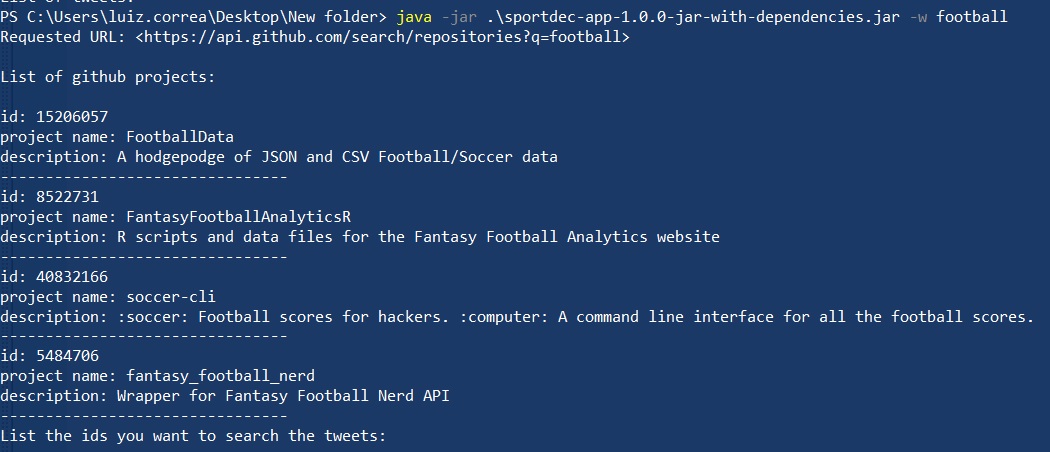
You may select the projects you want to look for the tweets by typing the id of the projects. If you want to list more than one project, you may separate the ids by space.