Week 4: Lane Heading Estimate
Now let's use the detected lane lines to estimate the heading angle of the robot. if we can keep the center of the two detected lane lines in the middle of the camera image, while the robot is moving forward then the robot will be inside the two lanes and will follow the lanes exactly.
When two lanes are detected we can compute the heading direction by simply averaging the far endpoints of both lane lines. The red line shown below is the heading. Note that the lower end of the red heading line is always in the middle of the bottom of the screen, that’s because our camera is installed in the middle of the robot and pointing ahead.
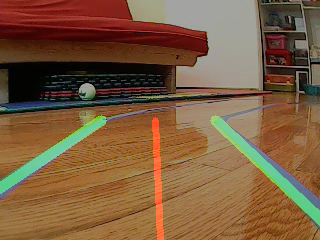
When one line is detected, which often can happen in corners we simply set the heading line parallel to the detected lane. When none of the lines are detected we set the angle to zero. The following function implements the said logic.
def compute_heading_angle(frame, lane_lines):
    height, width, _ = frame.shape

    if len(lane_lines) == 2: # if two lane lines are detected
        _, _, left_x2, _ = lane_lines[0][0] # extract left x2 from lane_lines array
        _, _, right_x2, _ = lane_lines[1][0] # extract right x2 from lane_lines array
        mid = float(width / 2)
        x_offset = float( (left_x2 + right_x2) / 2 - mid)
        y_offset = float(height / 2)

    elif len(lane_lines) == 1: # if only one line is detected
        x1, _, x2, _ = lane_lines[0][0]
        x_offset = float(x2 - x1)
        y_offset = float(height / 2)

    elif len(lane_lines) == 0: # if no line is detected
        x_offset = 0.0
        y_offset = float(height / 2)

    angle_to_mid_radian = math.atan(x_offset / y_offset)
    angle_to_mid_deg = float(angle_to_mid_radian * 180.0 / math.pi)
    heading_angle = angle_to_mid_deg
    rospy.loginfo("Heading angle %f :",angle_to_mid_deg)


    return heading_angle
The following function is used to display the heading line on the camera image as below.
def display_heading_line(frame, heading_angle, line_color=(0, 0, 255), line_width=5 ):
    heading_image = np.zeros_like(frame)
    height, width, _ = frame.shape

    # figure out the heading line from heading angle
    # heading line (x1,y1) is always center bottom of the screen
    # (x2, y2) requires a bit of trigonometry


    heading_angle_radian = (heading_angle + 90.0) / 180.0 * math.pi
    x1 = int(width / 2)
    y1 = height
    x2 = int(x1 - height / 2 / math.tan(steering_angle_radian))
    y2 = int(height / 2)

    cv2.line(heading_image, (x1, y1), (x2, y2), line_color, line_width)
    heading_image = cv2.addWeighted(frame, 0.8, heading_image, 1, 1)

    return heading_image