Week3 : Hough Line Detector
In the ROI_filtered from the previous tutorial, we can clearly see four lines. In order to Duckiebot to navigate within these lanes, we need to find the exact coordinates of these lines. OpenCV contains a function, called Hough Transform, which does exactly this. Hough Transform is a technique used in image processing to extract features like lines, circles, and ellipses. We will use it to find straight lines from a bunch of pixels that seem to form a line. The function HoughLinesP essentially tries to fit many lines through all the white pixels and return the most likely set of lines, subject to certain minimum threshold constraints.
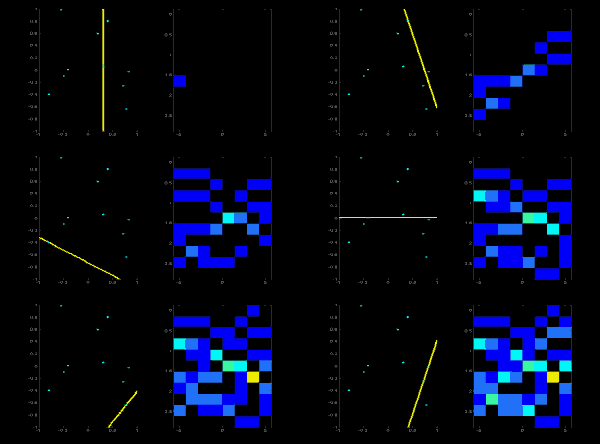
More information of openCV Hough Trasnform can be found here . Hough Transform
Internally, HoughLineP detects lines using Polar Coordinates. Polar Coordinates (elevation angle and distance from the origin) is superior to Cartesian Coordinates (slope and intercept), as it can represent any lines, including vertical lines which Cartesian Coordinates cannot because the slope of a vertical line is infinity. HoughLineP takes a lot of parameters:
- rho is the distance precision in pixel. We will use one pixel.
- angle is angular precision in radian.
- min_threshold is the number of votes needed to be considered a line segment. If a line has more votes, Hough Transform considers them to be more likely to have detected a line segment minLineLength is the minimum length of the line segment in pixels. Hough Transform won’t return any line segments shorter than this minimum length.
- maxLineGap is the maximum in pixels that two line segments that can be separated and still be considered a single line segment. For example, if we had dashed lane markers, by specifying a reasonable max line gap, Hough Transform will consider the entire dashed lane line as one straight line, which is desirable.
Setting these parameters is really a trial and error process