Week3: HSV Filter
Let's subscribe to the /image topic and apply HSV(Hue/Saturation/Value) filter to it so we can filter out blue lane of our image. First, we need to isolate all the blue areas on the image. To do this, we need to turn the color space used by the image, which is RGB (Red/Green/Blue) into the HSV (Hue/Saturation/Value) color space. The reason to use HSV color space is that in an RGB image, different parts of the blue tape may be lit with different light, resulting them appears as darker blue or lighter blue. However, in HSV color space, the Hue component will render the entire blue tape as one color regardless of its shading.
create a new example3_hsv_filter.py file in \nodes folder and modify the process_image function to following. Kill all the previous example nodes except the image publisher node.
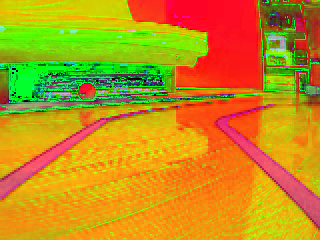
#!/usr/bin/env python
import rospy
from sensor_msgs.msg import Image
from cv_bridge import CvBridge
import cv2


def start_node():
    rospy.init_node('image_subcriber')
    rospy.loginfo('image_subcriber node started')
    rospy.Subscriber("image", Image, process_image)
    rospy.spin()

def process_image(msg):
    try:
       # convert sensor_msgs/Image to OpenCV Image
        bridge = CvBridge()
        orig = bridge.imgmsg_to_cv2(msg, "bgr8")
        hsv = cv2.cvtColor(orig, cv2.COLOR_BGR2HSV)
    except Exception as err:
        print err
    # show results
    show_image(hsv)


def show_image(img):
    cv2.imshow('image', img)
    cv2.waitKey(1)

if __name__ == '__main__':
    try:
        start_node()
    except rospy.ROSInterruptException:
        pass