Repository navigation
LocalLeaf v1.0.0

First public release of LocalLeaf, a local-first LaTeX editor with an Overleaf-style interface. Projects are plain folders, compilation uses the TeX engines installed on your computer, and the app doubles as an MCP server for AI agents.
Downloads
| Platform | File |
|---|---|
| macOS 11+ (Apple Silicon and Intel) | LocalLeaf_1.0.0_universal.dmg |
| Windows 10/11 x64 | LocalLeaf_1.0.0_x64-setup.exe or LocalLeaf_1.0.0_x64_en-US.msi |
| Linux x64 | LocalLeaf_1.0.0_amd64.AppImage, .deb or .rpm |
| MCP server CLI only | texcraft-core-<platform>.tar.gz / .zip |
Windows and Linux packages are built by GitHub Actions and attached a few minutes after publication; they have had less hands-on testing than macOS.
You also need a TeX distribution (MacTeX / TeX Live / MiKTeX, or Tectonic). See the README.
First launch: the builds are not code-signed yet. On macOS right-click the app → Open (or
xattr -dr com.apple.quarantine /Applications/LocalLeaf.app); on Windows choose More info → Run anyway in SmartScreen.
Highlights
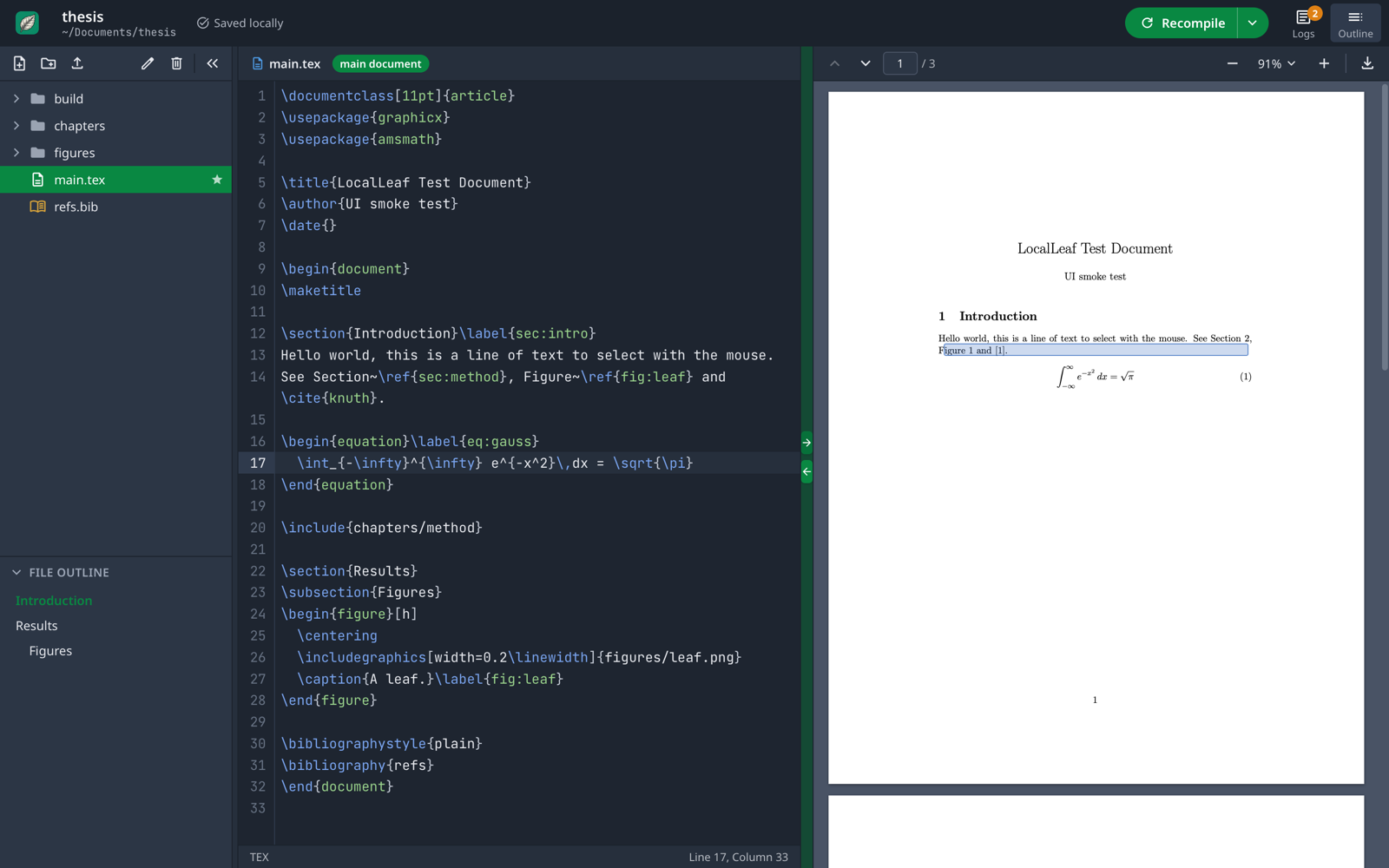
- Overleaf-style layout: file tree and outline, CodeMirror 6 editor, PDF.js preview, green Recompile button, clickable logs with hints.
- pdfLaTeX, XeLaTeX, LuaLaTeX and Tectonic, with bibtex/biber and latexmk-style reruns; auto-compile and draft mode.
- Bidirectional SyncTeX, autocompletion of
\reflabels and\citekeys, Vim/Emacs keybindings, light and dark themes. - Native menu bar with an Insert menu and standard shortcuts.
- Project dashboard: create, rename, move and trash projects.
- Built-in MCP server (
compile_tex,read_project_file,write_project_file,list_available_engines); agent edits show up live in the editor. See docs/MCP.md.
Full list in the changelog.