Example
The Bank example contains several concepts the editor supports. In the diagram we can see the full range of model elements, from simple natural types over compartment types and roles up to relations and fulfillments. In the diagram, data types such as String or Integer are omitted, but they must be contained in the graphical model.
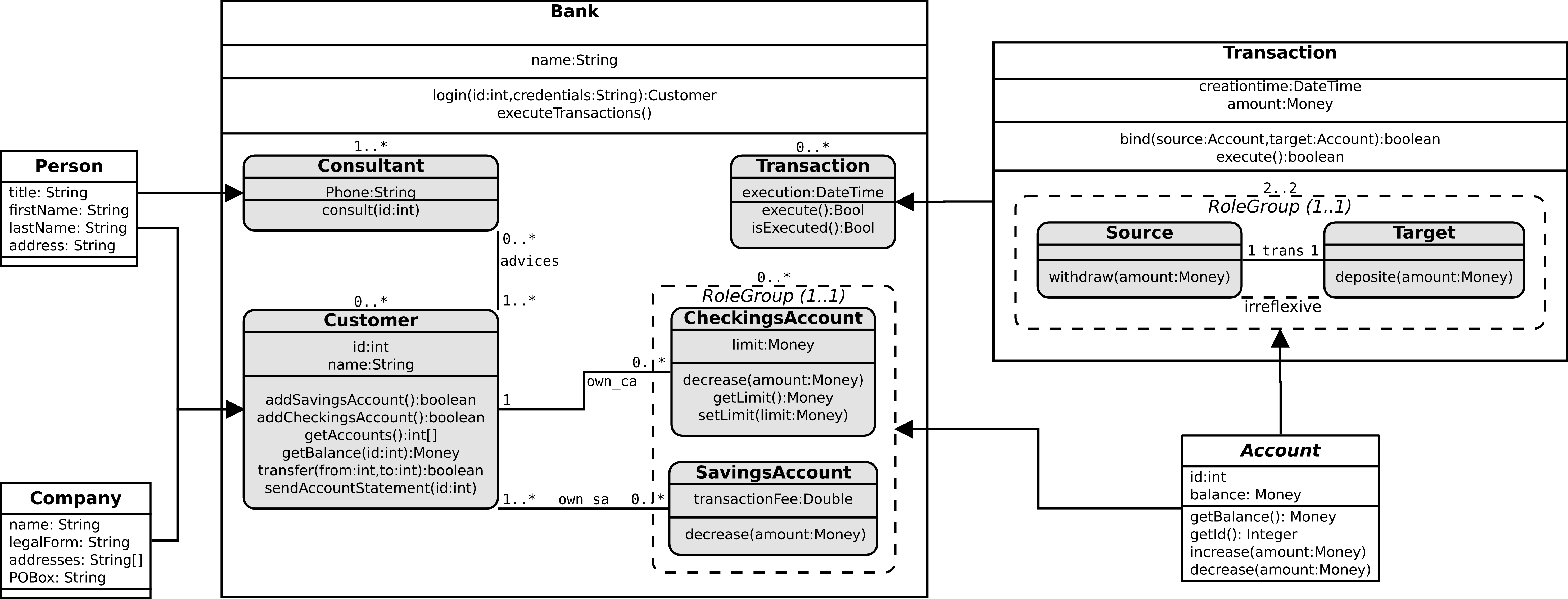
Let's go over the shown elements bit-by-bit. Person, Company, and Account are simple natural types which fulfill different roles (indicated by the fulfillment arrows). Bank and Transaction are both compartment types with child models. The compartment type Transaction fulfills the role type Transaction. The Role Group contained in Transaction has two elements which are in an irreflexive relation, i.e., a fulfilling account can either be source or target, but not both. The Bank compartment type does not introduce new concepts.
Note that all cardinalities (of relations, role groups, and compartment type child elements) are specified via simple Strings and have to conform to the well-known UML style notation (e.g. 1..* or 0..1).
Within the editor, some things look a bit different - but of course it does not matter in which angle relations are drawn. Instead of showing sub-models within the enclosing compartment type, the editor will only list the contained roles in the top-level view.
img/example/framed_bank_01.png

In order to inspect the child models you need to step into the compartment type (via the right click context menu). The following screenshots show the sub-models of the Bank and the Transaction compartment type.
img/example/framed_bank_02.png

img/example/framed_bank_03.png

You can get the graphical model from our GitHub page: ORM/Example/Bank.crom_dia.