Transformation
 The FRaMED editor works with a separate model. This ensures the simplicity of the original CROM-Model. Moreover, it provides developers with more flexibility and freedom.
To close the gap between the two models of FRaMED and CROM, a model-to-model transformation is implemented. This is done by using the Epsilon Transformation Language.
This part will contain some architecture documentation about the the transformation and its working process.
The transformation requires some labels, i.e., NamedElements, to follow specific syntactic rules. This is necessary in order to be able to parse the given strings accordingly to their meaning in the graphical model. The assumed syntax is briefly defined in the following (using an EBNF-like notation).
Operation := <name> "(" {Parameter} ")" ":" <type>
Attribute := <name> ":" <type>
Parameter := Attribute
Cardinality := (<integer> | "*") [".." (<integer> | "*")]
RoleGroupName := <name> "[" <Cardinality> "]"
Additional white spaces are ignored. <name> and <type> both stand for valid Java identifiers. The graphical front-end is responsible for assuring the correct format.
| Graphical Element | Transformation |
|---|---|
|
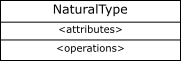
A Shape with type NATURAL_TYPE, which contains
|
A NaturalType with respective name, attributes, and operations.
|
|
|
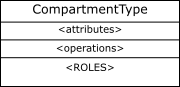
A Shape with type COMPARTMENT_TYPE, which contains
|
A CompartmentType with respective name, attributes, operations, and child reference.
|
|
|
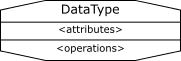
A Shape with type DATA_TYPE, which contains
|
A DataType with respective name, attributes, and operations.
|
| Graphical Element | Transformation |
|---|---|
|
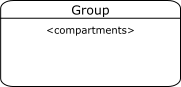
A Shape with type GROUP, which contains
|
A Group with respective name, and a correctly transformed child model. The child model's elements are contained in the group.
|
| Graphical Element | Transformation |
|---|---|
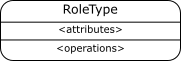
|
A Shape with type ROLE_TYPE, which contains
|
A RoleType with respective name, attributes, and operations.
|
|
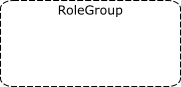
|
A Shape with type ROLE_GROUP, which contains
|
Transformed to a RoleGroup with respective name (without cardinality), and a correctly transformed child model. The child model's elements are contained in the group.
|
|

|
|
Transformed to the respective role contraint, i.e., RoleInheritance, RoleProhibition, or RoleEquivalence. The referenced roles are stored in first (source) and second (target).
|
|
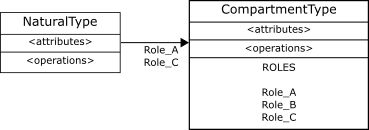
|
A Relation of type FULFILLMENT. The relation contains
|
Transformed to a list of Fulfillments, where for each referenced role a new fulfillment object with source as filler and the respective role as filled attribute.
|
| Graphical Element | Transformation |
|---|---|

|
A Relation of type INHERITANCE. The inheritance relation connects two elements of the same type, i.e., it is one of the following:
|
The corresponding, specific inheritance type with super and sub references. Furthermore, the relation is added to the outgoing relations of the source, and to the incoming relations of the target type.
|
|

|
A Relation of type RELATIONSHIP, with
|
The corresponding Relationship with correct name. The connected role types are referenced via Places, which also hold the cardinalities. A reference to the transformed relationship is added to each constraint.
|
| Graphical Element | Transformation |
|---|---|

|
A Relation with one of five types: TOTAL, CYCLIC, ACYCLIC, REFLEXIVE or IRREFLEXIVE.
|
Transformed to Total, Cyclic, Acyclic, Reflexive or Irreflexive intra-relationship contraint, respectively. The reference to the relation it constraints is set in the transformation of the relationship itself.
|
|
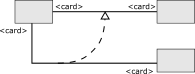
|
A Relation of type RELATIONSHIP_IMPLICATION. The implication has a source and target relationship.
|
Transformed to RelationshipImplication inter-relationship constraint. The relationship references first and second are set to source and target, respectively.
|
To ensure variety in all of our tests without setting up separate models by hand in every one we implemented a parameterized test which loads test cases out of the testcases directory inside the org.framed.transformation.test plug-in. To serialize those test cases a little emf model was build which consists of the TestCase case with the following attributes:
- title
- description
- framed model (Which will be transformed)
- crom model (the expected one which is used for comparing purposes)
So we just need to create a new file by using the default EMF-Editor implementation or FRaMED itself (for the framed model) to provide new tests.