Repository navigation
ORIGAMI 2.0.0

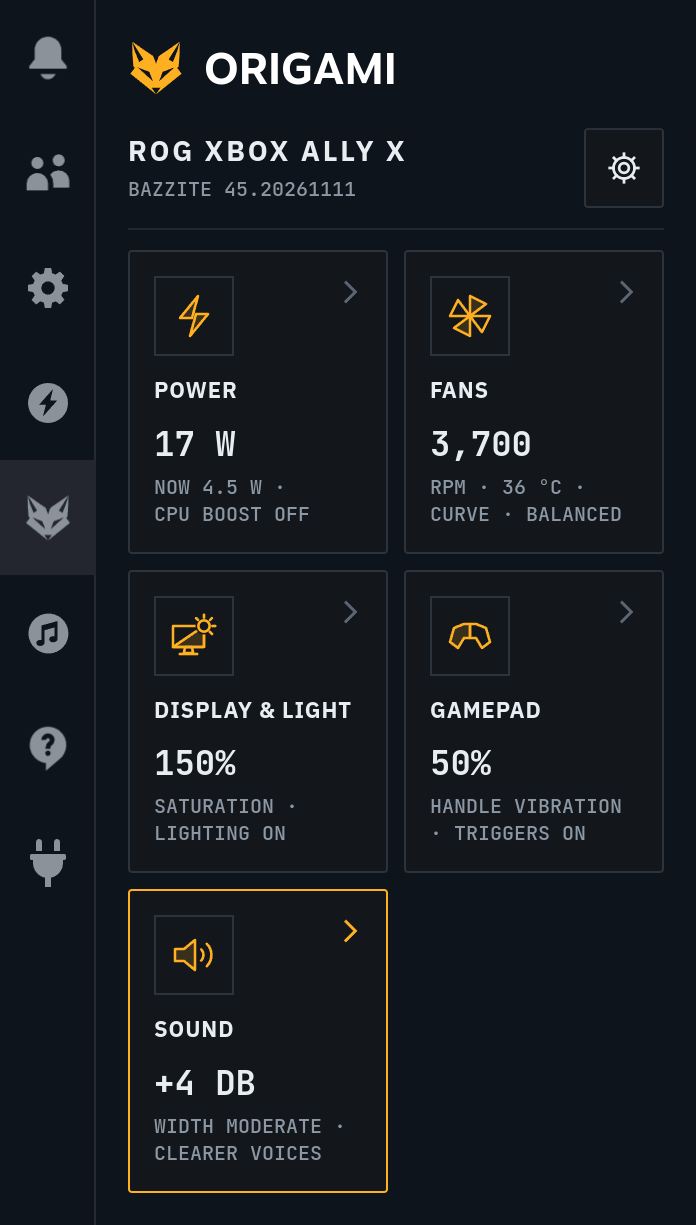
ORIGAMI has a fifth tile, Sound: louder speakers with no crackle, wider stereo and clearer voices. It also fixes the Bazzite menu that turned invisible after its first use, and makes moving between screens smoother.
What's new
Sound
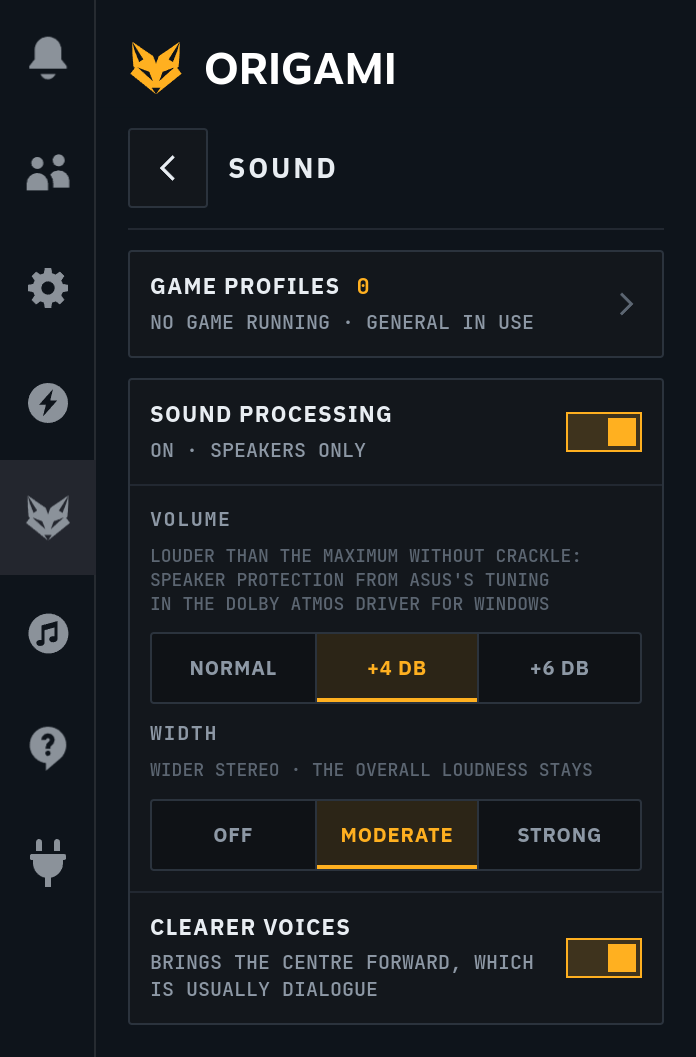
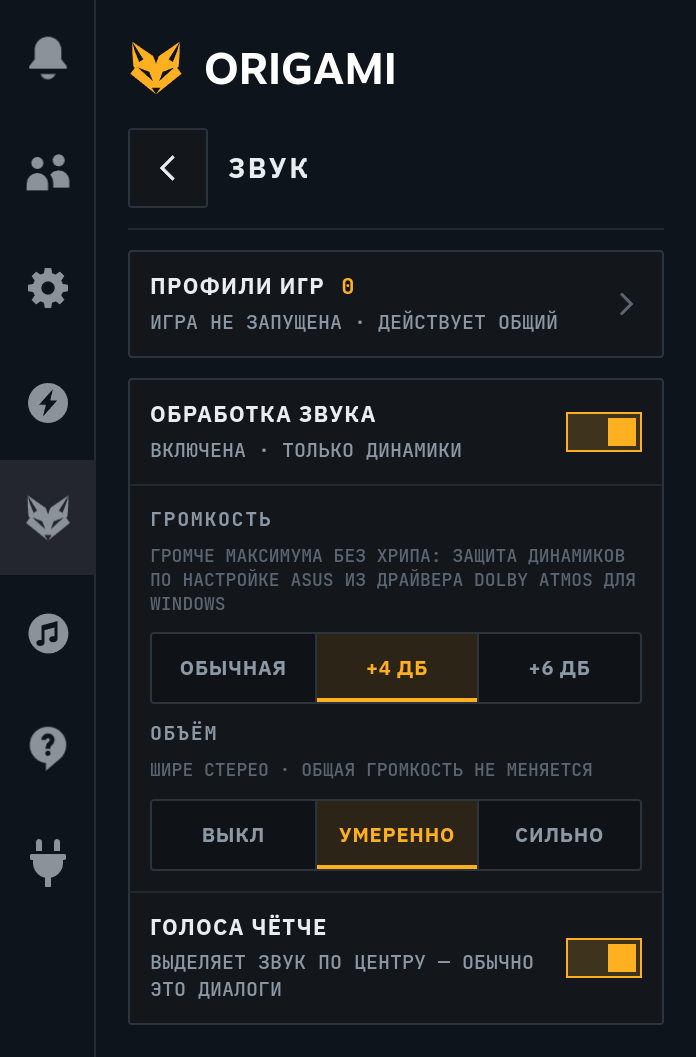
- Sound processing. A single switch on the new Sound screen. Switch it on and ORIGAMI processes the built-in speakers; switch it off and you get the system's own sound.
- Volume. Normal, +4 dB or +6 dB: louder than the system's maximum, with no crackle. The speakers stay protected by the limits ASUS set for each model in its Dolby Atmos driver for Windows.
- Width. Moderate or Strong: a wider stereo image at the same overall loudness.
- Clearer voices. Makes dialogue easier to hear by lifting the centre of the mix while someone is speaking. In a test game, speech got about 4.5 dB louder and gunfire only about 1 dB.
- Per-game sound. Start a game and switch on Per-game sound at the top of the Sound screen. The game gets its own sound settings, applied automatically every time it runs. Game profiles lists the games that have them.
- The Sound tile on the main screen shows the volume boost and which options are on.
Navigation
- Screens open at the top. A screen opened from one of the lower tiles used to appear scrolled to the middle or the end.
- Back takes you where you were. After going back, the tile or row you came from is selected again, instead of the first item on the screen.
- The main screen scrolls with your selection. Five tiles no longer fit in the panel, so the selected tile is kept in the middle, with the rows above and below still in view.
Fixes
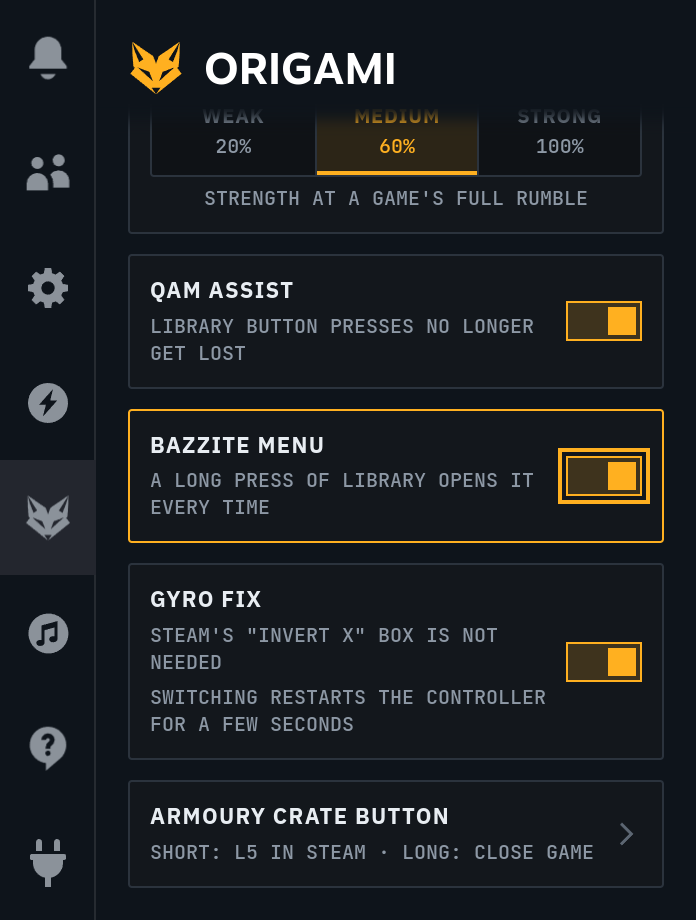
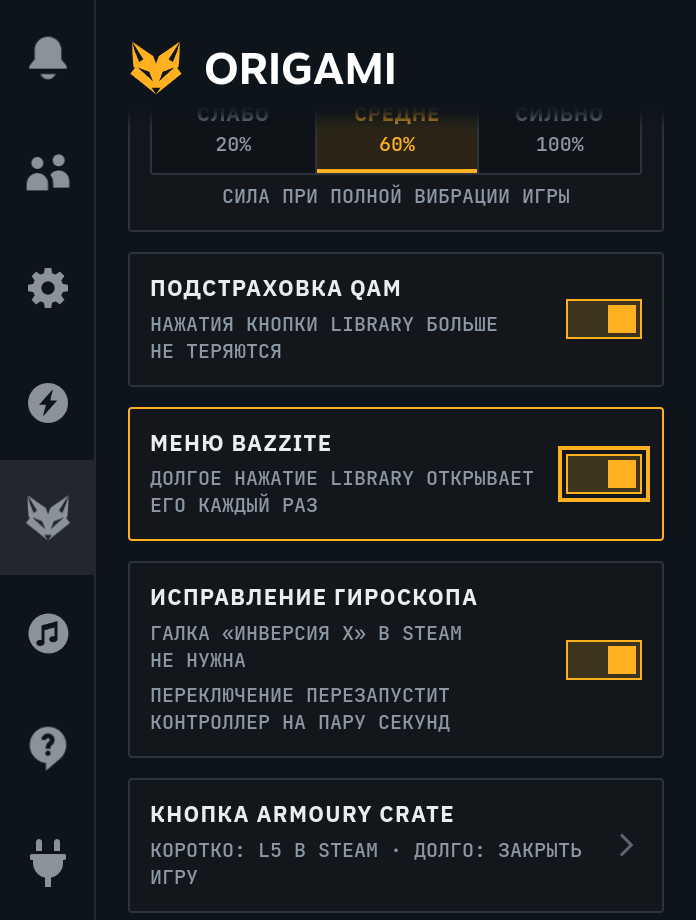
- Invisible Bazzite menu. On Bazzite, holding the Library button opens the system's own menu. After the first time it would open invisibly: you could hear it and it took over the controls, but nothing appeared on screen. The new Bazzite menu switch on the Gamepad screen makes it show up every time. Like the other fixes, the switch stays red until you set it, and it only appears on systems that have this menu.
- Sound crackle after sleep. If the console's clock is set to local time, which is what Windows does, the sound could crackle after waking until the next restart. On such consoles the Sound screen shows a Sound crackle after sleep switch: switch it on and ORIGAMI corrects the clock as soon as the console wakes.
Good to know
- Built-in speakers only. The processing pauses while headphones are plugged in and resumes by itself.
- If another plugin or app is already processing the sound, ORIGAMI switches its own processing off, shows which one is in control, and switches it back on once the other is turned off.
- Light on the processor: the processing uses about 0.4% of it.
- System changes in Settings lists the sound processing while it is on, and Restore everything switches it off along with everything else.
ORIGAMI.zipis bigger now, about 2.4 MB: everything the sound processing needs is included, so nothing is downloaded to the console.- Decky Loader 3.3.0 or newer is still required.
Updating
- From 1.2.0: open ORIGAMI's Settings, find the Updates card and choose Check, then Update. Decky asks for confirmation and installs the release; your settings are kept.
- From an older version, or if you prefer: on Decky's Developer page, use Install Plugin from URL with
github.com/lexdrev/origami/releases/latest/download/ORIGAMI.zip, or downloadORIGAMI.zipbelow and choose Install Plugin from ZIP File. - Don't update while a game is running: ORIGAMI stops for a moment while Decky swaps the versions, and the system briefly falls back to its own settings.
- New to ORIGAMI? See Install in the README.
Tested on
- ROG Xbox Ally X (board RC73XA) with Bazzite 45.20261111, kernel 7.3.3-ogc1.1, InputPlumber 0.84.0 and Decky Loader 3.3.1. The sound was measured and listened to there in a game, and the Bazzite menu fix was tried both in a game and outside one.
- The Sound tile is available on all five ROG Ally models, each with the speaker protection ASUS tuned for it, but so far the sound has only been listened to on the ROG Xbox Ally X. Headphones have not been tested.
- ORIGAMI also supports the ROG Ally X (RC72LA), the ROG Xbox Ally (RC73YA) and the ROG Xbox Ally X20 (RC74XA), but it has not been tested on them yet.
Feedback
Found a bug or missing a feature? Open an issue: the form asks for your console, the versions and the log. English and Russian are both fine.
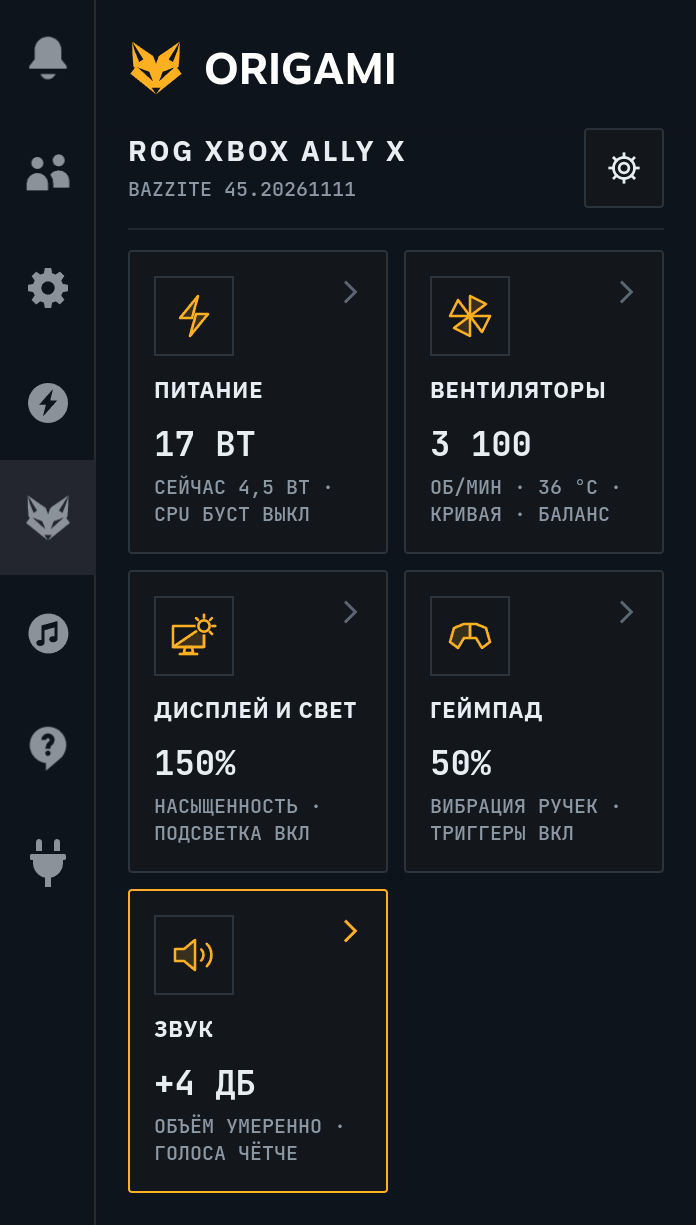
В ORIGAMI появилась пятая плитка — Звук: динамики громче без хрипа, шире стерео и чётче голоса. Ещё исправлено меню Bazzite, которое со второго раза открывалось невидимым, и стало удобнее переходить между экранами.
Что нового
Звук
- Обработка звука. Один переключатель на новом экране Звук. Включён — ORIGAMI обрабатывает встроенные динамики; выключен — звук как в системе.
- Громкость. Обычная, +4 дБ или +6 дБ: громче максимума системы и без хрипа. Динамики защищены настройками ASUS для каждой модели, взятыми из драйвера Dolby Atmos для Windows.
- Объём. Умеренно или Сильно: стерео шире, а общая громкость не меняется.
- Голоса чётче. Делает речь в диалогах громче: выделяет звук по центру, пока кто-то говорит. В игре речь стала громче примерно на 4,5 дБ, а стрельба — примерно на 1 дБ.
- Свой звук для игры. Запустите игру и включите Свой звук для игры вверху экрана «Звук»: у игры появятся свои настройки звука, и они включаются сами, когда игра запущена. Такие игры собраны в Профилях игр.
- Плитка на главном экране показывает выбранную громкость и что ещё включено.
Навигация
- Экран открывается с самого верха. Раньше экран, открытый с нижней плитки, показывался с середины или с конца.
- «Назад» возвращает туда, где вы были. После «Назад» выбрана та плитка или строка, из которой вы открыли экран, а не первый элемент экрана.
- Главный экран прокручивается за выбранной плиткой. Пять плиток не помещаются в панель, поэтому выбранная плитка стоит посередине, а ряды выше и ниже остаются видны.
Исправления
- Меню Bazzite открывалось невидимым. В Bazzite долгое нажатие Library открывает меню системы. Со второго раза оно открывалось невидимым: звук открытия слышен, управление переходит к меню, а на экране его нет. С новым переключателем Меню Bazzite на экране «Геймпад» оно открывается нормально каждый раз. Пока вы его не трогали, переключатель красный, как и другие исправления; он показывается только там, где у системы есть это меню.
- Хрип звука после сна. Если часы консоли идут по местному времени, как их ставит Windows, после сна звук мог хрипеть до перезагрузки. На такой консоли экран «Звук» показывает переключатель Хрип звука после сна: включите его, и ORIGAMI будет поправлять часы сразу после пробуждения.
Полезно знать
- Обработка — только для встроенных динамиков. Пока подключены наушники, она стоит на паузе и возвращается сама.
- Если звук уже обрабатывает другой плагин или программа, ORIGAMI выключает свою обработку, показывает, кто управляет звуком, и включает её снова, когда ту выключат.
- Нагрузка небольшая: обработка занимает около 0,4% процессора.
- Изменения в системе в Настройках показывают обработку звука, пока она включена, а Вернуть всё как было выключает её вместе с остальным.
ORIGAMI.zipстал больше, около 2,4 МБ: всё нужное для обработки звука лежит внутри, на консоль ничего не скачивается.- Нужен Decky Loader 3.3.0 или новее, как и раньше.
Обновление
- С 1.2.0: откройте Настройки ORIGAMI и в карточке Обновления нажмите Проверить, затем Обновить. Decky спросит подтверждение и поставит выпуск; настройки сохранятся.
- Со старой версии или если так привычнее: на странице Разработчик в Decky — Установить плагин из URL со ссылкой
github.com/lexdrev/origami/releases/latest/download/ORIGAMI.zip, или скачайтеORIGAMI.zipниже и выберите Установить плагин из ZIP файла. - Обновляйте не во время игры: пока Decky меняет версии, ORIGAMI на мгновение останавливается и система возвращается к своим настройкам.
- Ставите ORIGAMI впервые? Смотрите Установку в README.
На чём проверено
- ROG Xbox Ally X (плата RC73XA), Bazzite 45.20261111, ядро 7.3.3-ogc1.1, InputPlumber 0.84.0, Decky Loader 3.3.1. Звук там замерен и прослушан в игре, исправление меню Bazzite проверено в игре и без неё.
- Плитка «Звук» есть на всех пяти моделях ROG Ally, у каждой — защита динамиков, которую ASUS настроила для неё, но на слух звук проверен только на ROG Xbox Ally X. С наушниками не проверяли.
- ORIGAMI знает и ROG Ally X (RC72LA), ROG Xbox Ally (RC73YA) и ROG Xbox Ally X20 (RC74XA), но на них его ещё не проверяли.
Обратная связь
Нашли баг или чего-то не хватает? Создайте issue: форма спросит консоль, версии и журнал. Можно на русском.