|
Suppose you sell a product using the RasPi GPIO connector.
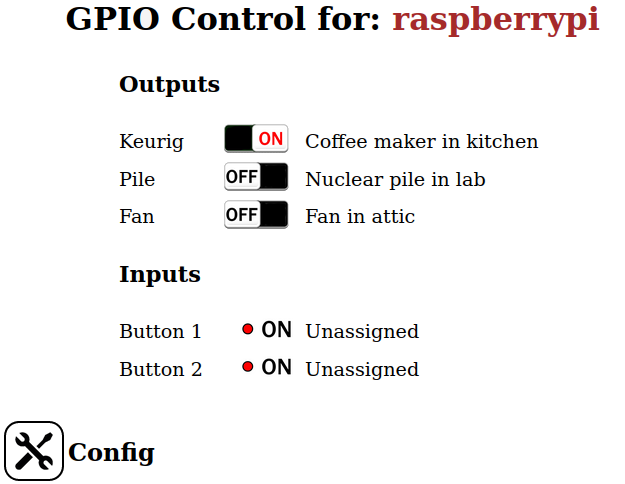
How does your customer control the attached hardware? For a RasPi relay board, how does the user control the relays when the Pi is located in the attic? End-users might not have a spare display and keyboard, and a display and keyboard may not be convenient at that location. The GPIOServer presents a web page interface to the RasPi GPIO lines, allowing the end user to read inputs and set outputs using any browser. The GPIO config is specified by a file (that you supply) limiting the user to valid actions. The project also supplies an executable to control the GPIO system directly without a browser. The program can be used at the command line or embeded into scripts as needed. It can be compiled to run on linux, windows, or IOS systems. |
 |
GPIOServer runs on the Raspberry Pi and reads a configuration file (that you supply) describing the GPIOs used by the attached hardware: the mode (input/output), logic (normal/inverted), hardware name ("Relay 2"), and so on. The server initializes these GPIOs and accepts JSON commands to read and/or set the values.
The project contains an executable (GPIOControl) to communicate with the server from an external host. The user can use this program to remotely read and control GPIO settings without a browser. The program can be run at the command line, and may be embedded into scripts as needed.
The system also spawns a web server with HTML pages showing the GPIOs. The web interface allows the user read inputs and set outputs using any web browser.
The system is intended to be used with your hardware product.
After installing the project (using "git clone"), simply edit the configuration file "GPIO.conf" to specify which GPIOs are available to the user, their mode specifics, and hardware names. Comment out any GPIOs that you don't want users to access.
Add your product branding to the web pages as needed: background color, fonts and styles, trademarks, and corporate logos.
This product is open source and free to use without attribution. Contact me through this site if you need a more definitive legal document.
Installation instructions are in the file "INSTALL.md" supplied with the project.
Please let me know about bugs and other issues so I can update the project.