IPEP 23: Backbone.js Widgets
| Status | Active |
| Author | Jonathan Frederic <jon.freder@gmail.com> |
| Created | October 9, 2013 |
| Updated | October 9, 2013 |
| Implementation | TODO: link to the PR |
Typical scientific computing suites live within a hard-coded GUI (graphical user interface). This stereotype can be broken by exposing an API that allows the user to generate and manipulate their GUI. By adding this functionality to the IPython Notebook, users will be able to define the environment in which their code is executed. Prior to the addition of comms (IPEP 21: Widget Messages) this was not possible.
The Notebook Widget is introduced in this IPEP. Notebook Widgets are GUI elements in the Notebook frontend which are automatically synchronized with equivalent representations in the Notebook backend. With the addition of Widgets, basic GUIs can be implemented completely in the backend.
It’s important to understand that user written code in is generally executed in the backend (traditionally Python, but also Julia, R, etc). Using the special magics %%javascript and %%html, users can write code that is executed on the frontend (in the web browser). The addition of comms allows for custom communication between frontend and backend code.
When designing the Widget architecture, we wanted to make sure that the widgets could be maximally reusable, configurable, and distributable. It is also important that the widgets themselves are independent of the data they represent. For this reason we decided to try to model our architecture after the MVC (model, view, and controller) design pattern. In the MVC pattern, the model contains all of the data, the view is used to render that data, and the controller is used to adjust the model (as seen in Figure 1). There are many Javascript libraries that aid in the creation of MVC architectures. We chose the backbone.js library to implement our architecture because it is lightweight and has a minimalistic impact on coding style.
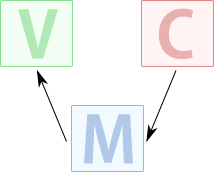 Figure 1: Interaction of MVC components
The MVC design pattern has to be altered to work within IPython. In the architecture introduced by this IPEP, the model, view, controller all live in the frontend. A copy of the model exists in the backend, which is automatically synced with the model in the front end (as seen in Figure 2).
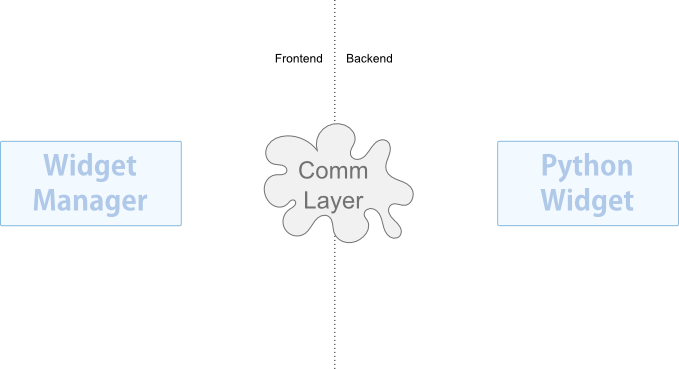 Figure 2: Synchronization of each model in the frontend with the corresponding model in the backend is done using a comm.
The models created with backbone.js are automatically synchronized by backbone.js with a user specified backend (usally a RESTful server). Backbone.js uses the Backbone.Sync(...) method to perform the syncronization. By overwriting the Backbone.Sync(...) function, all of the edits can be sent to the backend using a comm.
In the Python backend (other backends discussed later in this IPEP), traitlets are used to define each property of the model. The traitlets machinery listens for the properties to change. When a property is changed, the modified state of the model is sent to the frontend via the same comm.
The view and controller are combined in our architecture since widgets both display and accept input. The combined view and controller are simply referred to as a view in our architecture. The view only exists on the frontend.
This raises the first design question; How can users specify when and how a view should be displayed on the frontend via the backend? The solution is a model.show(...) method in the backend. When the model.show(...) method is called, a message is sent to the frontend instructing it to instanciate a view for the model (as seen in Figure 3).
[[/File/IPEP-23/Show.png|frame|alt=Figure 3: Result of calling model.show(...)]]
The IPython Notebook is designed so code is executed on a cell by cell basis. It would not be unusual to desire the same Widget to be available in more than one cell’s output. By calling model.show(...) again, the user can create another view linked to the same model (as seen in Figure 4).
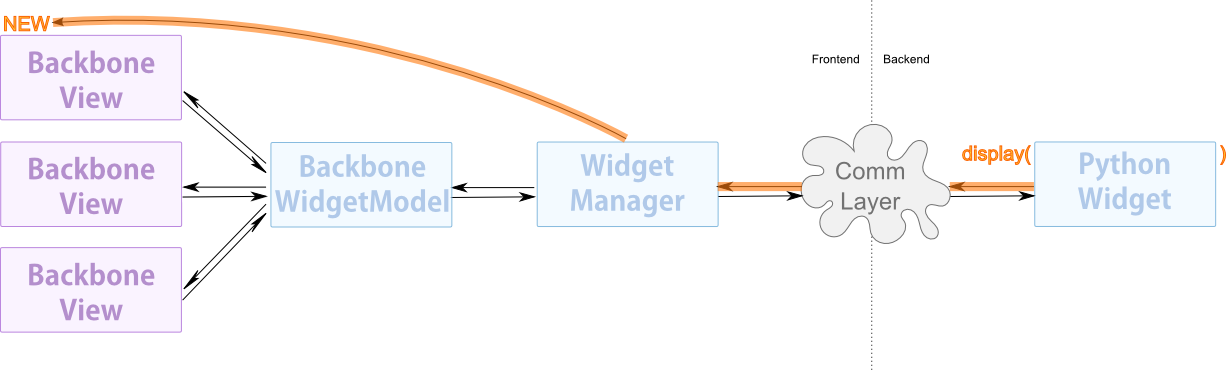 Figure 4: Multiple views associated with one model
The beauty of this design is that model state is only sent once between the backend and the frontend via the comm. The views are synchronized within the frontend (as seen in Figure 5).
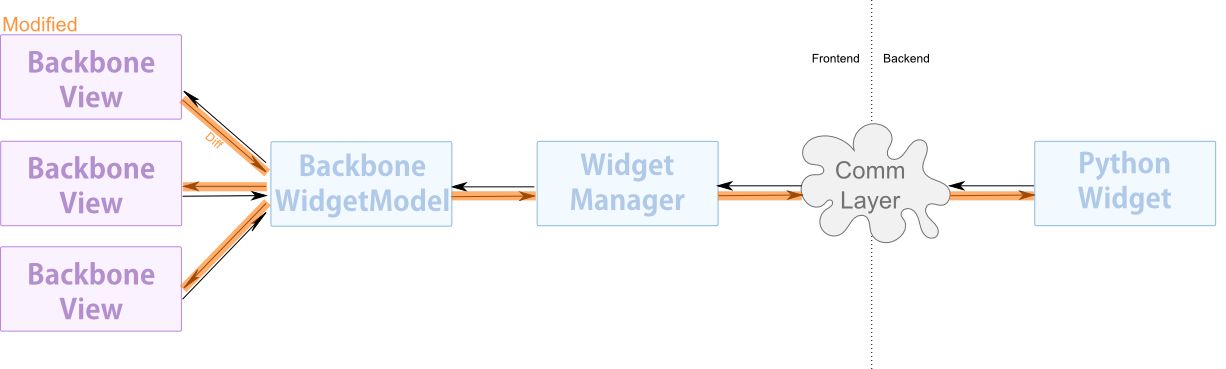 Figure 5: Synchronization of the views to the model occurs completely within the frontend.
Models and views are separate entities. The user can choose what view is used for a model. The user can even create a custom view for an existing model. Since multiple views can be displayed for one model, the user can represent a model more than one way in a single cell’s output (as seen in Figure 6). For example, one could show a slider view and a numeric text box view for the same numeric model. This would allow the user to slide the slider or enter a value explicitly in the numeric text box. To choose what view is shown, one must pass the view’s name when calling the model.show(viewname="myview") method (replace "myview" with the view's name).
 Figure 6: Models can be represented with multiple different views. Users are able to create their own views for existing models.
The second major design question arises because of the need to be able to nest views within each other; How can you display one view within another? Since nesting is only a function of the views, it’s hard to appropriately expose it in the backend. The solution is to allow models in the backend to be child of each other (as seen in Figure 7).
 Figure 7: Model parent child relationships can exist on the Python side.
When the user calls model.show(...) and the model has a parent, the id of the parent is sent along with the show message to the frontend. When a user calls model.show(...) and the model has children, the children of that model are also shown (as seen in Figures 8-9).
 Figure 8: First step - parent view is rendered
 Figure 9: Second step - children views are rendered
When the frontend receives the command to show a view for a model that is child to another model, it looks to see if a view exists for the parent. If the parent view does exist, the child view is created within that parent view. If a parent doesn't already exist, the view is shown alone (without the parent).
Even though the child views are children of a parent view, they are still associated with their own models individually and state synchronization occurs between each view and its respective model. The information from a child view is never relayed to a parent view (as seen in Figure 10).
 Figure 10: A view always has a single unique model it is linked to, even if it is child to another view.
TODO
TODO