Repository navigation
Releases
Bloom v3.10.1

Bloom 3.10.1
What's New
- choose which drives the dock extras show
- add an optional Task View button beside Start
- show widget tooltips beside the notch while it is open
- show tooltips for every status widget
- show battery details when hovering the battery widget
Bug Fixes
- accept bordered popups without title bars
- address tray integration review feedback
- find icons for apps that moved to a new version folder
- repair Windows tray and app integration
- handle exhausted overlap scan
- show UAC prompts that Windows parked in the background
- correct overlap detection for Start and displays
- clip the overlay window to the HUDs it draws
- keep the Add App popup inside the window region
- clip the dock window to the UI it draws
- address review on the window region
- clip the notch window to the UI it draws
- close Start on a second click instead of reopening it
- convert restore positions with each monitor's own work area
- balance COM initialization in get_battery_details
- line up the dock extras rows under their labels
- bring an off-screen window back on screen when restoring it
- keep the notch's width while a widget tooltip is open
- open settings import/export dialogs in the backend (#264)
- don't list an app's dialogs as separate windows (#236)
- open Bloom's menu when right-clicking a background app (#234)
- keep bounded runtime diagnostics for crashes and recovery (#231)
- bound thumbnail cache and stabilize network speed (#229)
- show failed settings saves and restore persisted values (#227)
- minimize only the foreground dock window (#225)
- serialize startup window reconciliation (#223)
- stabilize dock interactions and runtime persistence (#210)
- recover taskbars and AppBars after shell changes (#221)
- keep mouse hook responsive on dedicated thread (#219)
- verify dock handoff and recover taskbar after force kill (#216)
Bloom v3.10.0
Bloom 3.10.0
The notch grows up — rebuilt around a Dynamic Island model, with Wi-Fi and Bluetooth management, the shelf, and a round of dock fixes.
The notch, rebuilt
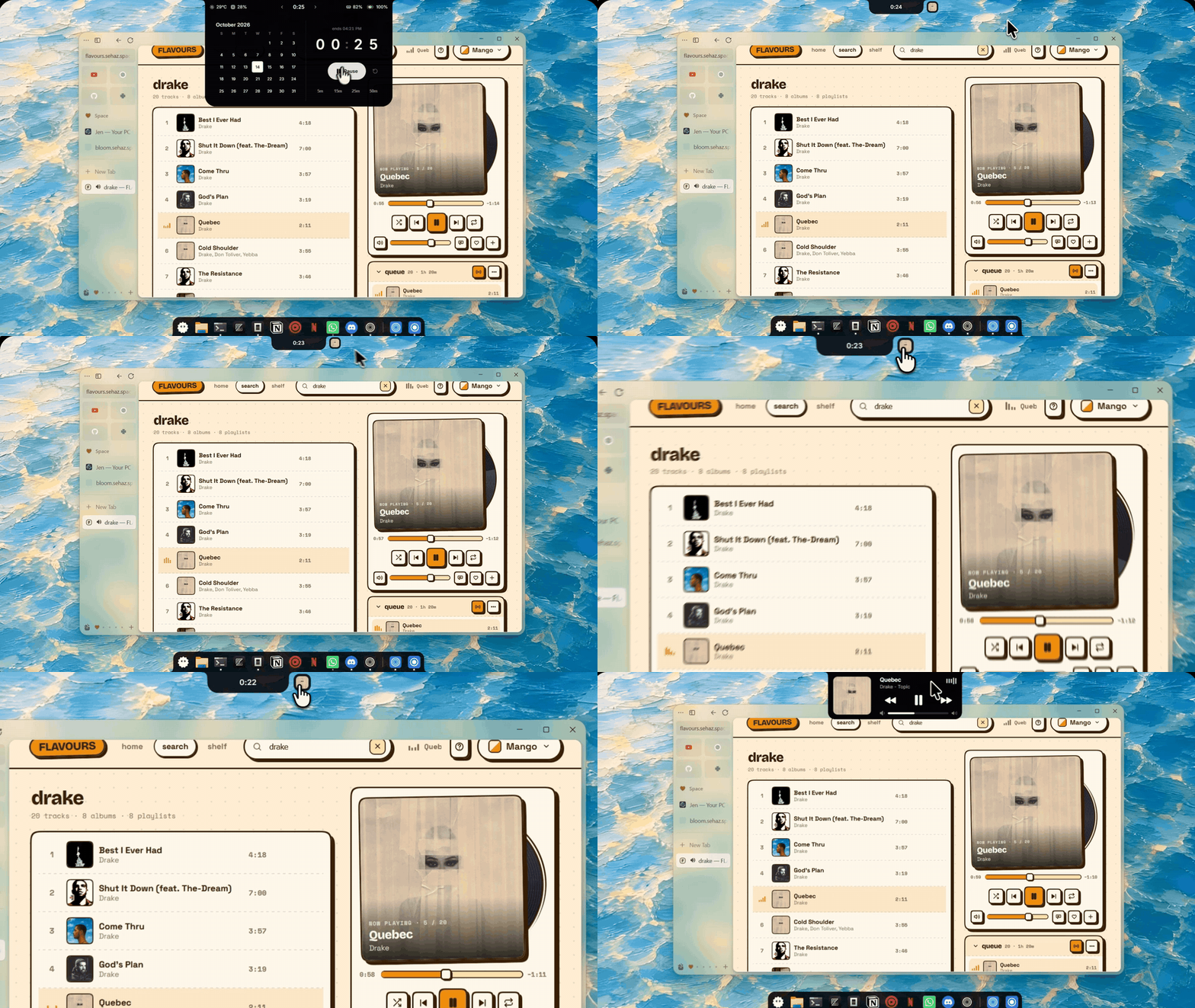
- Click to open, not hover. Hover now only peeks at the status strip; a click opens the panel you were last on. Prefer a fixed panel? Turn panel memory off in Settings → Notch.
- Live activities. Music, a running timer, and the shelf sit as bubbles beside the pill. A set timer holds the pill while music moves to its own bubble — click it to open the player.
Wi-Fi and Bluetooth, from the notch
- See and connect to networks, forget them, and manage paired devices without opening Windows Settings — signal strength, battery, and live updates in place.
- Right-click (or the › button) on the Wi-Fi and Bluetooth tiles to open the new views.
The shelf
- Drop files or text onto the notch to stash them, drag them back out anywhere. Text notes copy on click.
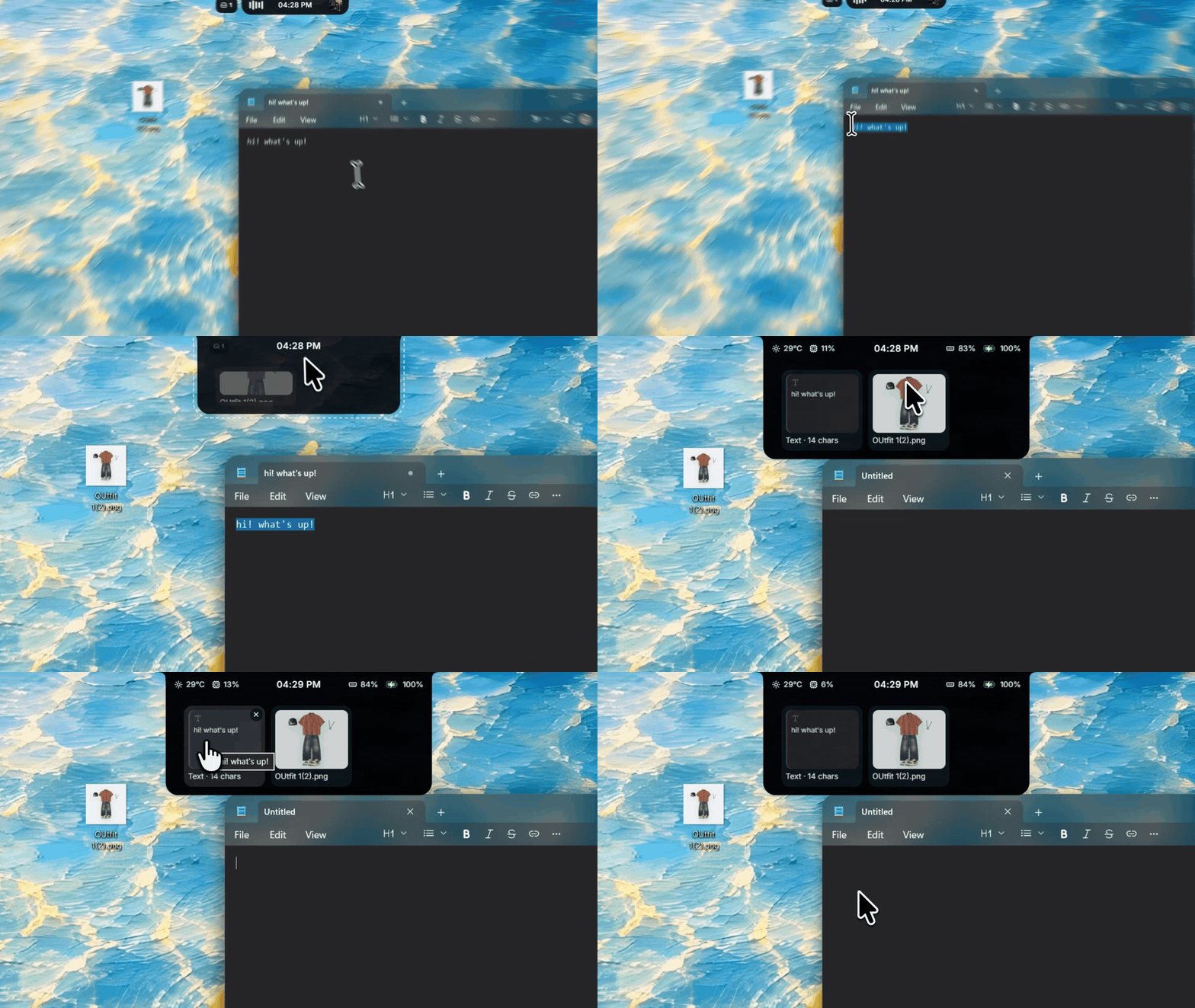
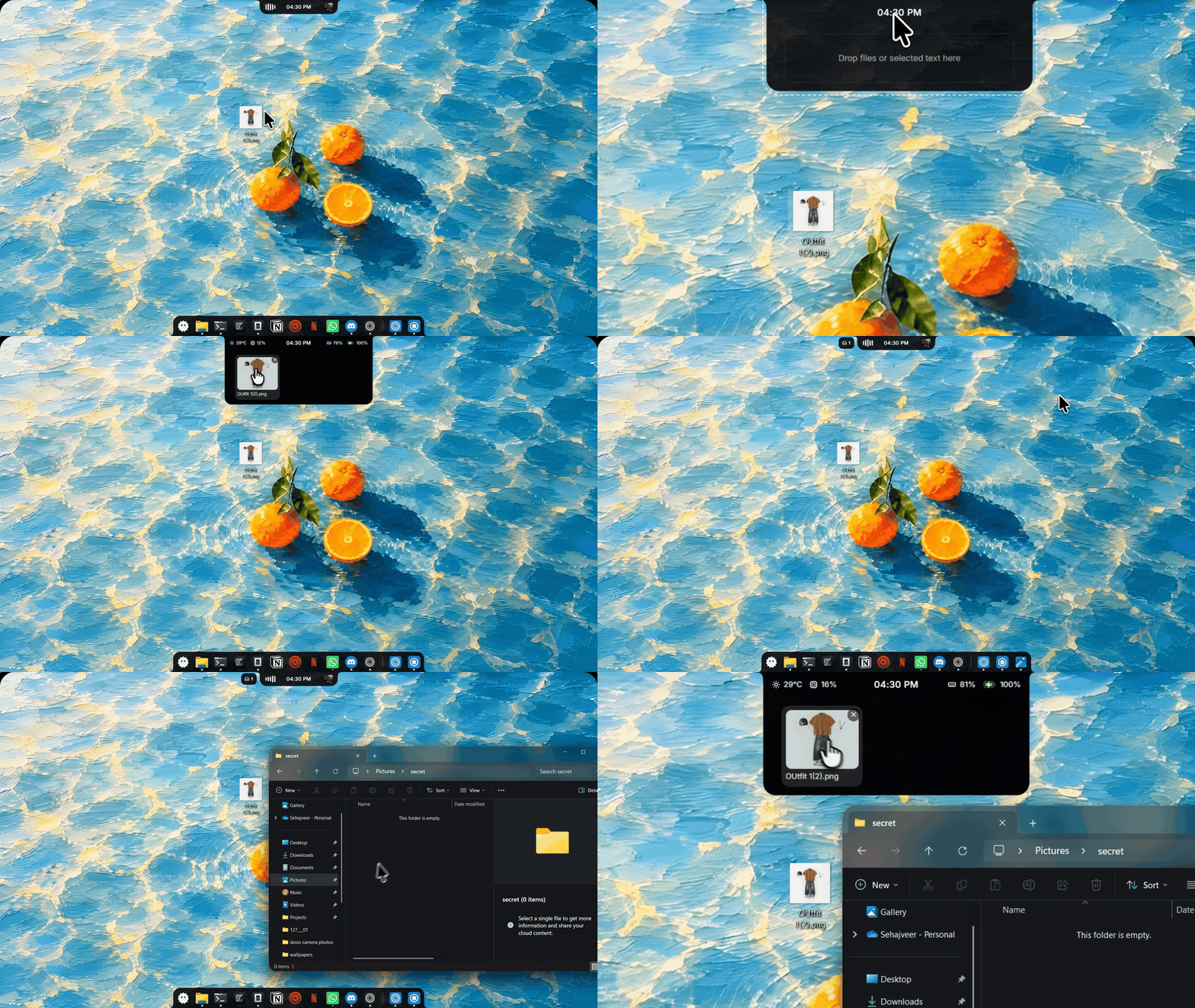
- Every file type now previews: images, PDFs, Office thumbnails, Explorer thumbnails, or the document's opening text — with type icons as the fallback.
Dock
- Extras in the dock: drives, folders, and the Recycle Bin.
- Tray menus open at the dock icon, apps show their Start menu names, and MSIX-packaged apps launch correctly.
- The bottom edge waits for hover intent (adjustable, 200 ms default) so skimming past it no longer pops the dock.
Polish
- Start menu icon picker: the add tile is centered, and the Windows preset is the real Windows 11 logo.
- Seam-free corner flares at fractional display scaling (125%, 150%).
- 24-hour clocks no longer leave empty space in the pill; activity bubbles are rounded squares; cleaner panel arrows.
Download bloom_3.10.0_x64-setup.exe below. Already on 3.9.x? Settings → About → Check for Updates.
Bloom v3.9.2
Bloom 3.9.2
A fixes-focused update: smoother dock behaviour, reliable volume and brightness, safer quitting — and a safety net so Bloom can never get stuck on your screen.
Highlights
- Bloom can't freeze on screen anymore. If Bloom's rendering engine ever crashes while running, the notch and dock used to stay visible but dead — blocking clicks across the screen until you killed Bloom from Task Manager. Bloom now notices within a couple of seconds and restarts itself cleanly. If it happens right at launch, it restores your taskbar and exits instead of looping.
- Dock apps with several windows now work properly. Clicking an icon cycles through that app's windows, each open window gets its own dot (up to three), and "Quit" closes every window instead of just one.
- The right-click menu opens at your cursor, instead of floating away from the dock.
- Volume and brightness sliders now stick. Brightness applies correctly, mute is respected, and the value you release on is the value that's set.
- New: Reset to defaults in Settings — start fresh without reinstalling.
Everything else fixed
- Pinning or unpinning a browser web app (Edge, Chrome, Brave) no longer affects other apps from the same browser.
- A disabled dock stays hidden when its mode changes.
- When Bloom's volume overlay is off, volume keys go back to Windows as expected.
- Media controls, brightness keys and fullscreen hiding keep working even with no audio output device connected.
- After an abnormal exit, your taskbar's auto-hide setting is restored correctly, and a hidden Bloom process can no longer block relaunching.
- Quitting is cleaner — Bloom stops updating windows and the taskbar the moment shutdown begins.
- Deleted settings no longer come back after a restart.
- The update badge clears after updating.
- Weather location now works on networks that block the previous lookup service.
- The notch no longer peeks open when your cursor just passes the top edge — it waits for a deliberate hover, and edge hover is more stable overall.
- The quick-settings Wi-Fi tile now tells "on" apart from "connected".
- New installs default to the Smart dock mode.
Updating
Bloom will find 3.9.2 on its own — the built-in updater handles it (auto-install waits ~24 hours by design, the badge appears immediately). If "Check for Updates" has never worked for you (the bug affecting 3.8.7 and 3.9.0), install 3.9.2 manually once from this page — from 3.9.1 onward automatic updates work again.
Full list of changes
- restart Bloom when its webview processes die (#158)
- drop localStorage settings missing from settings.json (#152)
- allow Tauri IPC and the Inter stylesheet (#151)
- stop touching windows and the taskbar once shutdown begins (#150)
- keep the user's auto-hide setting across a crash (#149)
- cycle through an app's windows and show a dot per window (#144)
- place the context menu at the cursor and quit all windows (#143)
- identify dock items by identity instead of path (#142)
- hand volume keys back to Windows with the overlay off, and keep commands working without an audio device (#141)
- keep a disabled dock hidden when its mode changes (#140)
- make the volume and brightness sliders reliable (#133)
- distinguish Wi-Fi on from connected in quick settings
- keep edge-pad hit-testing immediate to stop hover flicker
- default new installs to smart
- add reset to defaults
- require hover intent before the top edge peeks
- don't show a stale update badge after updating
- call ip-api over HTTP in the location fallback (#126)
Bloom v3.9.1
Bloom 3.9.1
What's New
- In-app announcements — Bloom can now surface important notices directly in the notch and in Settings.
- Redesigned About tab — a bigger, editorial "Bloom" wordmark, a version chip, a logo that spins on hover, and a GitHub link for the developer.
Bug Fixes
- Update checks no longer time out on slow networks. The checker only allowed 10 seconds, so on some routes to GitHub it gave up and showed "No updates found" even when a release existed. It now waits long enough for slow connections.
⚠️ On 3.8.7 or 3.9.0 and seeing "No updates found"?
Install this release manually once — your settings are kept:
- bloom_3.9.1_x64-setup.exe (recommended)
- bloom_3.9.1_x64_en-US.msi
Automatic updates keep working normally from 3.9.1 onward. Users on 3.8.6 or older are unaffected and will update automatically.
Bloom v3.9.0
Bloom 3.9.0
Here's what's new in Bloom 3.9 — a bigger update than usual, with a few long-requested features and important fixes.
What's New
Control the volume of every app — the volume panel now expands into a mixer with a slider for each app that's playing sound. Turn one app down without affecting the rest.
Choose your start button icon — pick Bloom, Colorful, Golden, Orange or the classic Windows icon, or upload an image of your own. You'll find it in Settings → Dock.
Open pinned apps with Win+1 … Win+9 — press the Windows key and a number to open, focus or minimize the app in that spot on the dock.
Middle-click for a new window — middle-click a dock icon, or right-click and choose the option, to open another instance of an app.
The dock adapts to maximized windows — in fixed mode, the dock now stretches across the screen while a window is maximized and returns to its normal size when you restore it.
A fresh look for the Pomodoro timer — the timer in the notch has a new flip-clock design and plays a chime when your session ends.
Fixes
- Bloom no longer crashes on launch for users whose previous update failed to install.
- The notch no longer leaves a gap at the top of the screen after waking from sleep or changing display scaling in smart and peek modes.
- Settings changes made right after startup are no longer lost.
- Brave web apps now appear as their own dock icons instead of blending into the browser.
- App names in the volume mixer are now more reliable.
Full Changelog: v3.8.7...v3.9.0
Bloom v3.8.7
Bloom 3.8.7
A patch release focused on dock reliability and input handling.
Bug Fixes
- Close Start menu when clicking its icon while open
- Prevent text selection across the dock UI
- Stop closed apps from staying in the dock
- Remove apps from the dock as soon as they close
- Show UWP apps and folder Properties windows
- Show each running PWA as its own dock item
- Show correct icons and find all installed apps
- Unblock screen edges and the Snipping Tool toolbar
- Stop native image drags on album art
- Throttle background update checks and centralize the update flow
Bloom v3.8.6
Bloom 3.8.6
What's New
- 24-hour time format toggle — new setting in General to switch between 12h/24h clock display
- SF Symbol media icons — replaced standard icons with Apple-style SF symbols for a cleaner look
- Settings documentation — added SETTINGS.md with all bloom-prefixed keys for external scripting
Improvements
- Zero-idle cursor tracking — replaced 32ms polling thread with a Windows mouse hook, eliminating CPU usage when the cursor is still
- Faster dock icon updates — debounced disk cache writes and only refetches the affected app on icon reset instead of clearing the entire cache
- Smoother thumbnail capture — deduplicated capture logic, added throttling, and safely prunes dead windows from the cache
- Unified settings event system — single settings-changed event channel, removed 33 redundant broadcast calls, and simplified the Rust backend
- Settings panel restructured — reorganized from 4 cluttered tabs to 6 focused tabs (General, Appearance, Notch, Dock, Overlays, About)
Bug Fixes
- Fixed brightness overlay state not persisting across app restarts
- Fixed notch/dock flickering when hovering from screen edges
- Fixed settings sync hook not converting numeric strings, which could break the UI scale control
Bloom v3.8.5
Bloom 3.8.5

What's New
- Peek mode: Notch now briefly appears when you receive notifications or play media
- Customizable status bar: Pick which widgets show up and see an update indicator
- Weather improvements: Better city selection, new dynamic weather icons, and various fixes
Fixes
- Overlay no longer steals focus from fullscreen games
- Fixed startup animation timing in peek mode
- Reduced false positive antivirus flags from background processes
Bloom v3.8.4
Bloom 3.8.4
What's New
- Custom Dock Icons — Make the dock your own! Set custom icons for your dock items
- Settings Export/Import — Save and load your settings with a simple file dialog
- Smart & Peek Dock Modes — New flexible dock modes to match your style
- Icon-Only Dock Mode — Clean, minimal dock without backgrounds or padding
Improvements
- Classic mode: album art click toggles layout, headphones icon on visualizer hover
- Features page redesign with hover-to-reveal cards and spotlight glow
- New loading screen for a smoother startup
- Wallpaper optimization (6.9 MB → 963 KB) with preloading
- Changelog redesign with a fresh new look
Bug Fixes
- Fixed SMTC album art for comma-separated content types
- Fixed large media artwork streams
- Fixed custom icon reset after restart
- General stability improvements
Bloom v3.8.3
Bloom 3.8.3
What's New
- Built-in auto-updates — Bloom can now check for and install updates on startup
- Taskbar now properly restores even if Bloom is force-killed through Task Manager
Improvements - Cleaner icon set using lucide-react
- Smoother window rendering with unified corner styles
- Smarter music mode ordering based on what's playing
Bug Fixes
- Fixed taskbar getting stuck hidden or in auto-hide after quitting Bloom
- Fixed system tray button displacing the notch
- Fixed dock re-enabling itself after sleep/wake when you had it disabled
- Fixed settings panel layout nesting incorrectly
- Replaced PowerShell scripts with native Windows APIs for better reliability