Repository navigation
Releases
RillDisk 0.1.6

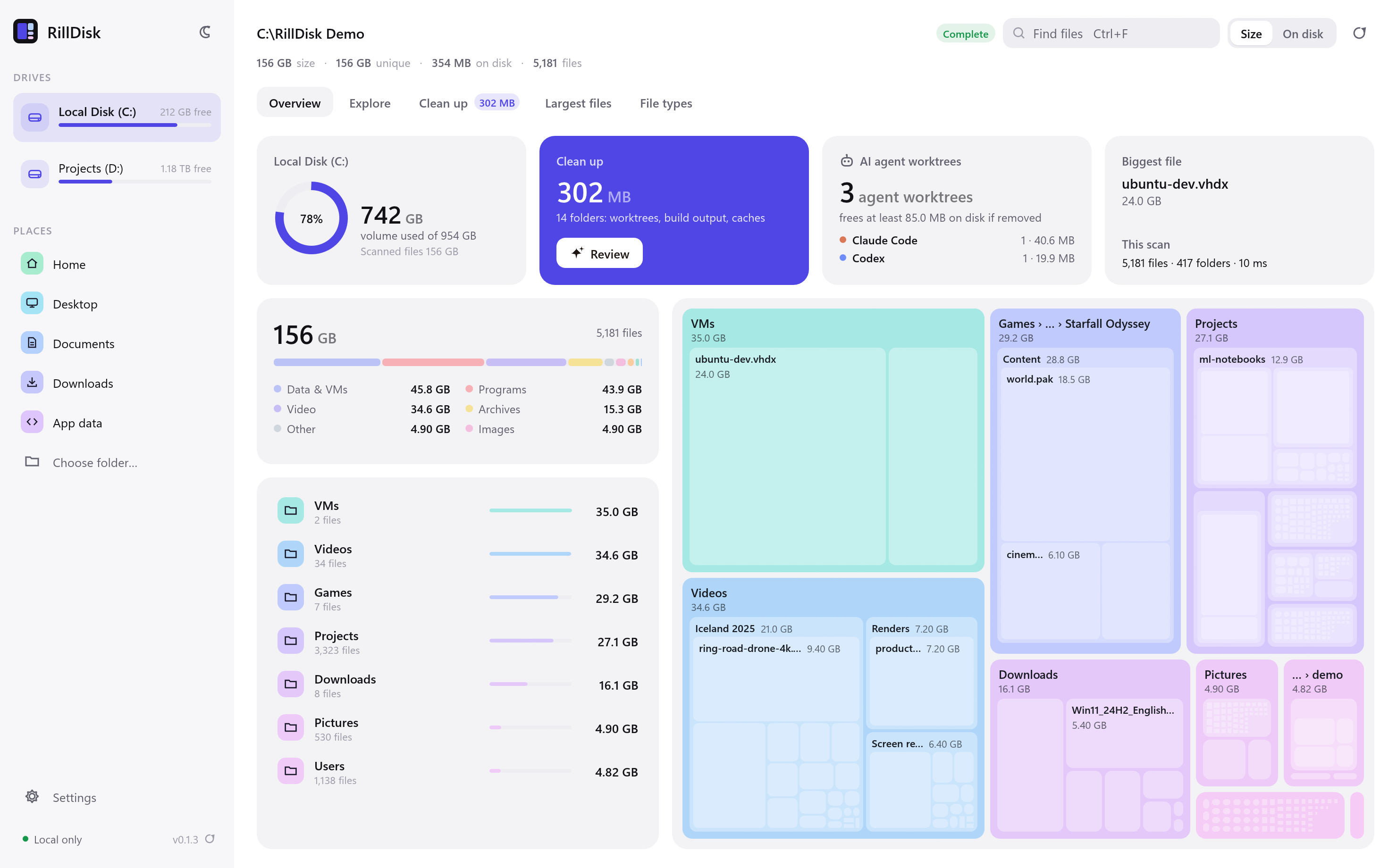
RillDisk 0.1.6: see what fills your disks and what you can safely free. A native app, a CLI and an MCP server for AI assistants, built in Rust. It reads file metadata; an optional Git check runs your own git read-only. Nothing is uploaded or deleted behind your back.
This release
Read-only reclaim reports now skip the folder identity lookups used to guard
cleanup. The MCP server reuses candidate discovery across pages while checking
protected paths on every request. In a Windows test with 256 candidates, each
page required 3 other I/O operations, down from 771 in v0.1.5.
Windows NTFS MFT scans build entries directly in the final list. The CLI and
MCP server also skip the live folder view used by the desktop. On a warm
24,771-entry synthetic image, the median peak working set fell from 31.2 MiB
to 28.9 MiB across eight paired runs comparing the collector change and
headless mode against the preceding reclaim-only build.
A torn MFT record can hide a worktree's Git pointer. RillDisk now withholds
orphan suggestions that depend on a complete directory listing when it finds
such damage. If an automatic MFT scan fails and falls back to a directory
walk, progress and the desktop live view restart with that walk.
First launch, verifying downloads, updating
- Windows: the builds are not code-signed yet. If SmartScreen appears, choose More info, then Run anyway.
- macOS: the app is not notarized yet. Open System Settings > Privacy & Security and choose Open Anyway, or run
xattr -dr com.apple.quarantine /Applications/RillDisk.app. - Linux: builds need glibc 2.28 or newer (Debian 10+, Ubuntu 20.04+, RHEL 8+). The static musl build runs anywhere.
- Verify:
sha256sum --check --ignore-missing SHA256SUMS, andgh attestation verify <file> --repo lord007tn/rilldiskfor the signed build provenance. - Update: the app offers new versions (with your consent). From a terminal, run
rilldisk update. Windows MSI copies can choose Update and restart on the update card; Windows asks for administrator consent. Copies installed with.deb,.rpm, AppImage or.dmglink the matching new package instead.
Full guide: docs/INSTALL.md
What's changed
🐞 Bug Fixes
- trace: Read the legacy listing error inside the timed step, label counters precisely - by @lord007tn and Claude Fable 5.2 (5a614)
🏎 Performance
- live: Make live tracking opt-in and cheaper - by @lord007tn and Claude Fable 5.2 (61d8b)
- mft: Build entries in place in the collector - by @lord007tn and Claude Fable 5.2 (0e593)
- trace: Count collector, worker and MFT work - by @lord007tn and Claude Fable 5.2 (877b9)
View changes on GitHub
Contributors

Assets 25
- 7.21 KB
2026-11-18T14:00:15Z - 5.5 KB
2026-11-18T14:00:17Z - 7.32 MB
2026-11-18T14:00:17Z - 8.32 MB
2026-11-18T14:00:17Z - 12.7 MB
2026-11-18T14:00:15Z - 44.9 KB
2026-11-18T14:00:15Z - 10.8 MB
2026-11-18T14:00:15Z - 8.61 MB
2026-11-18T14:00:15Z - 11.6 MB
2026-11-18T14:00:16Z - 9.54 MB
2026-11-18T14:00:16Z -
2026-11-18T12:54:39Z -
2026-11-18T12:54:39Z - Loading
RillDisk 0.1.5
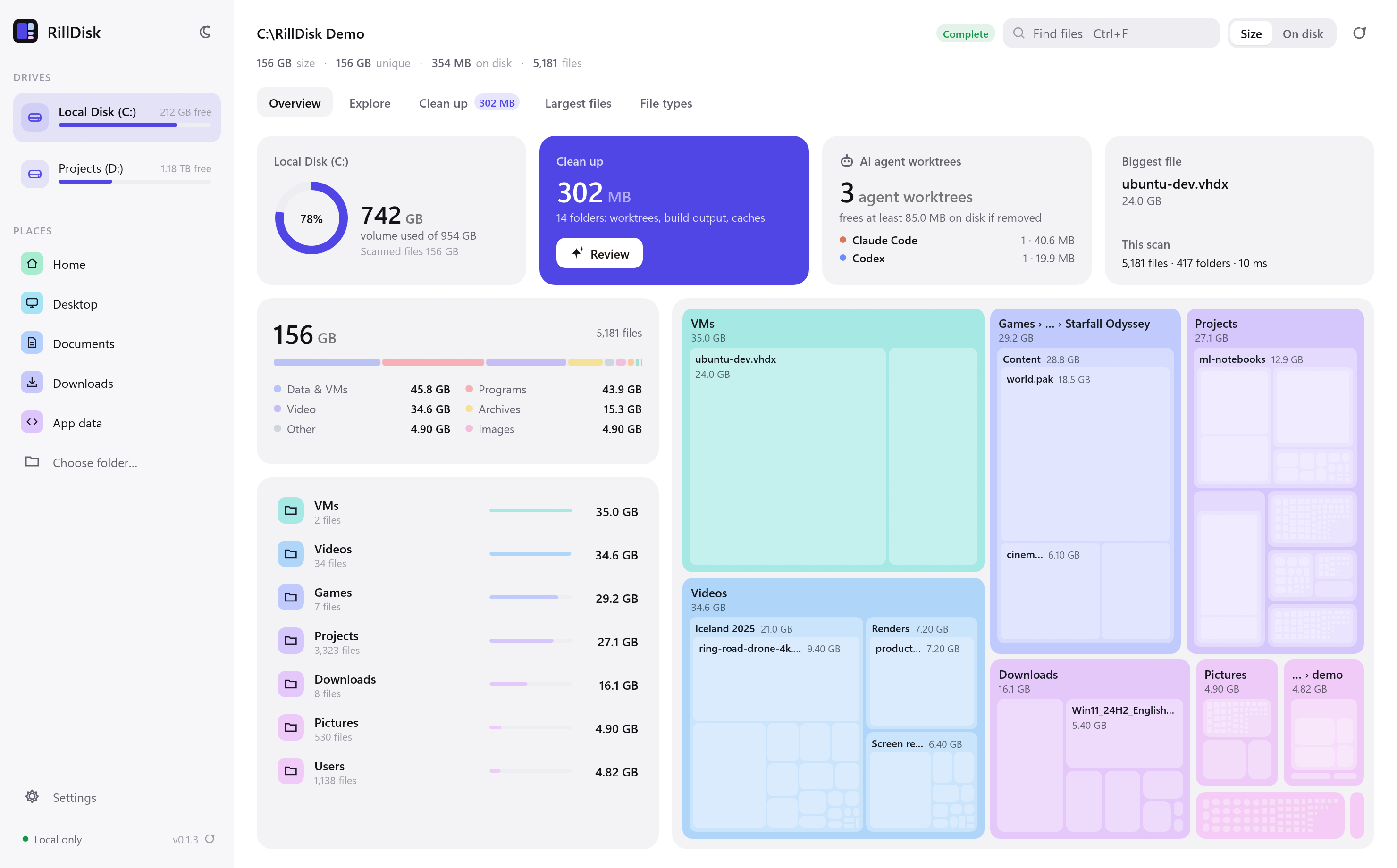
RillDisk 0.1.5: see what fills your disks and what you can safely free. A native app, a CLI and an MCP server for AI assistants, built in Rust. It reads file metadata; an optional Git check runs your own git read-only. Nothing is uploaded or deleted behind your back.
This release
Lessons from a real cleanup that freed about 175 GB on one Windows machine.
Protected paths. List folders RillDisk must never suggest or remove in
protected-paths.txt in the RillDisk state folder (%LOCALAPPDATA%\RillDisk on
Windows), one absolute path per line, or pass rilldisk reclaim --protect PATH for
one run. A candidate that is a protected path, sits inside one or contains one is
hidden from the CLI, the MCP server and the app, and cleanup refuses it. If the
file exists but can't be read, cleanup refuses everything rather than guess.
Idle time comes from files. A candidate's idle time is now the age of its
newest file. Folder times change when anything inside is removed, so a
half-cleaned folder used to look freshly active.
Clearer Git advice. rilldisk reclaim --git now says what to do next with each
worktree: keep it, push its branch, archive it then remove it, or remove it.
Commits on a detached HEAD that were already applied on another branch,
confirmed byte for byte with Git's own patch IDs, no longer count as work only
in that worktree. Git still can't see programs or assistant threads using a
folder, so every suggestion except keep says so.
Fixes. Filtering out a candidate no longer drops the folders nested inside it
from the totals. Removing a folder together with something inside it no longer
subtracts the inner one twice. The app no longer shows file-table progress after
a scan falls back to a folder walk. Malformed NTFS boot sectors are rejected
safely. An MCP limit that is out of range now explains how to page.
Scan speed is unchanged. The MCP server stays read-only and never runs Git. See
the cleanup lessons and plan.
First launch, verifying downloads, updating
- Windows: the builds are not code-signed yet. If SmartScreen appears, choose More info, then Run anyway.
- macOS: the app is not notarized yet. Open System Settings > Privacy & Security and choose Open Anyway, or run
xattr -dr com.apple.quarantine /Applications/RillDisk.app. - Linux: builds need glibc 2.28 or newer (Debian 10+, Ubuntu 20.04+, RHEL 8+). The static musl build runs anywhere.
- Verify:
sha256sum --check --ignore-missing SHA256SUMS, andgh attestation verify <file> --repo lord007tn/rilldiskfor the signed build provenance. - Update: the app offers new versions (with your consent). From a terminal, run
rilldisk update. Windows MSI copies can choose Update and restart on the update card; Windows asks for administrator consent. Copies installed with.deb,.rpm, AppImage or.dmglink the matching new package instead.
Full guide: docs/INSTALL.md
What's changed
🚀 Features
- reclaim: Protected paths, file-based idle time and Git next steps - by @lord007tn and Claude Opus 5.5 in #19 (875b4)
View changes on GitHub
Contributors
Assets 25
RillDisk 0.1.4
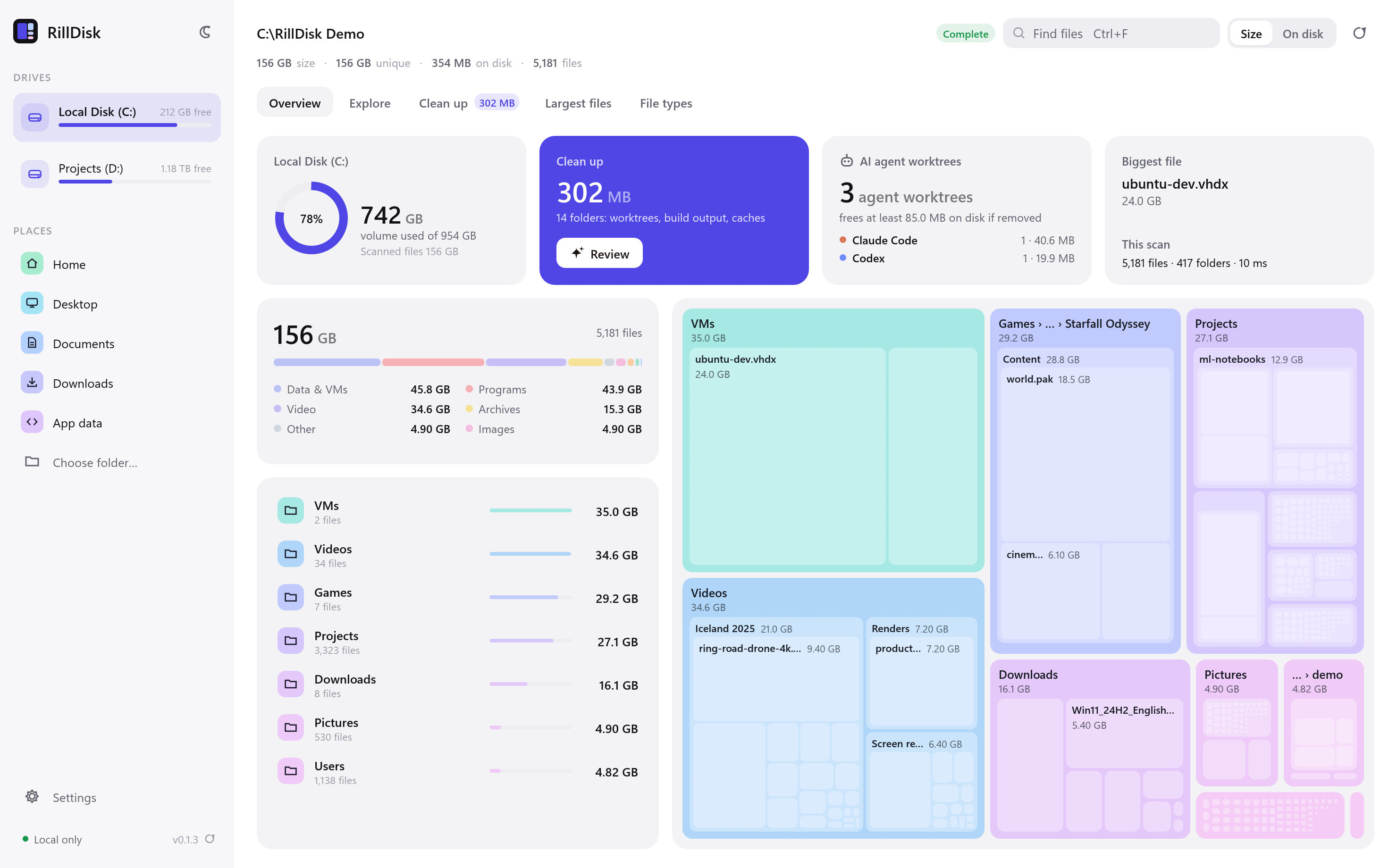
RillDisk 0.1.4: see what fills your disks and what you can safely free. A native app, a CLI and an MCP server for AI assistants, built in Rust. It reads file metadata; an optional Git check runs your own git read-only. Nothing is uploaded or deleted behind your back.
This release
Whole drives now finish. Earlier versions stopped every scan at 30 million
entries, so a large drive was read only part way. The limit now follows your
computer's memory: as many entries as fit in half of it, or in what the scan can
still allocate if that is less, and never under 30 million. That is up to about
35 million entries on 16 GB and 140 million on 64 GB. The CLI, the MCP server
and the app share it. Settings offers Automatic (the new default) plus larger
fixed limits. A saved 30 million limit from an earlier version reads as Automatic.
Measured on a real Windows system drive (55.4 million files, 5.9 million folders,
non-elevated): the scan finished in 269 s with a peak of 9.4 GB of memory, about
153 bytes per entry. The same drive previously stopped at 30 million entries.
Clean up is simpler. One switch picks Safe to delete (folders that tools
rebuild or re-download) or Review first (folders that may hold unique work),
and one All kinds menu narrows to one kind. A tick on each kind's heading
selects its safe folders. Counts, totals and Select all safe agree, and empty
folders are no longer listed. Removal rules and confirmation are unchanged, and
the MCP server stays read-only.
First launch, verifying downloads, updating
- Windows: the builds are not code-signed yet. If SmartScreen appears, choose More info, then Run anyway.
- macOS: the app is not notarized yet. Open System Settings > Privacy & Security and choose Open Anyway, or run
xattr -dr com.apple.quarantine /Applications/RillDisk.app. - Linux: builds need glibc 2.28 or newer (Debian 10+, Ubuntu 20.04+, RHEL 8+). The static musl build runs anywhere.
- Verify:
sha256sum --check --ignore-missing SHA256SUMS, andgh attestation verify <file> --repo lord007tn/rilldiskfor the signed build provenance. - Update: the app offers new versions (with your consent). From a terminal, run
rilldisk update. Windows MSI copies can choose Update and restart on the update card; Windows asks for administrator consent. Copies installed with.deb,.rpm, AppImage or.dmglink the matching new package instead.
Full guide: docs/INSTALL.md
What's changed
🐞 Bug Fixes
- Qualify Unix traversal and scanner benchmark gates - by @lord007tn in #17 (793c1)
- Size the scan limit from memory and simplify Clean up - by @lord007tn and Claude Opus 5.5 in #18 (08eb5)
View changes on GitHub
Contributors
Assets 25
RillDisk 0.1.3
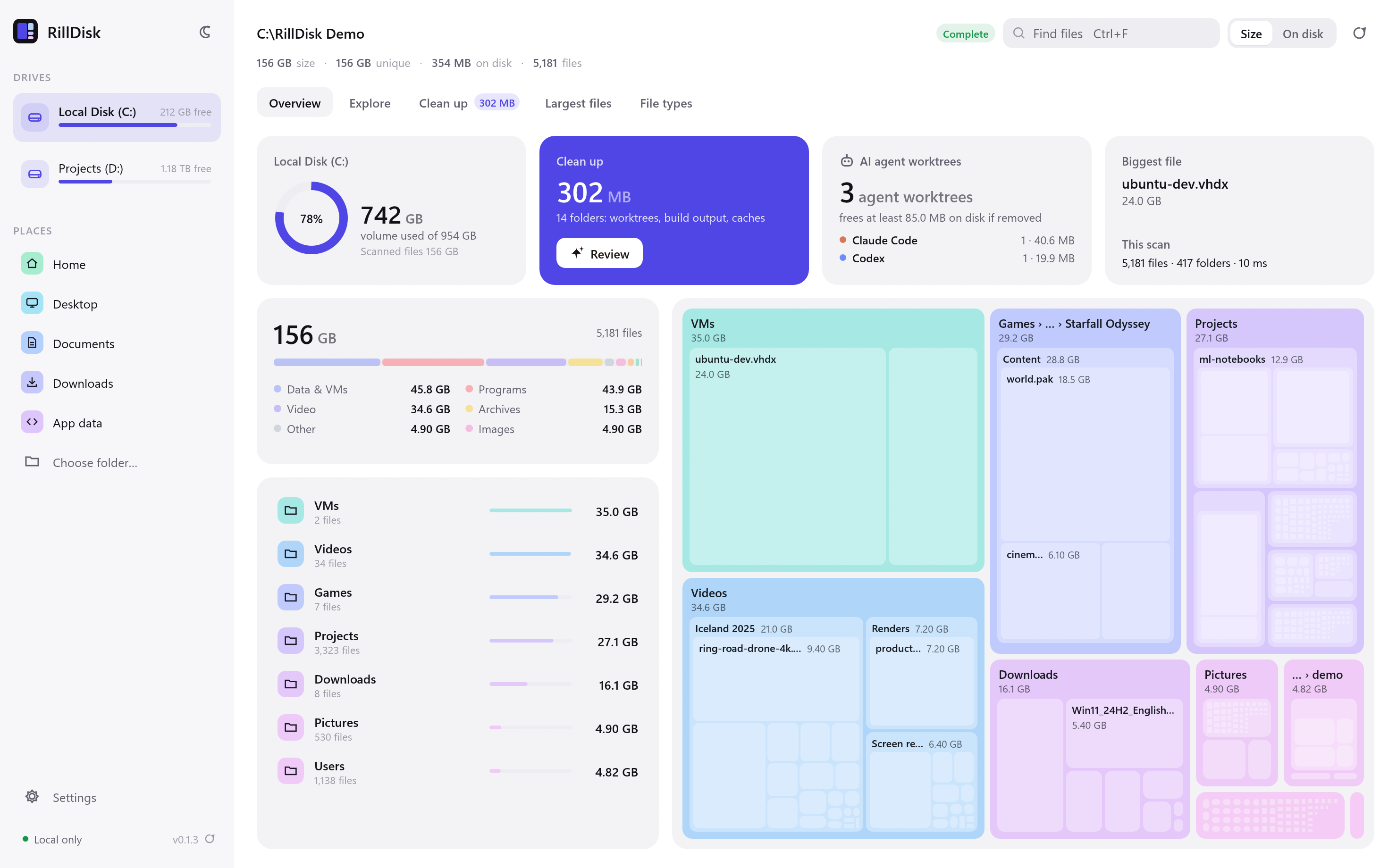
RillDisk 0.1.3: see what fills your disks and what you can safely free. A native app, a CLI and an MCP server for AI assistants, built in Rust. It reads file metadata; an optional Git check runs your own git read-only. Nothing is uploaded or deleted behind your back.
This release
See which Git worktrees hold work before you remove them. RillDisk can ask your own
git, read-only, whether each linked worktree has uncommitted or untracked changes,
commits that exist only on a detached HEAD, or a lock, and when work last happened.
Clean up shows the verdict on every worktree card, Select clean idle worktrees
ticks only worktrees with no Git-reported changes and no recent work, and removal
asks Git again right before each worktree is moved. Worktrees stay Review first:
Git does not see ignored files or running agents. The CLI does the same with
rilldisk reclaim --git. The MCP server does not run Git.
Cleanup now also refuses a different folder created at a candidate's path after the
scan, and what removal frees is always stated on disk ("at least" only when every
allocation is known). The desktop gains Show in Explorer on every right-click menu, a quieter
sidebar with the version and update check at the bottom, an update card instead of
the bottom bar, a scan-limit setting with a bounded rescan when a scan stops at
its entry limit, and a worktree inventory with clear scope.
Scan speed is unchanged. See release notes, evidence and known limits.
First launch, verifying downloads, updating
- Windows: the builds are not code-signed yet. If SmartScreen appears, choose More info, then Run anyway.
- macOS: the app is not notarized yet. Open System Settings > Privacy & Security and choose Open Anyway, or run
xattr -dr com.apple.quarantine /Applications/RillDisk.app. - Linux: builds need glibc 2.28 or newer (Debian 10+, Ubuntu 20.04+, RHEL 8+). The static musl build runs anywhere.
- Verify:
sha256sum --check --ignore-missing SHA256SUMS, andgh attestation verify <file> --repo lord007tn/rilldiskfor the signed build provenance. - Update: the app offers new versions (with your consent). From a terminal, run
rilldisk update. Windows MSI copies can choose Update and restart on the update card; Windows asks for administrator consent. Copies installed with.deb,.rpm, AppImage or.dmglink the matching new package instead.
Full guide: docs/INSTALL.md
What's changed
No significant changes
View changes on GitHub
RillDisk 0.1.2
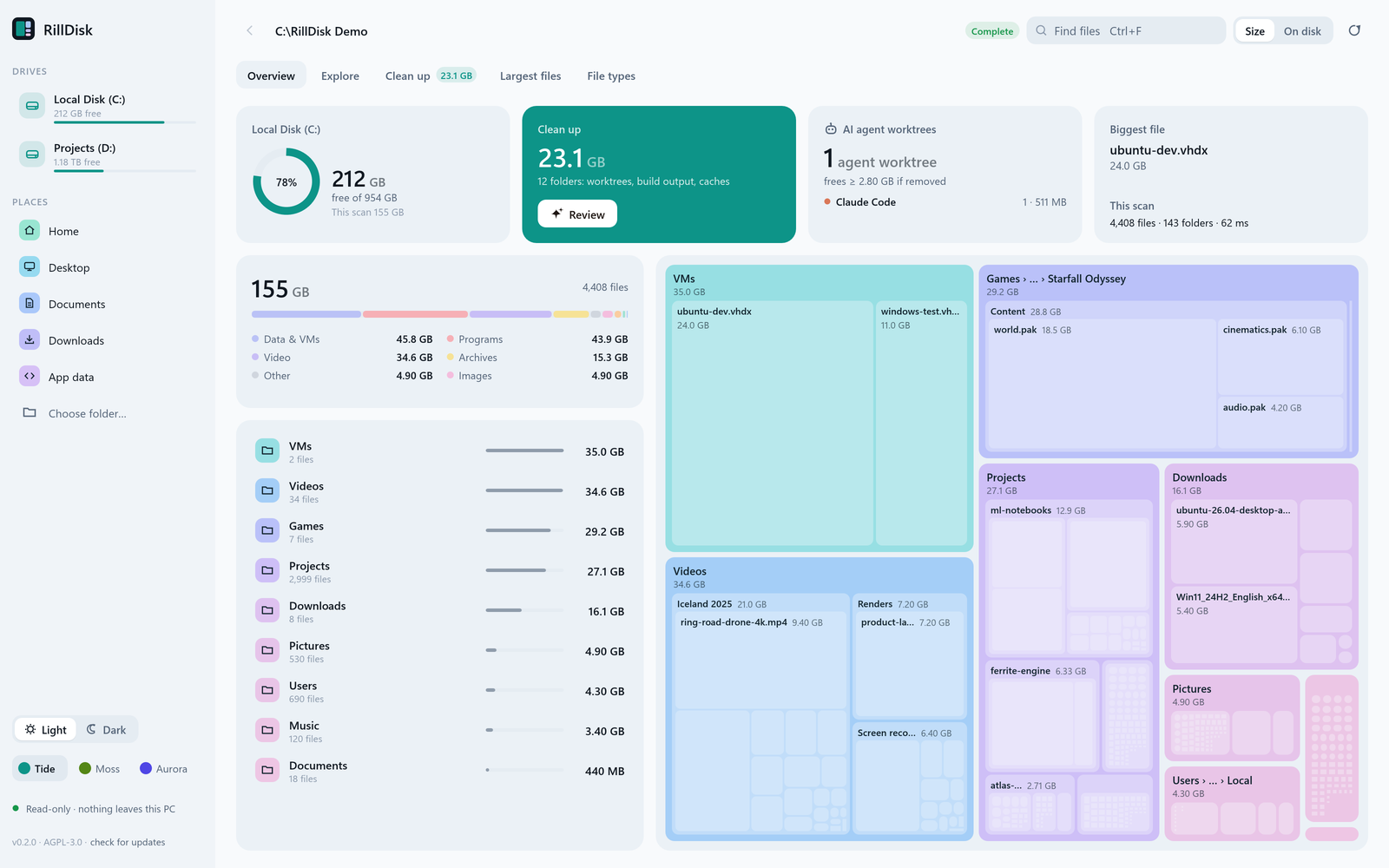
RillDisk 0.1.2: see what fills your disks and what you can safely free. A native app, a CLI and an MCP server for AI assistants, built in Rust. It reads file metadata only: nothing is opened, uploaded or deleted behind your back.
This release
Navigate folders with a stable sidebar, clickable hierarchy and a clear Parent
control. Returning to a parent marks the folder you left; rescans retain your
location. Long names, empty folders and unreadable results have clearer states.
Updates are visible in the bottom bar. Windows MSI copies can download, verify,
install with Windows consent, and restart directly from the app. Download progress,
verification, errors and retry are visible without entering Settings.
Whole-drive scan speed is unchanged. See navigation evidence and known limits.
First launch, verifying downloads, updating
- Windows: the builds are not code-signed yet. If SmartScreen appears, choose More info, then Run anyway.
- macOS: the app is not notarized yet. Open System Settings > Privacy & Security and choose Open Anyway, or run
xattr -dr com.apple.quarantine /Applications/RillDisk.app. - Linux: builds need glibc 2.28 or newer (Debian 10+, Ubuntu 20.04+, RHEL 8+). The static musl build runs anywhere.
- Verify:
sha256sum --check --ignore-missing SHA256SUMS, andgh attestation verify <file> --repo lord007tn/rilldiskfor the signed build provenance. - Update: the app offers new versions (with your consent). From a terminal, run
rilldisk update. Windows MSI copies can choose Update and restart in the bottom bar; Windows asks for administrator consent. Copies installed with.deb,.rpm, AppImage or.dmglink the matching new package instead.
Full guide: docs/INSTALL.md
What's changed
🚀 Features
- desktop: Improve folder navigation and install MSI updates in-app - by @lord007tn in #15 (a16c4)
View changes on GitHub
Contributors
Assets 25
RillDisk 0.1.1
Browse discovered folders during directory scans, then use Parent, breadcrumbs, Backspace or mouse Back to return. Completed chart navigation now keeps the displayed folder and its parent controls consistent. MFT scans expose folders after table processing.
The drive card now shows volume used space. Scan logical, unique and allocated totals are displayed separately, with exact bytes on hover. Logical totals include every hard-link name and can exceed disk usage; allocated scan totals also differ from volume consumption. Partial scans remain visible.
Windows directory parsing now reuses filename decoding storage. Multi-minute standard-access drive scans remain an open performance limitation; this release does not claim an end-to-end speedup. Auto now reports why it could not use the whole-volume NTFS MFT path, which requires existing administrator access. See the measurements and algorithm investigation.
Portable installations can run rilldisk update. MSI installations upgrade through the new MSI package. Installation instructions.
Built from 51ff050f1f685790077a7adec1cd238b0936a82c. All eight platform package jobs passed. Assets include SHA256SUMS, BUILD-MANIFEST.json and latest.yml; package provenance is attested by the release workflow.
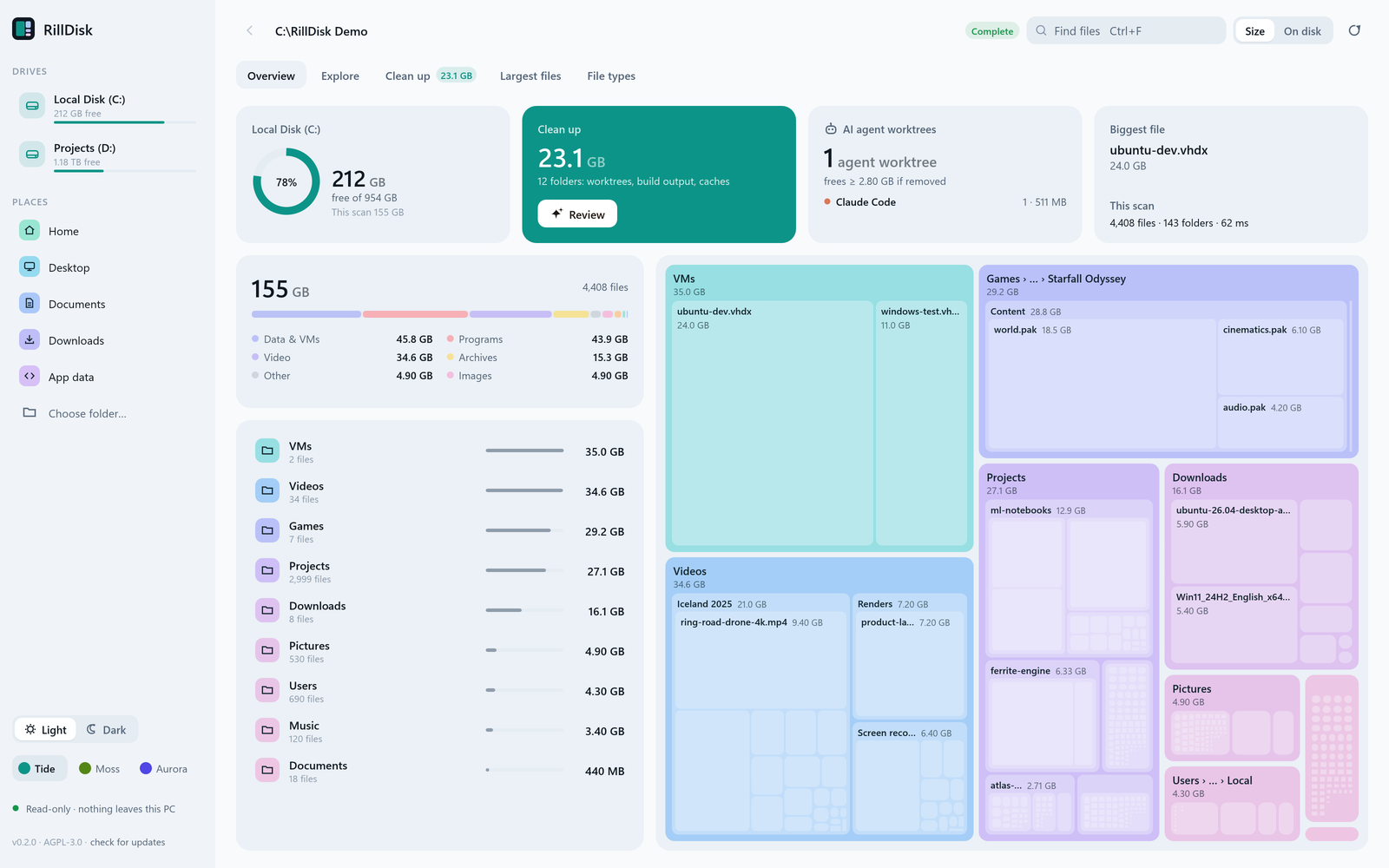
RillDisk 0.1.1: see what fills your disks and what you can safely free. A native app, a CLI and an MCP server for AI assistants, built in Rust. It reads file metadata only: nothing is opened, uploaded or deleted behind your back.
First launch, verifying downloads, updating
- Windows: the builds are not code-signed yet. If SmartScreen appears, choose More info, then Run anyway.
- macOS: the app is not notarized yet. Open System Settings > Privacy & Security and choose Open Anyway, or run
xattr -dr com.apple.quarantine /Applications/RillDisk.app. - Linux: builds need glibc 2.28 or newer (Debian 10+, Ubuntu 20.04+, RHEL 8+). The static musl build runs anywhere.
- Verify:
sha256sum --check --ignore-missing SHA256SUMS, andgh attestation verify <file> --repo lord007tn/rilldiskfor the signed build provenance. - Update: the app offers new versions (with your consent). From a terminal, run
rilldisk update. Copies installed with the MSI,.deb,.rpm, AppImage or.dmgare pointed at the matching new package instead.
Full guide: docs/INSTALL.md
What's changed
🚀 Features
- Select and remove cleanup candidates with confirmation - by @lord007tn and Claude Opus 5.5 in #10 (e4869)
- Detect, configure and test AI clients for the MCP server - by @lord007tn and Claude Opus 5.5 in #11 (d0b38)
- Read protected folders with explicit elevation and classify scan issues - by @lord007tn and Claude Opus 5.5 in #8 (b3b75)
- desktop: Live dashboard while scanning, settings page, places open in results - by @lord007tn and Claude Opus 5.5 in #9 (b25f9)
🐞 Bug Fixes
- Address second-round review of elevation - by @lord007tn and Claude Opus 5.5 in #13 (b1744)
- Browse active scans and clarify disk accounting (0.1.1) - by @lord007tn in #14 (51ff0)
🏎 Performance
- NTFS MFT backend for whole drives, handle-relative directory walks, benchmark harness - by @lord007tn, Claude Opus 5.5 and GPT via Codex in #12 (e6c68)
View changes on GitHub
Contributors
Assets 25
RillDisk 0.1.0
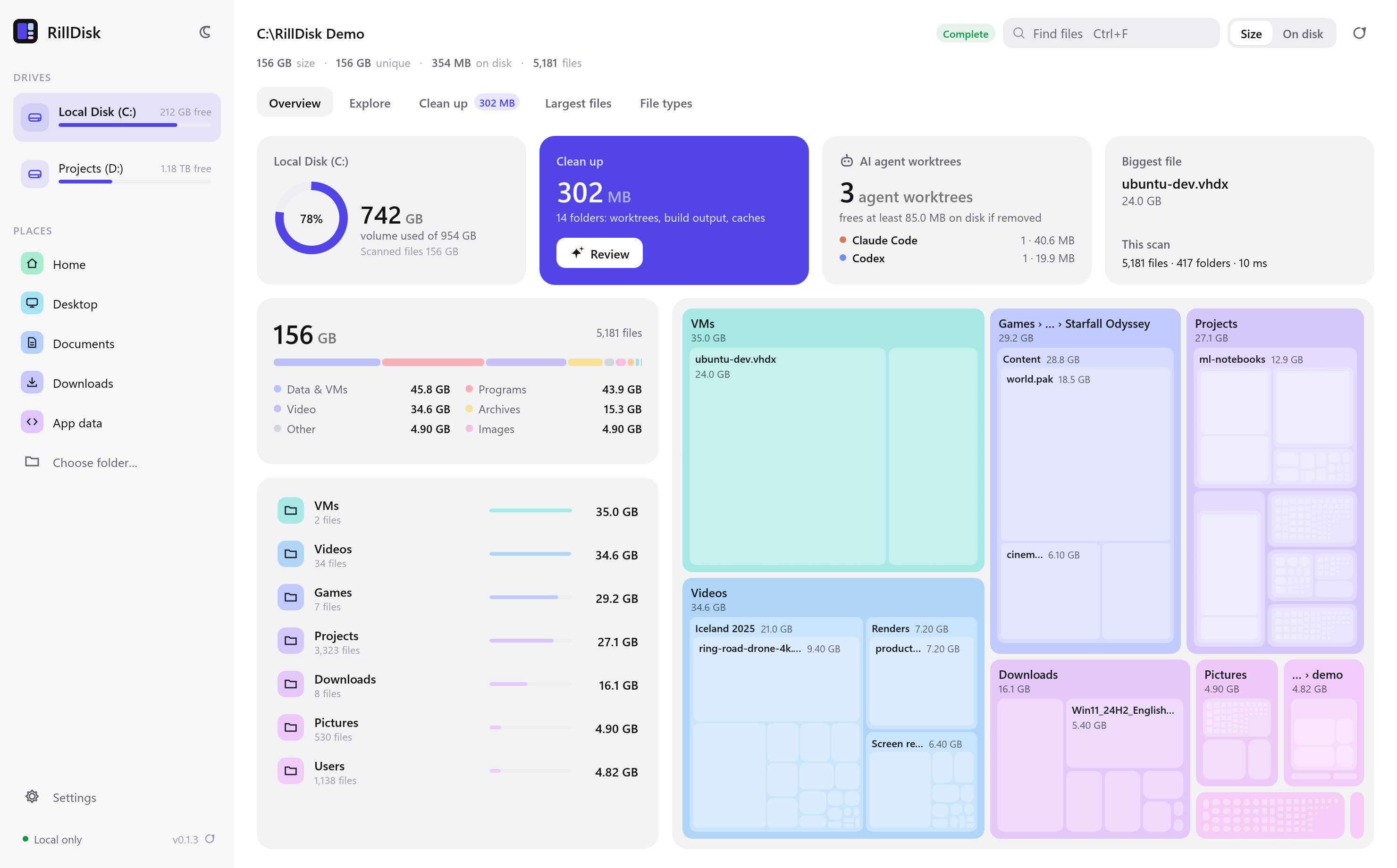
RillDisk 0.1.0: see what fills your disks and what you can safely free. A native app, a CLI and an MCP server for AI assistants, built in Rust. It reads file metadata only: nothing is opened, uploaded or deleted behind your back.
Highlights
The first public release of RillDisk: a native, GPU-rendered disk analyzer with a CLI and an MCP server, built in Rust for Windows, macOS and Linux.
- See where the space went. A dashboard with a treemap and a rings chart, largest files, file types and search, rendered with your GPU. It stays responsive on drives with tens of millions of files.
- Know what you can free. Clean up finds rebuildable build output (
target,node_modules,.next, UnityLibrary...), package caches (npm, pnpm, pip, Cargo, Go, NuGet, Gradle...), temp folders, and old Git or AI-agent worktrees (Claude Code, Codex, T3 Code, Cursor). Each one comes with a reason and a command you can run. - Honest numbers. Logical size, on-disk size and hard links counted once are kept apart. Partial scans, unreadable folders and cancelled scans are always shown, never hidden.
- For AI assistants too.
rilldisk mcpgives Claude, Codex, Cursor and other MCP clients the same read-only view: scans, largest folders, cleanup candidates, file types. - Proper installers for every system. MSI for Windows (x64 and ARM64),
.dmgfor macOS (Apple silicon and Intel),.deb,.rpmand AppImage for Linux (x86_64 and aarch64), and a static command-line build for servers and Alpine. Each one is installed and tested before it is published. - Safe updates. The app checks once a day if you allow it, verifies every download with SHA-256, and never overwrites files your package manager owns. Set
RILLDISK_NO_UPDATE_CHECK=1to turn checks off. - Private by design. RillDisk reads file names and sizes, never file contents. It sends nothing about you or your files anywhere.
Download
| System | Recommended | Also available |
|---|---|---|
| Windows 10/11 x64 | RillDisk-0.1.0-x64.msi | portable .zip |
| Windows 11 ARM64 | RillDisk-0.1.0-arm64.msi | portable .zip |
| macOS Apple silicon | RillDisk-0.1.0-arm64.dmg | .tar.gz |
| macOS Intel | RillDisk-0.1.0-x64.dmg | .tar.gz |
| Debian, Ubuntu, Mint, Pop!_OS | .deb x86_64 · arm64 |
AppImage, .tar.gz |
| Fedora, RHEL, Rocky, Alma, openSUSE | .rpm x86_64 · aarch64 |
AppImage, .tar.gz |
| Any Linux desktop (Arch, Manjaro, Gentoo...) | AppImage x86_64 · aarch64 | .tar.gz x86_64 · aarch64 |
| Servers, containers, Alpine (CLI + MCP only) | static musl x86_64 · aarch64 |
First launch, verifying downloads, updating
- Windows: the builds are not code-signed yet. If SmartScreen appears, choose More info, then Run anyway.
- macOS: the app is not notarized yet. Open System Settings > Privacy & Security and choose Open Anyway, or run
xattr -dr com.apple.quarantine /Applications/RillDisk.app. - Linux: builds need glibc 2.28 or newer (Debian 10+, Ubuntu 20.04+, RHEL 8+). The static musl build runs anywhere.
- Verify:
sha256sum --check --ignore-missing SHA256SUMS, andgh attestation verify <file> --repo lord007tn/rilldiskfor the signed build provenance. - Update: the app offers new versions (with your consent). From a terminal, run
rilldisk update. Copies installed with the MSI,.deb,.rpm, AppImage or.dmgare pointed at the matching new package instead.
Full guide: docs/INSTALL.md
What's changed
🚀 Features
- Dashboard redesign, release pipeline with update feed, Linux and macOS - by @lord007tn and Claude Opus 5.5 in #6 (fcdcb)
- Installers and packages for Windows, macOS and Linux - by @lord007tn and Claude Opus 5.5 in #7 (39032)