Repository navigation
mod-7.0

Caution
THE FIRMWARE MOD IS EXPERIMENTAL AND CAN BRICK YOUR CART.
Firmware mod 2.0 rewrites the bootloader (stage1) in the cart's FPGA flash, as an official firmware update does. A bootloader that runs and then hangs can't be fixed with another updater: recovery needs hardware, an SPI programmer on the flash chip or JTAG. It has run on one FW4 and one FW5 Jr. The updater patches are attached below, but the patcher page is the safer way to apply them: it refuses anything but the exact stock updater and makes you read the risk first. With your own IPS patcher, apply each patch only to the updater it names and check the md5s in README.txt. Use a fast microSD card and fresh batteries, and never power off while the updater writes.
If you don't need what it adds, use the kernel patch below and stop there.
The safe option: kernel only
The easiest way is the patcher page, which checks your ezgb.dat and applies the right patch in the browser. Or patch it yourself with the IPS files below; README.txt has the md5s. Either way only ezgb.dat on your microSD card changes and nothing on the cart is rewritten. Swapping the kernel is as simple as changing a file and is completely reversible.
| Kernel | Package | Stock ezgb.dat md5 |
|---|---|---|
| 1.04e | juniorkernel-1.04e-FW4 |
b8c29fa5a94c37200434e4c72f0cdfea |
| 1.05e-0731 | juniorkernel-1.05e-FW5-0731 |
91eb7fc67332ef20b5691029181ff748 |
| 1.05e-0918 | juniorkernel-1.05e-FW5-0918 |
5238ac5987d23b68a19d40e43af8c786 |
1.04e is the build EZ Flash still offers for download, and it runs on FW4 and FW5 carts alike. EZ Flash took its FW5 (1.05e) packages down after users bricked carts updating to them; the 1.05e patches are for carts already on FW5.
Stock packages from EZ Flash: 1.04e / FW4 (download page, EZ-FLASH Junior) or 1.05e FW5 2021-9-18.
New since mod-6.9
Kernel mod 7.0
-
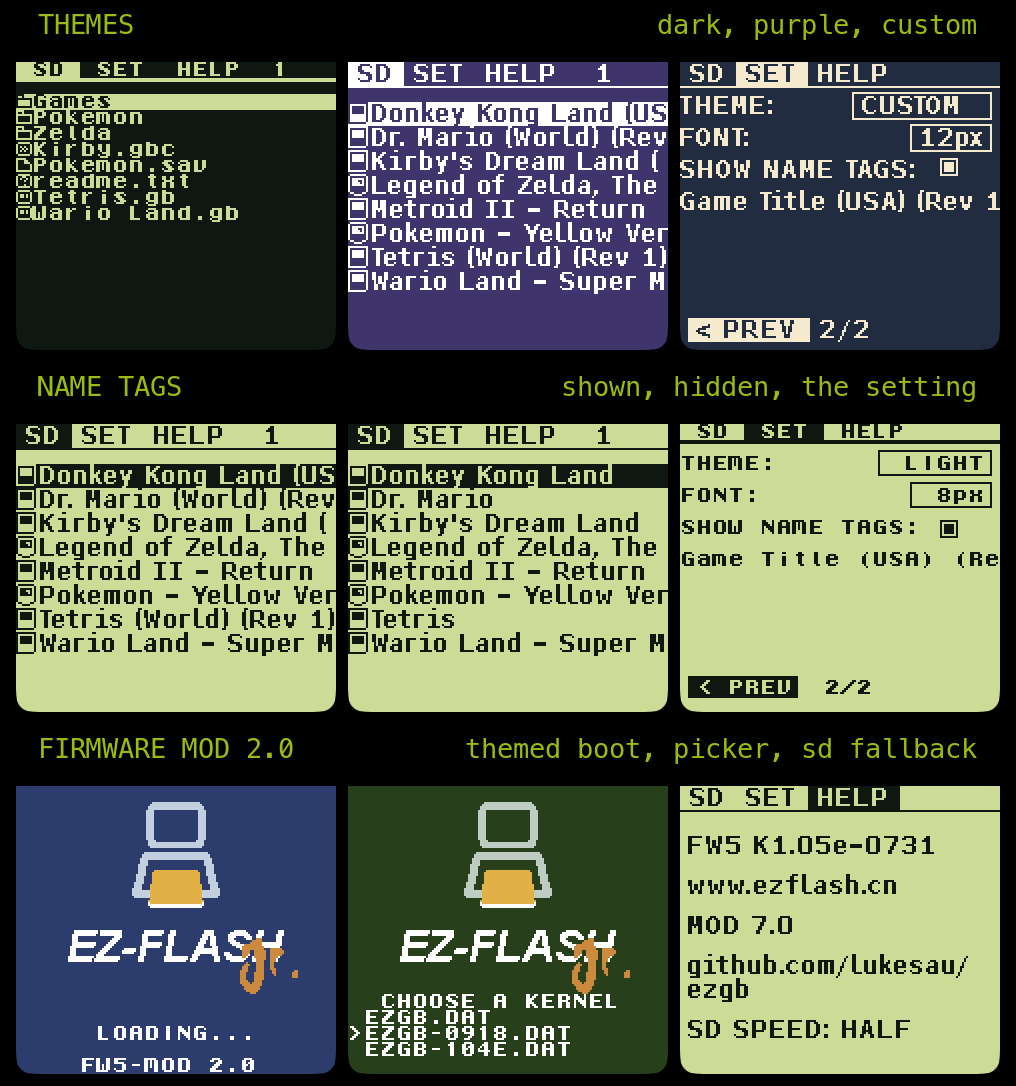
Themes: a THEME button on the SET tab picks light (the stock look), dark (black with white text), red, green, purple or blue, or a custom pair of colors from a
COLORS=line in/EZGB.CFG. The colors show on a Game Boy Color running firmware mod 2.0, which starts the kernel in color mode. With stock firmware the console runs the kernel in DMG mode, and there, as on an original Game Boy, every theme but light is the inverted palette. Popups and the Reading / Loading boxes take a lighter shade of the theme's background.Custom colors: open
/EZGB.CFGon a computer (create it if it's missing) and add these as its first two lines, the background then the text as hex like a web color:THEME=6 COLORS=1E2A44,F2D7A0Put them at the top: the kernel pads the file with spaces you can't see, and a line typed at the very end is never read. Once
COLORS=is set, CUSTOM also appears after BLUE on the THEME button. -
SHOW NAME TAGS: untick it and the browser drops the
(USA),(Rev 1)and[!]tags from ROM names, so more of the title fits. An example under the box shows what you'll get. -
Two pages on the SET tab: NEXT and PREV move between the clock and save settings on page 1 and THEME, FONT and SHOW NAME TAGS on page 2.
-
SD SPEED: HALF on the HELP tab when firmware mod 2.0 has dropped a misbehaving card to half speed (FW5-0918).
-
Long names scroll the same way everywhere, in both fonts: the fast launch target, the last ROM on the START overlay and both lines of the save backup prompt, whose date now reads as month and day.
-
SGB BOOT in the background: with SGB BOOT ticked the kernel sends the first packet at boot and the rest from the VBlank interrupt while you use the menu, so the boot takes about 0.4 s longer instead of about 7 s. Not yet tested on a real Super Game Boy (6.9's slower send is).
-
SET tab D-pad fix: a single tap could move the cursor or a clock value two or three steps. A tap now moves one step, and holding a direction waits 0.4 s before it repeats, then repeats 10 times a second.
-
.datfiles are hidden from the browser.
Firmware mod 2.0
- Kernel picker: put two or more
.datkernels in the card's root and the boot screen lets you choose one. With a single kernel it boots as before. - Themed boot screen that follows the kernel's theme, now in the kernel's font.
- SD error recovery on FW5-0918: a card that returns a bad block or stops answering used to freeze the cart. The firmware now retries, and after the first error runs the card at half speed with FW5's fast loading off, as on FW4, until power-off. The HELP tab shows SD SPEED: HALF when that has happened.
- Another game's save at the backup prompt: B drops that save and fast-launches. Before 2.0 it booted the kernel, which asked again.
- A fast launch's save backup creates the
/SAVERfile if it's missing, instead of skipping the backup.
Assets
ezgb-mod-7.0-for-<kernel>.ips: the kernel patchesezgb-firmware-mod-2.0-for-fw4.ips: the firmware patch forUpdate_FW4.gb(experimental, see above)ezgb-firmware-mod-2.0-for-fw5-0918.ips: the firmware patch forUpdate_FW5_2021-9-18.gb(experimental, see above)manifest.json: stock and patched md5sREADME.txt: install steps, md5s and SHA-1s, going back- Patcher page: applies any of these in the browser, after checking your file