Repository navigation
Releases: lukesau/ezgb
Release list
mod-6.9

Caution
THE FIRMWARE MOD IS EXPERIMENTAL AND CAN BRICK YOUR CART.
Firmware mod 1.9 rewrites the bootloader (stage1) in the cart's FPGA flash, as an official firmware update does. A bootloader that runs and then hangs can't be fixed with another updater: recovery needs hardware, an SPI programmer on the flash chip or JTAG. It has run on one FW4 and one FW5 Jr. The updater patches are attached below, but the patcher page is the safer way to apply them: it refuses anything but the exact stock updater and makes you read the risk first. With your own IPS patcher, apply each patch only to the updater it names and check the md5s in README.txt. Use a fast microSD card and fresh batteries, and never power off while the updater writes.
If you don't need what it adds, use the kernel patch below and stop there.
The safe option: kernel only
The easiest way is the patcher page, which checks your ezgb.dat and applies the right patch in the browser. Or patch it yourself with the IPS files below; README.txt has the md5s. Either way only ezgb.dat on your microSD card changes and nothing on the cart is rewritten. Swapping the kernel is as simple as changing a file and is completely reversible.
| Kernel | Package | Stock ezgb.dat md5 |
|---|---|---|
| 1.04e | juniorkernel-1.04e-FW4 |
b8c29fa5a94c37200434e4c72f0cdfea |
| 1.05e-0731 | juniorkernel-1.05e-FW5-0731 |
91eb7fc67332ef20b5691029181ff748 |
| 1.05e-0918 | juniorkernel-1.05e-FW5-0918 |
5238ac5987d23b68a19d40e43af8c786 |
1.04e is the build EZ Flash still offers for download, and it runs on FW4 and FW5 carts alike. EZ Flash took its FW5 (1.05e) packages down after users bricked carts updating to them; the 1.05e patches are for carts already on FW5.
Also, if you have a slow SD card it is highly recommended to stay on FW4. Some slow SD cards will fail to boot on a cart that is updated to FW5 (this is an issue with stock firmware).
Stock packages from EZ Flash: 1.04e / FW4 (download page, EZ-FLASH Junior) or 1.05e FW5 2021-9-18.
A kernel patched with another build's patch no longer boots into a broken state: 1.05e-0731 and 1.05e-0918 stop on a WRONG PATCH screen, and a 1.04e / 1.05e mix-up shows a blank screen. Neither writes to the card.
New since mod-5.2
Kernel
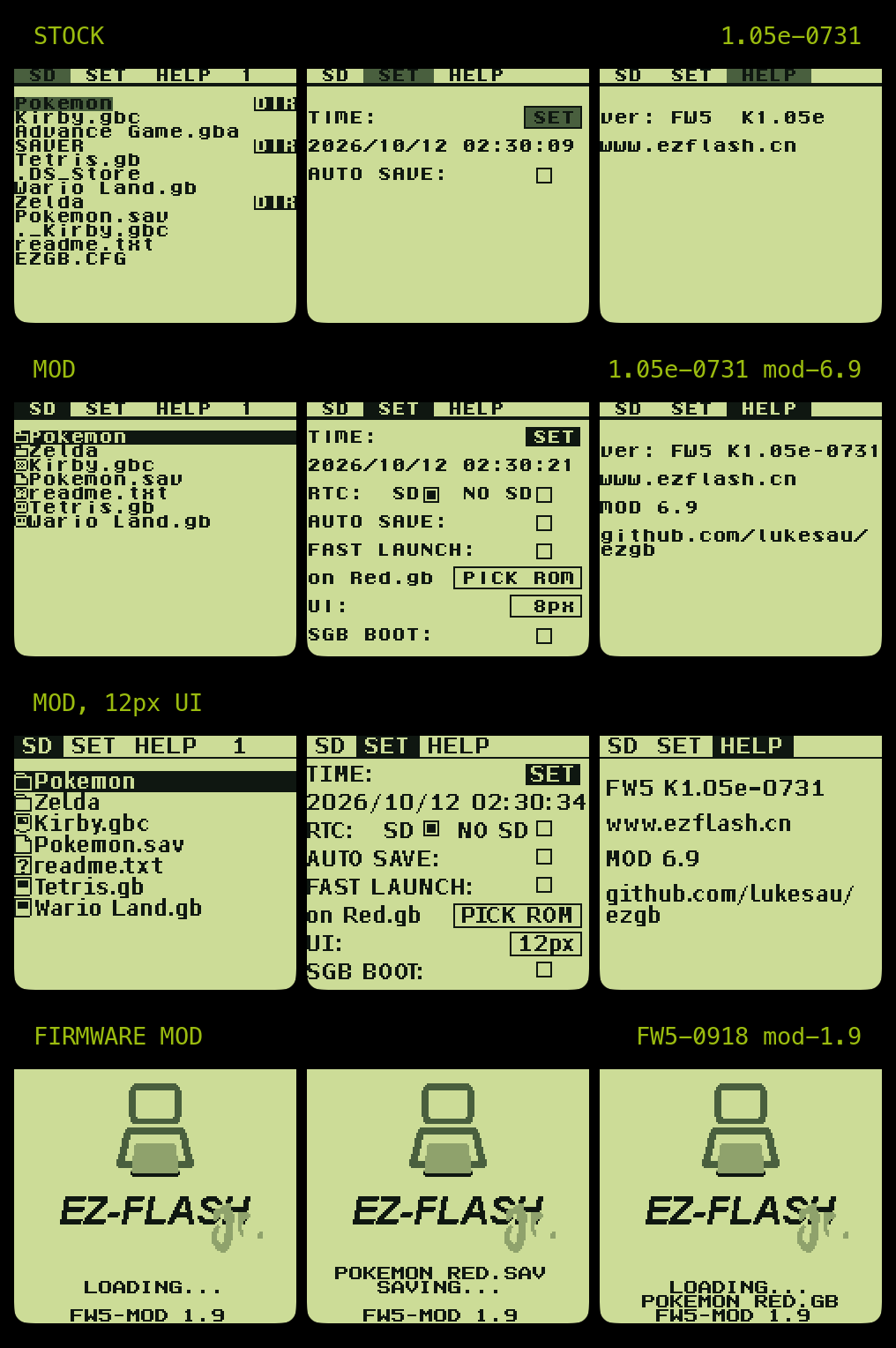
- Hold A on a ROM for options: Start, or Manage saves. A tap still launches.
- Manage saves: back up a ROM's save on the cart under a timestamped name, restore any backup (the current save is backed up first), and delete backups.
- SGB BOOT on the SET tab sends the cartridge header a Super Game Boy waits for (after nitro2k01's SGB Enabler). Confirmed working on a real Super Game Boy.
- Faster game loading on FW5 (the 1.05e kernels turn on FW5's fast load mode).
- A dead battery never costs you a save: a BATTERY DRY boot drops the faded pending save instead of offering to back it up over the good one, and puts AUTO SAVE back from
/EZGB.CFG. - 416 entries per folder: a bigger folder used to spill browser records onto the save pages; it is now cut at 416 and left unsorted.
- One press of A, B, SELECT or START acts once, and a START held at power-on no longer leaks into the save prompt or the browser.
- LEFT/RIGHT jump to the top and bottom of the SET tab; the SAVER folder is hidden from the browser; faster screen fills and tab switches.
Firmware mod 1.9
A new bootloader for FW4 and FW5-0918 carts: a new boot screen, fast launch straight from the bootloader (the ROM in FLAUNCH=, START at power-on cancels), the pending save backed up before a fast launch (never when the battery is dead), Super Game Boy detection (not yet tested on a real Super Game Boy; with the firmware installed the kernel's tested SGB BOOT box shows AUTO and steps aside, so on an SGB stick to the kernel for now), and on FW5 the MBC3 game clock and fast loading. It also says INSERT SD CARD when the card doesn't answer and GPT CARD: USE MBR for a card it can't read, instead of sitting on LOADING.
Assets
ezgb-mod-6.9-for-<kernel>.ips: the kernel patchesezgb-firmware-mod-1.9-for-fw4.ips: the firmware patch forUpdate_FW4.gb(experimental, see above)ezgb-firmware-mod-1.9-for-fw5-0918.ips: the firmware patch forUpdate_FW5_2021-9-18.gb(experimental, see above)manifest.json: stock and patched md5sREADME.txt: install steps, md5s and SHA-1s, going back- Patcher page: applies any of these in the browser, after checking your file
mod-5.3
Super Game Boy boot, now a setting
Follow-up to mod-5.2-sgb. The SGB header unlock is now a checkbox instead of always on, so this is the normal mod kernel with nothing extra to install.
On a DMG, GBC or GBA: SET tab, last row, SGB BOOT:, A to tick it. Then move the cart to the Super Game Boy and power on. Boots take about 7 seconds longer while it's ticked, on every model, so untick it when the cart goes back to a handheld. With it unticked the kernel boots exactly as before.
The setting is kept in battery-backed pSRAM, not EZGB.CFG, because the packets go out before the SD card is up. A dead or missing coin cell turns it off (without a cell it survives about a minute out of the console).
Details: docs/sgb-boot.md
Still not tested on a real SGB
I don't have a Super Game Boy. In SameBoy the SGB receives all 24 header packets with valid checksums when the box is ticked and none when it isn't, on all three kernels. On a GBC with an FW4 Jr the checkbox persists across power cycles and boots take longer when it's on. Nobody has confirmed a real SNES accepts it yet.
- FW4 firmware with the 1.04e build matches what nitro2k01's SGB Enabler was tested on and is the most likely to work.
- FW5 and the 1.05e builds are unknown. Please try them anyway.
If you test it, please report the firmware (shown on HELP), the kernel build, which SGB (SGB or SGB2, NTSC or PAL), whether the menu shows up, and whether games get borders and colors after launching.
Applying
Pick the patch matching the ezgb.dat from your official firmware package:
| Kernel | Package | Stock ezgb.dat md5 |
Patched md5 |
|---|---|---|---|
| 1.04e | juniorkernel-1.04e-FW4 |
b8c29fa5a94c37200434e4c72f0cdfea |
9a15850f412e0e56fe5ba19bdbdbc091 |
| 1.05e-0731 | juniorkernel-1.05e-FW5-0731 |
91eb7fc67332ef20b5691029181ff748 |
29dc4948b577da1503d34b91e3eba6ce |
| 1.05e-0918 | juniorkernel-1.05e-FW5-0918 |
5238ac5987d23b68a19d40e43af8c786 |
f65b56518bd069752bec1701f2ccbdc5 |
Apply with any IPS patcher and copy the output to the card root as ezgb.dat. HELP shows MOD 5.3 when it's installed. Full steps are in README.txt below.
mod-5.2-sgb
Super Game Boy test build
Mod 5.2 plus a Super Game Boy unlock at boot. Everything else is the same as mod-5.2.
The EZ Flash Jr holds the Game Boy CPU in reset while its FPGA loads, so the SNES never receives the cartridge header and the SGB sits on a black screen. This build sends the header from the kernel at power-on.
The idea and the timing come from nitro2k01's SGB Enabler, a patched 1.04e kernel from 2021. This is a port of it onto the mod for all three kernels. The packets are now built from the live header and the waits no longer depend on the LCD, but the send timing is unchanged.
Not tested on real hardware
I don't have a Super Game Boy and could not test this. It has only been checked in SameBoy, where the SGB receives all 24 header packets with valid checksums and the menu boots normally. The emulator can't reproduce the Jr's late CPU start, so that doesn't prove a real SNES accepts it.
- FW4 firmware with the 1.04e build is the setup the SGB Enabler was tested on, and the only one currently expected to work.
- FW5 and the 1.05e builds are unknown. FW5's FPGA design is different and may start the CPU at a different time, and 1.05e writes an unidentified register when launching a game. Please give them a try anyway.
If you test it, please report the firmware (shown on HELP), the kernel build, which SGB (SGB or SGB2, NTSC or PAL), whether the menu shows up, and whether games get borders and colors after launching.
Known cost
The header is always sent, on every model, so every boot takes about 7 seconds longer on a DMG, GBC or GBA. A setting to turn it on only for the SGB is planned.
Applying
One patch per kernel; pick the one matching the ezgb.dat from your official firmware package:
| Kernel | Package | Stock ezgb.dat md5 |
Patched md5 |
|---|---|---|---|
| 1.04e | juniorkernel-1.04e-FW4 |
b8c29fa5a94c37200434e4c72f0cdfea |
e912d9c17e02225e1e5f17193e764ab1 |
| 1.05e-0731 | juniorkernel-1.05e-FW5-0731 |
91eb7fc67332ef20b5691029181ff748 |
cf663005636e84bf918908c02cb5269d |
| 1.05e-0918 | juniorkernel-1.05e-FW5-0918 |
5238ac5987d23b68a19d40e43af8c786 |
09a3780fabc38693805cc5353f4301e9 |
Apply with any IPS patcher and copy the output to the card root as ezgb.dat. The HELP tab shows MOD 5.2SGB when it's installed. To go back, copy the stock or regular mod-5.2 ezgb.dat back.
mod-5.2
New in 5.2
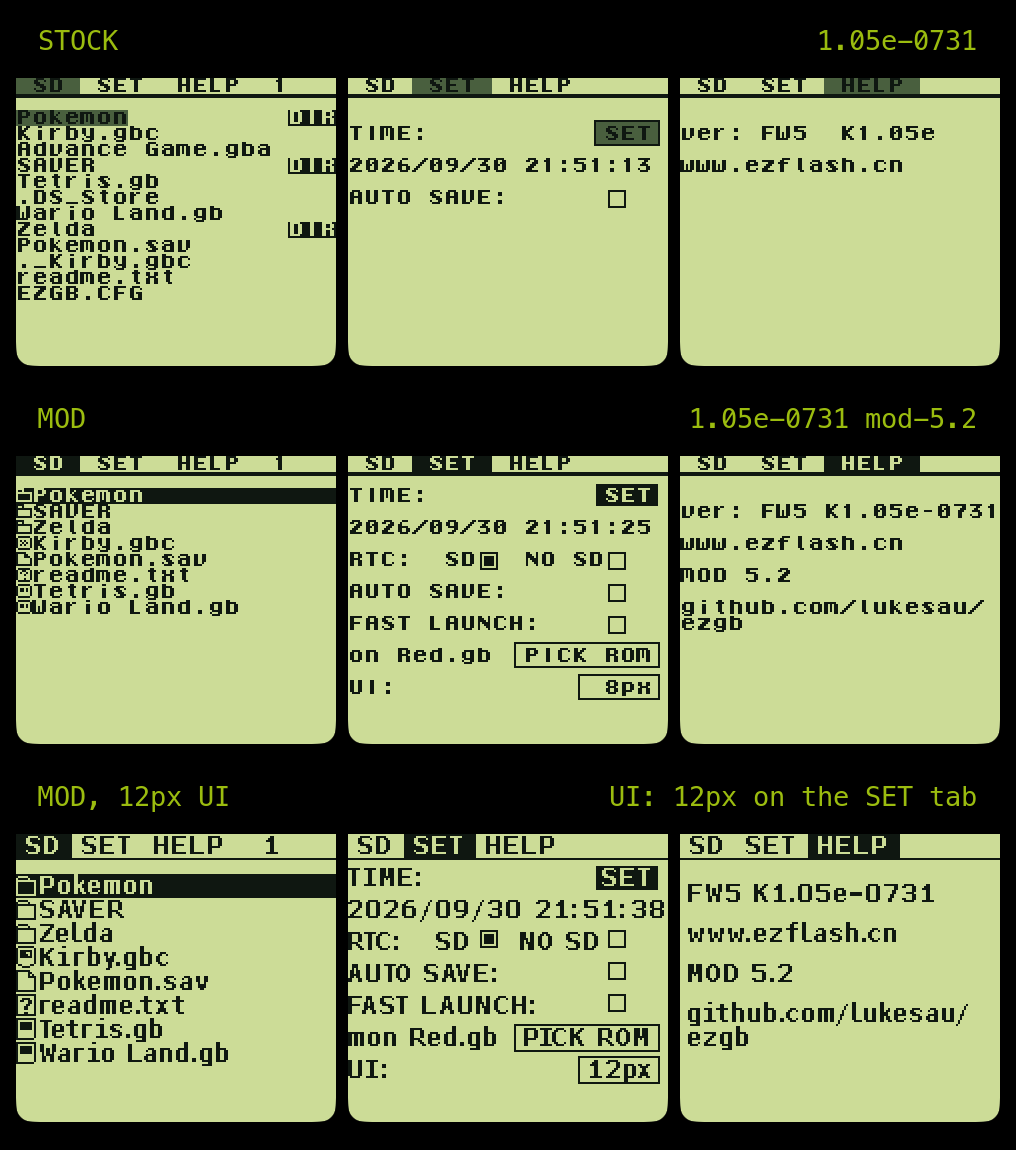
- 12px mode covers the whole menu. The tab strip, the SET and HELP tabs, the START overlay, the boot prompts and the Reading / Loading / Error boxes now follow
UI: 12px, not just the file browser. Digits are tabular figures with a plain zero, so the clock and dates do not shift as they change. - START overlay redrawn. One closed box:
Launch Last ROM?, the ROM's name in white on a black band (scrolling when long), and[B]return/[A]startwith a rule between them. The stock overlay's text repainted parts of its frames, leaving bracket-like stubs. - Save prompt redrawn.
Back up save?in the same look, with the save's file name, when the game was last played (from the RTC backup), and dots counting afterSavingwhile it writes. The RTC restore prompt matches. - No garbage save prompt without a battery. The "backup pending" stamp is checked at boot; a stamp whose path is not a real
/SAVER/file is ignored instead of offering to back up a save with a long garbled name.
The 12px UI is opt-in: UI: on the SET tab. Everything else is as in mod-5.1.
Applying
One patch per kernel; pick the one matching the ezgb.dat from your official firmware package:
| Kernel | Package | Stock ezgb.dat md5 |
|---|---|---|
| 1.04e | juniorkernel-1.04e-FW4 |
b8c29fa5a94c37200434e4c72f0cdfea |
| 1.05e-0731 | juniorkernel-1.05e-FW5-0731 |
91eb7fc67332ef20b5691029181ff748 |
| 1.05e-0918 | juniorkernel-1.05e-FW5-0918 |
5238ac5987d23b68a19d40e43af8c786 |
Apply with any IPS patcher, or with scripts/kernel-patch.py apply ezgb.dat from this repo, which detects the kernel by md5 and checks the result against manifest.json. Copy the output to the card root as ezgb.dat. The HELP tab shows MOD 5.2 when it's installed.
mod-5.1
New in 5.1

- The 12px browser uses a proportional font with kerning. Each glyph is as wide as its ink plus a 2 px gap, and neighbouring glyphs kern where their shapes leave room (
To,AV,r.), the way text is set on modern systems. A row holds as many characters as fit: about 18 of a typical name instead of 15, andPokemon Crystal.gbcfits without scrolling. Whether a long name scrolls is now decided in pixels. - Glyph fixes.
fhas its top hook, so "of" no longer reads as "ot"; the.gbicon's bottom-right corner is rounded like the DMG's.
The 12px browser is opt-in: UI: on the SET tab. Everything else is as in mod-5.0.
Applying
One patch per kernel; pick the one matching the ezgb.dat from your official firmware package:
| Kernel | Package | Stock ezgb.dat md5 |
|---|---|---|
| 1.04e | juniorkernel-1.04e-FW4 |
b8c29fa5a94c37200434e4c72f0cdfea |
| 1.05e-0731 | juniorkernel-1.05e-FW5-0731 |
91eb7fc67332ef20b5691029181ff748 |
| 1.05e-0918 | juniorkernel-1.05e-FW5-0918 |
5238ac5987d23b68a19d40e43af8c786 |
Apply with any IPS patcher, or with scripts/kernel-patch.py apply ezgb.dat from this repo, which detects the kernel by md5 and checks the result against manifest.json. Copy the output to the card root as ezgb.dat. The HELP tab shows MOD 5.1 when it's installed.
mod-5.0
New in 5.0
- The 12px browser now fits 15 characters per row. The cells are 10 px wide (still 12 tall), so a row is the file-type icon plus 15 characters instead of 12, and names like
Pokemon Crystalfit without scrolling. The glyphs are the same; the old 12 px cells were mostly padding. - Redrawn icons. The
.gband.gbccart,.savpage and unknown-file icons were redrawn for the narrower cell. - New text renderer for the 12px mode. Rows are composed in a buffer and written to the screen in the same short bursts as 4.8, so the flicker and streak fixes from 4.8 still apply. Tested on FW4 (1.04e) and FW5 (1.05e-0918) carts.
The 12px browser is opt-in: UI: on the SET tab. For the tab-strip and HELP fixes see mod-4.8; for the SET tab changes, mod-4.7.
Applying
One patch per kernel; pick the one matching the ezgb.dat from your official firmware package:
| Kernel | Package | Stock ezgb.dat md5 |
|---|---|---|
| 1.04e | juniorkernel-1.04e-FW4 |
b8c29fa5a94c37200434e4c72f0cdfea |
| 1.05e-0731 | juniorkernel-1.05e-FW5-0731 |
91eb7fc67332ef20b5691029181ff748 |
| 1.05e-0918 | juniorkernel-1.05e-FW5-0918 |
5238ac5987d23b68a19d40e43af8c786 |
Apply with any IPS patcher, or with scripts/kernel-patch.py apply ezgb.dat from this repo, which detects the kernel by md5 and checks the result against manifest.json. Copy the output to the card root as ezgb.dat. The HELP tab shows MOD 5.0 when it's installed.
mod-4.8
Fixed in 4.8
- No more flicker in the tab strip in 12px mode. Moving through the file browser with the 12px font on could make the
SD SET HELPbar flash garbage for a frame while the list redrew. The 12px renderer now never delays the screen's once-a-frame housekeeping. - No leftover from the SET screen on HELP. Since the SET tab moved up a row in 4.7, switching from SET to HELP could leave a thin line from the TIME
SETbutton at the top of the HELP screen. The tab switch now clears everything the SET screen draws.
For the SET tab changes, the RTC: SD / NO SD setting and the held-A fix, see mod-4.7; for the clock backup and restore prompt, mod-4.6.
Applying
One patch per kernel; pick the one matching the ezgb.dat from your official firmware package:
| Kernel | Package | Stock ezgb.dat md5 |
|---|---|---|
| 1.04e | juniorkernel-1.04e-FW4 |
b8c29fa5a94c37200434e4c72f0cdfea |
| 1.05e-0731 | juniorkernel-1.05e-FW5-0731 |
91eb7fc67332ef20b5691029181ff748 |
| 1.05e-0918 | juniorkernel-1.05e-FW5-0918 |
5238ac5987d23b68a19d40e43af8c786 |
Apply with any IPS patcher, or with scripts/kernel-patch.py apply ezgb.dat from this repo, which detects the kernel by md5 and checks the result against manifest.json. Copy the output to the card root as ezgb.dat. The HELP tab shows MOD 4.8 when it's installed.
mod-4.7
Fixed in 4.7
- Held A carried into the next screen. Since 4.6, a button held down could briefly read as released, so anything that waited for you to let go moved on too early. Most visibly, pressing A on PICK ROM dropped into the file browser with A still down, and the browser then opened the first folder by itself. The pad is now read in one uninterrupted step.
New in 4.7
- RTC: SD / NO SD. A new SET-tab setting right under the clock.
SD(the default) is the clock backup and restore prompt from 4.6.NO SDturns it all off for carts where the clock doesn't matter: no clock check or prompt at boot, and no clock writes to the card at launches, save dumps or TIME SET. Stored asRTCSD=0inEZGB.CFG. - Tidier SET tab. Everything moved up a row to use the space under the tab bar. The ROM line now shows the fast-launch target's name next to a
PICK ROMbutton, scrolling when it's too long to fit. Top to bottom: TIME, date, RTC, AUTO SAVE, FAST LAUNCH, ROM / PICK ROM, UI.
For the clock backup, the restore prompt and the rest of the 4.6 changes, see the mod-4.6 release.
A note on the cart's coin cell
The Jr's coin cell powers both the clock and the save memory, and the save memory draws enough to run a CR2032 down over time; corrosion on the cell or its contacts has the same effect. A weak cell shows up as the clock resetting to 2000 (caught by the restore prompt) or as BATTERY DRY!!!. Cleaning the contacts or replacing the cell fixes it; docs/battery-sram-swap.md covers a longer-lasting hardware fix. On a cart with no cell at all, set RTC: NO SD if you don't need the clock.
Applying
One patch per kernel; pick the one matching the ezgb.dat from your official firmware package:
| Kernel | Package | Stock ezgb.dat md5 |
|---|---|---|
| 1.04e | juniorkernel-1.04e-FW4 |
b8c29fa5a94c37200434e4c72f0cdfea |
| 1.05e-0731 | juniorkernel-1.05e-FW5-0731 |
91eb7fc67332ef20b5691029181ff748 |
| 1.05e-0918 | juniorkernel-1.05e-FW5-0918 |
5238ac5987d23b68a19d40e43af8c786 |
Apply with any IPS patcher, or with scripts/kernel-patch.py apply ezgb.dat from this repo, which detects the kernel by md5 and checks the result against manifest.json. Copy the output to the card root as ezgb.dat. The HELP tab shows MOD 4.7 when it's installed.
mod-4.6
This release replaces mod-4.4, which has been withdrawn: its clock restore could rewrite the cart's clock without asking. Everything from 4.4 is included below.
Fixed in 4.6
- The clock is never rewritten without asking. At boot, if the cart's clock has reset to 2000, reads as garbage, or has gone backwards since your last launch or save, a box shows the chip's time next to the backup in
EZGB.CFG:A:SDrestores the backup,B:KEEPleaves the clock alone. The reading is checked again after about a second before the box appears, so a slow first read on a cold boot doesn't trigger it. In 4.4 the restore happened automatically and could fire when it shouldn't. - RTC games keep their clock when the cart's clock moves backwards. If the clock is earlier than when the game was last launched (a restore, or setting TIME back), the kernel used to reset the game's clock, so Pokemon Crystal jumped to the time you entered when you first set its clock. The game now carries on from its last saved time instead. 1.05e kernels only; 1.04e does not have this code.
- The clock backup is kept current.
RTC=inEZGB.CFGis now updated at every game launch (from the browser, the START last-ROM overlay, or fast launch), not only at save dumps, so a restore loses at most the time since your last launch. - TIME SET always updates the backup. Setting the clock back from a wrong future date used to leave the old future time stored.
- Earlier fix from 4.4: no clock rollback on cold boots. Up to mod 4.3 the boot-time restore also fired when the clock read as invalid or earlier than the stored time, or after the
BATTERY DRY!!!prompt. On a cold power-up that first read can come too early, so with a good battery the clock was sometimes set back to the last save, and an RTC game launched afterwards reset its own clock. - No more one-tile streaks when drawing text on DMG. The stock text and pixel routines could be interrupted between checking that VRAM was free and writing to it, which dropped writes and left streaks.
- Short button taps are no longer missed. The browser polls the pad every few frames; presses are now latched every frame so a quick tap always registers.
New in 4.6
- 12px browser (opt-in). A larger 12×12 font for the file browser, with file-type icons, selectable on the SET tab (
UI: 8px / 12px, stored asUI=inEZGB.CFG). 8px stays the default. - From 4.4: no
DIRtag in the file browser. The folder icon already marks directories, so the text tag on the right is gone and folder names use the full row (19 characters, the same as files). Long folder names scroll across the full width. Suggested on issue #2.
A note on the cart's coin cell
The Jr's coin cell powers both the clock and the save memory, and the save memory draws enough to run a CR2032 down over time; corrosion on the cell or its contacts has the same effect. A weak cell shows up as the clock resetting to 2000 (now caught by the prompt above) or as BATTERY DRY!!!. Cleaning the contacts or replacing the cell fixes it; docs/battery-sram-swap.md covers a longer-lasting hardware fix.
Applying
One patch per kernel; pick the one matching the ezgb.dat from your official firmware package:
| Kernel | Package | Stock ezgb.dat md5 |
|---|---|---|
| 1.04e | juniorkernel-1.04e-FW4 |
b8c29fa5a94c37200434e4c72f0cdfea |
| 1.05e-0731 | juniorkernel-1.05e-FW5-0731 |
91eb7fc67332ef20b5691029181ff748 |
| 1.05e-0918 | juniorkernel-1.05e-FW5-0918 |
5238ac5987d23b68a19d40e43af8c786 |
Apply with any IPS patcher, or with scripts/kernel-patch.py apply ezgb.dat from this repo, which detects the kernel by md5 and checks the result against manifest.json. Copy the output to the card root as ezgb.dat. The HELP tab shows MOD 4.6 when it's installed.
mod-1.0
- Continuous scrolling via the down arrow past the stock 16 file limit (including snappier redraw of file manager from the bottom up instead of top down)
- Sorted file browser
- Hidden file list expanded (now includes files that start with ._, .DS_Store, files that end with .gba, and fast launch control files)
- Fast launch feature to quickly get into your preferred rom. Supports multiple methods of config such as an explicit file path inside of FLAUNCH.CFG, .fastlaunch for specifying a rom at the top level of the sd card, or simply launching the only rom on the disk if only one exists.
includes patches for both 1.05e kernel versions. You can patch with your favorite patcher software or you can use the kernel-patch.py (has automatic md5 checks) script in this repo.