Repository navigation

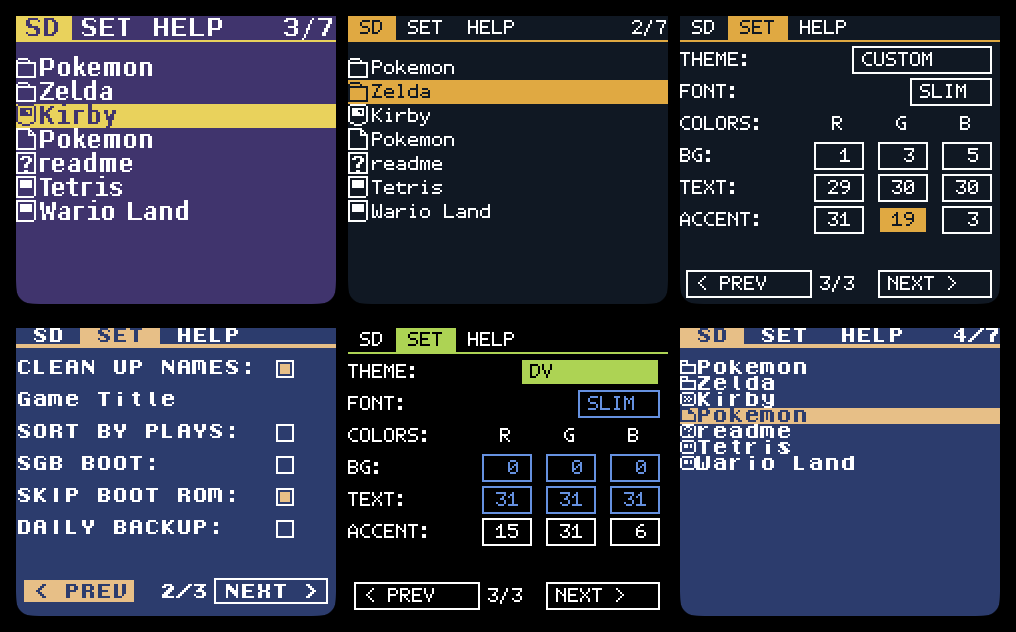
New since mod-7.1
The faster browser and the daily save backup are davidesqalv's code, from his fork ezgb-dv, fitted to both fonts, every theme and all three kernels.
Kernel mod 7.2
- Theme page and color picker: the SET tab has a third page for THEME and FONT, and under them a picker for the custom theme's background, text and accent. A on a row, LEFT and RIGHT pick red, green or blue, UP and DOWN change it, and the whole screen is the preview. It starts from the theme on screen, so red with a darker background is: pick RED, turn BG down. Saved as
COLORS=in/EZGB.CFG. Color consoles with the firmware mod only; anywhere else the picker is not shown. - Accents: red, green, purple and blue draw the selection bar, the active tab and the rules in an accent color of their own, as DV does in lime. A third
COLORS=value is the accent of the custom theme and DV's highlight in place of its lime. - SLIM font: FONT steps 8px, 12px, SLIM. SLIM is DV's Tamzen letters with the stock icons, in any theme, about 26 characters a row.
- Faster browser: the list wraps at both ends, moving the cursor redraws no text, a held UP or DOWN speeds up, and the counter reads
n/total. - DAILY BACKUP: tick it on the SET tab's second page and the first boot of each day after a game was played copies its save to a dated backup before the new one overwrites it. One per game, restored from Manage saves. Off by default; that boot takes about 7 s longer for a 32 KB save.
- Skip boot ROM: now a checkbox on the SET tab's second page. Your console decides which games skip, because a launch can only jump straight to a game when the console is already in the mode that game needs. On a DMG or Pocket every game jumps. On a GBC or GBA with the firmware mod, color games jump, and DMG-only games still reset the console, since a reset is the only way to put it in DMG mode. On a GBC or GBA with stock firmware every game resets, and a Super Game Boy always resets. With firmware mod 2.1 the jump hands the game the registers this console's boot ROM left, so a game can still tell a GBA from a GBC. Color games on a GBC and GBA have run on hardware (#8). The DMG jump has only run with a test firmware that makes a color console act as a DMG, not on a real DMG or Pocket.
- SET tab: three pages that go round, PREV and NEXT on every page, LEFT and RIGHT jump to them, and UP and DOWN wrap within a page. Settings are written to the card once, when you change page or leave the tab, instead of at every press.
- File dates on 1.04e: saves and backups get the cart clock's date instead of 2015-01-01, as on 1.05e.
- Idle menus halt: the browser, the SET tab, the ROM menu, Manage saves and the message boxes that wait for a button now halt the CPU between frames instead of busy-waiting, so the cart's bus is quiet while nothing happens.
- Smaller things: the THEME button only offers what the console can show (light, dark and DV on a DMG or stock firmware) and B steps it back, TIME SET writes the clock to the card at once, the BATTERY DRY box is smaller, the cursor on a SET checkbox gets a second outline in the text's color so it shows in a dark theme, and the status boxes leave their rounded corner pixels alone, so no stray pixel shows over the selection bar.
Firmware mod 2.1
- Boot registers: stage1 keeps the registers the console's boot ROM left and passes them to the kernel, for skip boot ROM above.
- Skip boot ROM on a fast launch: a boot with
FLAUNCH=set never reaches the kernel, so stage1 makes the same jump itself.BOOTROM=1in/EZGB.CFGturns it off.
Warning
The firmware mod is flashed to the cart. Read this before running it.
Firmware mod 2.1 rewrites the bootloader (stage1) in the cart's FPGA flash, as an official firmware update does. It has run on one FW4 and one FW5 Jr. Two things go wrong with Jr firmware updates, stock or modded:
- An interrupted or bad write. Nearly always the half-written firmware fails its CRC, the cart starts from its factory firmware (a second copy no updater touches) and you run the updater again. Rarely a damaged image passes the check and the cart boots a broken bootloader, and that can't be fixed with another updater: recovery needs hardware, an SPI programmer on the flash chip or JTAG. Use fresh batteries and don't power off or bump the cart while the updater writes.
- A card FW5 can't start. On FW5, some slow or old microSD cards stop at
Micro SD initial erroror the mod's insert-card prompt. Nothing on the cart is damaged: put the kernel and the FW4 updater on a good card, flash FW4, and the old card works again. The FW5 mod retries SD errors instead of hanging, and with it the error has become hard to reproduce even on slow cards.
Which firmware: if you are comfortable with the above and have a modern, genuine microSD card, use FW5-0918. FW4 is missing MBC3 game clock, fast loading and SD error recovery. On an FW4 cart, update while on the 1.04e kernel (it boots on both), then switch ezgb.dat to patched 1.05e-0918. Stay on FW4 if your card is old or of doubtful origin.
The updater patches are attached below, but the patcher page is the safer way to apply them: it refuses anything but the exact stock updater. With your own IPS patcher, apply each patch only to the updater it names and check the md5s in README.txt.
If you don't need what the firmware adds, use the kernel patch below and stop there.
Nothing flashed: kernel only
The easiest way is the patcher page, which checks your ezgb.dat and applies the right patch in the browser. Or patch it yourself with the IPS files below; README.txt has the md5s. Either way only ezgb.dat on your microSD card changes and nothing on the cart is rewritten. Swapping the kernel is as simple as changing a file and is completely reversible.
| Kernel | Package | Stock ezgb.dat md5 |
|---|---|---|
| 1.04e | juniorkernel-1.04e-FW4 |
b8c29fa5a94c37200434e4c72f0cdfea |
| 1.05e-0731 | juniorkernel-1.05e-FW5-0731 |
91eb7fc67332ef20b5691029181ff748 |
| 1.05e-0918 | juniorkernel-1.05e-FW5-0918 |
5238ac5987d23b68a19d40e43af8c786 |
Match the cart's firmware, which the HELP tab shows: 1.04e on an FW4 cart, 1.05e on an FW5 cart. 1.04e also boots on FW5, so start there if you can't tell. EZ Flash no longer lists its FW5 (1.05e) packages on the download page, because of the two update problems described above, but FW5 is the better firmware and an FW4 cart can be moved to it: see Should I update an FW4 cart to FW5?
Stock packages from EZ Flash: 1.04e / FW4 (download page, EZ-FLASH Junior) or 1.05e FW5 2021-9-18.
Assets
ezgb-mod-7.2-for-<kernel>.ips: the kernel patchesezgb-firmware-mod-2.1-for-fw4.ips: the firmware patch forUpdate_FW4.gb(experimental, see above)ezgb-firmware-mod-2.1-for-fw5-0918.ips: the firmware patch forUpdate_FW5_2021-9-18.gb(experimental, see above)manifest.json: stock and patched md5sREADME.txt: install steps, md5s and SHA-1s, going back- Patcher page: applies any of these in the browser, after checking your file