Repository navigation
Releases
PS4 Native v0.5.0 - Bloodborne, TLOU and Sonic

0.5.0 — 2026-11-01
This release integrates the Bloodborne bring-up branch, TLOU input/reticle updates, and release-review correctness fixes on top of 0.4.3.
Playable game coverage and documentation
- Three title families now have playable compatibility entries: The Last of Us Remastered (
CUSA00557v1.00), Sonic Origins Plus (CUSA30448update 02.00; Sonic 1/CD gameplay verified), and Bloodborne GOTY (CUSA03173; bring-up and local performance work target v1.09). Bloodborne v1.00 is also registered, but a separate v1.00 benchmark was not established by this audit. - Uncharted 4 remains in progress. These statuses describe verified scenarios, not complete campaigns or every game mode.
- README now identifies the M1 Pro / 16 GB test machine, current macOS 27.2 system, historical OS/scene differences, renderer/resolution/Pro-mode conditions, and the limitations of each FPS report.
- Added sanitized performance provenance with Bloodborne log hashes and individual 300-present telemetry windows. No game binaries, shaders, saves or captured memory are included.
- TLOU's latest combat smoke (84.5–85.6 FPS, menus about 120) is an operator-reported integration result, separate from the historical 98.9 FPS scripted route. Sonic's 54.7 FPS Green Hill median remains its earlier bounded idle-scene result. Bloodborne's latest local patched candidate logged 49.4–58.8 FPS in the six heavier late windows, including compilation; selected zero-skipped-draw windows logged 52.6–58.8 FPS. These are not a new controlled benchmark of the final release artifact.
Bloodborne CPU and runtime bring-up
- Expanded integer/bit and double-shift instruction lowering, CMPXCHG16B, REP STOS, and FMA instruction families used during bring-up.
- Improved PRX discovery/initialization, ELF module initialization, symbol resolution and guest pointer-return handling.
- Added AvPlayer MP4 demux and media playback through VideoToolbox H.264 and AudioToolbox AAC, plus boot-path compatibility adjustments in audio, synchronization, direct memory, threads, saves, RTC, PlayGo and related APIs.
- API coverage remains partial; this is not a complete implementation of the PS4 operating system.
Renderer and shader translation
- Added tessellation-stage translation and MSL generation (
LS -> HS -> VS(DS) -> PS) and geometry-stage translation (ES -> GS -> VS(Copy) -> PS). Synthetic translator smoke checks compile the generated MSL using Metal. - Added GPU-side preparation and indirect geometry draws, batched tessellation, in-pass tessellation pre-pass scheduling, and deferred multi-region buffer-copy work.
- Added large private render targets and lazy texture-usage upgrades. These descriptors permit Apple GPU compression; actual AFRC activation and compression ratios were not independently established.
- Expanded shader handling for relative register moves, lane/swizzle operations, float-class checks, and NaN/Inf handling used by the new workloads.
The Last of Us Remastered and input
- Added QuadStrip index conversion used by the weapon aiming reticle.
- Added DualSense/DualShock 4 touchpad click and touch-coordinate input, with fallback input handling for supported controllers.
- Adjusted texture-digest polling backoff to reduce repeated work on unchanged sampled textures. Digest sampling remains heuristic and may miss ordinary CPU writes outside sampled bytes; explicit targeted invalidations force refreshes.
Release-review correctness fixes
- Removed a new compute-to-clear substitution that inferred shader behavior only from resource sizes/dispatch shape. The original compute shader now executes rather than risking replacement of unrelated work by a constant clear.
- Fixed private render-target usage upgrades so preservation copies execute after preceding producers on the Main queue, instead of being committed early on Upload.
- Restored CPU/GPU ordering before WRITE_DATA and CE dump writes to guest memory that earlier GPU work may still read.
- Removed compiler-local STD direction tracking that was lost at basic-block boundaries. STD/backward string execution remains explicitly unsupported rather than silently corrupting memory; CLD and normal forward string paths remain supported.
Packaging and important limits
- App and bundled engine version are 0.5.0. Rebuild existing compiled games to pick up the new compiler/runtime; the release does not update already generated game assembly in place.
- Bloodborne 60 FPS/timestep modification is not installed by this release. The measured local candidate had edits in generated game assembly; a clean build normally retains the game's 30 FPS cap. The final release also contains the safety changes above, so candidate FPS must not be presented as final-release performance.
- Use Metal 3 for the documented gameplay scenarios. Sonic Metal 4 flicker remains unresolved; Bloodborne Metal 4 gameplay has not been established.
- Bloodborne online multiplayer/networked Chalice features, full campaign coverage and all save/reload scenarios are not verified. Sonic 2/3 gameplay remains unverified.
- Packages are ad-hoc signed, not notarized. Requirements remain Apple Silicon, macOS 26+, and Apple command-line tools to build games from the user's own dump.
Fresh build/test results and the exact source commit are recorded in the downloadable release manifest. App fixture smoke tests validate the manager UI with recorded data; they do not run or validate real gameplay.
Release verification
Passed fresh Go tests and vet, 119 Swift tests, tessellation/geometry MSL smoke, the full host/GPU suite on Metal 3 and 4, and 167 Python tests. The runner reported 38 missing local game-fixture cases skipped; the optional game-video fixture was absent too. Engine-kit sample compilation, manager fixture UI smoke, signatures and DMG checksum verification passed. The UI smoke uses a fake engine and is not gameplay validation. All 205 runtime sources and paired GCN/SPIRV-Cross archive hashes match the package.
Source: b81d337. Downloads include the DMG, detailed changelog, source/build manifest and SHA256SUMS.
PS4 Native v0.4.3 - TLOU FPS regression fix
Fixes the TLOU texture-upload performance regression introduced during Sonic Origins Plus integration. This release includes the Sonic support and game-library changes from 0.4.2.
Fixed
- TLOU FPS regression: submitting a command buffer no longer walks the entire texture cache and marks every sampled texture dirty. Submissions now advance an epoch; cached textures are checked lazily when used, avoiding redundant CPU detiling and GPU uploads when the checked contents match.
- Texture-binding CPU overhead: surface layouts are computed only for render-target alias checks or new cache entries, rather than on every sampled-texture cache hit. Storage-image hazard handling skips a cache-lock lookup when no pending write overlaps.
- Refresh fallbacks: explicit write invalidations and aborted/hazard GPU uploads invalidate the cached digest so the next refresh is forced. Reference CPU uploads still execute. Added tests cover CPU/GPU refresh skipping, changed contents, fallback behavior, and a PROT_NONE tail.
- Diagnostics: texture-cache telemetry reports
unchanged uploads skipped.
Scope and known limits
The optimization addresses the cause of the reported TLOU slowdown; no new controlled end-to-end FPS benchmark of this packaged release is claimed here. Earlier TLOU and Sonic FPS results in the README retain their original measurement conditions.
Content checks are heuristic: spans of up to 4 KiB are fully hashed; larger textures use sampled cache lines. Stable compressed/mipmapped textures are checked less often. Ordinary CPU writes outside the sampled bytes can be missed; targeted invalidations still force updates. The original design document's full-scan/single-pixel guarantee does not describe this implementation.
Use Metal 3 for Sonic Origins Plus; live Metal 4 flicker remains unresolved. Compatibility and visual correctness are still experimental.
Installation
Download PS4Native-0.4.3.dmg and drag PS4 Native.app into Applications. Requires Apple Silicon, macOS 26+, and Apple command-line tools to compile your own game dump. The app is ad-hoc signed, not notarized. Rebuild existing compiled games to include the new bundled runtime. If you tested an earlier local 0.4.3 package, force a rebuild even when its version already reads 0.4.3. No game content, keys, firmware or saves are included.
Validation
Passed: full Go tests and go vet, 119 Swift tests, the full host runtime/GPU suite on Metal 3/4, and 167 Python tests. The runner reported 38 skipped local game-fixture cases; the optional game-video fixture was absent too. Engine-kit sample compilation, app fixture smoke, app/mounted-DMG signature checks and DMG checksum verification passed. The fixture smoke does not run a real game. release-manifest.json records the source/runtime hashes and validation scope; SHA256SUMS verifies the downloadable files.
Source: 28c6679.
PS4 Native v0.4.2
PS4 Native 0.4.2 includes the Sonic Origins Plus bring-up work, runtime and renderer corrections, and game-library improvements since 0.4.0.
- Sonic 1 and Sonic CD render gameplay and accept input. An optional native chooser for the four Origins games is available in
examples/sonic-origins; startup notices and final mode/character confirmation remain manual. - Correct texture/display interpretation, GPU-write tracking, depth-decompress copies, 3D storage depth, and complete 32-bit microtile detiling.
- SaveDataMemory2 persists writes, preserves repeated setup, checks metadata/data write failures, and retains dirty data when a failed flush needs retry.
- ARM64 conditional branches are relaxed conservatively even when many intervening branches expand. Shader wave-lane predicates, kernel synchronization, JSON, login/network stubs and VideoToolbox decoding include further corrections.
- Games used in place can install DLC alongside their library entry without writing into the source folder. Concurrent imports retain separate logs.
Performance and known limits
Use Metal 3 for Sonic: Metal 4 has observed live flicker. On M1 Pro / 16 GB, macOS 27.2, 1920x1080 / base PS4 mode, the measured Sonic Green Hill candidate had a median logged 54.7 FPS, frame p50 18.4 ms, p95 19.7 ms. This was a bounded idle-scene measurement, not a full-game average or a 60 FPS guarantee. It did not improve FPS over the 55.5 FPS control. The final release adds reviewed save-error and dense-branch fixes after that run and was not re-benchmarked. Full conditions and samples are in the README and docs/sonic-origins-performance.json.
Sonic 2 chooser navigation was checked; Sonic 2/3 gameplay and FPS are not claimed. Latest TLOU gameplay regression testing remains for the user's check. This is an experimental compatibility layer, with incomplete title coverage.
Installation
Download PS4Native-0.4.2.dmg and drag PS4 Native.app into Applications. Requires Apple Silicon, macOS 26+, and installed Xcode command-line tools for compiling your own game dump. The app is ad-hoc signed, not notarized. No game content, console firmware, keys or saves are included. Existing compiled games need rebuilding to pick up the bundled runtime/compiler changes.
Validation
Go tests and vet, 119 Swift tests, 167 Python tests, engine-kit sample compilation, packaged-app fixture smoke, and app/DMG signature checks passed. The app smoke uses a fake engine and does not validate gameplay. The full host runtime/GPU suite also passed, with 38 reported game-fixture cases skipped; the optional game-video fixture was absent too.
release-manifest.json records the source commit, checks and bundled-library hashes; SHA256SUMS verifies the release files.
Built from cfda2f9.
ps4-native-mac v0.4.0
ps4-native-mac v0.4.0
ps4-native-mac is an ahead-of-time (AOT) static recompiler for Apple Silicon Macs. It translates
the x86-64 code of a PlayStation 4 game (eboot.bin and the PRX modules shipped with the game)
into a native arm64 macOS app. The game code is lifted once, at build time, into ARM64 assembly.
It then runs against a high-level emulation (HLE) runtime of the Orbis OS libraries and a GNM
command processor that renders with Metal. There is no JIT, no interpreter and no MoltenVK.
The project is a fork of PS4Recomp, developed
independently under the new name since 2026-10. License: GPL-2.0.
No game is included. You recompile a game that you own and dumped yourself.
What's new since v0.3.0: the PS4 Native app
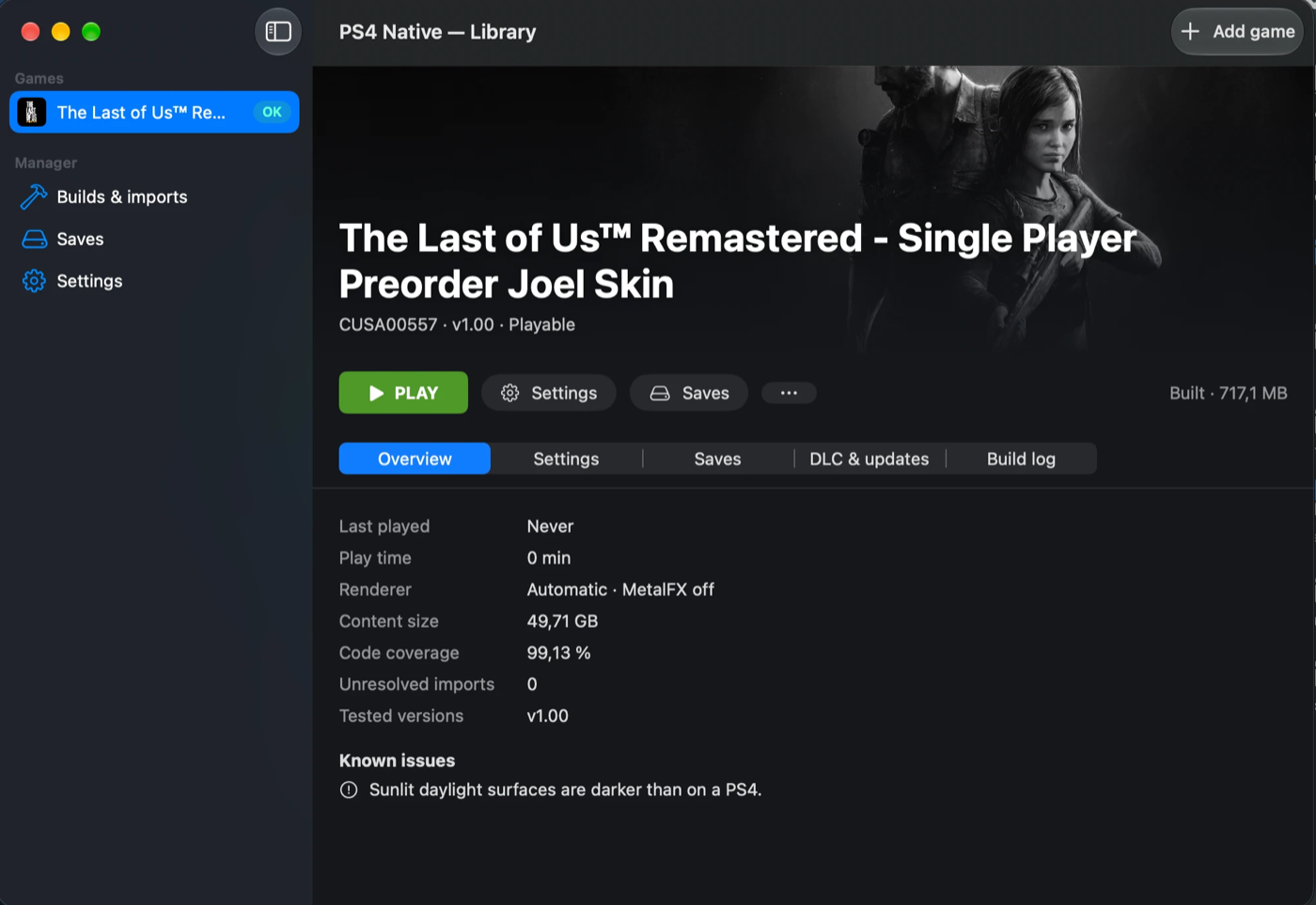
The Last of Us Remastered (CUSA00557) in PS4 Native, built and ready to play.
PS4 Native is a Steam-style library for your own PS4 games on a Mac. It is a native SwiftUI app
that drives the recompiler, so you no longer need the terminal:
- Add a game. Drop a fake-signed PKG or a dumped game folder onto the window, or use
Add game. - Import and analyse. The app imports the game, analyses
eboot.binand shows a support
badge. - Build. One button builds the native version in the background.
- Play. Press PLAY.
What the app does:
- Library and support badges. Each game shows a badge from the analysis and the built-in
compatibility database: OK (playable), WIP (in progress), VER (a version that was not tested),
EXP (experimental, not in the database) or ? (not analysed). A retail PKG, a broken PKG or a
folder withouteboot.binis refused at the add step. - Adding games. A fake-signed
.pkg, or a dumped folder (for exampleCUSA00557/with
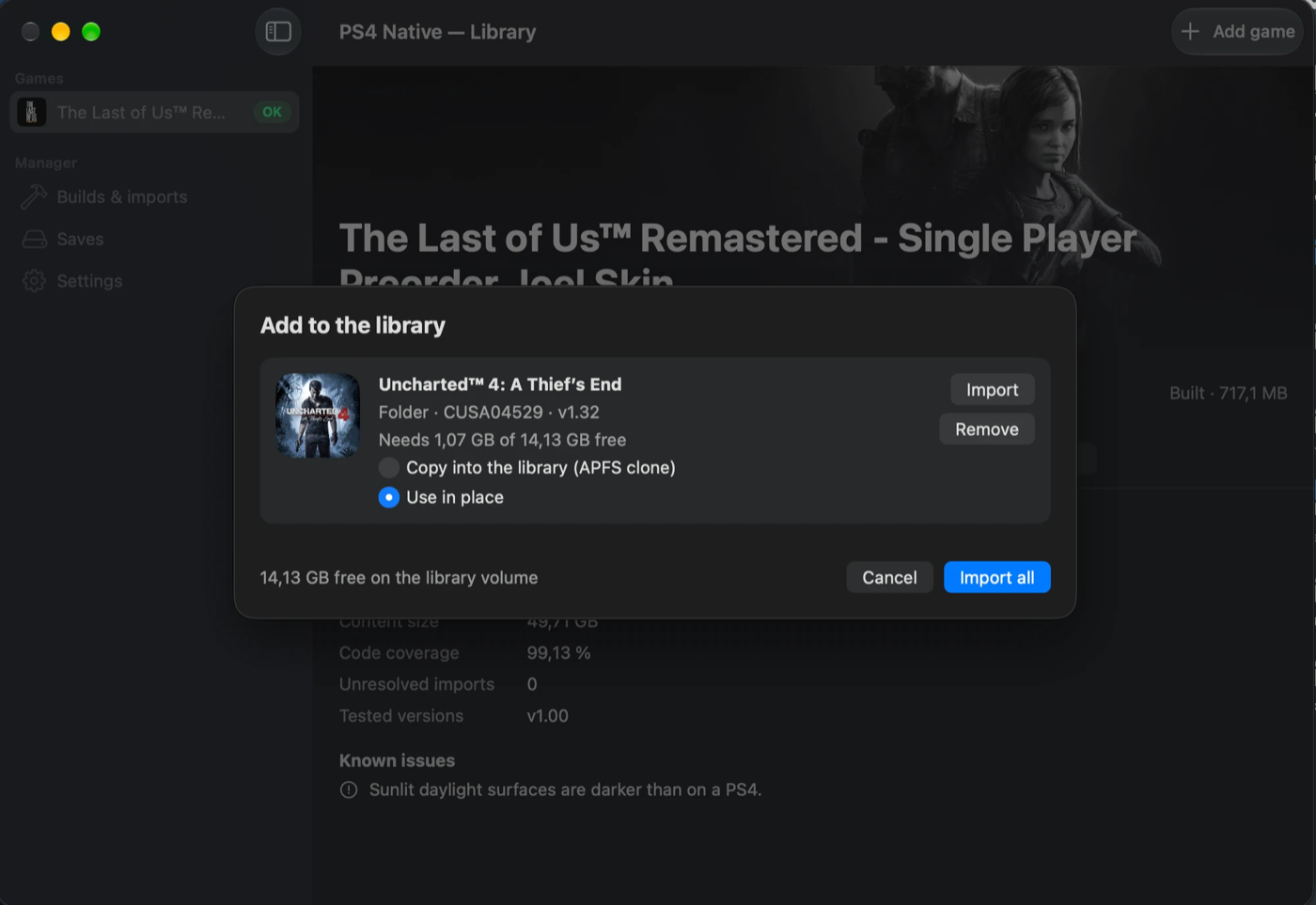
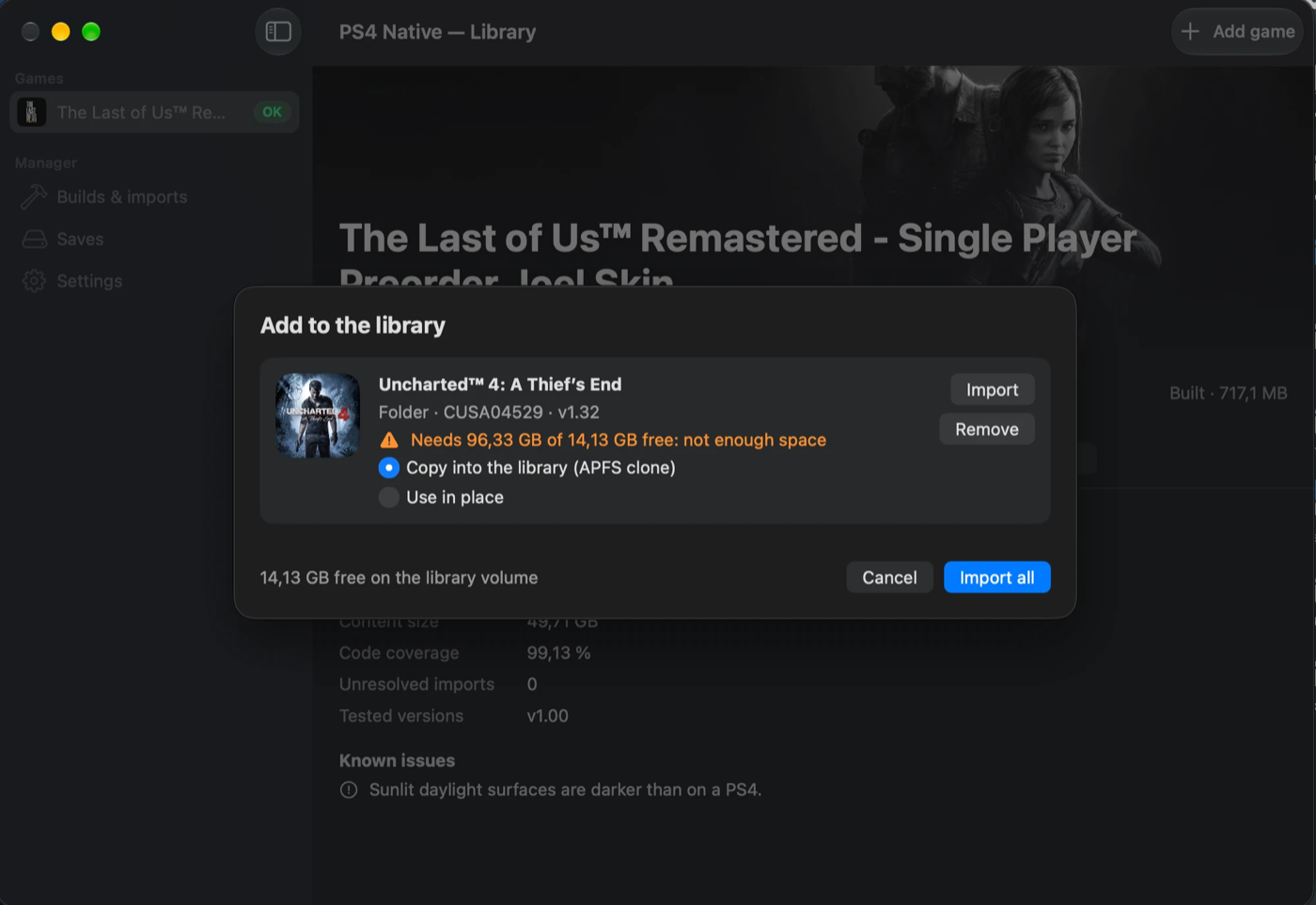
eboot.binandsce_sys/param.sfo). A folder can be copied into the library (an APFS clone on
the same volume) or used in place, where the library only holds a symlink and never writes to
the folder. The add sheet shows the space needed against the free space. Retail PKGs are refused:
the engine never tries to decrypt them. Update PKGs are laid over the game; DLC goes to
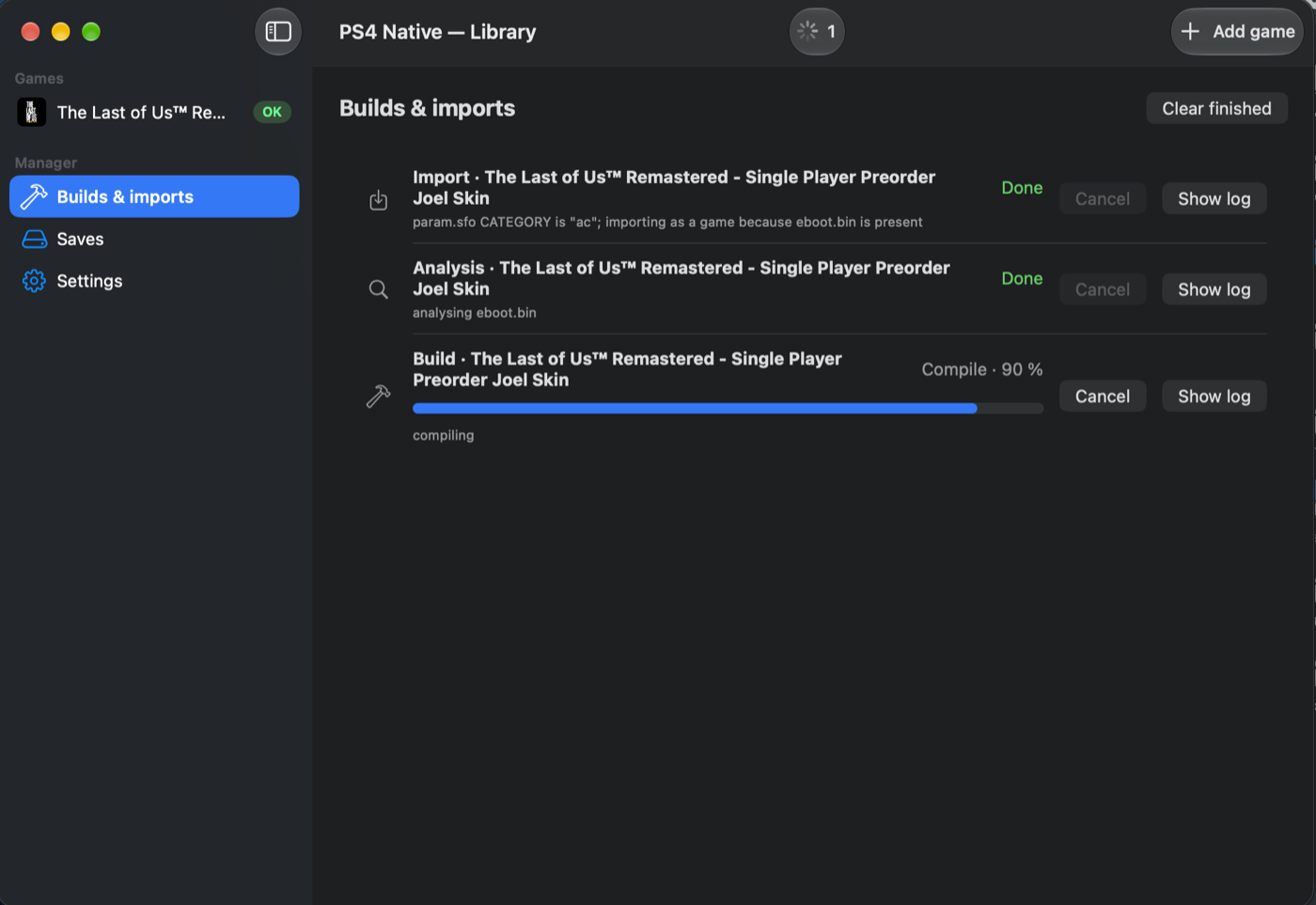
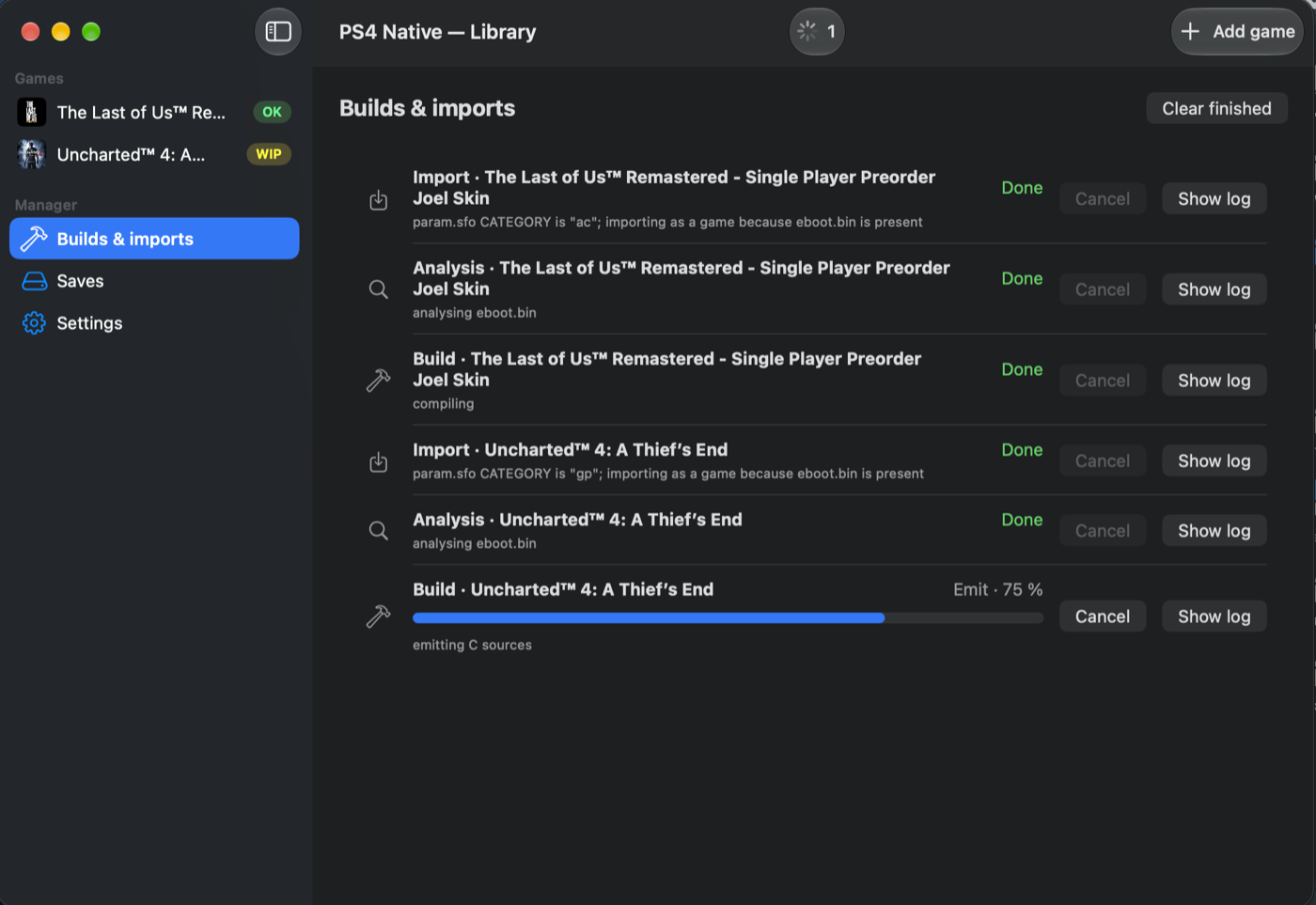
content/addcont/<entitlement>. - Builds & imports queue. Every import, analysis and build is a row with its stage, a progress
bar, Cancel and Show log. One build and one import can run at the same time. The game
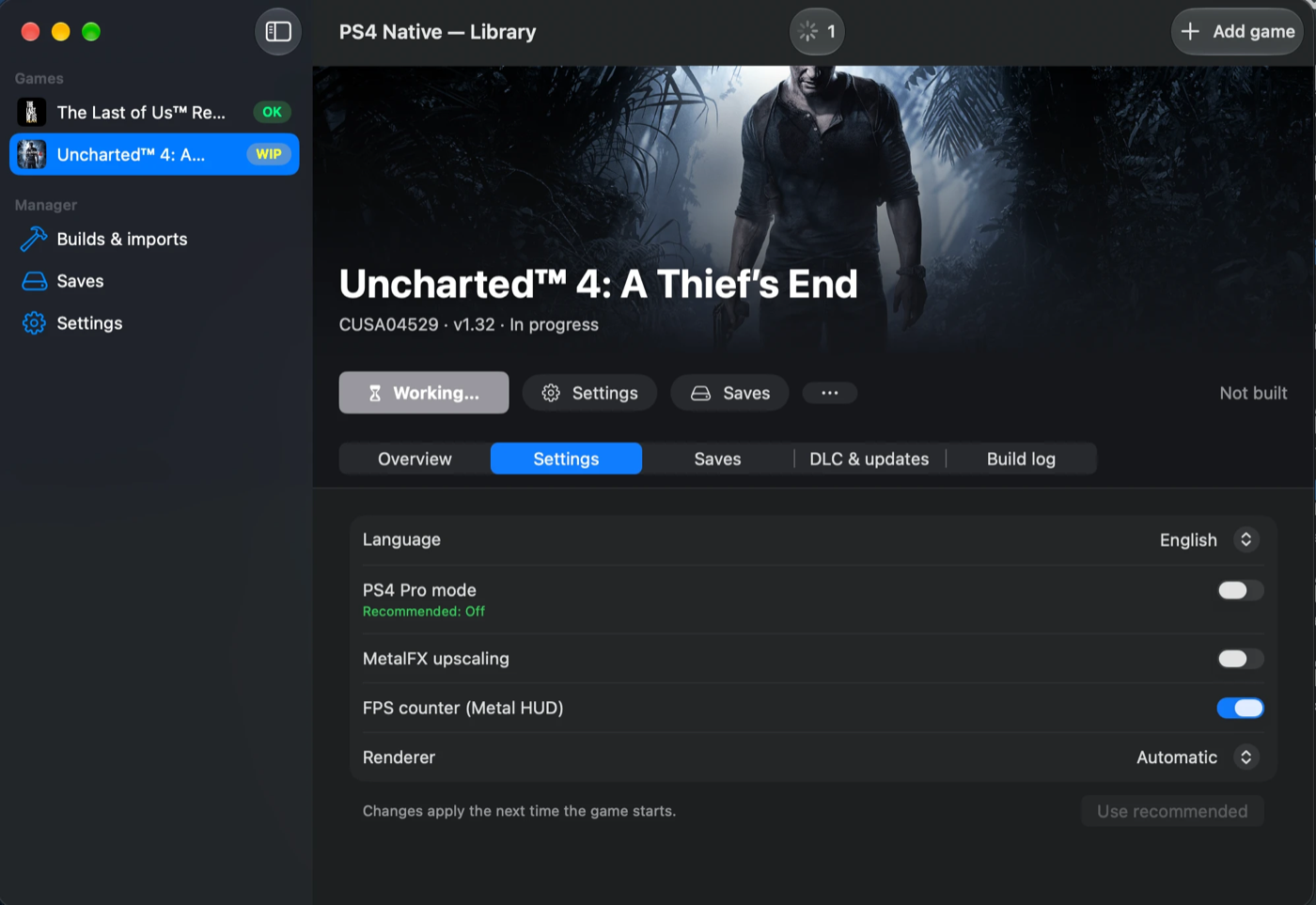
page offers a rebuild when the engine is newer than the one that built the game. - Game page with five tabs: Overview (last played, play time, renderer, size, code
coverage, unresolved imports, tested versions, known issues), Settings (language, PS4 Pro
mode, MetalFX upscaling, FPS counter, renderer Automatic / Metal 3 / Metal 4, with the
database's recommended values marked), Saves (backup, restore, import, export, delete a
slot; removed saves go to the Trash), DLC & updates and Build log. - Play and stop. PLAY starts the built
.app; Stop sends SIGTERM, then SIGKILL after 10 s.
Play time and Last played are recorded; after a crash the page offers the log. - Uninstall shows the space it frees and keeps the saves by default.
- First run checks the Command Line Tools (clang 17 or later, macOS 26 SDK) and the free space,
and offers to install the tools when they are missing.
 |
 |
 |
 |
The full description is in the README ("PS4 Native app") and in docs/game-manager-app.md.
Install
-
Download
PS4Native-0.4.0.dmg, open it and drag PS4 Native to Applications. -
The app and the games it builds are signed ad hoc, not notarized. Gatekeeper blocks the first
launch of a downloaded copy: allow it in System Settings → Privacy & Security → "Open Anyway".
Alternatively remove the quarantine flag:xattr -dr com.apple.quarantine "/Applications/PS4 Native.app" -
Install Apple's Command Line Tools if the first-run check asks for them
(xcode-select --install). They provide theclangthat compiles and links every game build;
they are not bundled.
The app bundles its engine (Contents/Resources/engine): ps4-recomp, the runtime sources, the
3rdparty static libraries, ninja and a static FreeType, with every licence text. Homebrew is not
needed.
Requirements
| Requirement | Notes |
|---|---|
| Apple Silicon Mac | Developed and measured on M1 Pro, 16 GB. Intel Macs are not supported. |
| macOS 26 or later | The app's minimum (Package.swift, Info.plist). Tested on macOS 27.0.1. |
| Command Line Tools | clang 17 or later and the macOS 26 SDK (xcode-select --install). |
| Library on APFS | The default library (~/Library/Application Support/PS4Native/) is on the internal disk. See "Known limits". |
Engine changes
- Engine commands with a JSON protocol.
ps4-recomp inspect,import,analyze-game,
versionandbuild. With--jsoneach writes one JSON event per line to stdout (progress,
warning,error,done), and the last event says whether the operation succeeded. The
contract, result schemas, error codes and library layout are indocs/game-manager-engine.md. - PKG and folder import. Fake-signed PKG and PFS extraction (also PFSC-compressed), ported
from shadPS4;param.sforeader; the game library with a lock, staged commits by rename,
resumable cancel and crash recovery; patches and DLC; retail PKGs are detected and refused. - Compatibility database (
pkg/compat/compat.json, built into the engine): The Last of Us
Remastered CUSA00557 v01.00 playable, Uncharted 4 CUSA04529 v01.32 in progress. Any other game
is experimental. - Per-game keys by TITLE_ID. The runtime keys settings (
settings/<TITLE_ID>.cfg), the save
directory ("<TITLE> [<TITLE_ID>]") and the shader cache by the TITLE_ID fromparam.sfo,
falling back to the game folder name. Bundles get the IDorg.ps4native.<TITLE_ID>. The settings
file also holdsmetal=3|4, used asPS4_GNM_METALwhen the environment has none, and keeps
lines it does not own. - Translator library check.
ps4-recomprefuses alibgcn_recompiler.athat was not built
from the gcn-recompiler sources next to it; rebuild it after any change there. - Engine kit.
tools/make_engine_kit.shassembles the self-contained engine the app ships,
and checks it with a build ofhello_world.elfwithout Homebrew inPATH.
Runtime, lifter and renderer work from the inFAMOUS Second Son bring-up is included as well, among
it: static TLS per module, SSE4A and VZEROUPPER/VZEROALL decoding, jump-table discovery fixes,
sceNetEpoll* over kqueue, direct memory sized from the process parameters, guest-memory sync
objects, thread FP state inheritance, Ajm/AudioOut/Videodec fixes and diagnostics
(PS4_AUDIO_LOG, PS4_AUDIO_DUMP, PS4_AJM_LOG, PS4_VIDEODEC_LOG, PS4_VIDEODEC_DUMP,
headless audio), flip-label waits, inline fetch shaders and vertex buffers at any stride, 1D and
cube textures, save-data dialog fixes, and pad motion sensors (gyro and accelerometer from a
connected DualShock 4 or DualSense; a virtual pad tilted with H and shaken with N). The
README's environment-variable table lists the new switches.
Game status
Unchanged from v0.3.0 for The Last of Us Remastered (playable) and Uncharted 4 (in progress); the
measured numbers are in the README ("Supported games on Mac").
inFAMOUS Second Son: bring-up is in progress. It is not in the compatibility database, so the
app treats it as experimental (EXP). This release makes no claim about how far it runs.
Known limits
- APFS only for the library. On exFAT or FAT, macOS writes
._*AppleDouble files and the
signing ofeboot.appfails, so every build fails after the compile. A folder used in place may
stay on any volume; only the library'sbuild/must be on APFS. - DLC and updates need a copied game. DLC can be installed only into a game copied into the
library; games added in place (by reference) refuse DLC — fixed in the next release. Updates are
likewise applied only to a copied game. - Disk use. A copy costs the game's unpacked size unless it is an APFS clone on the same
volume; the add sheet always counts the full size. - Not notarized. See "Install".
- Shortcuts. A game started from its
/Applicationsshortcut or the Dock uses its settings, but
its play time is not recorded. - The known issues of v0.3.0 are unchanged (TLOU daylight, HTILE on Pro depth arrays, Metal 4
slower than Metal 3, Uncharted 4 rendering gaps, x87 precision and the others). The README lists
them all.
Assets
| File | What it is |
|---|---|
PS4Native-0.4.0.dmg |
The PS4 Native app with its bundled engine (arm64, ad-hoc signed, not notarized) and a link to /Applications |
SHA-256 of PS4Native-0.4.0.dmg:
0f26dcc...
ps4-native-mac v0.3.0
ps4-native-mac v0.3.0
ps4-native-mac is an ahead-of-time (AOT) static recompiler for Apple Silicon Macs. It translates
the x86-64 code of a PlayStation 4 game (eboot.bin and the PRX modules shipped with the game)
into a native arm64 macOS app. The game code is lifted once, at build time, into ARM64 assembly.
It then runs against a high-level emulation (HLE) runtime of the Orbis OS libraries and a GNM
command processor that renders with Metal. There is no JIT, no interpreter and no MoltenVK.
The project is a fork of PS4Recomp, developed
independently under the new name since 2026-10. License: GPL-2.0.
No game is included. You recompile a game that you own and dumped yourself.
What's new since v0.2.0: The Last of Us colours are fixed
Before this release, The Last of Us Remastered looked too bright and washed out, Joel's hair was
blond instead of dark brown, foliage was neon green, and much of the sun shadow was missing or
wrong. Three bugs caused this. Each was found by comparing frames with a PS4 reference video and
by replaying captured passes, and each is fixed here.
1. The output gamma was inverted.
- The game sets its output gamma with
sceVideoOutAdjustColor. At its default brightness TLOU
passes gamma 0.8. - The old presenter re-encoded the image with the exponent 1/(3.4 − gamma). For 0.8 that
brightened the image and washed it out. - Now the encoded value is raised to 1/gamma: gamma below 1 darkens, above 1 brightens, and 1.0
leaves the image unchanged. This was calibrated against a PS4 reference video. - The in-game brightness slider now goes the right way.
2. Hair and foliage were never shadowed.
- The GCN shader recompiler ignored the
addr64bit of MUBUF/MTBUF buffer instructions. - TLOU's hair and foliage pixel shaders (18 programs) load their shadow-cascade matrix with
buffer_load_dwordx4 ... addr64. Without the bit they read zeros, so they were always lit.
That made Joel's hair blond instead of dark brown and the foliage neon. - Fix:
addr64loads are now general guest-memory loads (descriptor base plus the 64-bit address
in VGPRs plus the offsets). Draw shaders got their own guest-memory path: the page table,
read-only windows and their own fault slot. - Draw-stage stores and
addr64forms that are not supported fail shader translation with an
error instead of reading wrong data quietly.
3. Sun shadow cascades 1–2 were always in shadow.
- The sun shadow map is a depth array with 3 slices. Its compute HTILE fast clear was applied
only to slice 0, so cascades 1 and 2 kept stale depth and shadowed everything. - Now the clear's coverage is sized from the bytes it cleared and the addrlib HTILE layout (2, 8
and 16 pipes, and linear HTILE), so every cleared slice is covered. - Pro (Neo) depth targets fall back to one slice, and this is logged.
Window colour space.
- The window's
CAMetalLayeris now tagged sRGB, so macOS colour-matches the frame to the panel.
PS4_COLORSPACE=nativerestores the old untagged layer. - The on-screen effect is expected but not measured: window captures look the same with both
settings.
Tools.
tools/color_compare.pycomputes CIE L*C*h statistics of frame regions against reference frames.tools/gamma_candidates.pyandtools/tlou_color_run.sh(window captures through the macOS
display path).PS4_SCREENSHOT_STAGE=outputtakes the internal screenshots after the gamma pass.docs/color-measurement.mddescribes the method. The reference frames and game captures are not
in the repository.
Measured colour
Location-matched frames, our window captures against the PS4 reference video, CIE L* (lightness,
0–100):
| Frame | v0.2.0 | v0.3.0 | PS4 reference |
|---|---|---|---|
| Interior save point, median L* (p50) | 10.2 | 3.2 | 2.6 |
| Joel's hair, L* | 32 | 9 | 4; hue within 20° |
| Plank courtyard in daylight, median L* | not measured | 11–19 (two captures) | 32 |
Known remaining:
- Sunlit daylight surfaces are still darker than on the PS4 reference (the plank courtyard row
above). The sun direction was checked: it is the game's own data. So the remaining gap is in the
evaluation of lighting or shadows, and it is under investigation. - Pro (Neo) depth arrays keep single-slice HTILE coverage.
Performance
- The shadow work that now runs for hair and foliage costs about +0.4 ms of GPU time per frame in
scenes with much hair and foliage. - The last A/B of that change was within noise: 93.5 against 89.7 fps (±6.6).
- No new A/B was run for the HTILE change.
- The screenshot in the README (Beyond the Wall, Metal 3, MetalFX 1920x1080 → 2560x1440) shows
about 89 fps on the developer's Mac. - The route numbers in "Status" are from v0.2.0 and were not re-measured.
Status
Measured on an Apple M1 Pro (16 GB), macOS 27.0.1. Only measured numbers are listed; "TBD" means
not measured yet.
| Game | Stage | fps | Resolution |
|---|---|---|---|
| The Last of Us Remastered (CUSA00557) | Playable: boot, menus, movies, gameplay, saves | Chapter 1 courtyard route (300 s, median of 5 runs, v0.2.0 code): 98.9 fps on Metal 3 (default), 85.5 fps on Metal 4 | 1920x1080 (base PS4 mode, PS4_PRO=0), MetalFX off. Pro mode: TBD |
| Uncharted 4: A Thief's End (CUSA04529) | In progress: boots, menus, New Game, chapter 1 (boat cutscene and boat gameplay), saves, audio | Title screen about 21–22 fps, boat gameplay about 20–21 fps (PS4_PRO=0, measured before v0.2.0's renderer changes) |
1920x1080 (PS4_PRO=0); 2560x1440 in Pro mode |
Uncharted 4 was checked only for this release's colour change: its first-run brightness menu
renders byte-identical to v0.2.0. It was not checked further.
Assets
| File | What it is |
|---|---|
ps4-native-mac-v0.3.0-macos-arm64.tar.gz |
The prebuilt ps4-recomp tool with everything it needs at run time (see below) |
ps4-native-mac-v0.3.0-src.tar.gz |
The source of tag v0.3.0 (git archive; the submodules are not included, see "Building from source") |
SHA256SUMS |
SHA-256 checksums of both archives |
The prebuilt archive has the same layout as in v0.2.0:
ps4-recomp: the recompiler (arm64, ad-hoc signed, not notarized);pkg/runtime/: the HLE runtime sources (C / Objective-C). They are copied into every game build
and compiled there together with the lifted game code;3rdparty/: the prebuilt static librarieslibgcn_recompiler.a,libspirv-cross.a,
libatrac9.awith the headers the build needs, and the minimp3 headers;LICENSE, the third-party license files (3rdparty/*/LICENSE,licenses/) andINSTALL.txt.
Keep the layout as it is: ps4-recomp looks for pkg/runtime and 3rdparty/ next to its own
executable or in the current directory.
Requirements
Unchanged from v0.2.0:
| Requirement | Notes |
|---|---|
| Apple Silicon Mac | Developed and measured on M1 Pro, 16 GB. Game code is built with -mcpu=apple-m1. |
| macOS | Tested on macOS 27.0.1. Building a game needs the macOS 26 SDK or later (Xcode or Command Line Tools 26+), because the Metal 4 backend is compiled into every build. The prebuilt ps4-recomp needs macOS 13 or later. The Metal 4 backend needs a GPU with MTLGPUFamilyMetal4. |
| Xcode Command Line Tools | xcode-select --install. clang assembles and links every game build. Building gcn-recompiler from source needs Apple clang 17+ (C++23); tested with Apple clang 21. |
| Ninja | brew install ninja. It drives the parallel game build. |
| FreeType 2 | brew install freetype pkg-config. Found through pkg-config, or at /opt/homebrew/opt/freetype. The game binary also loads it at run time. |
| Go, CMake | Only to build from source: Go 1.27.1 (go.mod), CMake ≥ 3.20. |
Quick start (prebuilt archive)
-
Unpack.
tar -xzf ps4-native-mac-v0.3.0-macos-arm64.tar.gz # only if macOS blocks the tool after a browser download: xattr -dr com.apple.quarantine ps4-native-mac-v0.3.0-macos-arm64 -
Dump your own game. The project works only on a decrypted, extracted game folder that
containseboot.bin,sce_module/andsce_sys/. It does not decrypt or unpack PKG files and
no game files are provided. -
Recompile.
/path/to/CUSA00557stands for your game folder.ps4-native-mac-v0.3.0-macos-arm64/ps4-recomp /path/to/CUSA00557/eboot.bin \ --app-dir /path/to/CUSA00557 -o /path/to/build -cRebuild games built with v0.2.0: the colour fixes are in the runtime and the shader translator.
The shader cache ID is a hash of the translator's sources, so old cached shaders are not
reused and the cache does not need to be cleared. -
Sign ad hoc (again after every rebuild):
codesign -f -s - /path/to/build/eboot.app -
Run:
open /path/to/build/eboot.app.PS4_GNM_METAL=4selects the Metal 4 backend.
Known issues
- TLOU daylight is darker than on a PS4 (see "Measured colour").
- HTILE on Pro depth arrays: a compute HTILE clear covers only the first slice in Pro (Neo)
mode. - Window colour space: the effect of the sRGB tag on screen is not measured.
- Metal 4 is slower than Metal 3 (85.5 against 98.9 fps on the TLOU route in v0.2.0), so it is
not the default. - Uncharted 4: no fog and no light shafts on the title screen; water colour, foam and sky
differ from a PS4; large or GPU-indexed T# tables read a null image; no decals (CMASK); frame
rate below 30 fps; the guest-memory fast path stays opt-in. - The other known issues of v0.2.0 are unchanged (x87 precision, misaligned atomics, NaN sign,
unresolved imports, screenshot frame cost, shader cache key, bundle ID, AppleDouble files, the
analyzecoverage list, the old name in places, not notarized, anassetsfolder near the
build, FreeType at run time, symlinks tops4-recomp). The README lists them all.
Building from source
The...
ps4-native-mac v0.2.0
ps4-native-mac v0.2.0
ps4-native-mac is an ahead-of-time (AOT) static recompiler for Apple Silicon Macs. It translates
the x86-64 code of a PlayStation 4 game (eboot.bin and the PRX modules shipped with the game)
into a native arm64 macOS app. The game code is lifted once, at build time, into ARM64 assembly.
It then runs against a high-level emulation (HLE) runtime of the Orbis OS libraries and a GNM
command processor that renders with Metal. There is no JIT, no interpreter and no MoltenVK.
The project is a fork of PS4Recomp, developed
independently under the new name since 2026-10. License: GPL-2.0.
No game is included. You recompile a game that you own and dumped yourself.
What's new since v0.1.0
Renderer: two Metal backends.
- Every game build now contains two renderer backends behind one interface: Metal 3 (the
default) and Metal 4 (PS4_GNM_METAL=4). The log line[gnm-draw] backend metal3 (...)
and the end of the Metal HUD's first line show which one runs. - The Metal 4 backend uses
MTL4CommandQueue, command allocators that are reused once their work
completed, argument tables, a bytes arena instead ofsetBytes, residency sets for every
resource, and a barrier at each encoder start.PS4_GNM_RESIDENCY_CHECK=1checks every
resource a command uses against the residency sets. - Both backends share the command processor, the caches, shader translation, capture and replay.
Replays of two captured TLOU frames (570 and 267 passes) give byte-identical outputs on both. - An explicit
PS4_GNM_METAL=4that cannot be honoured (for example a GPU without
MTLGPUFamilyMetal4) stops at start with the reason; it never falls back silently. - Metal 3 stays the default because Metal 4 is slower: 85.5 fps against 98.9 on the TLOU route.
The loss is GPU time (11.4 against 9.3 ms per frame). Metal 4's encoder-start barriers keep its
command buffers from overlapping on the GPU, while Metal 3's hazard tracking lets them overlap.
Seedocs/metal4-backend.md,docs/gnm-ordering.mdanddocs/metal4-baseline.md.
Renderer: faster on both backends.
- Batched compute commits: while at least two command buffers are in flight, the end of a compute
submission is held for at most 0.5 ms, so back-to-back submissions share a command buffer. TLOU
went from 49 to 9 command buffers per frame, and from about 82 to 92 fps on Metal 3 in that
change's own A/B.PS4_GNM_COMPUTE_BATCH=0turns it off. Seedocs/compute-batching.md. - Guest memory windows that alias the same bytes are ordered explicitly on Metal 3 (an access
fence per encoder), and GPU detiles of a texture are ordered after the work that wrote it.
Uncharted 4 graphics (already on main after v0.1.0, first released here):
- Wave64 predication in the shader translator: code under a per-lane EXEC mask that needs the whole
wave runs predicated on both 32-lane halves, so every thread reaches every barrier. This fixes
the boat cutscene's motion-blur smear. v_writelaneis a real per-lane select again.- Image descriptor (T#) tables indexed at run time are bound as images when the CPU can bound the
index to at most 8 entries. - Guest memory dispatches: an opt-in fast path (
PS4_GNM_GUEST_MEMORY_FAST=1). Buffer stores that
fully overwrite a GPU-owned target refresh it before its next GPU use. sceGnmSubmitAndFlipCommandBuffersandsceVideoOutSubmitFlipno longer wait for the display.- Capture tooling: replayable passes selected by shader, a pass extractor for host-test fixtures.
Tools and tests.
PS4_SCREENSHOT_EVERY_SEC=<s>saves a frame everysseconds of wall time, to compare runs at
the same moments.- The benchmark scripts behind the TLOU numbers are in
tools/(metal4_route.sh,
metal4_perf_ab.sh). They are written for the developer's workspace and need your own save and
pad script. - The host test suite runs every renderer-level test on both backends, Metal 4 with the residency
check. Tests that need shaders dumped from a game skip without those local fixtures.
Status
Measured on an Apple M1 Pro (16 GB), macOS 27.0.1. Only measured numbers are listed; "TBD" means
not measured yet.
| Game | Stage | fps | Resolution |
|---|---|---|---|
| The Last of Us Remastered (CUSA00557) | Playable: boot, menus, movies, gameplay, saves | Chapter 1 courtyard route (300 s, median of 5 runs): 98.9 fps on Metal 3 (default), 85.5 fps on Metal 4 | 1920x1080 (base PS4 mode, PS4_PRO=0), MetalFX off. Pro mode: TBD |
| Uncharted 4: A Thief's End (CUSA04529) | In progress: boots, menus, New Game, chapter 1 (boat cutscene and boat gameplay), saves, audio | Title screen about 21–22 fps, boat gameplay about 20–21 fps (PS4_PRO=0, measured before this release's renderer changes, while other work ran on the machine) |
1920x1080 (PS4_PRO=0); 2560x1440 in Pro mode |
The Last of Us Remastered:
- The route is
tools/metal4_route.sh: a scripted pad route from a copy of a chapter 1 save, with
PS4_PRO=0, separate data and cache directories and no screenshots.tools/metal4_perf_ab.sh
alternated the backends on one build; the noise between runs was ±1.3 fps. - 300 s runs of the release's runtime on both backends: no fatal errors, GPU errors or watchdog
reports; screenshots taken every 20 s show the same scenes on both. - 30-minute courtyard soak (v0.1.0 code): no fatal errors, no hangs, memory footprint flat at
~3.5 GB. - The frame rate is uncapped (
PS4_PRESENT_MODE=uncappedis the default). The machine's
background load moves the numbers by a few fps between runs.
Uncharted 4:
- Title screen: the scene is lit, but fog and light shafts are missing.
- Boat cutscene: Drake and Sully are lit and the motion-blur smear is fixed.
- Gameplay: water colour and foam differ from a PS4 and the sky is too dark.
- Base mode is recommended.
Assets
| File | What it is |
|---|---|
ps4-native-mac-v0.2.0-macos-arm64.tar.gz |
The prebuilt ps4-recomp tool with everything it needs at run time (see below) |
ps4-native-mac-v0.2.0-src.tar.gz |
The source of tag v0.2.0 (git archive; the submodules are not included, see "Building from source") |
SHA256SUMS |
SHA-256 checksums of both archives |
The prebuilt archive contains:
ps4-recomp: the recompiler (arm64, ad-hoc signed, not notarized);pkg/runtime/: the HLE runtime sources (C / Objective-C). They are copied into every game build
and compiled there together with the lifted game code;3rdparty/: the prebuilt static librarieslibgcn_recompiler.a,libspirv-cross.a,
libatrac9.awith the headers the build needs, and the minimp3 headers;LICENSE, the third-party license files (3rdparty/*/LICENSE,licenses/) andINSTALL.txt.
Keep the layout as it is: ps4-recomp looks for pkg/runtime and 3rdparty/ next to its own
executable or in the current directory.
Requirements
| Requirement | Notes |
|---|---|
| Apple Silicon Mac | Developed and measured on M1 Pro, 16 GB. Game code is built with -mcpu=apple-m1. |
| macOS | Tested on macOS 27.0.1. New in v0.2.0: building a game needs the macOS 26 SDK or later (Xcode or Command Line Tools 26+), because the Metal 4 backend is compiled into every build. The game binary is linked for the SDK of the Mac it is built on. The prebuilt ps4-recomp needs macOS 13 or later. MetalFX upscaling needs macOS 13 or later. The Metal 4 backend needs a GPU with MTLGPUFamilyMetal4. |
| Xcode Command Line Tools | xcode-select --install. clang assembles and links every game build. Building gcn-recompiler from source needs Apple clang 17+ (C++23); tested with Apple clang 21. |
| Ninja | brew install ninja. It drives the parallel game build. |
| FreeType 2 | brew install freetype pkg-config. Found through pkg-config, or at /opt/homebrew/opt/freetype. The game binary also loads it at run time. |
| Go, CMake | Only to build from source: Go 1.27.1 (go.mod), CMake ≥ 3.20. |
Quick start (prebuilt archive)
-
Unpack.
tar -xzf ps4-native-mac-v0.2.0-macos-arm64.tar.gz # only if macOS blocks the tool after a browser download: xattr -dr com.apple.quarantine ps4-native-mac-v0.2.0-macos-arm64 -
Dump your own game. The project works only on a decrypted, extracted game folder that
containseboot.bin,sce_module/andsce_sys/. It does not decrypt or unpack PKG files and
no game files are provided. Dump a game you own legally, using your own console and the tools
of your choice. -
Recompile.
/path/to/CUSA00557stands for your game folder.ps4-native-mac-v0.2.0-macos-arm64/ps4-recomp analyze /path/to/CUSA00557/eboot.bin # optional check ps4-native-mac-v0.2.0-macos-arm64/ps4-recomp /path/to/CUSA00557/eboot.bin \ --app-dir /path/to/CUSA00557 -o /path/to/build -cThe result is
/path/to/build/eboot.app. The bundle holdsguest_image.bin,sce_sysand
the icon; the game files are read at run time from the--app-dirfolder (PS4_APP_DIR
changes it,--copy-resourcescopies the whole game into the bundle instead). -
Sign ad hoc (again after every rebuild):
codesign -f -s - /path/to/build/eboot.app
-
Run.
open /path/to/build/eboot.app
# or, to see the log:
/path/to/build/eboot.app/Contents/MacOS/eboot > run.log 2>&1
# the Metal 4 backend instead of the default Metal 3:
PS4_GNM_METAL=4 /path/to/build/eboot.app/Contents/MacOS/eboot > run.log 2>&1
Controllers that GameController.framework supports (DualShock 4, DualSense and others) act as
the pad.
Launch settings (hold Option)
A settings window opens before the game starts on the first launch of a game, and on any later
launch while Option (⌥) is held as the app starts. It sets the language, PS4 Pro mode (on by
default), MetalFX upscaling, the FPS cou...
ps4-native-mac v0.1.0
ps4-native-mac v0.1.0
First release of ps4-native-mac, an ahead-of-time (AOT) static recompiler for Apple Silicon Macs.
It translates the x86-64 code of a PlayStation 4 game (eboot.bin and the PRX modules shipped with
the game) into a native arm64 macOS app. The game code is lifted once, at build time, into ARM64
assembly. It then runs against a high-level emulation (HLE) runtime of the Orbis OS libraries and
a GNM command processor that renders with Metal. There is no JIT, no interpreter and no MoltenVK.
The project is a fork of PS4Recomp, developed
independently under the new name since 2026-10. License: GPL-2.0.
No game is included. You recompile a game that you own and dumped yourself.
Status
Measured on an Apple M1 Pro (16 GB), macOS 27.0.1. Only measured numbers are listed; "TBD" means
not measured yet.
| Game | Stage | fps | Resolution |
|---|---|---|---|
| The Last of Us Remastered (CUSA00557) | Playable: boot, menus, movies, gameplay, saves | Walking (330 s scripted routes): chapter 1 courtyard 89.7 fps, spore corridor 99.6 fps, 0 frames > 100 ms. Standing: courtyard 78.5–78.9 fps, Sarah's house 113.7–114.5 fps. | 1920x1080 (base PS4 mode, PS4_PRO=0), MetalFX off. Pro mode: TBD |
| Uncharted 4: A Thief's End (CUSA04529) | In progress: boots, menus, New Game, chapter 1 (boat cutscene and boat gameplay), saves, audio | TBD (being re-measured after the guest-memory dispatch fix) | 1920x1080 (PS4_PRO=0); 2560x1440 in Pro mode |
The Last of Us Remastered:
- 30-minute courtyard soak: no fatal errors, no hangs, memory footprint flat at ~3.5 GB.
- Exit: 3/3 by closing the window, 3/3 by terminate, no crash reports.
- The frame rate is uncapped (
PS4_PRESENT_MODE=uncappedis the default). The walking numbers come
from a scripted pad route withPS4_PRO=0; the machine's background load moves them by a few
fps between runs. - Its fps in PS4 Pro mode has not been measured yet (TBD).
Uncharted 4:
- The title screen renders like a PS4 (lit scene, light shafts).
- Boat cutscene: Drake and Sully are lit; a motion-blur smear remains (fix in progress).
- Gameplay still shows red streaks and flat water.
- Base mode is recommended: Pro mode stays under 30 fps.
Upstream milestones that were not verified in this fork: Hollow Knight: Silksong (upstream
reported a boot into the Unity runtime with a Metal display) and Hogwarts Legacy (upstream reported
a boot up to a virtual address space allocation failure).
Assets
| File | What it is |
|---|---|
ps4-native-mac-v0.1.0-macos-arm64.tar.gz |
The prebuilt ps4-recomp tool with everything it needs at run time (see below) |
ps4-native-mac-v0.1.0-src.tar.gz |
The source of tag v0.1.0 (git archive; the submodules are not included, see "Building from source") |
SHA256SUMS |
SHA-256 checksums of both archives |
The prebuilt archive contains:
ps4-recomp: the recompiler (arm64, ad-hoc signed, not notarized);pkg/runtime/: the HLE runtime sources (C / Objective-C). They are copied into every game build
and compiled there together with the lifted game code;3rdparty/: the prebuilt static librarieslibgcn_recompiler.a,libspirv-cross.a,
libatrac9.aand the headers the runtime includes (gcn_recompiler.h, the LibAtrac9 headers,
minimp3.h);LICENSE, the third-party license files (3rdparty/*/LICENSE,licenses/) andINSTALL.txt.
Keep the layout as it is: ps4-recomp looks for pkg/runtime and 3rdparty/ next to its own
executable or in the current directory.
Requirements
| Requirement | Notes |
|---|---|
| Apple Silicon Mac | Developed and measured on M1 Pro, 16 GB. Game code is built with -mcpu=apple-m1. |
| macOS | Tested on macOS 27.0.1. The prebuilt ps4-recomp needs macOS 13 or later. Game bundles declare 12.0 as their minimum, but the game binary is linked for the macOS SDK of the Mac it is built on, and older versions are untested (TBD). MetalFX upscaling needs macOS 13 or later. |
| Xcode Command Line Tools | xcode-select --install. clang assembles and links every game build. Building gcn-recompiler from source needs Apple clang 17+ (C++23); tested with Apple clang 21. |
| Ninja | brew install ninja. It drives the parallel game build. |
| FreeType 2 | brew install freetype pkg-config. Found through pkg-config, or at /opt/homebrew/opt/freetype. The game binary also loads it at run time. |
| Go, CMake | Only to build from source: Go 1.27.1 (go.mod), CMake ≥ 3.20. |
Quick start (prebuilt archive)
-
Unpack.
tar -xzf ps4-native-mac-v0.1.0-macos-arm64.tar.gz # only if macOS blocks the tool after a browser download: xattr -dr com.apple.quarantine ps4-native-mac-v0.1.0-macos-arm64 -
Dump your own game. The project works only on a decrypted, extracted game folder that
containseboot.bin,sce_module/andsce_sys/. It does not decrypt or unpack PKG files and
no game files are provided. Dump a game you own legally, using your own console and the tools
of your choice. -
Recompile.
/path/to/CUSA00557stands for your game folder.ps4-native-mac-v0.1.0-macos-arm64/ps4-recomp analyze /path/to/CUSA00557/eboot.bin # optional check ps4-native-mac-v0.1.0-macos-arm64/ps4-recomp /path/to/CUSA00557/eboot.bin \ --app-dir /path/to/CUSA00557 -o /path/to/build -cThe result is
/path/to/build/eboot.app. The bundle holdsguest_image.bin,sce_sysand
the icon; the game files are read at run time from the--app-dirfolder (PS4_APP_DIR
changes it,--copy-resourcescopies the whole game into the bundle instead). For TLOU,
generation takes ~25 s and a full build took ~85 s on the M1 Pro. -
Sign ad hoc (again after every rebuild):
codesign -f -s - /path/to/build/eboot.app
-
Run.
open /path/to/build/eboot.app
# or, to see the log:
/path/to/build/eboot.app/Contents/MacOS/eboot > run.log 2>&1
Controllers that GameController.framework supports (DualShock 4, DualSense and others) act as
the pad.
Launch settings (hold Option)
A settings window opens before the game starts on the first launch of a game, and on any later
launch while Option (⌥) is held as the app starts.
| Option | What it does | Default |
|---|---|---|
| Language | The console system language reported to the game. The list shows only the languages whose speech packs are in your game data, and English if none are found. | macOS language |
| PS4 Pro mode | The game is told it runs on a PS4 Pro (sceKernelIsNeoMode) and takes its Pro rendering path. TLOU then renders at 3200x1800 instead of 1920x1080. This costs more GPU time. |
On |
| MetalFX upscaling | Scales the presented frame up to the window size with MetalFX spatial upscaling (macOS 13+). | Off |
| FPS counter (Metal HUD) | An on-screen overlay with fps, frame time, the longest frame, the mode and the render (and MetalFX output) resolution. | On |
| Remember | Saves the choices for this game, so the window does not open on later launches unless Option is held. | On |
- Settings are stored per game folder in
~/Library/Application Support/PS4Recomp/settings/<game folder name>.cfg(under
PS4RECOMP_DATA_DIRwhen that is set). - Environment variables override the stored values:
PS4_LANG,PS4_PRO=0|1,
PS4_UPSCALE=off|metalfx,MTL_HUD_ENABLED=0|1.PS4_NO_DIALOGS=1(or settingPS4_LANG)
never shows the window. - TLOU stores its text, subtitle and speech language in its save. Once a save exists, change the
language in the game's own Options menu. - PS4 Pro mode is on by default, but the measured TLOU numbers above use base mode, and for
Uncharted 4 base mode is recommended.
Saves go to ~/Library/Application Support/PS4Recomp/saves (or $PS4RECOMP_DATA_DIR/saves),
shader caches and the pipeline archive to ~/Library/Caches/PS4Recomp/<game folder name>/.
Known issues
- Uncharted 4.
- Gameplay: red streaks and flat, blocky water; the sky is dark.
- Boat cutscene: a motion-blur smear remains; its fix is in progress.
- The title-screen fog is weaker than on a PS4.
- Images read through descriptors (T#) loaded at run time read a null image (counted and logged
per shader). - Decals are not applied (CMASK is not emulated).
- The shadow cube map is resolved from a 2D target ("texture type mismatch" in the log).
v_writelanereturns 0 (a counted, logged gap).- Inside per-lane EXEC scopes,
v_readfirstlaneandv_mbcntof a wave64 shader act per
32-lane half.
- x87. 80-bit values are kept as doubles, which loses 11 mantissa bits.
- Misaligned atomics. A LOCK operation on an operand that crosses a 16-byte boundary raises
SIGBUS. TLOU has none. - NaN sign. The sign of NaN results from invalid operations differs from x86.
- Unresolved imports. Any import without an implementation is bound to a stub that stops the
game with a log message naming the import. TLOU has 2, inlibSceGnmDriver; it was never seen
calling them. - Screenshot frames. With screenshots on, the frames that capture one take ~130–150 ms.
- Shader cache sharing. The cache key is the game folder's name, so two games in folders with
the same name share a cache. - Bundle ID. Every bundle gets the ID
org.ps4recomp.<executable name>, so everyeboot.app
has the same ID. - macOS metadata files. On exFAT/FAT volumes, AppleDouble
._*files next to the PRX modules
produce harmless "Skipping module" messages. ps4-recomp analyzecoverage list is out of date. Its "Missing Instructions" table comes
from an opcode list that predates the ARM64 backend and names instructions the backend does lift
(for exampleSFENCE,VPSHUFD). Use it as an inventory, not as a list of gaps.- Old name in places. The tool's
--helpba...