
A live-coding playground for GlyphsApp reporter plugins

Building a reporter plugin1 for Glyphs usually means wrestling with boilerplate, file structures, and constant app restarts. Skedge strips all of that away.
- Sketch ideas instantly — no plugin scaffolding, no intimidating developer kit
- See results in real time — no restarting Glyphs after every change
- Focus on the drawing code — only write what actually goes into the drawing callback
- Transfer to a real plugin when you're ready — your Skedge code drops right in
Whether you're a beginner exploring Python for type design or an experienced developer prototyping a new tool, Skedge gives you a fast, visual feedback loop.
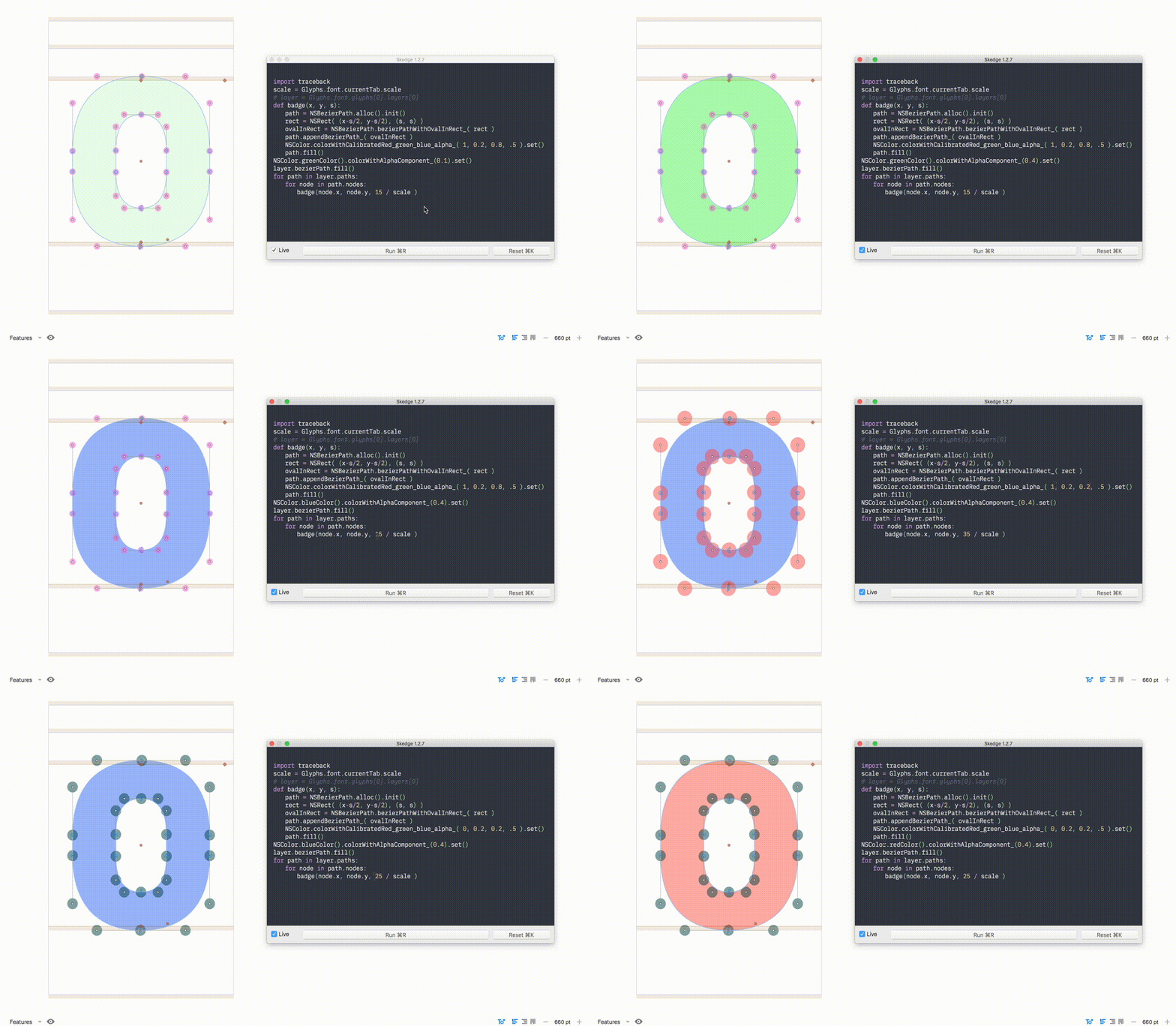
Install Skedge via the Glyphs Plugin Manager, then open it from the Window menu.
- Skedge launches with sample code to help you get oriented.
- Replace the sample with your own drawing code — only the code for your reporter's drawing method is needed.
- Results appear immediately in the Edit View.
- Toggle Live for real-time preview, or click Run (Cmd+R) to execute manually.
| Shortcut | Action |
|---|---|
| Cmd+S | Save code |
| Cmd+O | Open code |
| Cmd+R | Run code |
| Cmd+K | Clear drawing from Edit Tab |
| Cmd+P | Print or save as PDF |
- Use tabs for indentation (spaces are not supported yet).
- All GlyphsApp Python objects and Cocoa UI classes are available — just import what you need, e.g.
from AppKit import NSColor, NSRect. - When you're done prototyping, paste your Skedge code directly into a reporter plugin's drawing method.
If something goes wrong, reset Skedge to its default state by running this in the Macro Panel:
del(Glyphs.defaults["SkedgeCode"])Drop any of these snippets into Skedge to see them in action.
01 — Draw Layer Bounds
###################
# Draw Layer Bounds
###################
from AppKit import NSRectFill, NSRect, NSMakeRect

NSColor.yellowColor().set()

bounds = layer.bounds
x = bounds.origin.x
y = bounds.origin.y
width = bounds.size.width
height = bounds.size.height

rect = NSMakeRect(x, y, width, height)
NSRectFill(rect)
02 — Filled Path with Red Outline & Alternating Node Highlights
###################################################################
# Draw filled Path with red outline and highlight every second Node
###################################################################
import traceback

scale = Glyphs.font.currentTab.scale

def badge(x, y, size):
    myPath = NSBezierPath.alloc().init()
    myRect = NSRect( ( x-size/2, y-size/2 ), ( size, size ) )
    thisPath = NSBezierPath.bezierPathWithOvalInRect_( myRect )
    myPath.appendBezierPath_( thisPath )
    NSColor.colorWithCalibratedRed_green_blue_alpha_( 0.5, .5, 0.5, .3 ).set()
    myPath.fill()

for path in layer.paths:
    NSColor.grayColor().colorWithAlphaComponent_(0.3).set()
    bp = path.bezierPath
    bp.fill()
    bp.setLineWidth_(5/scale)
    NSColor.redColor().set()
    bp.stroke()
    for i, node in enumerate(path.nodes):
        if i % 2:
            badge(node.x, node.y, 20/scale )
03 — Plumblines at Each Path's Centre
#################################################
# Draw plumblines at each path’s center (x and y)
#################################################
import traceback

scale = Glyphs.font.currentTab.scale
layer = Glyphs.font.selectedLayers[0]
NSColor.blueColor().set()


def drawLine((x1, y1), (x2, y2)):
    strokeWidth = 1/scale
    path = NSBezierPath.bezierPath()
    path.moveToPoint_((x1, y1))
    path.lineToPoint_((x2, y2))
    path.setLineWidth_(strokeWidth)
    path.setLineDash_count_phase_((10, 2), 2, 0.0)
    path.stroke()

def DrawCross((x, y), (width, height)):
    ### BOUNDS DIMENSIONS
    xRight = x + width
    yTop = y + height
    xCenter = (x + width/2)
    yCenter = (y + height/2)

    ### LAYER/METRIC DIMENSIONS
    left = 0
    right = layer.width
    ascender = layer.glyphMetrics()[1]
    descender = layer.glyphMetrics()[3]

    drawLine((left, yCenter), (right, yCenter))
    drawLine((xCenter, descender), (xCenter, ascender))


for path in layer.paths:
    DrawCross(*[p for p in path.bounds])
04 — Line at Half Cap Height
#################################################
# Draw line @ half Cap Height
#################################################
from AppKit import NSColor, NSBezierPath
scale = Glyphs.font.currentTab.scale
layer = Glyphs.font.selectedLayers[0]

def myColor(a, b, c, d):
    c = NSColor.colorWithHue_saturation_brightness_alpha_(a, b, c, d)
    return c

def line(x1, y1, x2, y2, scale):
    myPath = NSBezierPath.alloc().init()
    myPath.moveTo_((x1, y1))
    myPath.lineTo_((x2, y2))
    NSColor.systemPurpleColor().colorWithAlphaComponent_(0.9).set()
    myPath.setLineWidth_(.5/scale)
    myPath.stroke()

capHeight = layer.associatedFontMaster().capHeight
width = layer.width

line(0, capHeight/2, width, capHeight/2, scale)…and many others who generously share their work with the community.
Warning
Skedge is in beta. Please back up your files — no guarantee against data loss.
Warning
Be careful with transforms on layer.bezierPath — it addresses the real path. Make a .copy() of the layer first if you need to transform it. Reading data and drawing new objects from it is always safe.
Pull requests and feedback are welcome.
Copyright 2017–2026 Mark Frömberg @Mark2Mark
Made possible with the Glyphs SDK by Georg Seifert (@schriftgestalt) and Rainer Erich Scheichelbauer (@mekkablue). Thanks to Georg Seifert for streamlining and helping keep this tool working through recent API changes.
Licensed under the Apache License, Version 2.0. See the included License file for details.
Footnotes
-
A plugin that draws into the active Edit Tab. ↩