
Default ProcessPoolExecutor makes it hard to maintain stateful workers,
especially workers with expensive setup (e.g., workers each with a model loaded in GPU memory).
This library lets you create a pool of stateful workers (spawn once) to run tasks in parallel across processes (execute many) using a worker pattern actor model.
+-----------------------+              +----------------------+
|     Main Process      |              |     Process Pool     |
| +--------+ +--------+ |              | +------------------+ |
| | Thread | | Thread | | --- Task --> | | Worker (Process) | |
| |   1    | |   2    | | <-- Resp --- | +------------------+ |
| +--------+ +--------+ |              | +------------------+ |
|      ...     ...      |              | | Worker (Process) | |
| +--------+ +--------+ |              | +------------------+ |
| | Thread | | Thread | | --- Task --> |         ...          |
| |  N-1   | |   N    | | <-- Resp --- | +------------------+ |
| +--------+ +--------+ |              | | Worker (Process) | |
|                       |              | +------------------+ |
+-----------------------+              +----------------------+
Installation:
pip install stateful-poolFollowing is an example of how to define a worker class, spawn workers (assigned several GPU IDs), and execute tasks on them.
from stateful_pool import SPool, SWorker
import time, random

# will run in another process
class SquareWorker(SWorker):
    def spawn(self, gpu_ids: list[int]):
        self.gpu_ids = gpu_ids
        return f"Worker initialized on GPU: {self.gpu_ids}"

    def execute(self, value):
        time.sleep(random.uniform(0.1, 1.0))
        return f"[Execute] Square of {value} is {value * value} (computed on GPU: {self.gpu_ids})"

if __name__ == "__main__":
    with SPool(SquareWorker, queue_size=100) as pool:
        # spawn a worker, return value can be captured
        s = pool.spawn(gpu_ids=[0, 1])

        # submit a single task and wait for result
        r = pool.execute(100)
The example calls pool.execute once. This doesn't demonstrate the power of the pool (parallelism).
In practice, you would likely want to submit tasks in a non-blocking manner via submit_* or async_* counterparts:
with SPool(SquareWorker) as pool:
    spawn_futures = [pool.submit_spawn(gpu_ids=[i, i+1]) for i in range(0, 4, 2)]
    for f in spawn_futures:
        print(f.result())

    execute_futures = [pool.submit_execute(i) for i in range(4)]
    for f in execute_futures:
        print(f.result())
more examples can be found in the example.py and benchmark/exp/server_spool.py.
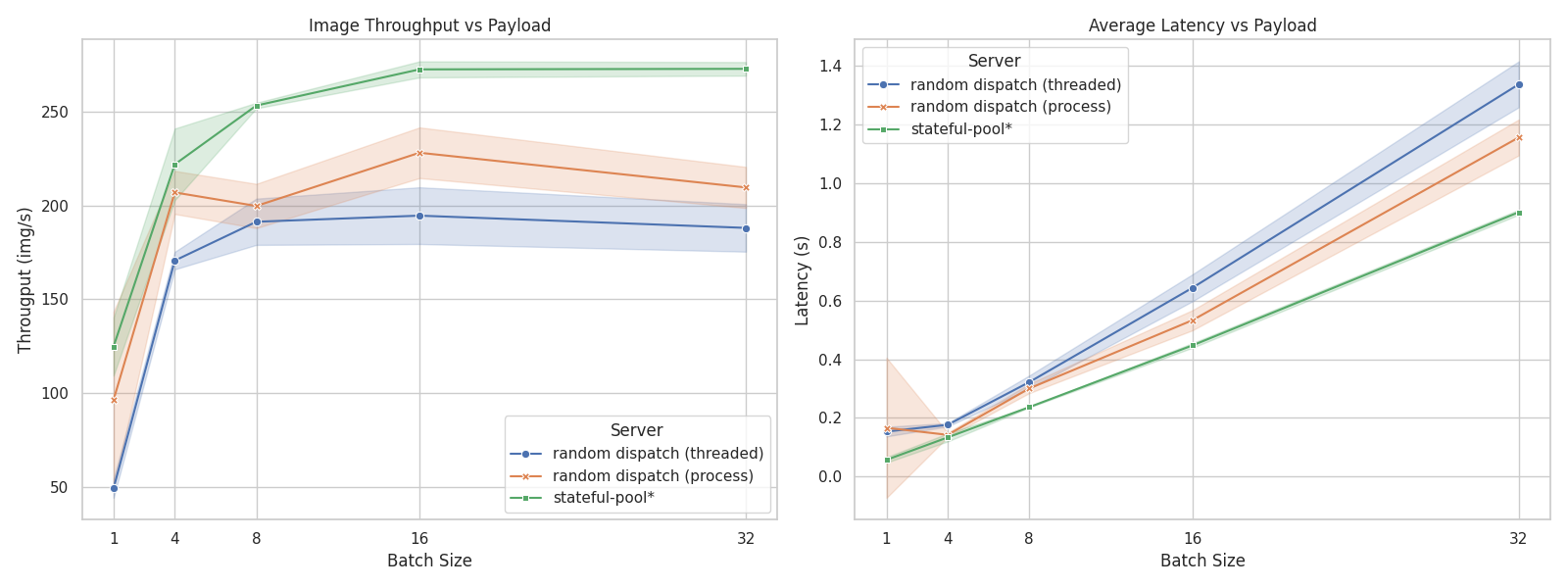
The performance is benchmarked in a stress test scenario where multiple clients send concurrent requests to a server processing image data. The benchmark compares three server implementations, essentially comparing load-balancing strategies:
server_simple: A simple threaded server that randomly dispatches requests to worker threads.server_mp: A multiprocessing server that maintains a pool of workers, but still random dispatch without producer-consumer queues.server_spool: A server that utilizes thestateful-poollibrary, allowing for efficient parallel task execution.
The result shows that server_spool achieves ~30% higher throughput and more stable latency, while implemented with less complexity (~40% code reduction).
Details
The result is obtained by running a stress test with 100 concurrent clients sending requests to each server implementation. Each request involves processing an image and returning a response.
We use ViT-L/16 as the model for processing images, the server runs on a machine with 2 GPUs.
The test is run for 5 times for each server, and the average throughput and latency, as well as their standard deviation, are recorded.