Repository navigation
SmartClock-OSS 0.1.1

First public release of SmartClock-OSS, open replacement firmware for the "Smart Weather Clock" SD Pro (ESP8266, 240×240 IPS). Install it from the clock's own update page; no cables needed.
Download
SDPro_SmartClockOSS_v0.1.1.bin: the one file you need, for both the stock update page and later updates. Keep the file name: the stock page only accepts names starting with SDP.
SHA-256: 1e801f1d3a56d295f00abd6603c6ec464345b573076d243132d61900cbee6c42
Install over the stock firmware
- Open the clock's web page, find Firmware Update (OTA), choose the file and press Start Update.
- Wait for "Update Success". The clock restarts by itself within about 30 seconds. Keep it powered.
- Join the WiFi network Smart Weather Clock and open http://192.168.4.1/.
- Set up your WiFi in the WiFi card. The clock shows its new address when it connects.
Your clock's update page should say "Please use the firmware of SD PRO". Tested over stock V1.0.6. Other GeekMagic models are not supported.
There is no way back to the stock firmware over WiFi; that needs a USB-serial adapter.
What's in it
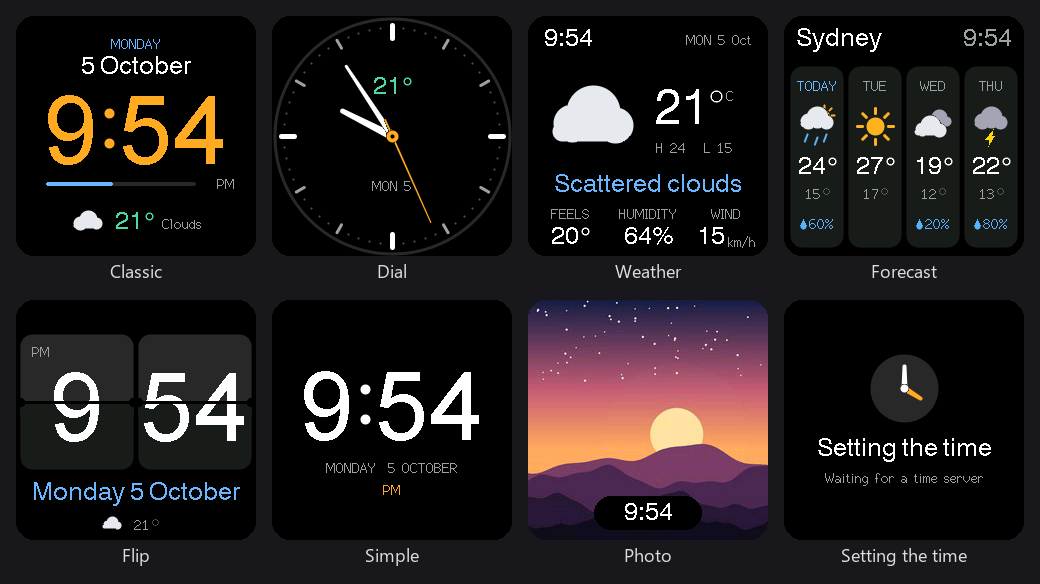
- Seven faces: Classic, Dial, Weather, Forecast, Flip, Simple and Photo, with optional rotation.
- Weather and a 4-day forecast from Open-Meteo. No API key needed.
- Time zones with daylight saving.
- Photo upload, resized to 240×240 in your browser.
- A modern settings page that works on phones, in dark mode, and offline on the setup network.
- Validated firmware updates, an always-on setup network, and power-cycle recovery mode.
- WiFi passwords are not exposed by the web API, unlike the stock firmware.
Known limitations
- The setup network and settings page have no password yet: anyone in WiFi range can change settings or install firmware.
- Animated GIFs are not played.
Licensed under GPL-3.0. Full history: CHANGELOG.md.