Repository navigation
SmartClock-OSS 1.2.0

SmartClock-OSS 1.2.0 adds integrations: design your own clock faces with live values, show Home Assistant dashboards via geekmagic-hacs, and connect to Home Assistant over MQTT. All three are off until you turn them on. The version jumps from 0.1.2 to 1.2.0.
Download
SDPro_SmartClockOSS_v1.2.0.bin: one file for both the stock update page and our own. Keep the file name: the stock page only accepts names starting with SDP. It contains no WiFi details.
SHA-256: bb611565bd931096fd0b7958c2d8ff41445d2917c3b45d3751dc1c068f2aedc3
Upgrading
- From 0.1.2: install it from the Firmware update card. Nothing else changes until you turn an integration on.
- From 0.1.1 or earlier: the settings page and setup network now ask for the clock's password. On the sign-in page, press Show the password on the clock (see the 0.1.2 notes).
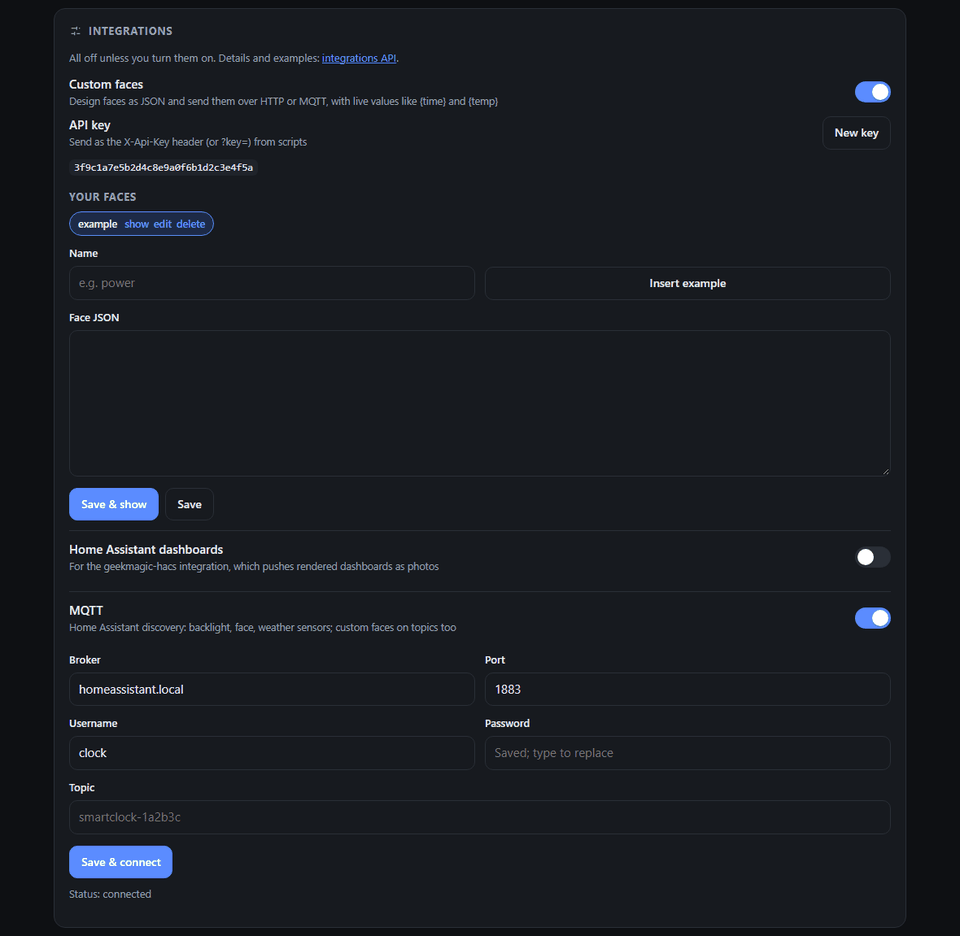
New: integrations (settings page → Integrations)
- Custom faces. Describe a face as JSON (text, rectangles, circles, lines, progress rings and bars, weather icons, your photos) and send it over HTTP or MQTT. Placeholders such as
{time},{temp},{hum}and{sunset}stay live on the clock, and you can push your own values (for example{solar}) without resending the face. Faces join the rotation. Use your signed-in browser or the generated API key. The page has an editor with a ready-made example. - Home Assistant dashboards. The stock SD Pro photo API, so geekmagic-hacs recognises the clock and pushes rendered dashboards. Tested on a clock with that integration's exact request sequence. That integration cannot sign in, so while this is on, anyone on your network can manage photos, the face and brightness without the password. WiFi, the password and firmware stay protected.
- MQTT with Home Assistant discovery: the backlight as a dimmable light, the face as a select, temperature, humidity, weather and WiFi signal as sensors, and an update-weather button. Custom faces and values can arrive on MQTT topics too.
Full API reference: integrations-api.md.
Also new
- Photos: an "in slideshow" switch on each photo, and how many seconds each one shows.
- A single photo is no longer redrawn at every interval, and full-screen photos draw without a black flash.
- The System card links to this project.
- The README now shows the settings page.
Known limitations
- MQTT has not yet been tested against a real broker and Home Assistant. Please report what you find.
- The image is now 97% of the over-the-air update limit, so future features will need to make room.
Licensed under GPL-3.0. Full history: CHANGELOG.md.