Does this issue occur when all extensions are disabled?: No? It is related to the keybindings contributed by an extension.
- VS Code Version: 1.58
- OS Version: macOS 11.4
Steps to Reproduce:
- Upgrade to 1.58
- Install VSCodeVim extension
- Use Go to Reference (Shift + F12)
- Use Vim navigation key such a j or k
EXPECTED: It focuses an tree view element up or down using the contributed keybindings from Vim
ACTUAL: It goes into highlighting mode of keyboard navigation
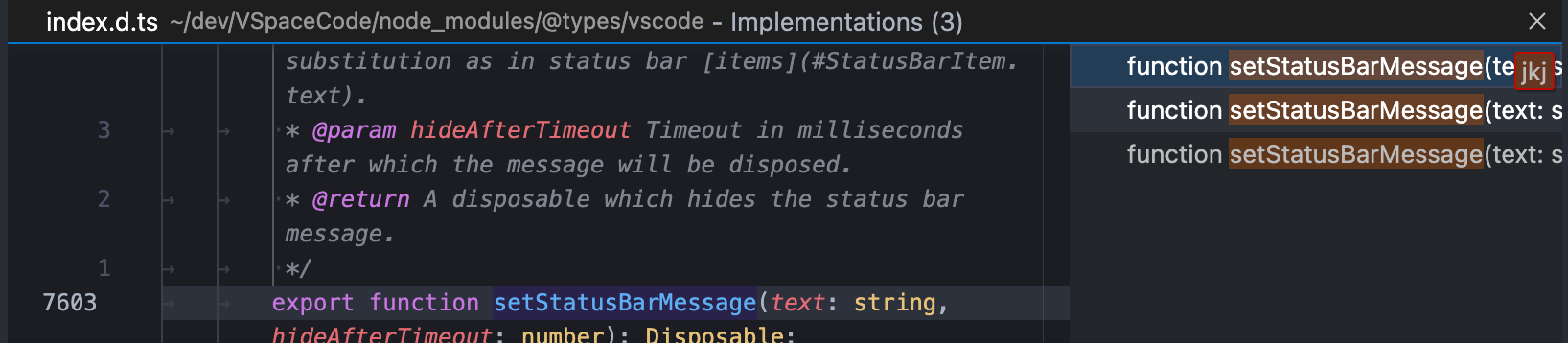
In order to use the vim navigation keys, setting workbench.list.automaticKeyboardNavigation to false can disable that behavior and revert back to a similar behavior pre 1.58.
My question is if this is an expected behavior or it is a regression?


Does this issue occur when all extensions are disabled?: No? It is related to the keybindings contributed by an extension.
Steps to Reproduce:
EXPECTED: It focuses an tree view element up or down using the contributed keybindings from Vim

ACTUAL: It goes into highlighting mode of keyboard navigation
In order to use the vim navigation keys, setting
workbench.list.automaticKeyboardNavigationtofalsecan disable that behavior and revert back to a similar behavior pre 1.58.My question is if this is an expected behavior or it is a regression?