[theming] Use different colors for rendering warning and info markers #34849


Description

Both the lsp and vscode api support different severity levels for linter style markers:
- error
- warning
- info
However it seems that the editor theming doesn't actually make a distinction between warning and info (both of them look identical and render as a green squigly underline).
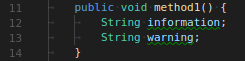
A more traditional way of rendering is to use Red for errors, Yellow for warnings and either Green or Blue for info.
I looked at trying to change these looks via the theming support, but as far as I could figure out, the 'equal treatment' of warnings and infos goes down to the theming engine as well. Looking here:
https://code.visualstudio.com/docs/getstarted/theme-color-reference
I find that there are properties like editorError.foreground and editorWarning.foreground, but there is no edtitorInfo.foreground and the info squiglies simply follow the warning color if it is changed.