Issue Type: Bug
I have a 1680x1050 monitor and set to 150% scale. I'm contributing a new view to the Azure view container and found the newly added view could not show up when there're too many views already. I can't shrink spaces for top 4 views any more and the view container can't be scrolled to see the views at the bottom.
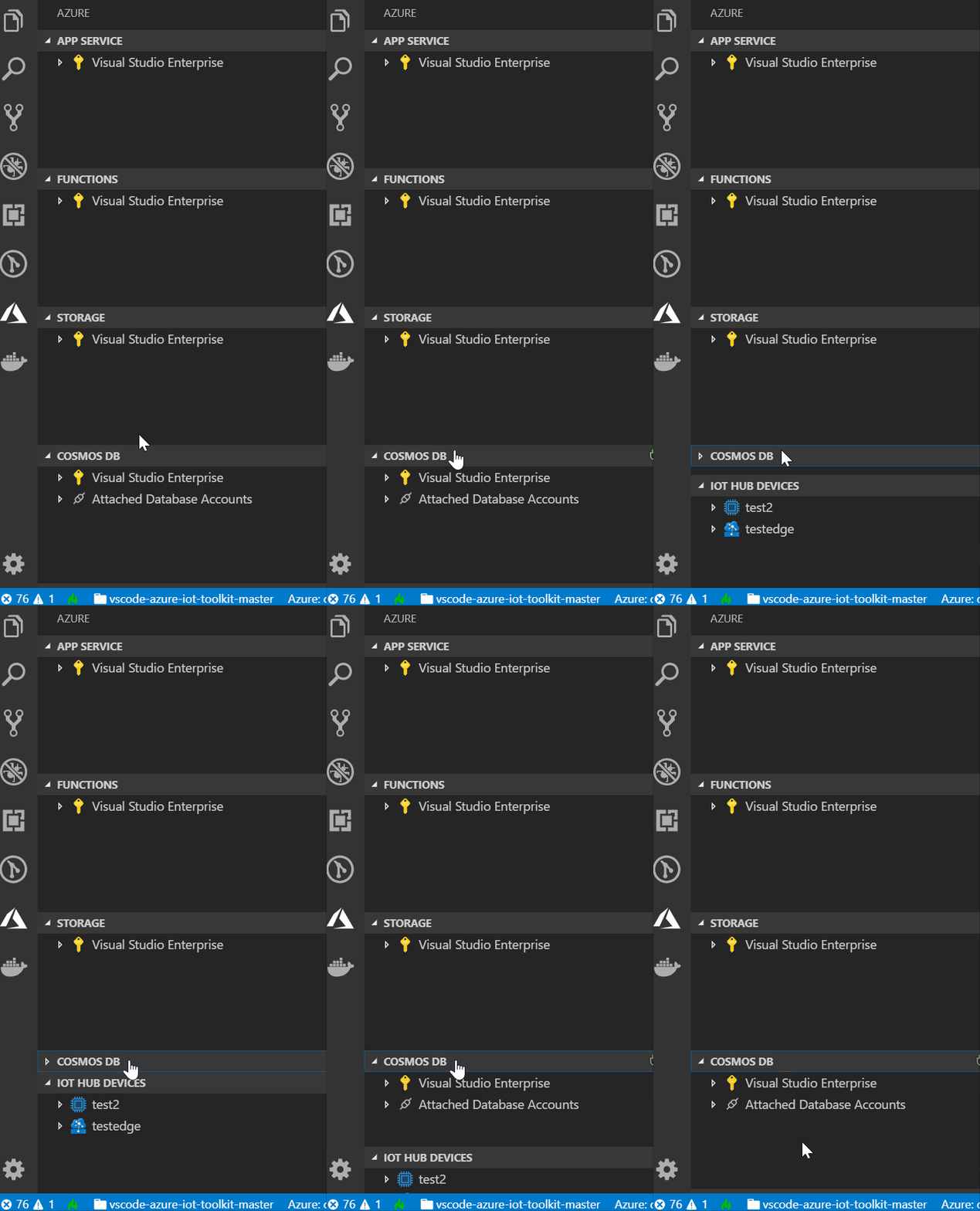
VS Code version: Code 1.29.1 (bc24f98, 2018-11-15T19:13:36.375Z)
OS version: Windows_NT x64 10.0.17763
System Info
| Item |
Value |
| CPUs |
Intel(R) Xeon(R) CPU E5-1620 v4 @ 3.50GHz (8 x 3492) |
| GPU Status |
2d_canvas: enabled
checker_imaging: disabled_off
flash_3d: enabled
flash_stage3d: enabled
flash_stage3d_baseline: enabled
gpu_compositing: enabled
multiple_raster_threads: enabled_on
native_gpu_memory_buffers: disabled_software
rasterization: enabled
video_decode: enabled
video_encode: enabled
webgl: enabled
webgl2: enabled |
| Memory (System) |
31.92GB (18.44GB free) |
| Process Argv |
. |
| Screen Reader |
no |
| VM |
0% |
Extensions (20)
| Extension |
Author (truncated) |
Version |
| gitlens |
eam |
9.0.1 |
| tslint |
eg2 |
1.0.40 |
| docker-explorer |
for |
0.1.6 |
| rest-client |
hum |
0.20.4 |
| vscode-azureappservice |
ms- |
0.10.0 |
| vscode-azurefunctions |
ms- |
0.12.1 |
| vscode-azurestorage |
ms- |
0.4.2 |
| vscode-cosmosdb |
ms- |
0.9.1 |
| mssql |
ms- |
1.4.0 |
| azure-account |
ms- |
0.6.2 |
| azurecli |
ms- |
0.4.2 |
| cpptools |
ms- |
0.20.1 |
| csharp |
ms- |
1.17.1 |
| PowerShell |
ms- |
1.9.0 |
| vscode-node-azure-pack |
ms- |
0.0.5 |
| azurerm-vscode-tools |
msa |
0.4.2 |
| vscode-docker |
Pet |
0.4.0 |
| partial-diff |
ryu |
1.4.0 |
| azure-iot-toolkit |
vsc |
1.7.1 |
| vscode-arduino |
vsc |
0.2.23 |


Issue Type: Bug
I have a 1680x1050 monitor and set to 150% scale. I'm contributing a new view to the Azure view container and found the newly added view could not show up when there're too many views already. I can't shrink spaces for top 4 views any more and the view container can't be scrolled to see the views at the bottom.

VS Code version: Code 1.29.1 (bc24f98, 2018-11-15T19:13:36.375Z)
OS version: Windows_NT x64 10.0.17763
System Info
checker_imaging: disabled_off
flash_3d: enabled
flash_stage3d: enabled
flash_stage3d_baseline: enabled
gpu_compositing: enabled
multiple_raster_threads: enabled_on
native_gpu_memory_buffers: disabled_software
rasterization: enabled
video_decode: enabled
video_encode: enabled
webgl: enabled
webgl2: enabled
Extensions (20)