Repository navigation
Releases
Flagship v1.3.0-dev.1 — native Rocky Linux 9/10

Native Rocky Linux 9/10 development prerelease — no Wine.
- Redesigned infrastructure workspace: dark inventory navigator, resource icons,
summary cards, readable capacities, compact contextual actions, back/forward
navigation and preserved collapsed branches. - Import/export OVA appliances and standalone qcow2 disks, alongside XVA.
- Docked console with undock/redock, fullscreen, fit and opt-in built-in input.
- Native Virt Viewer option through a one-use authenticated bridge. XAPI session
credentials remain in Flagship's verified/pinned TLS tunnel.
Install
Rocky Linux 9:
sudo dnf install https://github.com/mike0615/flagship/releases/download/v1.3.0-dev.1/flagship-1.3.0-0.1.dev1.el9.noarch.rpmRocky Linux 10:
sudo dnf install https://github.com/mike0615/flagship/releases/download/v1.3.0-dev.1/flagship-1.3.0-0.1.dev1.el10.noarch.rpmLaunch Flagship from the application menu or run flagship. Native qemu-img and
virt-viewer dependencies come from Rocky AppStream and are in the offline bundles.
For a disconnected desktop, download the matching-major airgap archive, verify
SHA256SUMS, extract it, enter airgap/ and run sudo ./install-offline.sh.
The graphical desktop is a prerequisite. RPMs are unsigned development packages;
SHA256SUMS checks corruption and is not a signature.
Live XCP-ng testing verified OVA and qcow2 disk-byte roundtrips, dock/undock console
continuity and real Virt Viewer access; disposable resources were removed and
verified absent. The release workflow separately checks native installed packages
on both Rocky majors with networking disabled.
OVA supports a single VM with self-contained disks. This USTAR compatibility
profile limits each converted VMDK file to under 8 GiB; use qcow2 for larger disk
files. Backing chains, split extents, OVF collections/chunking, Secure Boot-required
appliances and vTPM are unsupported. Image conversion does not install guest
storage/NIC drivers. No vCenter/ESXi deployment or installed guest OS migration
qualification is claimed. Read docs/PORTABLE_IMAGES.md and attached qualification
notes for the exact scope.
Flagship v1.2.0-dev.2 — native Rocky Linux 9/10
Native Rocky Linux 9/10 desktop client. Development prerelease; no Wine required.
This release adds the Center-style interface, contextual menus/tabs, scoped
inventory tables, an eight-step VM wizard, host controls, NFS/private-network
creation, RRD graphs and XVA import/export. It fixes XVA import readiness and
VM-set task result compatibility found during live XCP-ng 8.3.0 testing.
Install on a connected desktop
Rocky Linux 9:
sudo dnf install https://github.com/mike0615/flagship/releases/download/v1.2.0-dev.2/flagship-1.2.0-0.2.dev2.el9.noarch.rpmRocky Linux 10:
sudo dnf install https://github.com/mike0615/flagship/releases/download/v1.2.0-dev.2/flagship-1.2.0-0.2.dev2.el10.noarch.rpmThen launch Flagship from the application menu or run flagship.
Runtime dependencies come from stock Rocky repositories; no pip or EPEL is required.
Offline installation
Download the matching flagship-airgap-el9-x86_64-1.2.0.dev2.tar.gz or
flagship-airgap-el10-x86_64-1.2.0.dev2.tar.gz. Verify its SHA-256 against the
attached SHA256SUMS, extract it, enter airgap/ and run
sudo ./install-offline.sh. Use only the bundle matching your Rocky major.
A graphical desktop is a prerequisite.
The release workflow builds each major separately, checks offline installation,
and runs the native installed GUI and regression suite with networking disabled.
Earlier live testing completed 16 disposable workflow checks including an XVA
roundtrip; test VMs, snapshots, disks and networks were removed and verified absent.
RPMs are unsigned development packages. SHA256SUMS detects corruption and is not
a signature. Application SRPMs and per-major source archives are attached;
dependency SRPM archives are not included. Full Windows feature parity, guest OS,
multi-host, migration and HA/DR qualification remain incomplete. See the attached
qualification notes and repository docs/CENTER_INTERFACE.md for details.
Flagship 1.1.0.dev2: self-signed XCP-ng certificates

Flagship 1.1.0.dev2: self-signed XCP-ng certificates
XCP-ng hosts ship with a self-signed TLS certificate. Flagship still verifies certificates by default, and now gives you two ways to connect to these hosts anyway.
New
- Trust this certificate prompt. When a host's certificate can't be verified (self-signed, unknown CA, name mismatch or expired), Flagship stops before sending your password. It shows the subject, issuer, validity dates and SHA-256 fingerprint, with Connect once, Always trust this certificate and Cancel.
- Pins are saved per
host:portin~/.config/flagship/known_certs.json(mode 0600). - A pinned host is accepted while its fingerprint matches, even when it is self-signed or the name doesn't match. The fingerprint is checked right after the handshake, before any request, credential or console cookie is sent, on both the XML-RPC connection and the VM console.
- If the certificate changes, you get a red certificate has changed warning showing both fingerprints and a new prompt. A changed certificate is never accepted automatically.
- Tools ▸ Trusted certificates… lists and removes pins.
- Pins are saved per
- Ignore SSL certificate errors (insecure) checkbox in the connect dialog. It turns off verification for that connection, covering RPC and console. It shows a one-line warning, and the status bar shows a red Insecure TLS marker while you're connected.
flagship --insecureopens the dialog with the box already ticked. flagship-recovery inspectgains--pin SHA256,--insecureand--no-saved-pins, and honors GUI pins by default.- Help chapter Self-signed XCP-ng certificates, an About note, and a CHANGELOG.
Fixed
- The RPM now ships its own bytecode. On Rocky 10, an upgrade could reuse an old
__pycache__because file times are clamped to the changelog date.
| Trust prompt | Connect dialog |
|---|---|
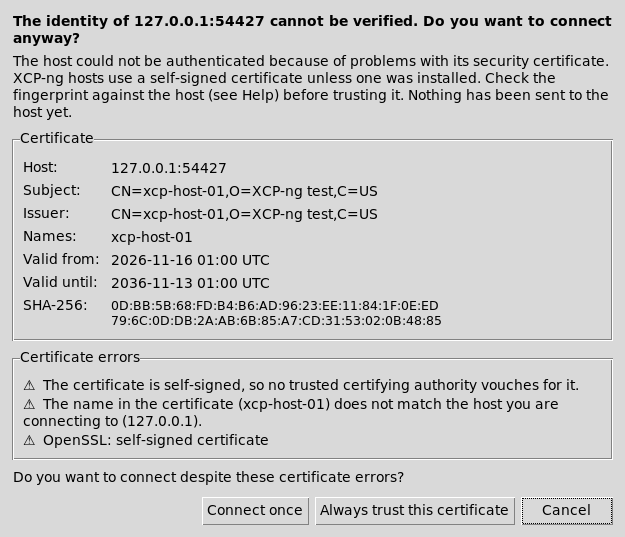 |
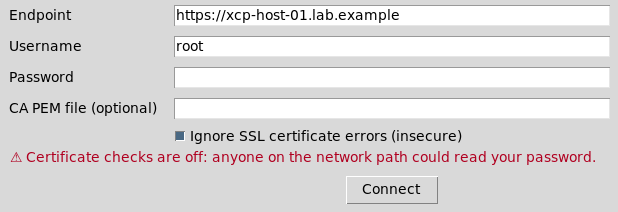 |
Install (Rocky Linux 9 / 10)
# Rocky Linux 9
sudo dnf install https://github.com/mike0615/flagship/releases/download/v1.1.0-dev.2/flagship-1.1.0-0.2.dev2.el9.noarch.rpm
# Rocky Linux 10
sudo dnf install https://github.com/mike0615/flagship/releases/download/v1.1.0-dev.2/flagship-1.1.0-0.2.dev2.el10.noarch.rpm
This replaces 1.1.0.dev1 and xenadmin-rocky (Obsoletes/Provides).
Testing
176 unit tests pass on Rocky 9.8 (Python 3.9) and Rocky 10.2 (Python 3.12), including new localhost-only TLS tests: verify failure, pin accept, pin mismatch with nothing sent, and insecure accept, for both RPC and console. On both releases, a fresh install and a dev1 → dev2 upgrade were checked with rpm -V, --version and --smoke-test. No real hypervisor was contacted.
SHA-256
654a78955047ce83f3ae32d5766d4a595451e3c418cdb082e8c28f5f35e15506  flagship-1.1.0-0.2.dev2.el9.noarch.rpm
48c586babf385f2d4ac8d96705f8cfe3c97c2fe7b982cb1f6776422615c1035d  flagship-1.1.0-0.2.dev2.el10.noarch.rpm
This is an unsigned development candidate, not a qualified v1.0.
Flagship 1.1.0.dev1 — renamed from XenAdmin Rocky
Flagship 1.1.0.dev1
Formerly XenAdmin Rocky. This development candidate renames the app, package and commands to Flagship so they sit alongside Skiff, Sonar and Porthole in the Anderson Computer cyber chief toolset.
This is not a qualified v1.0. The rebrand does not close the outstanding qualification gates recorded for the XenAdmin Rocky 1.0.0.dev4 tree. See QUALIFICATION.md.
Install (Rocky Linux 9 / 10)
# Rocky Linux 9
sudo dnf install https://github.com/mike0615/flagship/releases/download/v1.1.0-dev.1/flagship-1.1.0-0.1.dev1.el9.noarch.rpm
# Rocky Linux 10
sudo dnf install https://github.com/mike0615/flagship/releases/download/v1.1.0-dev.1/flagship-1.1.0-0.1.dev1.el10.noarch.rpm
Runtime dependencies (python3, python3-tkinter, ca-certificates) come from the stock BaseOS/AppStream repos. Verify downloads against SHA256SUMS. The candidate RPM is unsigned.
Upgrading from XenAdmin Rocky
Installing this package replaces xenadmin-rocky (Obsoletes: / Provides:). The xenadmin-rocky and xenadmin-rocky-recovery commands remain as symlinks to flagship and flagship-recovery.
On first run, if ~/.local/state/flagship does not already exist, Flagship copies ~/.local/state/xenadmin-rocky (operation journals) and ~/.config/xenadmin-rocky if present, and leaves the originals untouched.
Changes
- Package
flagship, commands/usr/bin/flagshipand/usr/bin/flagship-recovery, new icon and desktop file. - Journals live under
~/.local/state/flagship/journals/. - Help ▸ Flagship Help (F1) and Help ▸ About Flagship (name, version, toolset, GitHub link, BSD 2-Clause license, credits).
python3 -m xenadmin_rockyand the old recovery command still start Flagship.- Documentation and the toolkit-style README were updated for the new name.
Source commit: 228ddc4.
XenAdmin Rocky 1.0.0.dev3 — development candidate
Post-release qualification: These RPMs installed from the local bundle in an isolated Rocky 9.6 Workstation guest, which rebooted into GNOME and launched the native application and indexed offline help with SELinux enforcing. A 1024×768 display exposed clipped controls in dev.3; the source fix is in PR #5 and is not included in these RPMs. Second installed-system reboot, menu/pool workflows and Rocky 10 booted-desktop qualification remain pending.
Native Rocky Linux development candidate — not a qualified stable v1.0 or complete Windows feature parity. The full delivery goal remains active under #1.
New in dev.3:
- Disk/DVD/NIC management: add/attach/grow/rename/detach; separate UUID-confirmed permanent disk deletion; ISO insertion/ejection; adapter network changes preserving identity.
- Private durable operation journals, restart history, safe recovery exports and UUID-based inspection through the GUI and standalone
xenadmin-rocky-recoverycommand. Uncertain operations are never automatically replayed. - Indexed offline help and named-host migration selection.
- Live-XAPI provisioning fixes: accept implicit XML-RPC string task results and retain template state until VM.provision completes. Dev.2 RPMs remain affected; inspect partial clones before retrying.
Verified: 117 local regression checks; both RPM builds; fresh network-disabled installs and installed GUI/help/history/headless recovery checks on Rocky 9 and 10 containers. Live XCP-ng 8.3/XAPI 26.1.11 passed dedicated VM provisioning, cold disk/DVD/NIC changes and firmware start/pause/unpause/shutdown. All dedicated test resources were cleaned up with UUID manifests. See evidence/LIVE_PROTOCOL.md and docs/QUALIFICATION.md for precise limits. RPM native modules match build commit 9e1afc6; the release tag additionally includes documentation and verification evidence.
Booted Rocky desktop/reboot, guest OS I/O and hotplug, installed-template copy, independent operator and full parity qualification remain open. Consoles, XVA/OVF transfer, graphs and advanced host/pool workflows remain incomplete. RPMs are unsigned development artifacts.
Offline install: transfer and authenticate the matching airgap-el9 or airgap-el10 archive, extract it, verify its SHA256SUMS and run sudo ./install-offline.sh on an existing x86_64 Rocky graphical desktop. Only the local transferred DNF repository is enabled.
Complete corresponding source requires the native source/SRPM plus the matching dev.1 baseline dependency-source archive and dev.3 source-delta archive. DEPENDENCY-SOURCES.json maps every bundled binary RPM to its exact source filename, SHA-256 and archive URL; a source delta alone is incomplete.
Original XenAdmin 25.04 Windows source and notices remain in the dev.1 release. Source, help, operator/build/install documentation, feature matrix and release notes are attached. SHA-256 checksums detect corruption; authenticate releases through your trusted transfer process.
1.0.0-dev.2 — VM provisioning and task outcomes
Provisioning advisory (November 14, 2026): Subsequent live XCP-ng testing found two provisioning defects in these dev.2 RPMs: valid implicit XML-RPC string task results are rejected after cloning, and template state is cleared before VM.provision. A failed attempt can leave a halted partial clone. Inspect tasks and existing resources before retrying; do not repeatedly submit the same creation request. Both defects are fixed in dev.3 source (commit 9e1afc6), which passed live provisioning/device/power-state checks. Replacement dev.3 RPM qualification is in progress.
Native Rocky Linux development candidate — not a qualified stable v1.0 or complete Windows feature parity. The full delivery goal remains active under #1.
New in dev.2:
- Reviewed VM provisioning: installer-template clone or installed-template copy to a selected SR, CPU/RAM settings, new disk where needed, one selected NIC, optional ISO and startup.
- Server-confirmed task outcomes and live creation-stage updates.
- Halted-VM vCPU/fixed-memory editing with correct CPU shrink ordering.
- Stop-monitoring control and saveable recovery reports. Uncertain mutations are never replayed and partial resources are not speculatively deleted.
- Correct decimal-string XAPI integer encoding and opaque reference handling.
- Version-isolated RPM, source and offline-bundle tooling.
Verified: 51 local API/TLS/task/GUI/stateful-simulation checks; passing remote CI tests and both RPM builds; fresh network-disabled installations of dev.2 on Rocky 9 and 10 containers; installed New VM review and built-in offline help on both under Xvfb. All native modules match both RPM source archives (build commit 7b24863); the release tag additionally includes documentation, source-delta tooling and verification evidence.
No live hypervisor workflow, booted desktop/reboot or independent operator qualification is claimed. Device editors, consoles, XVA/OVF transfer, performance charts, advanced pool/host operations and Windows plugin replacements remain open. Hardware editing currently exposes halted fixed-memory/startup+maximum CPU settings, not dynamic-memory ranges or live CPU changes. The candidate RPMs are unsigned.
Offline runtime install: authenticate and transfer the matching airgap-el9 or airgap-el10 archive, extract it, verify its SHA256SUMS and run sudo ./install-offline.sh. An existing x86_64 Rocky graphical desktop is required. DNF enables only the transferred local repository.
For a complete offline corresponding-source set, retain the native source/SRPM and use the matching dev.1 baseline dependency-source archive plus the dev.2 source-delta archive. The delta contains the new application SRPM and changed dependency SRPMs. DEPENDENCY-SOURCES.json maps every bundled binary to its exact source filename, SHA-256 and archive URL. A source delta alone is not a complete dependency source set.
Baseline sources retained from dev.1:
The original XenAdmin 25.04 Windows source and notices remain available in the dev.1 release. README, user/help, operator, installation, build, feature-matrix and qualification documents are attached with this candidate. SHA-256 checksums detect corruption; authenticate the release through your trusted transfer process.
1.0.0-dev.1 — native Rocky development candidate
Native Rocky Linux development candidate. This is not the requested completed v1.0 release or full Windows feature parity. The delivery goal remains active.
Includes native Python/Tk source, Rocky 9 and 10 binary/source RPMs, dependency-complete offline repositories, local help, installation/user/operator/build documentation, source analysis and a feature-gap matrix. The supplied Windows source is retained separately with original notices.
Verified locally: 20 passing API/TLS/desktop tests; network-disabled package installation on fresh Rocky 9 and 10 containers; installed GUI construction under Xvfb on both. Matching dependency SRPMs are provided separately for offline source access. Checksums detect corruption; authenticate this release through a trusted channel. Development RPMs are unsigned.
Not yet verified: booted desktop installs/reboot, independent operator journey, live hypervisor management, or complete Windows workflows. New VM wizard, consoles, XVA transfers, performance charts and advanced host/pool operations remain open. See docs/FEATURE_MATRIX.md and docs/QUALIFICATION.md on main.
Install: transfer the matching airgap-el9 or airgap-el10 archive, authenticate it, extract, verify its SHA256SUMS, then sudo ./install-offline.sh. Requires an existing x86_64 Rocky desktop. Sources are separate downloads and are not needed for runtime installation.
Both RPM builds record source commit c8f30cf; the release tag additionally includes subsequent verification evidence and source-collection tooling. The native module contents were compared against the release working tree. See evidence/package-provenance.json.