Repository navigation
Flagship 1.1.0.dev2: self-signed XCP-ng certificates
Pre-release
Pre-release

Flagship 1.1.0.dev2: self-signed XCP-ng certificates
XCP-ng hosts ship with a self-signed TLS certificate. Flagship still verifies certificates by default, and now gives you two ways to connect to these hosts anyway.
New
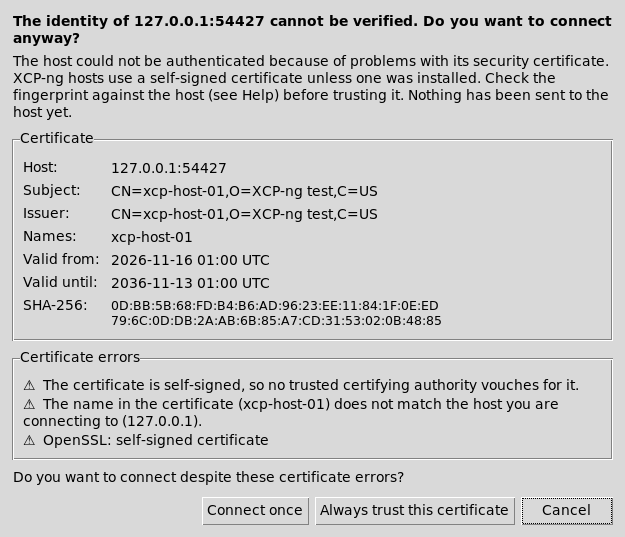
- Trust this certificate prompt. When a host's certificate can't be verified (self-signed, unknown CA, name mismatch or expired), Flagship stops before sending your password. It shows the subject, issuer, validity dates and SHA-256 fingerprint, with Connect once, Always trust this certificate and Cancel.
- Pins are saved per
host:portin~/.config/flagship/known_certs.json(mode 0600). - A pinned host is accepted while its fingerprint matches, even when it is self-signed or the name doesn't match. The fingerprint is checked right after the handshake, before any request, credential or console cookie is sent, on both the XML-RPC connection and the VM console.
- If the certificate changes, you get a red certificate has changed warning showing both fingerprints and a new prompt. A changed certificate is never accepted automatically.
- Tools ▸ Trusted certificates… lists and removes pins.
- Pins are saved per
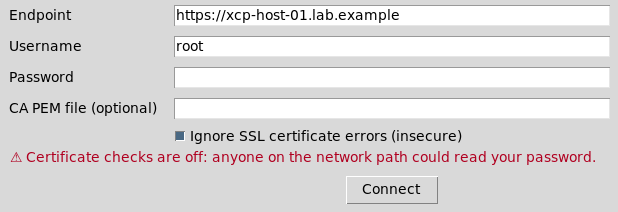
- Ignore SSL certificate errors (insecure) checkbox in the connect dialog. It turns off verification for that connection, covering RPC and console. It shows a one-line warning, and the status bar shows a red Insecure TLS marker while you're connected.
flagship --insecureopens the dialog with the box already ticked. flagship-recovery inspectgains--pin SHA256,--insecureand--no-saved-pins, and honors GUI pins by default.- Help chapter Self-signed XCP-ng certificates, an About note, and a CHANGELOG.
Fixed
- The RPM now ships its own bytecode. On Rocky 10, an upgrade could reuse an old
__pycache__because file times are clamped to the changelog date.
| Trust prompt | Connect dialog |
|---|---|
 |
 |
Install (Rocky Linux 9 / 10)
# Rocky Linux 9
sudo dnf install https://github.com/mike0615/flagship/releases/download/v1.1.0-dev.2/flagship-1.1.0-0.2.dev2.el9.noarch.rpm
# Rocky Linux 10
sudo dnf install https://github.com/mike0615/flagship/releases/download/v1.1.0-dev.2/flagship-1.1.0-0.2.dev2.el10.noarch.rpm
This replaces 1.1.0.dev1 and xenadmin-rocky (Obsoletes/Provides).
Testing
176 unit tests pass on Rocky 9.8 (Python 3.9) and Rocky 10.2 (Python 3.12), including new localhost-only TLS tests: verify failure, pin accept, pin mismatch with nothing sent, and insecure accept, for both RPC and console. On both releases, a fresh install and a dev1 → dev2 upgrade were checked with rpm -V, --version and --smoke-test. No real hypervisor was contacted.
SHA-256
654a78955047ce83f3ae32d5766d4a595451e3c418cdb082e8c28f5f35e15506  flagship-1.1.0-0.2.dev2.el9.noarch.rpm
48c586babf385f2d4ac8d96705f8cfe3c97c2fe7b982cb1f6776422615c1035d  flagship-1.1.0-0.2.dev2.el10.noarch.rpm
This is an unsigned development candidate, not a qualified v1.0.