Repository navigation
Releases
Sleekmeeter 0.21.3

A small fix release. The full list is in CHANGELOG.md.
Fixed
- The Glass toolbar no longer covers a channel's panel. With the panel open, the toolbar sat on top of its name, close button and Routing / Sound / Appearance tabs. The panel now opens over the toolbar, as it does in every other theme
Sleekmeeter Remote
/api/statenow includes the Windows playback or recording device Voicemeeter uses for each hardware channel (empty for virtual ones), so other apps can listen to the same audio as a channel
Stream Deck
- The plugin (0.21.2.0) and icon pack (2.0.3) now list Sleekmeeter as their author
Installing: run Sleekmeeter-0.21.3-setup.exe (or update from inside Sleekmeeter); your settings are kept. Stream Deck users: Sleekmeeter offers the new plugin in Settings → Stream Deck, or double-click Sleekmeeter-Studio.streamDeckPlugin.
Sleekmeeter 0.21.2
Everything since 0.20.1. The Stream Deck plugin moves to 0.21.0.0, with Save replay, Music off stream and Game / Chat keys and dial. The full list is in CHANGELOG.md.
Fixed in 0.21.2
- Mini mode and the volume panel look right in every theme. The level on each slider was crossed out in most themes, OLED printed it dark on a black slider, and Darkroom and Transit sliders were squashed into ovals. The Docked button no longer goes blank, Keep on top lights up while it's on, and the first channel's outline is no longer cut off
Fixing your sound
- Crackle doctor (⋯ → Crackle doctor…) checks the usual causes of crackles and dropouts, such as mismatched sample rates, a tiny Voicemeeter buffer, Power saver and Bluetooth outputs, with a one-click fix where there is one
- Bluetooth headset warning says which app dropped your headset to muffled call quality
- Mic coach (⋯ → Mic coach…) listens while you talk for half a minute and points out pops, harsh s's, boom, distance, room noise and clipping. Nothing is recorded
- Mic EQ presets: Mic: fewer pops and Mic: softer S
Setting up and going live
- A Setup guide on a fresh install picks your headphones and mic, shows every change before it applies, and tells you what to set in Discord and OBS. A backup of your Voicemeeter setup is saved first
- Stream loudness in LUFS next to the Live tag, with a button that reaches -14 LUFS without pushing peaks past -1 dB
- MIDI controllers: faders, knobs and buttons learned in Settings → Controls
- Separate replay tracks: instant replays can keep up to four inputs as their own WAV tracks
- Turn the volume overlay off completely in Settings → Appearance
Themes
- Six new themes: Darkroom, Cassette, Greenhouse, Overclock, Groovy and Transit, plus a remade Glass and a makeover for every theme, each with its own bundled fonts, logo and motion (Off / Subtle / Full)
- Retired Kokiri Forest, Hadal and Sticker Bomb. Sleekmeeter switches those to Overclock, Glass or Block
Fixed
- The Stream Deck Level step key now uses a new amount straight away
Installing: run Sleekmeeter-0.21.2-setup.exe (or update from inside Sleekmeeter); your settings are kept. Stream Deck users: Sleekmeeter offers the new plugin in Settings → Stream Deck, or double-click Sleekmeeter-Studio.streamDeckPlugin.
Sleekmeeter 0.20.1
Everything since 0.17.0. The Stream Deck plugin moves to 0.20.0.0, with Mute on outputs and Mic clean-up keys and an editable Stream Deck + profile. The full list is in CHANGELOG.md.
Fixed in 0.20.1
- No more black window after starting Windows. WebView2 sometimes crashes while the PC is still starting up, and the window then stayed black. Sleekmeeter now notices and restarts itself in a second, with your window back as it was. A window whose page crashes or hangs reloads on its own
Mic clean-up and plugins
- NVIDIA noise and echo removal on your mic (NVIDIA RTX card and NVIDIA's free Audio Effects SDK runtime needed), and speaker echo removal for people who use speakers instead of headphones
- VST3 plugins on your mic, on any output (like a spatial audio plugin on your headphones), and on a chat or app input such as the one Discord plays into, so you don't hear your friends' keyboards and fans. Plugins run in a separate crash-safe helper; one that crashes is bypassed instead of closing Sleekmeeter
- More than one mic, plugin presets, portable mic-chain presets, and a guided Mic Chain tune-up that suggests a fader level and gentle gate
Going live
- Go live check, "You're muted" warning, silent stream warning, Music off stream, Instant replay and channel point rewards
- Mute on one output (right-click Mute) and mute destinations for each input's main Mute button
- Game / Chat balance, Personal / Stream mix and OBS audio tracks reporting
Your sound
- Listening EQ presets (Footsteps, Bass boost, Voice clarity and more) and Gentle / Night mode on any output or input, inside Voicemeeter with no added delay
- Listen to a mix, private cue, guided audio tests and device fallback chains for hardware outputs
Finding your way
- Quick Actions (Ctrl+K), Audio Event History, Live Audio Flow, the Apps workspace with an audio route inspector, scene preview, mixer undo (Ctrl+Z) and linked faders
- Settings has six searchable categories
- Phone remote is now Sleekmeeter Remote; your address and key stay the same
Themes
- New Hadal (deep ocean) and Kokiri Forest (sunlit forest clearing), a refreshed Glass, and polish across Console, OLED black, Neon, Terminal, Arcade, Block and the light themes, with Off / Subtle / Full theme motion
- Retired Lunar, Onyx, After Hours, Caldera, Blueprint, Titanium, Afterburner and Opal. Sleekmeeter switches those selections to Console
Installing: run Sleekmeeter-0.20.1-setup.exe (or update from inside Sleekmeeter); your settings are kept. Stream Deck users: Sleekmeeter offers the new plugin in Settings → Stream Deck, or double-click Sleekmeeter-Studio.streamDeckPlugin.
Sleekmeeter 0.17.0
Everything since 0.15.3. The Stream Deck plugin is now numbered with the app: plugin 0.17.0.0 goes with Sleekmeeter 0.17.
Output mix (Voicemeeter Potato)
- Mix view: Mix in the header shows every input's level on every output at once, like Voicemeeter's Streamer View, with each output's on/off button under its slider. Drag or scroll a slider, or double-click it to match the input's main fader
- In its own window: the button next to Mix's close button pops the output mix out into a window of its own, for example on a second screen. It remembers its size and place, and opens again at the next start if you left it open
Stream Deck (plugin 0.17.0.0)
- Swap route: one key switches between two routes, for example which mic goes to B2, or whether your game plays on A1 or A2. One turns off as the other turns on, and the key shows which one is live. Banana and Potato
- Level step on one output (Potato): a Level step key can change an input's level on one output only, for example game +5 dB in your headphones without changing your stream, like a Voicemeeter macro with
Strip(2).GainLayer(0) += 5.0 - Hold to repeat: holding a Level step key keeps stepping until you let go
- Fixed: Now Playing showed "Open Spotify" or "Nothing playing" on most PCs, because Windows' default PowerShell setting stopped it from reading what's playing. It now works everywhere, and Current Windows media app also finds players such as Apple Music
- Fixed: Swap route and Faders set keys left on the input or output their settings showed didn't use it
Updates
- What's new: after an update, Sleekmeeter shows what changed, once. Settings → Updates → What's new shows it again any time
- Check for updates: a button in Settings → Updates checks straight away, and Sleekmeeter looks again every 6 hours while it runs
- Test versions: with Also offer test versions on, they now come from a separate beta page, so only people who opted in get them
- Fixed: installing an update turned off Start Sleekmeeter with Windows. Updates now keep it, and Sleekmeeter puts it back if a manual install removed it. If it's off for you, tick it again once in Settings → Startup
Installing: run Sleekmeeter-0.17.0-setup.exe (or update from inside Sleekmeeter); your settings are kept. Stream Deck users: Sleekmeeter offers the new plugin in Settings → Stream Deck, or double-click Sleekmeeter-Studio.streamDeckPlugin.
Sleekmeeter 0.15.3
- Voicemeeter backups: Sleekmeeter saves a copy of Voicemeeter's whole setup once a day, and before loading a scene, running the setup assistant or restoring a backup. Settings → Backup and layout lists them with a Restore button (your current setup is saved first)
- Test versions: Settings → Updates → Also offer test versions gets pre-releases as updates. Without it, Sleekmeeter now only offers full releases
- Scenes keep each output's mix (Potato): saving a scene also saves every input's gain layers, which Voicemeeter's scene file leaves out, and loading it puts them back
- Stream Deck: Output mix dial and Faders set key (plugin 0.16.1.0): turn a dial to set one input's level on one output, like Game on B3, or press a key to make the input faders set one output's mix. Potato only
- App routing works with the window hidden: apps you've sent to a channel are put back on it when they start again, even while Sleekmeeter sits in the tray or in mini mode
- A different mix on each output (Potato): Potato's gain layers give each input its own level on each output, for example less game on your stream than in your headphones, like Voicemeeter's Streamer View. Set them in an input's settings under Level on each output, or pick an output in Faders set above the inputs and the input faders set that output's mix
- Your output mixes stay put (Potato): with no output picked, Voicemeeter's main level resets every layer. Sleekmeeter's faders, mute fades, ducking, scenes and Be right back now move all of an input's layers together instead, so the differences are kept
- Input limiter (Banana and Potato): in an input's settings under Dynamics. At +12 dB it's off
- Tray panel options: Settings → Tray volume panel has a Columns layout with vertical sliders, a size from 60% to 100%, an opacity, and switches for channel icons, level meters and mute buttons. Each channel's settings can leave it out of the panel
- Volume overlay options: choose which screen the overlay appears on, and leave channels out of it from their settings
- Fixed: the volume overlay flickered while a level kept changing. It now fades in once and updates in place
- Fixed: the tray panel kept its old theme until it was reopened
- Fixed: the recorder clock kept running after a sound loaded by a Voicemeeter macro button (
Recorder.load) had finished. Voicemeeter keeps reporting that playback as playing until Stop is pressed, so Sleekmeeter no longer shows a clock for playback it didn't start - The user count is sent as soon as you say yes, instead of up to 10 minutes later. Saying no deletes the ID straight away
Updating from 0.14.0 or older? Download Sleekmeeter-0.15.3-setup.exe below once. The update button in those versions closes Sleekmeeter without installing anything.
Sleekmeeter 0.15.2
- Anonymous user count, only if you say yes: Sleekmeeter asks once whether it may send sleekmeeter.app a random ID, its version and your Voicemeeter edition once a day, so we know how many people use it. Nothing else is sent. Change it in Settings → Privacy; turning it off deletes the ID
- Fix my audio: if plugging devices in makes Windows play sound to them instead of Voicemeeter, the mixer goes quiet. Sleekmeeter now spots this, shows a Fix my audio button (also in Check my setup) that switches Windows back to Voicemeeter's input and restarts the audio engine, and can do it automatically with Settings → Keep Windows sound on Voicemeeter. Windows' device for calls is switched too
Updating from 0.14.0 or older? Download Sleekmeeter-0.15.2-setup.exe below once. The update button in those versions closes Sleekmeeter without installing anything.
Sleekmeeter 0.15.0
On 0.14.0 or older? Download this version from the files below. The Update now and restart button in those versions closes Sleekmeeter without installing anything. Open Sleekmeeter again and it's still your old version, with nothing lost. Run Sleekmeeter-0.15.0-setup.exe once, and your settings are kept.
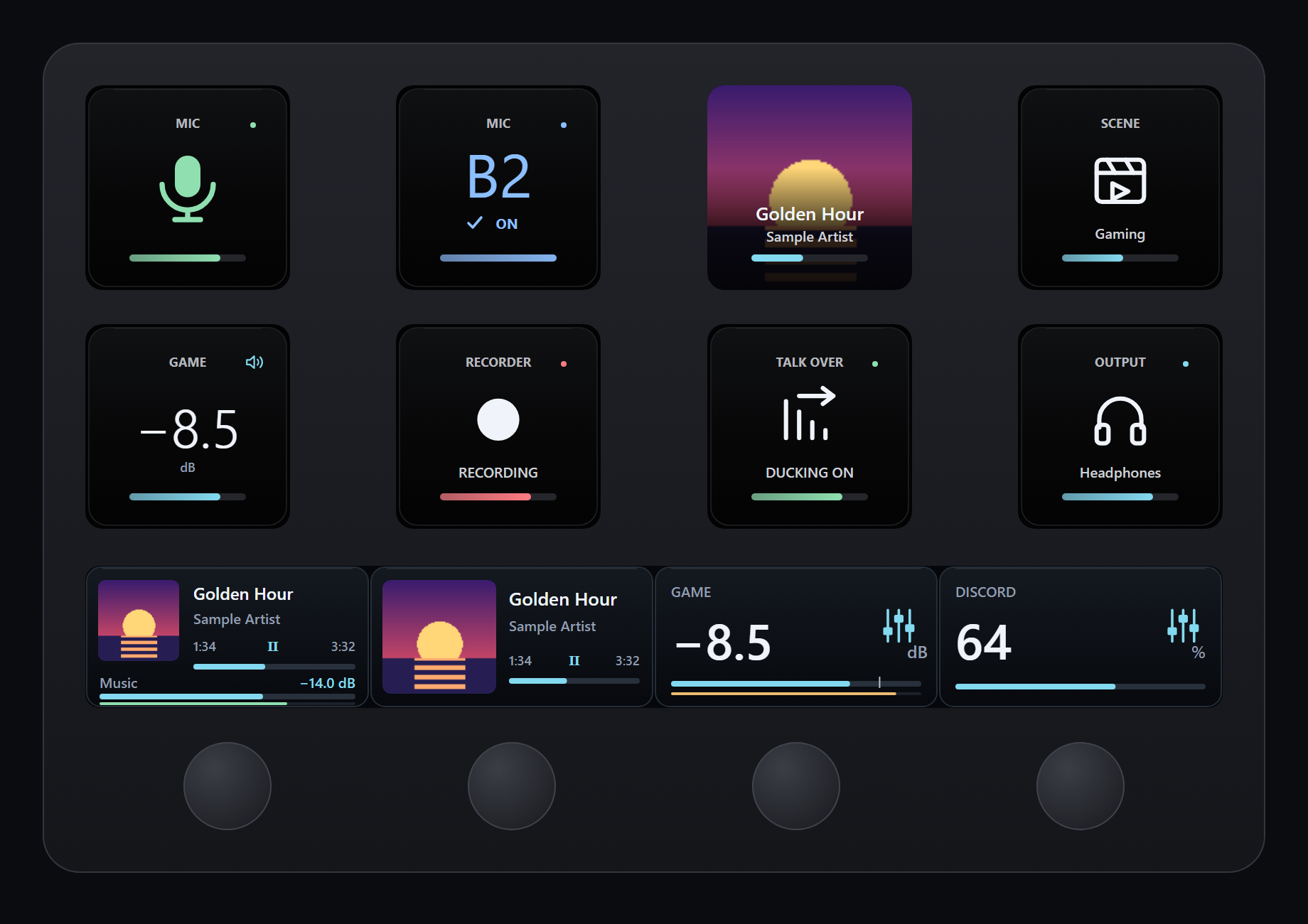
- Stream Deck plugin offer: Sleekmeeter finds the Stream Deck app or a Stream Deck that has been connected, and offers to install or update its plugin, which comes inside Sleekmeeter. It asks once per plugin version, and Settings → Stream Deck keeps the button. With a Stream Deck but no app, it offers Elgato's download page
- New Stream Deck look (plugin 0.16.0.2): Studio has dark surfaces, one clear symbol or value on each key, and short colour rails. Action IDs are unchanged, so your keys and dials carry over
- Now Playing + channel dial: album art, title, artist and track time from Spotify or the current Windows media app. Turn for a channel's level, tap to play or pause
- Now Playing + tracks dial and Now Playing key: turn the dial to change track, or put album art and progress on any key
- App volume dial: turn to change one app's volume, press or tap to mute it
- Live meters: Channel and Now Playing dials show a thin level meter that turns amber and red as a channel gets loud. Each dial has a Live meter setting
- Faster media controls: play, pause and track changes reach the player right after the press, and play or pause shows on the key or dial at once
- Clearer route keys: coloured bus, checkmark and ON when a route is on, dim bus, cross and OFF when it's off. A missing bus says which ones exist ("Only B1–B2"), and an outdated app says "Update Sleekmeeter"
- Show text option: each Stream Deck action can hide its names and captions for a cleaner symbol. Live states stay visible
- Studio icon pack: 486 matching icons for Sleekmeeter, Discord, Spotify, Twitch, OBS, Philips Hue, Revidi, Voicemod, system controls and navigation, as
Sleekmeeter-Studio-Icons.streamDeckIconPack - Remote API: new
/api/levels,/api/appsand/api/appvolume, protected by the same key as the rest - Fixed: Update now and restart closed Sleekmeeter without installing the update or reopening. If an update can't start, Sleekmeeter now stays open and shows an error.
- Fixed: Now Playing updates no longer wait for a dial press
- Fixed: opening a Stream Deck folder or page no longer flashes "Open Spotify / Waiting for media" while the current track loads
Stream Deck: Sleekmeeter offers to install the plugin when it starts. You can also double-click Sleekmeeter-Studio.streamDeckPlugin below. The icon pack is a separate download. Live meters and the App volume dial need this version of Sleekmeeter.
Sleekmeeter 0.14.0
-
App lists that stay open: click a channel's app-count badge to pin its list open; click outside, click the badge again or press Escape to close it
-
Safer app removal: each app has an explicit × button to return it to the Windows default; clicking its name no longer disconnects it
-
Tidier ⋯ menu: grouped actions, a checkmark for Simple mode, and ↑/↓, Home/End, Enter and Escape keyboard controls
-
Lock channel arrangement: prevent accidental header dragging in Settings while keeping all faders and buttons usable
-
Rack theme retired: existing Rack users switch to Console. There are now fifteen themes
-
Fixed: dragging a Sticker Bomb fader no longer adds a black halo around its starburst cap (including mini mode and the tray panel)
-
Four new themes: Afterburner (graphite, orange LEDs and faceted metal faders), Lunar (satin aluminium, violet keys and circular fader pucks), Onyx (dark mix bays, electric blue and sculpted faders) and Opal (pearlescent white, mist and lilac). Each includes its own appearance card, mini mode, tray panel and matching volume overlay
-
Stream Deck: Route to bus key. Turn an input's A1–A5 or B1–B3 route on or off from a key (say your mic to B3 for a game). It lights up and pulses slowly while the route is on. Needs the new Sleekmeeter build (the phone-remote server now reports routes) and the updated plugin
-
Stream Deck: Mute mic key. A dedicated key that shows your microphone's state: green LIVE, or red MUTED with the mic crossed out. Optional Hold to talk mode. Update the plugin by double-clicking
streamdeck/Sleekmeeter.streamDeckPlugin -
Fixed: mic-chain threshold sliders now match Voicemeeter's supported ranges: compressor −40 to −3 dB and gate −60 to −10 dB
-
Hide Solo, Mono and EQ: Settings → Channel buttons leaves just Mute under each input and hides the Mono and EQ buttons on outputs, for a cleaner mixer. They're still in each channel's settings (click its icon), and a button that's switched on keeps showing so you can turn it off. New installs start with them hidden; if you already use Sleekmeeter nothing changes until you turn it on
-
Cleaner header: BRB, Rec and Sounds are now small icon buttons next to the pin and mini-mode buttons. BRB still widens to Back live while you're away, and Rec shows its clock while it records. Don't stream? Turn off Settings → Streamer mode to hide all three (their shortcuts still work)
-
Fixed: items in the ⋯ menu could wrap onto two lines in some themes
-
Tidier apps on channels: apps dragged onto a channel no longer take up room under its name. A small tag in the channel's top corner shows how many apps are on it, and hovering the top of the channel lists them all by name (use × to put an app back on the Windows default). Every channel's A1/A2 buttons stay lined up however many apps it has
-
Simple mode: ⋯ → Simple mode hides Solo, Mono and EQ, every device name and the A4/A5 buttons in one click. Turn it off to get back exactly what you had
Sleekmeeter 0.13.0
0.13.0
- Mic chain: ⋯ → Mic chain… has noise gate, compressor and denoiser sliders for your microphone, one-click presets (Streamer voice, Gentle, Noisy room, All off) and a live meter. Only the controls your Voicemeeter edition has are shown
- Setup assistant: ⋯ → Setup assistant… sets the A1 and B1 routing for every channel for "Just gaming + chat" or "Streamer + Discord" (which also builds a stream mix on B2)
- OBS overlay: a see-through browser-source page with a MUTED or BRB badge, a mic meter and the name of the last sound played. The address is under Settings → Phone remote
- Duck for friends too: talk-over ducking can now start from more than one channel (your mic or Discord), under "Or when these talk"
- Smarter soundboard: a shortcut for each sound, groups with a tab bar, and Random pack… to turn a folder into one button that plays a random sound from it
- Sounds are copied into Sleekmeeter's own
soundsfolder when you add them, so you can move or delete the originals. Random packs copy their folder too - Hear yourself: ⋯ → Hear yourself… records 5 seconds of your stream mix and plays it back on your headphones
Sleekmeeter 0.11.0
- Soundboard: play wav, mp3, ogg and flac clips into your mix from buttons, shortcuts or chat, to any output device (like a Voicemeeter virtual input, so each sound is a channel you can route and fade)
- Twitch chat commands:
!brb,!scene,!soundand more, from you, your mods or everyone. Joins chat anonymously; nothing is ever posted - Phone remote: faders, mutes, Be right back, scenes, sounds and outputs from a phone on the same Wi-Fi, protected by a secret key in the address
- Level history: a graph of how loud each channel was over the last 3 hours, with clipping highlighted
- Per-app routing: choose which output each app plays to, from the Apps window
- New shortcut actions: load a scene, play a sound, stop all sounds