Repository navigation
Sleekmeeter 0.15.0

On 0.14.0 or older? Download this version from the files below. The Update now and restart button in those versions closes Sleekmeeter without installing anything. Open Sleekmeeter again and it's still your old version, with nothing lost. Run Sleekmeeter-0.15.0-setup.exe once, and your settings are kept.
- Stream Deck plugin offer: Sleekmeeter finds the Stream Deck app or a Stream Deck that has been connected, and offers to install or update its plugin, which comes inside Sleekmeeter. It asks once per plugin version, and Settings → Stream Deck keeps the button. With a Stream Deck but no app, it offers Elgato's download page
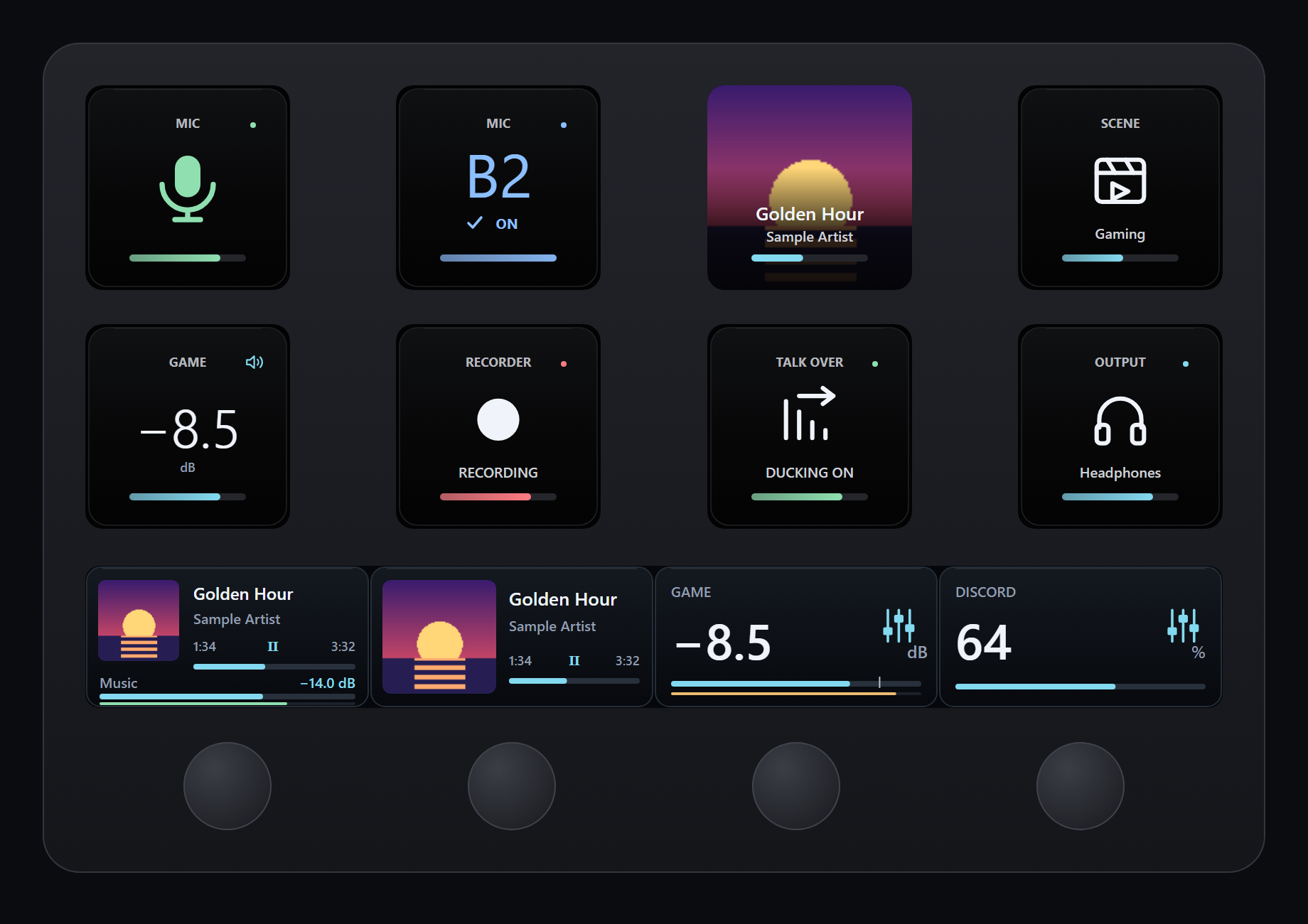
- New Stream Deck look (plugin 0.16.0.2): Studio has dark surfaces, one clear symbol or value on each key, and short colour rails. Action IDs are unchanged, so your keys and dials carry over
- Now Playing + channel dial: album art, title, artist and track time from Spotify or the current Windows media app. Turn for a channel's level, tap to play or pause
- Now Playing + tracks dial and Now Playing key: turn the dial to change track, or put album art and progress on any key
- App volume dial: turn to change one app's volume, press or tap to mute it
- Live meters: Channel and Now Playing dials show a thin level meter that turns amber and red as a channel gets loud. Each dial has a Live meter setting
- Faster media controls: play, pause and track changes reach the player right after the press, and play or pause shows on the key or dial at once
- Clearer route keys: coloured bus, checkmark and ON when a route is on, dim bus, cross and OFF when it's off. A missing bus says which ones exist ("Only B1–B2"), and an outdated app says "Update Sleekmeeter"
- Show text option: each Stream Deck action can hide its names and captions for a cleaner symbol. Live states stay visible
- Studio icon pack: 486 matching icons for Sleekmeeter, Discord, Spotify, Twitch, OBS, Philips Hue, Revidi, Voicemod, system controls and navigation, as
Sleekmeeter-Studio-Icons.streamDeckIconPack - Remote API: new
/api/levels,/api/appsand/api/appvolume, protected by the same key as the rest - Fixed: Update now and restart closed Sleekmeeter without installing the update or reopening. If an update can't start, Sleekmeeter now stays open and shows an error.
- Fixed: Now Playing updates no longer wait for a dial press
- Fixed: opening a Stream Deck folder or page no longer flashes "Open Spotify / Waiting for media" while the current track loads
Stream Deck: Sleekmeeter offers to install the plugin when it starts. You can also double-click Sleekmeeter-Studio.streamDeckPlugin below. The icon pack is a separate download. Live meters and the App volume dial need this version of Sleekmeeter.